



Code production is speeding up: CI/CD pipelines deliver frequent code changes, and AI coding tools can increase the volume of generated code. But with more code comes higher testing demand, and manually creating and updating test cases becomes a common bottleneck.
AI test case generation addresses this by reducing repetitive test design work. This article explores how LLM test generation works and how to incorporate AI-generated tests into QA pipelines.
What AI test case generation automates
AI test case generation automatically creates candidate test cases based on an application’s intended behavior. AI analyzes inputs, like natural-language user prompts and software requirements, and identifies scenarios worth testing. The output specifies what teams should test, under which conditions, and what results to expect.
AI test automation helps teams keep up with the pace of frequent software changes by proposing or updating relevant regression testing scenarios, suggesting edge case scenarios, and reducing manual test design. It can also expand test coverage by identifying potentially overlooked scenarios.
How AI-generated test cases work
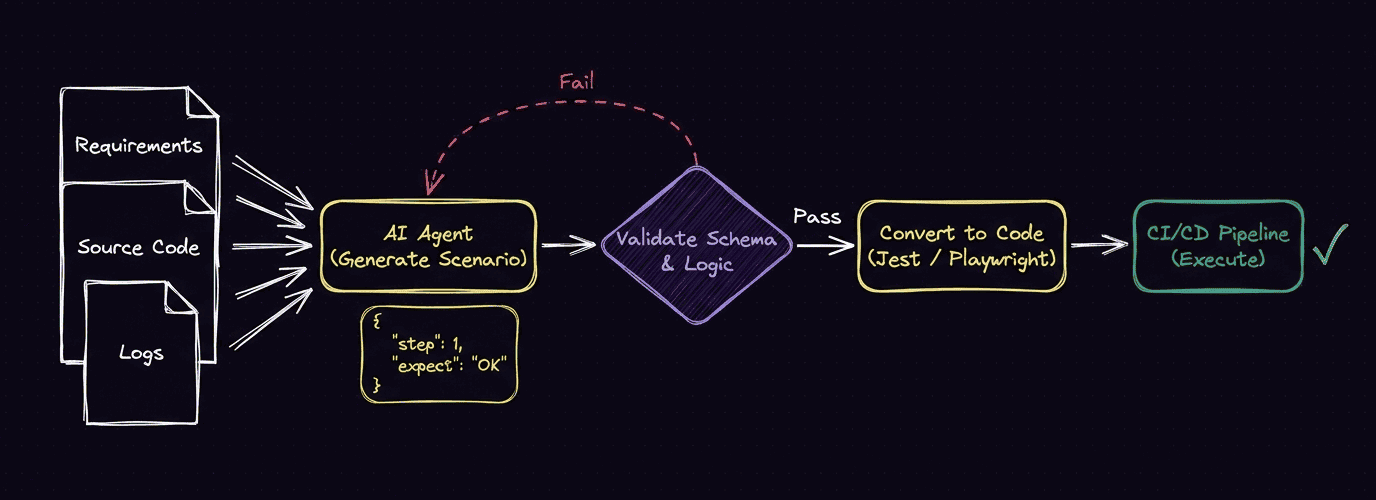
The AI test case generation process includes:
- Providing application information like prompts, requirements, source code, or user flows
- Generating test scenarios including test steps, conditions, and expected results
- Validating the outputs for format, completeness, and correctness
- Converting to executable scripts translates the validated, structured test steps into actual automation code (such as PyTest, Jest, or Playwright) that a test runner can execute
- Executing through a testing workflow, involves running test cases, collecting and reporting results
Here’s a closer look.
Prompt-driven test generation
To turn written requirements into test cases, teams provide the model with instructions describing what to test and relevant application requirements, and sometimes include examples or expected output format. Models use the context to interpret the requested functionality and identify behaviors or conditions worth testing, generating test cases containing conditions, steps, and expected outcomes.
The clearer the requirements and expected test-case format, the more relevant and accurate the AI-generated tests. Ambiguous acceptance criteria can cause the model to invent assumptions or produce tests that don’t match the intended functionality.
Behavioral and workflow analysis
In addition to prompt-driven generation, AI can develop and update tests using provided application information. Potential inputs might include recorded user interactions and workflows, application logs and past test results, UI designs, and application changes. Analyzing sequences of interactions helps AI identify alternative user paths, missing checks, and potential failure conditions.
Structured output and validation
AI can output test cases as an unstructured paragraph, but it’s also possible to request a more consistent, structured output such as a JSON object with fields like test_name, precondition, steps, and expected_result.
In addition to allowing downstream systems to process tests predictably, structured output directly supports validation. A JSON schema can check whether generated output has required fields and whether those fields contain the expected data types.
A separate requirements-based validation check evaluates whether the generated steps and expected results match the application’s requirements. This may require human review.
Common use cases for AI test case generation
AI-generated test cases support different types of testing throughout the software development lifecycle. Here are four of the most common use cases.
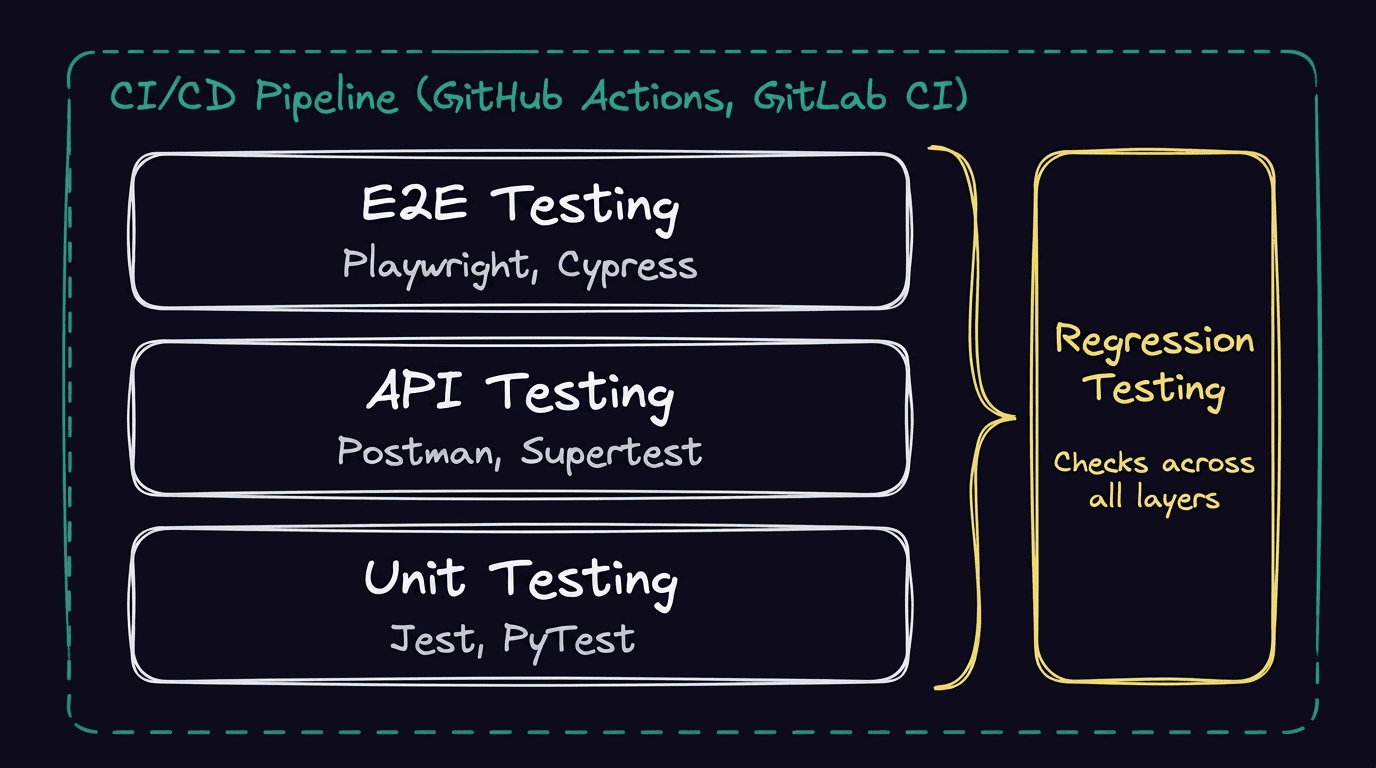
Regression testing
Regression testing is one of the most repetitive tasks for QA teams, requiring checks after every code change, issue fix, and update. AI can introduce more efficiency by suggesting new or updated regression scenarios based on:
- Code and application changes: To identify affected components
- Application requirements: To establish intended behavior
- Existing tests: To show what’s already covered
- Historical defects and test results: To identify previous problematic areas
Some AI tools can prioritize tests based on what was changed. Teams dealing with large regression suites can run the most relevant tests first and receive feedback on potentially affected functionality.
For example, when introducing an updated discount calculation for an e-commerce system, AI might suggest test scenarios to ensure it doesn’t affect existing promotional codes or shipping charges.
API testing
APIs accept many different parameters, payloads, and authentication conditions, requiring testing to verify how an endpoint responds to different combinations of inputs. AI can use API specifications, endpoint descriptions, and request schemas to suggest test inputs and expected responses. This is useful for scenarios such as valid requests, missing required fields, incorrect data types, invalid authentication, and boundary values.
For an API endpoint that lets users retrieve account details, for instance, AI could generate test cases for a valid authentication token, an expired token, or a missing token.
E2E testing
End-to-end (E2E) testing involves multiple elements, states, and possible paths, each requiring testing. AI analyzes UI designs, recorded interactions, and application flows to propose tests for different user behaviors. Useful scenarios include form validation, navigation, error messages, interrupted processes, and multi-step transactions.
For an online checkout process, AI might generate test cases like completing a purchase successfully, entering an invalid shipping address, or abandoning checkout.
CI/CD and automated QA pipelines
Modern CI/CD pipelines involve frequent commits and releases, requiring testing to keep up with the pace of development. AI can help by producing or updating test cases based on new requirements, pull requests, or code changes. Teams can focus on validating AI-generated test cases, converting them to executable tests when needed, and adding them to automated testing processes.
Let’s say a developer opens a pull request containing changes to how declined payments are handled. An AI system could propose tests for the updated functionality. The QA system or reviewer would first validate the tests for structure, correctness, and execution readiness.
They might check that the tests match the acceptance criteria; in this case, that a declined payment doesn’t result in a paid order. Once validated, the tests can be run as part of the CI pipeline, with results reported before the change is merged.
Where workflow orchestration fits into AI testing automation
Generating test cases with AI is just the first step in the testing process. AI-generated test cases move through multiple systems before they can contribute to AI software testing, including LLMs, validation tools, testing frameworks, and CI/CD platforms.
Workflow orchestration coordinates these stages and tools, manages dependencies, and helps ensure failures are handled appropriately. n8n is an AI-native, source-available workflow automation platform that manages that coordination.
n8n combines AI capabilities, API integrations, and customizable automation logic. It helps coordinate the different stages of AI QA automation, from automated test case generation and validation to execution and monitoring.
Coordinating AI-generated test workflows
Workflow coordination determines the order of operations and conditions under which AI-assisted testing workflows continue. n8n workflows consist of connected visual nodes that can retrieve, process, or send data and be combined into automated processes.
An AI-generated test workflow can be triggered by multiple things: a software change, a CI/CD event, or a new testing request. Nodes then perform operations such as retrieving requirements or sending data to an AI model. n8n’s AI Agent node lets an LLM select and use connected tools, such as choosing which sources to consult when gathering context for test generation.
AI-generated test cases pass through structural checks and requirements-based review as necessary. Validation and conditional logic determine which operations run next. The workflow then passes approved outputs to a downstream system such as a testing framework or external runner.
Monitoring execution and failures
Workflow orchestration enables teams to track what happens during automated testing and respond when something goes wrong. n8n’s Executions list lets teams view workflow runs to identify failed or problematic executions.
Teams can also debug by loading data from previous executions into a workflow, making it easier to reproduce and investigate problems. This feature is available on all Cloud plans and self-hosted Business, Enterprise, and Community.
When a workflow execution fails, error workflows trigger alerts or other configured responses. The Error Trigger receives information such as the failure message and the last node executed, so teams know which operation failed.
For a big picture view, n8n’s Evaluations test the workflow itself. This ensures the test-generation stage still produces reliable output when prompts or AI models change.
Orchestrating integrations across testing systems
Testing workflows typically involve issue trackers, AI providers, source code repositories, CI/CD platforms, and test runners. n8n provides the connections needed to move information and trigger operations across these otherwise separate applications and tools.
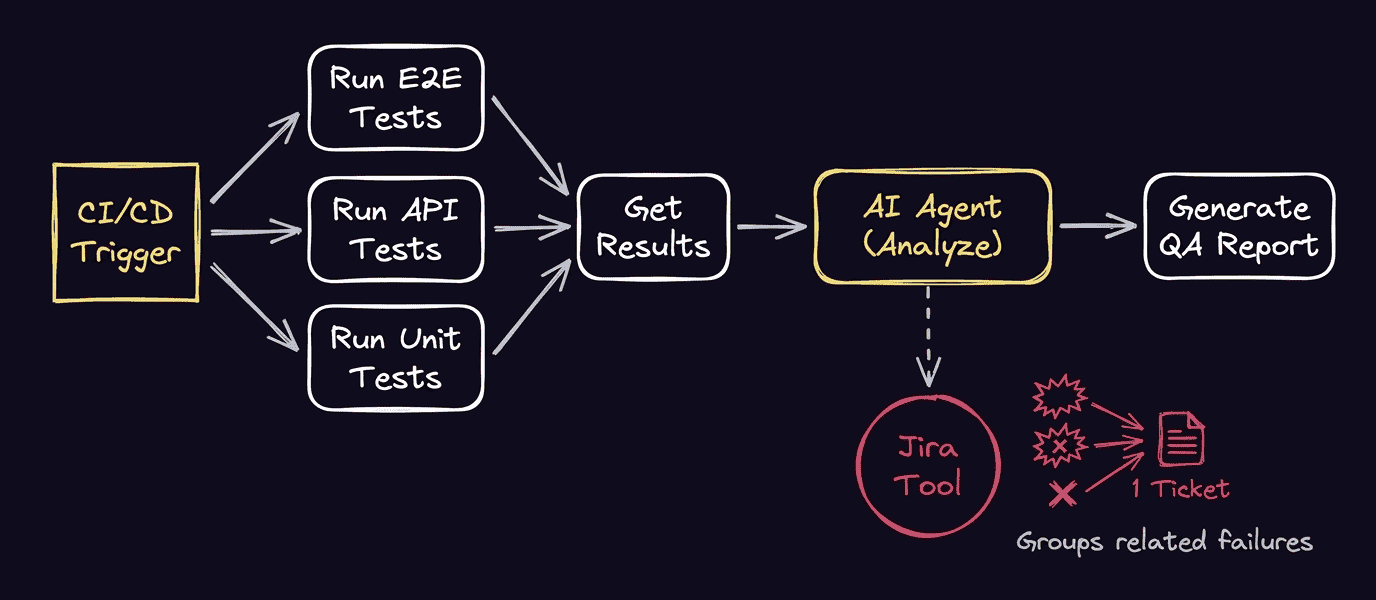
The Webhook node receives data from external applications when an event occurs, triggering a workflow. For example, a CI/CD platform could send an event when a new build is ready for testing.
The HTTP Request node sends HTTP requests to external services if they don’t have a dedicated integration. For workflows that have already generated and validated a set of tests, the HTTP Request node can call an external testing service’s API to initiate a test run. Once the service executes the tests, n8n can receive or retrieve the results, depending on how the service’s API works.
Build reliable AI testing workflows with n8n
AI test case generation reduces repetitive QA work, helps testing keep pace with software changes, and supports better test coverage. However, its efficacy depends on accurate requirements, appropriate validation, and proper workflow orchestration.
n8n helps manage AI-generated testing workflows, coordinating each stage, making execution visible, and connecting relevant tools and systems.