



Gemini 4 Carbon is out and it's now available in n8n. Google is calling it its strongest model yet, with big gains in coding, long-running agentic work and cybersecurity. In Google's results, it posts a 53.9% on AutomationBench, a benchmark for automation work, topping the results which makes it a good fit for n8n. If you're building AI agents in n8n, this is one to try.
Checkout the benchmarks Google published.
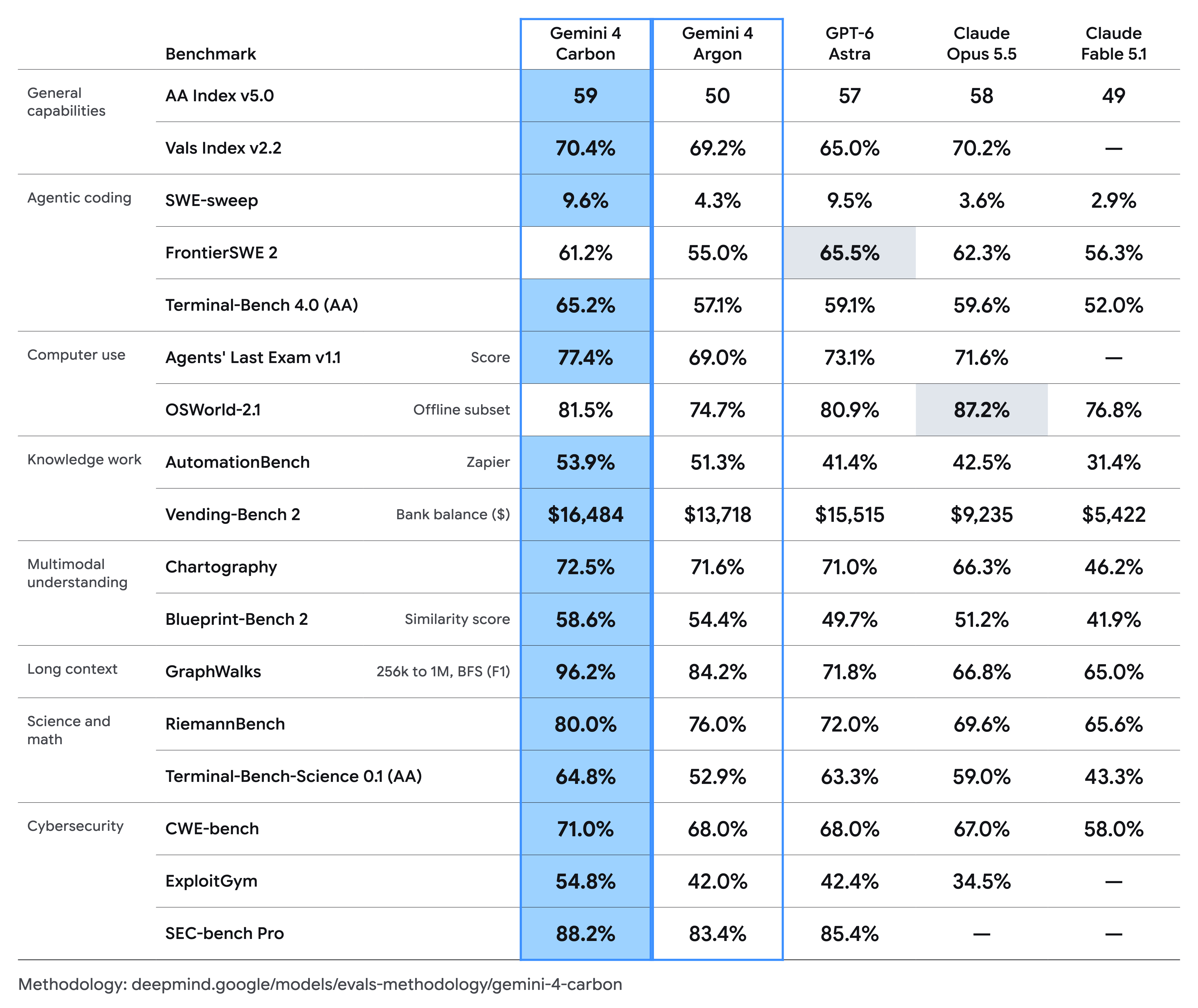
Benchmarks reported by Google. Source: Gemini 4 Carbon announcement.
What Carbon brings to your n8n agents
Google's announcement focuses on three areas, and each one maps neatly onto how you build in n8n.
Strong on security. Security is top of mind for this launch. Carbon leads its benchmarks across the defence lifecycle: finding vulnerabilities (88.2% on SEC-bench Pro), checking which ones are exploitable (54.8% on ExploitGym) and patching them (71.0% on CWE-bench). If your team runs security workflows in n8n, this one's for you.
Built for the long haul. Carbon handles long, multi-step tasks. Google reports that internal team runs have lasted for days on complex engineering problems, pushing through dead ends instead of stopping like previously seen. In n8n, that means your agents can work through more steps and tool calls before losing the thread.
More reliable agents. Agents in n8n often read inputs that you don't or cannot control, such as inbound emails, web-hook payloads, form submissions and scraped pages. Any of these can carry hidden instructions that can be used to hijack your agent. On Gray Swan's prompt injection benchmark, Carbon resisted every attack (0.0% success rate, down from 0.7% for Argon). Although this is a real improvement, no model is completely resistant to malicious attacks at scale, so keep your security protocols in place.
Example use case
A security alert lands via web-hook. Your agent reads it, pulls the related logs, checks it against known issues, sets a priority, and posts a summary to Slack for your on-call engineer. The alert text is untrusted input, which is exactly where prompt injection resistance pays off.
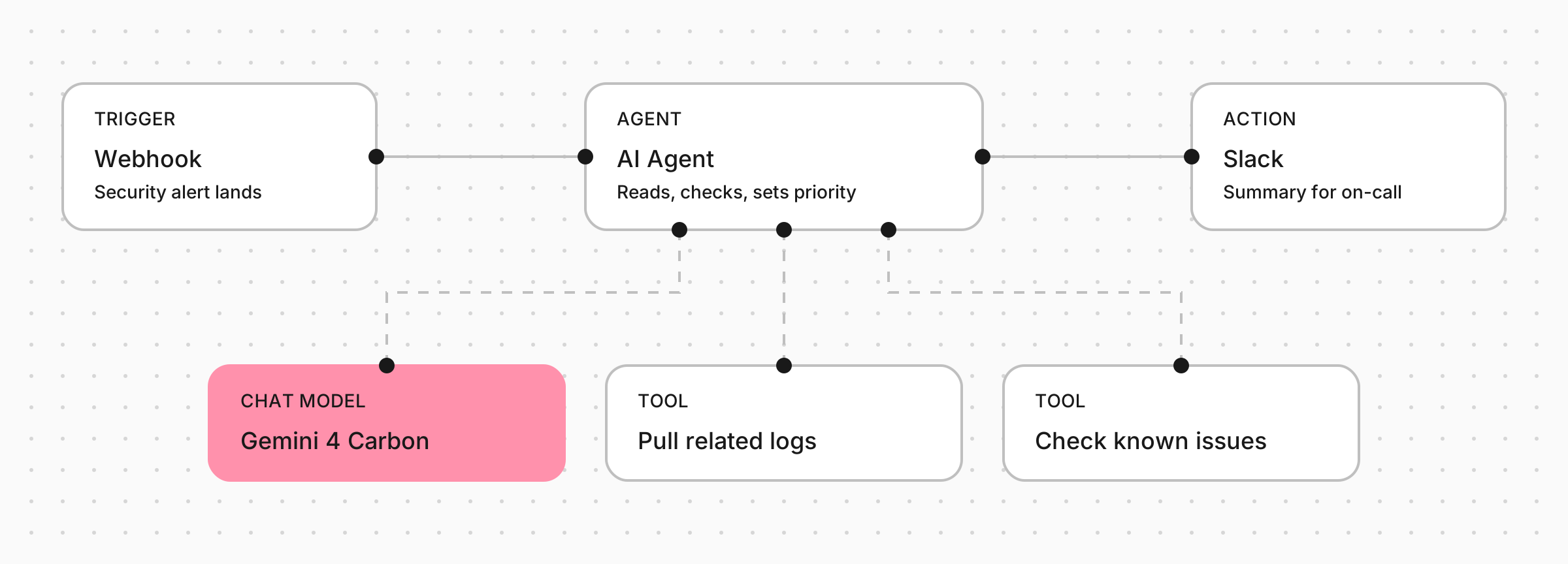
The web-hook hands the alert to an AI Agent running on Gemini 4 Carbon, which uses two tools before posting its summary to Slack.
How you can use Gemini 4 Carbon in n8n
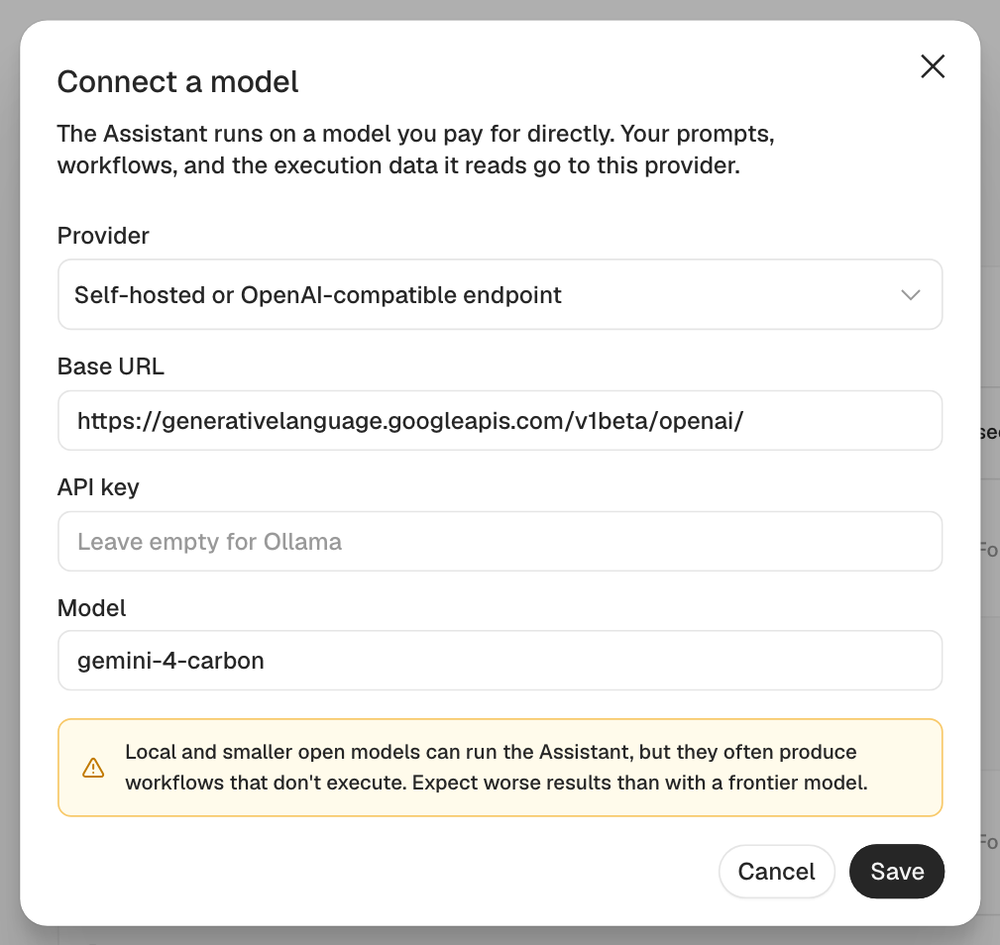
Open an AI Agent node, add the Google Gemini Chat Model, and pick Gemini 4 Carbon from the model list. It's also available in the standalone Google Gemini node. Plug in the tools your agent is allowed to use, add memory if it needs context, and you're good to go.
On n8n Cloud, you can use Carbon through Gateway credits, so there's no separate provider account or extra billing. On self-hosted, just add your own Gemini API key.
Already using Gemini 4 Argon? You don't need to switch everything over. Use Carbon for the agent steps that need heavy reasoning, and keep Argon or a lighter model for simple jobs like classifying or formatting.
What it costs
Google has launched Carbon at the same introductory price as Argon: $2 per million input tokens and $10 per million output tokens, rising to $4 and $20 once the introductory period ends (November 30, 2026). Full details are in Google's announcement.
Overall, Gemini 4 Carbon gives your n8n agents more staying power on long tasks and better protection against the messy, untrusted input they deal with every day. Build your first workflow and get started with Google Gemini 4 Carbon today.
Happy building!