




An ETL pipeline doesn't stop at moving data between systems. Someone still has to schedule it, handle failures, and make sure rerunning a job doesn't create duplicates or leave gaps. Those operational details are what separate a pipeline that works in a demo from one you can rely on in production.
This guide covers the patterns that make the difference.
What an ETL pipeline is and how the stages work
An Extract, Transform, and Load (ETL) pipeline extracts data from one or more sources and transforms it into a consistent format. It then loads it into a destination like a data warehouse or SQL database so it’s ready for business intelligence, analytics, or downstream applications.
While some people confuse ETL pipelines with data pipelines, they're not the same thing. A data pipeline is any system that moves data between sources and destinations. An ETL pipeline is a data integration workflow that extracts data from one or more sources, transforms it into a consistent format, and loads it into a destination. That distinction affects where processing happens, how failures are handled, and how much control you have over data quality.
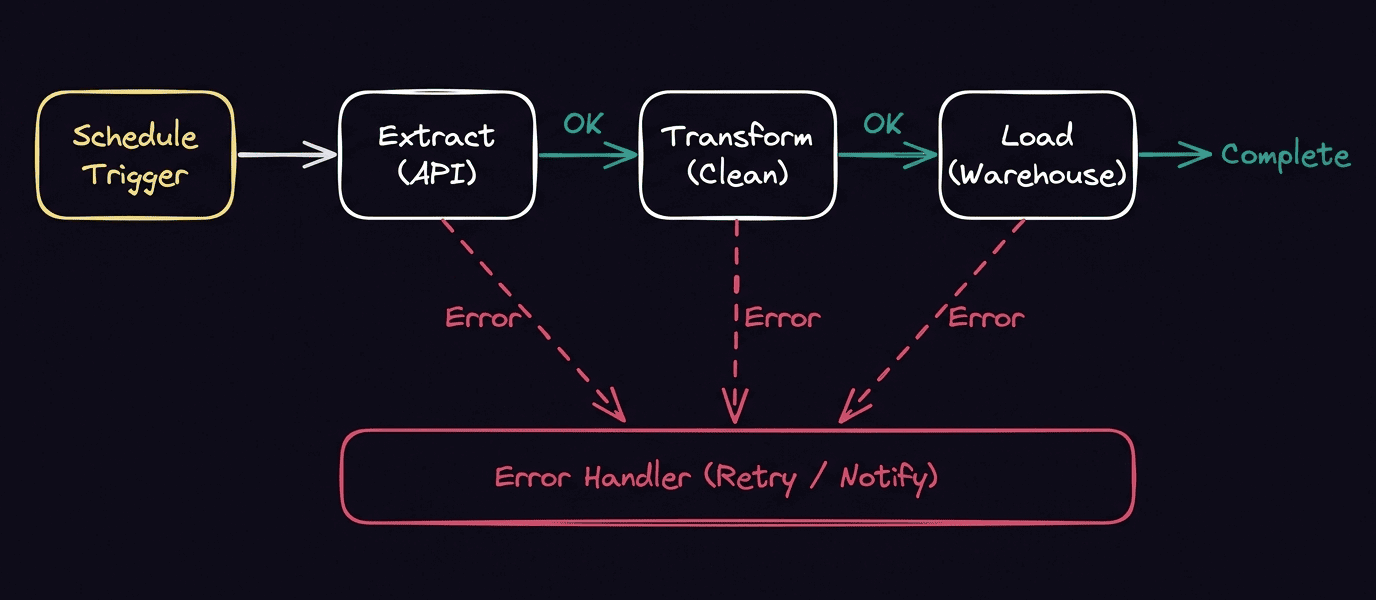
At a high level, every ETL pipeline follows the same three stages:
- Extract: Collect data from source systems like SaaS applications, databases, APIs, and flat files. This step often includes scheduling jobs, authenticating with external services, and handling rate limits or connection failures.
- Transform: Clean, validate, enrich, or reshape data so it matches business rules. Common transformations include standardizing formats, filtering records, joining datasets, and calculating new fields.
- Load: Write the transformed data to its destination, whether that's a data warehouse, relational database, data lake, or another analytics platform. Depending on the use case, this might involve full refreshes or incremental updates that only process new or changed records.
ETL vs. ELT: Which approach fits your workflow?
ETL and Extract, Load, and Transform (ELT) both move data from source systems into a destination for analysis, but they take different architectural approaches. The right one depends on your data platform, the volume of data you're processing, and the requirements of the systems you're building.
When ETL makes sense
ETL transforms data before it's loaded into its destination. That gives you more control over data quality because you can validate and standardize details or remove sensitive information before it reaches your warehouse. ETL is often the better choice when downstream systems depend on clean, consistent data or when governance requirements limit storage.
When ELT makes sense
ELT reverses the order by loading raw data first and applying transformations inside the destination. This provides flexibility because raw data stays available for multiple downstream uses instead of being transformed for just one. ELT may be a better choice when working with high-volume data that modern cloud data warehouses can process efficiently, or when different teams need to shape the same raw data differently.
ETL process patterns that keep pipelines reliable
The extract, transform, and load stages are only part of a production ETL pipeline. You also need to consider how the workflow behaves when new data arrives or a job fails halfway through. A few design patterns can make the difference between a pipeline that requires constant intervention and one that recovers gracefully.
Full loads vs. incremental loads
A full load replaces the entire dataset every time the pipeline runs. It's simple to implement, but it becomes slower and more expensive as data volumes grow.
An incremental load processes only new or updated records since the last successful run. Besides reducing compute costs, incremental loading shortens execution times and makes it easier to recover from failures because the pipeline only needs to reprocess a smaller set of data. It’s fast, but it requires careful, precise maintenance to prevent issues like inaccurate updates, missed updates, and partial reprocessing.
Batch vs. streaming ETL workflows
Most ETL pipelines run on a schedule, processing data in batches every hour, day, or week. Batch workflows are easier to manage and work well for use cases that don't require immediate updates, like analytics.
Streaming workflows process events as they happen, making them a better fit when downstream systems depend on near real-time data. They can deliver fresher data, but they also introduce additional complexity around ordering, state management, and error recovery.
Idempotency, retries, and checkpoints
Failures are inevitable. A network timeout, an unavailable API, or a temporary database issue shouldn't force you to rerun an entire pipeline from the beginning.
That's where idempotency, retries, and checkpoints come in. An idempotent workflow produces the same result whether it runs once or multiple times, helping prevent duplicate records during retries. Checkpoints track how far a pipeline has progressed so it can resume from the last successful step instead of starting over. Combined with retry logic, which re-runs a failed task or stage, these patterns make ETL workflows far more resilient when something goes wrong.
Building an automated ETL workflow in n8n
ETL patterns are principles you can apply regardless of your stack. The challenge is implementing them without stitching together custom orchestration code for scheduling, retries, error handling, and recovery.
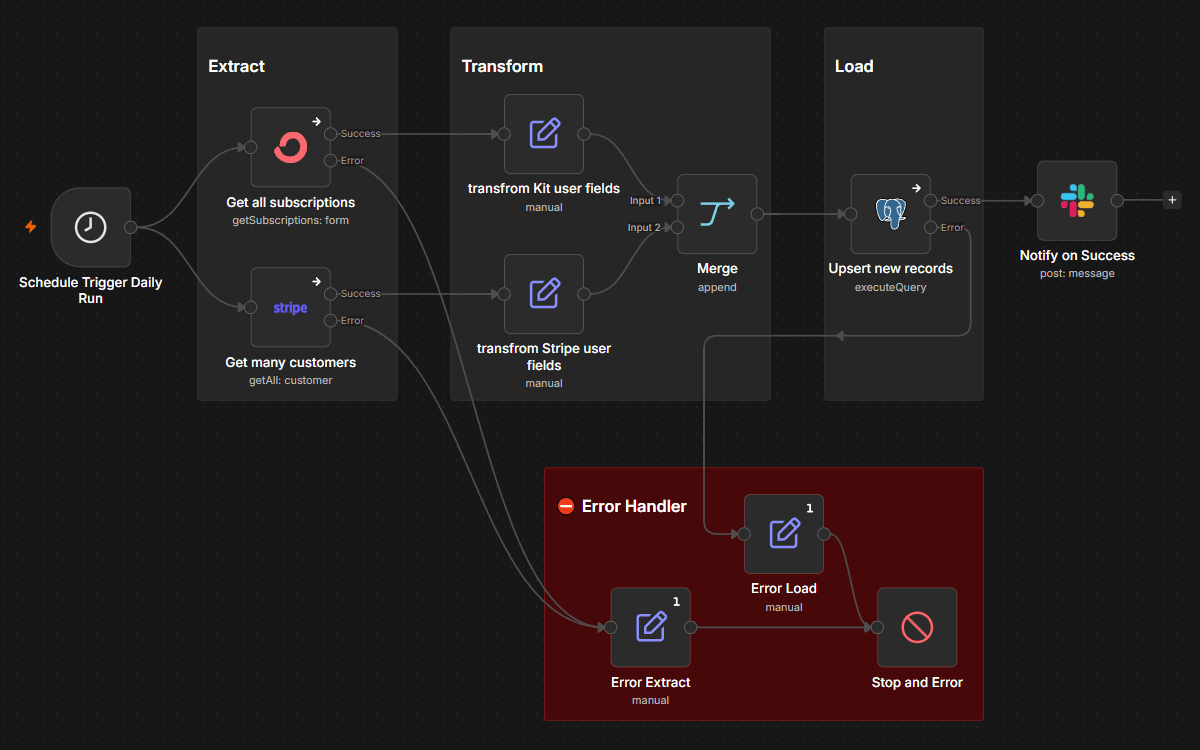
This is where n8n fits. n8n is source-available, AI-native workflow automation platform that acts as the orchestration layer around your ETL workflow. You can extract data from APIs, databases, or SaaS applications, perform data transformation with built-in nodes or custom code, and load it into destinations like PostgreSQL or BigQuery. Schedule runs, respond to events, retry failed executions, and route errors into recovery workflows from the same canvas.
Where n8n fits among ETL pipeline tools
Most ETL platforms focus on moving and transforming data at scale. n8n focuses on orchestrating the workflow around those operations. It connects to source systems through native integrations and HTTP requests, handles transformation with nodes like Set, Aggregate, Filter and Merge, and loads records into databases and warehouses. That makes it well suited for lightweight to mid-volume ETL workflows, especially when your pipeline spans multiple systems or depends on APIs alongside traditional data sources.
How n8n schedules, triggers, and recovers your runs
In n8n, you can trigger pipelines at fixed intervals, start them when an event occurs, or combine both approaches in the same workflow. If a temporary failure interrupts execution, built-in retry settings and error workflows recover without requiring manual intervention, reducing the risk of missed updates or incomplete loads.
How n8n handles failures without losing rows
n8n supports dedicated error workflows that can notify teams, log failures, or retry the affected step instead of restarting the entire pipeline. Combined with incremental loading and idempotent workflow design, these recovery patterns help keep data pipelines accurate even when external systems are unavailable.
Build ETL pipelines you can trust with n8n
Creating an ETL pipeline that stays reliable as data grows and source systems change takes careful planning. Decisions like using incremental loads, designing idempotent workflows, and implementing re-runs encourage long-term consistency.
That's where orchestration becomes just as important as data movement. By combining scheduling, error handling, retries, and integrations in a single workflow, n8n helps teams automate ETL processes without taking on the overhead of building infrastructure from scratch.