
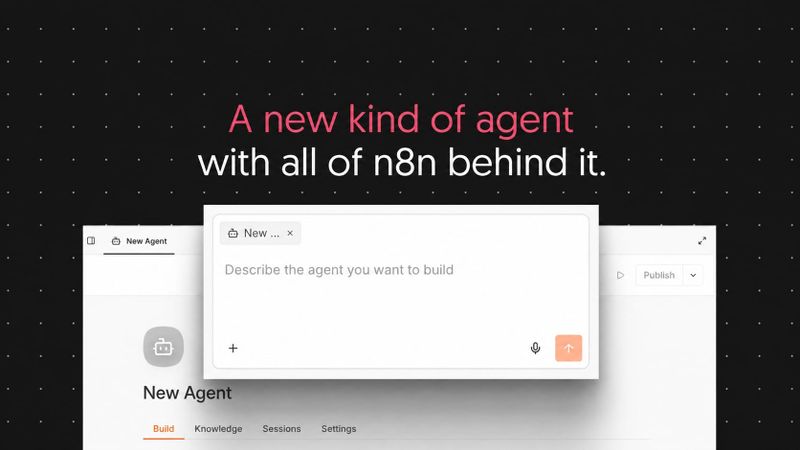
n8n now has Agents. You describe what an agent should do, give it a model and the tools and workflows it can use, and it works out the steps itself. You can talk to it in Slack, run it on a schedule, or call it from any workflow, and it's the same agent in every one of those places.
With agents, it's easier to handle open-ended or back-and-forth jobs that could get complicated to build as a fixed workflow. And you can build an agent without first learning how workflows work.
Agents sit next to your workflows, and the two are built to work together. Your agent can use your workflows as tools, so you decide exactly what it's allowed to do in your systems. And when a workflow needs an agent for one of its steps, the new Message an Agent node calls it from inside the workflow.
If you use the AI Agent node today, nothing about it has changed. Everything you've built keeps working.
👇 Check out the following video which goes into detail with a real world example. 👇
Why agents, and why now
For as long as n8n has existed, automating something meant working out the steps and adding them to the canvas. That's still the right approach for plenty of work. A lead comes in, you enrich it, score it, route it. The more fixed the sequence, the better a workflow fits, even if one of the steps is a model making a decision.
Two things have changed:
- Models can work out the how. Give a current model a goal and the right tools, and it's really good at figuring out the steps to get there.
- People expect to ask for an outcome. More and more, people want to define a goal, and have it handled, instead of designing the process first.
That matters most for jobs where the input is different every time. Someone on the team asks in Slack why a customer's usage dropped last month. Answering takes a few rounds: pull the account, ask which product line they mean, check the support history, come back with a summary and a follow-up question. The next step depends on the answer to the last one, so there's no way to lay out the process in advance.
The same goes for a support email, a new GitHub issue, or any request where you know the domain but not the task. For those jobs, you want to describe the goal in plain language, give the agent access to what it needs, and let it work out the steps as it goes.
Until now, taking on a job like that in n8n meant fitting an open-ended conversation into a workflow. You could do it, and plenty of people did, but it took some work to build. Agents are built for those jobs.
Sometimes you want the workflow in charge, with the agent as a step inside it.
Sometimes you want the agent in charge, with workflows as tools.
n8n now gives you both.
"But I've been building agents in n8n for years"
You have, and so have we. A chat trigger, a memory node, an AI Agent node with a few tools attached, and a workflow around it to hold it all together. Lots of n8n users run agents built exactly this way, and they work.
The difference is how much of it you have to assemble yourself. It's a bit like building your own PC versus buying a pre-built one. Building your own gets you a working machine, but you pick every part and connect every cable. A pre-built PC arrives with everything connected and ready to go, and you can still open it up and add what you need.
n8n Agents are the pre-built version. Memory, sessions, channels, versions and approvals come with every agent, so you spend your time on what the agent should do. You can still extend it with any tool or workflow you like.
What goes into an agent
You don't need to know how workflows work to build one. You describe what the agent should do in plain language, and when you open it later, its instructions read like a brief you'd write for a colleague. If your first agents were built in a tool where you write instructions and attach tools, this is how you build them in n8n.
Each agent has:
- A model. Any model you have credentials for, or n8n's Gateway credits.
- Instructions. Its role, its tone, what it should and shouldn't do, and which tools to prefer.
- Channels & triggers. Slack, Telegram, Linear, Discord, a schedule.
- Tools. Built-in n8n integrations, MCP servers, any workflow.
- Skills. Reusable instructions and reference files the agent loads when it needs them, shareable across agents.
- Sub-agents. One agent can call another.
- Knowledge. Upload csv, pdf, markdown or txt files for the agent to ground its answers in. Available on n8n Cloud. Vector stores as well.
- Memory. It holds the session conversation by default and can remember across sessions as well.
- Sessions. Every conversation is stored, reviewable, and can be picked up again.
Once it's running, you can see what it did. Each session shows every step the agent took, which tools it called, and the input and output of each call.
Your workflows can be your agent's tools
An agent can use three kinds of tools, and you choose per tool:
- MCP servers. Connect a service and the agent gets all of its tools at once, then works out how to use them. The quickest to set up, and you can exclude any tools you don't want it to touch.
- n8n tools & nodes. The integrations you already use, set up for one specific action with the parameters you choose. More setup, and more control over exactly what the agent can do.
- Workflows. A whole process you've already built, run exactly the way you defined it.
Workflows are the part we're most excited about. Every workflow you've built in n8n is something an agent can use, and none of it needs to change.
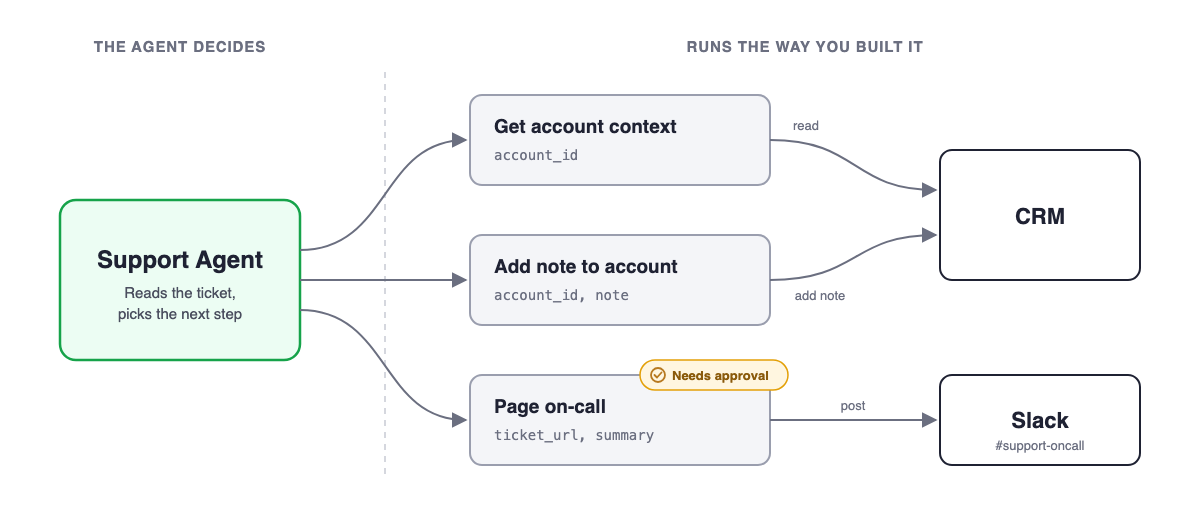
Take a support agent handling the inbound queue. It has three workflows as tools:
- Get account context. Pulls the account from the CRM, checks contract status, scores health. It works, and it's boring, which is the highest compliment you can pay a workflow.
- Add a note to the account. Takes an account ID and a note, and writes the note. That's all it can do.
- Page on-call. Posts an urgent ticket to the on-call channel.
The agent reads each ticket, decides whether it needs account context, drafts a reply, logs what happened, and escalates anything urgent. It decides when each workflow runs. What happens when a workflow runs is fixed, step by step, the way you built it.
That second workflow is the one to notice. Without a workflow in between, logging a note would mean giving the agent write access to your CRM and trusting its instructions to keep it to the notes field. With the workflow, the agent never holds that credential. It holds a workflow that adds a note and does nothing else.
Around that, the controls you'd expect:
- Approvals. Mark a tool as sensitive and the agent pauses for Approve or Reject before using it. For the support agent, paging on-call waits for a person.
- Per-tool credentials. Each tool runs with the credential you attached to it. The agent never holds the keys to your instance.
- Access to the agent itself follows your n8n roles, so who can edit and publish it is up to you.
So you choose, per use case, how much is defined process and how much the agent decides. And you can move that line later: pull a task out of the agent into a workflow when you want it fixed, or hand a workflow to an agent when you want it used with discretion.
For anything sensitive, start where the blast radius is small: scoped tools, a test channel, and approvals on any action that writes to a system of record.
Built for teams that rely on it
A support agent is only useful if the team can count on it. Three things help with that:
- One agent, used everywhere. Connect it to Slack and the whole team talks to it there, each in their own conversation. Put it on a schedule for a morning pass over the queue. Call it from your ticket-intake workflow. Change the instructions once, publish, and every place it's connected gets the new version.
- Drafts and published versions. Edit and preview the draft while the team keeps using the published version. Publish when you're ready. Restore, revert, or unpublish when you need to.
- Sessions and execution logs. Inputs, tool calls, outputs and errors, per session, so you can see what it did last Tuesday.
Using agents inside workflows
Agents work in the other direction too. When a workflow needs an agent for one of its steps, add the Message an Agent node. It sends the agent a message built from your workflow data and passes the agent's answer to the next node.
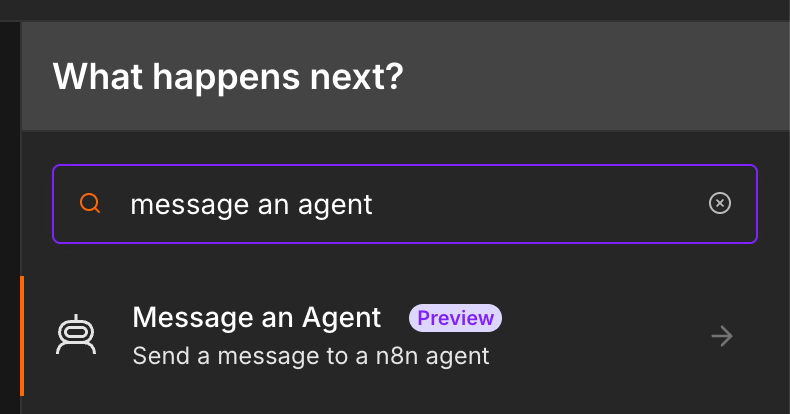
The agent brings its own instructions, tools and memory, so the node itself stays simple: you define what goes in, and you get the answer back. It's the same published agent your team uses everywhere else, so when you update the agent, every workflow that calls it gets the update.
The AI Agent node is still there and works as it always has. Use whichever fits the job.
Getting started
Open the Agents tab and click Create Agent, or describe what you want to n8n Assistant. The Assistant picks the best fit for the job, workflow or agent, and builds it. If you already know you want an agent, say so. Either way you get the instructions, tools and channels drafted, ready to test.
With Gateway credits, you don't need an API key from an AI provider to try it. Pick a model, have the first conversation, and bring your own keys later if you want to.
Between the Assistant and Gateway credits, getting started takes little more than a description of what you want. What you end up with is an agent you can read and change yourself.
If you're not sure what to build first, try an internal Slack bot connected to one or two systems your team asks about all the time. A few other ideas:
- A support agent that reads new tickets, pulls account context and drafts a reply
- A research agent that looks into inbound leads and posts a summary to Slack
- A Linear agent that watches new issues and recommends follow-ups
- A morning summary of what changed overnight, on a schedule
The full guide is in the docs: Build and manage agents.
Things you should know
- Availability:
- On n8n Cloud for everyone on the latest stable version.
- Self-hosted (with some extra setup). See Self-hosted setup.
- Coming to Enterprise soon.
- Cost. One turn with an agent is one execution. Tool calls to your workflows and to sub-agents don't count separately, and agents share your workflow execution quota. Building an agent with n8n Assistant uses AI credits, as any Assistant conversation does.
- Still in preview. Everyone on Cloud can use agents and they work. We're improving them release by release, so test before publishing and keep approvals on anything sensitive.
We have more coming for agents soon. In the meantime, tell us what you built, what it did, and where it fell down. We're reading the community forum closely.
Agents & Workflows - Better Together.