


Every LLM call starts from zero
An LLM has no memory of its own. Each request is independent: the model reads the prompt, returns a response, and keeps nothing. Send a second request and, as far as the model knows, the first never happened.
That is fine for a one-shot question. It breaks down the moment you build something that works over time: a support agent handling a follow-up, a sales assistant prepping for a renewal call, or a workflow that runs every hour and should know what it did last time. These systems need state, and the model can't hold it for them.
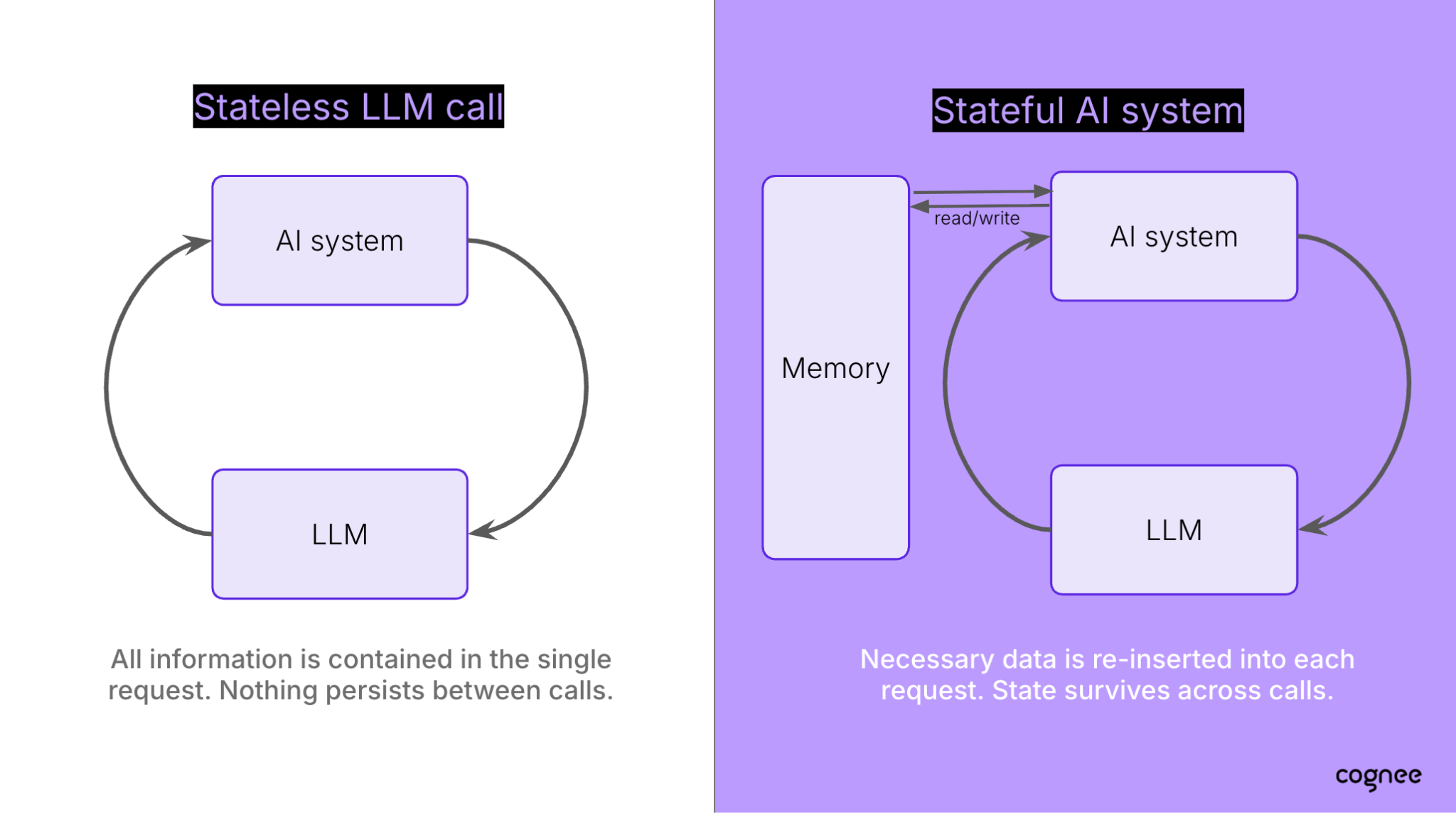
So when people ask how LLM memory works, the honest answer is that the memory lives outside the model. The agent stores what it learns somewhere else, retrieves the relevant parts before each call, and feeds them back into the prompt. That external layer is what we call AI agent memory, and how you design it decides whether your agent remembers the right things or drowns in the wrong ones.
This post explains how that layer works, the main ways to build it, and how to use it in n8n, both as a shared "company brain" your workflows can query and as memory inside a single agentic workflow.
Short-term and long-term memory
Agent memory usually works on two timescales, and they are often built as two separate components.
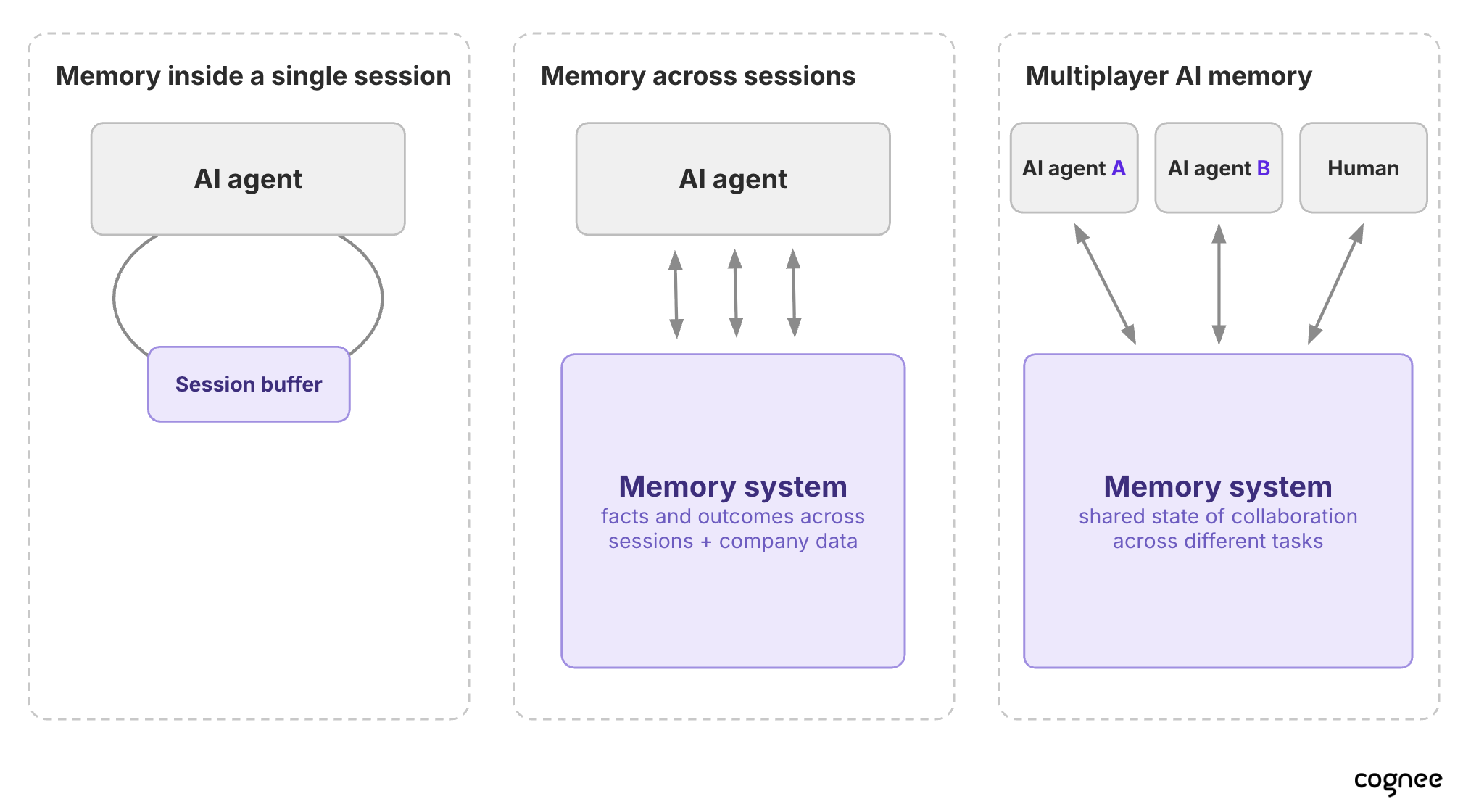
Short-term memory keeps track of what's happening right now: recent messages, intermediate reasoning, tool outputs, the state of the task. It lives close to the agent, often inside the harness itself. When the context window fills up, a common trick is to summarize the history so far and feed the summary back in. That works until it doesn't: summaries lose detail, and some outputs shouldn't be compressed at all, for example intermediate drafts or the results of expensive computations.
Long-term memory survives across sessions. It holds user preferences, outcomes of past tasks, lessons about what worked, and increasingly, company knowledge the agent didn't generate itself: docs, tickets, CRM records. This almost always needs a dedicated external layer from day one, because something has to decide what gets kept, how it's organized, and what comes back for each request.
Either way, the delivery mechanism doesn't change. The model still receives one prompt. Memory just changes how that prompt is assembled: the new user message, plus the running session, plus whatever long-term memories are relevant right now.
LLM memory, context, RAG, agent memory: what's the difference?
These four terms get used interchangeably, but they describe different places where knowledge can live. A real system often uses all of them.
LLM memory in the strict sense is what the model absorbed during training. It's compressed patterns, not a lookup table, which is why a model can confidently repeat something outdated. Fine-tuning can add domain knowledge, but it's slow, expensive, hard to inspect, and it can't capture anything from a live session.
Context engineering is choosing what goes into the context window for this particular call. Bigger windows help, but they don't solve memory: the context vanishes when the session ends, long prompts cost more, and models don't attend equally to everything in a very long input.
RAG retrieves from an existing knowledge source (docs, a database, an API) and adds the results to the prompt. The key limitation is direction: RAG reads, but it doesn't write back. It won't remember what the user asked last week or which fix already failed.
Agent memory starts where the agent writes back. It captures new facts, preferences and outcomes as it works, and retrieves them later. Picture a sales assistant that pulls this quarter's numbers via RAG, but also remembers from earlier conversations that this user wants EU figures in euros, broken down by country.
How agent memory actually works
At a high level, any memory system needs three pieces: a data store where memories are persisted, write logic that decides what gets stored and how, and a retrieval interface that lets the agent find the relevant memories. The store you choose has a big influence on the other two: which write logic makes sense, and what retrieval can do. So here are the main architectures, by store type.
Vector databases. Memories are turned into embeddings and found by semantic similarity. Easy to set up and well supported, but similarity isn't everything. "Q3 sales" and "Q4 sales" sit almost on top of each other in vector space, there's no notion of which fact is current, and an entry that's relevant but phrased differently can be missed entirely.
Plain files. The agent keeps a MEMORY.md (or similar) that it reads and edits. Coding agents popularized this. It's transparent and version-controlled, but retrieval is limited to loading everything or grep-ping, and sharing a file between many agents gets messy fast.
Knowledge graphs. Facts become entities and relationships: the sales report covers EU deals, EU deals are booked in euros, the figures come from the billing export. Retrieval finds an entry point, then follows the edges, so the agent gets facts that are logically related to the question, not only ones that sound similar. The trade-off is more work at ingestion time.
Hybrid systems. In practice, no single store covers everything. Exact IDs want a structured index, relationships want a graph, fuzzy matching wants vectors, and "what did the customer prefer last March?" needs timestamps. Production memory layers combine stores and put logic on top that decides what goes where. This is also why a memory layer is more than a database: the stores are just where the data lives, and the memory layer sits on top of them. It decides what gets stored and in what form, and exposes the operations agents use to write, retrieve, update and forget.
Memory has to be managed, not just accumulated
A memory layer that only grows gets worse over time. Facts change, preferences shift, and stale entries start competing with correct ones. Good memory systems handle several processes on top of storage. The main three are:
- Consolidation. Raw entries pile up faster than they become useful. The system should periodically turn them into fewer, higher-level records (summaries, derived facts) while keeping a trail back to the originals.
- Updating. When a fact changes, a blind overwrite loses history: what was true before, and when it changed. Keeping time information on facts lets the agent answer both "what's true now?" and "what did we believe in March?"
- Forgetting. Some data has to go: a stale dataset, a correction, a deletion request. That should be an explicit, deliberate operation, separate from the softer job of letting less useful memories fade in relevance.
The best systems also learn from use. If an answer gets confirmed, the memories behind it gain weight; if it gets corrected, the misleading ones drop. Over weeks, retrieval should get sharper, not noisier.
How do you know your memory works?
Public benchmarks give a useful first signal. Most follow the same two-phase pattern: feed a long history into the memory system, then ask questions whose answers depend on storing and retrieving the right facts, including ones that were later updated or contradicted.
Size matters more than people expect. If a benchmark's whole history fits in a modern context window, you can skip memory entirely and paste everything into the prompt, so the test says more about the model than about the memory. That doesn't mean the model will answer perfectly, though: models don't use long contexts evenly, and details buried in the middle of a long prompt can get less attention. LoCoMo conversations run around 26k tokens; LongMemEval's common variant is about 115k. BEAM is the most demanding of the three, testing ten memory abilities over conversations of up to 10M tokens, which is where external memory actually has to do the work. The reported state of the art on BEAM is 79% at 100K tokens and 67% at 10M, set by Cognee, up from the previous best of 73.4% and 64.1%.
But benchmarks mostly check final answers. They don't look at what the memory actually stored, how it holds up after weeks of updates, or how it behaves when many agents share it. For a full map of what each benchmark measures and where it falls short, see this guide to AI memory benchmarks.
The test that matters most is your own: run the same workflow with memory on and off, and measure the outcome you care about, such as tickets resolved, fewer repeated questions, or correct follow-ups.
Adding n8n workflows memory
n8n workflows share a trait with LLMs: by default, each execution starts fresh. So a support workflow that drafted a fix on Monday won't automatically know about it when a follow-up arrives on Wednesday. Many teams handle this with a Postgres table or an Airtable base, which works, but each workflow then needs its own storage setup and its own rules for what to keep.
1. A shared brain for all your workflows
At its simplest, memory lets any workflow pick up where the last run left off. One node stores what the workflow learned; another looks it up on the next run. And because the memory lives outside any single workflow, many workflows can share it.
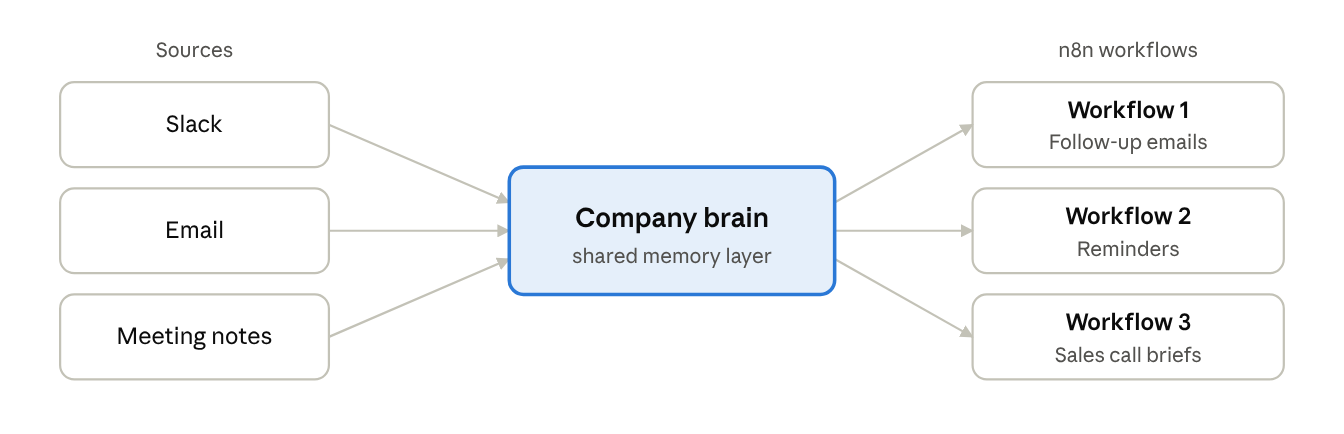
The biggest payoff is a centralized "brain": one shared memory that all your workflows write to and read from. Extend it to the whole company and you get a "company brain". Most useful context already exists across the company: Slack threads, tickets, docs, CRM notes, call transcripts. n8n can collect it from all those tools, and a memory layer can structure and connect it, so every workflow draws on the same picture of what the company knows.
The pattern is simple:
- Collector workflows use n8n's triggers and app integrations to pick up new material as it appears, such as a closed ticket, a call summary or a form submission, and send it to the memory layer, which structures and connects it.
- Acting workflows query that same memory right before they do something: draft a reply, route an escalation, prep a sales brief. They can ask in plain English, like "What's the current status with Acme, and what did we promise them?", and pass the answer on to the next node.
Because both sides point at the same memory, workflows share context without sharing implementation details. And when the memory keeps relationships between entities, acting workflows get connected answers, such as which contracts expire next quarter or which accounts share the same root cause, that a pure similarity search would miss.
2. Memory inside an agentic workflow
The second pattern lives inside a single n8n AI Agent, and it maps onto the short-term and long-term split from earlier. Without memory, every message the agent receives starts from zero. n8n handles the short-term side through the AI Agent's Memory port. n8n's default, "Simple Memory", stores a customizable length of chat history for the current session, and it's the easiest way to get started. You can stick with this default or choose a more advanced third-party memory provider, as shown below:
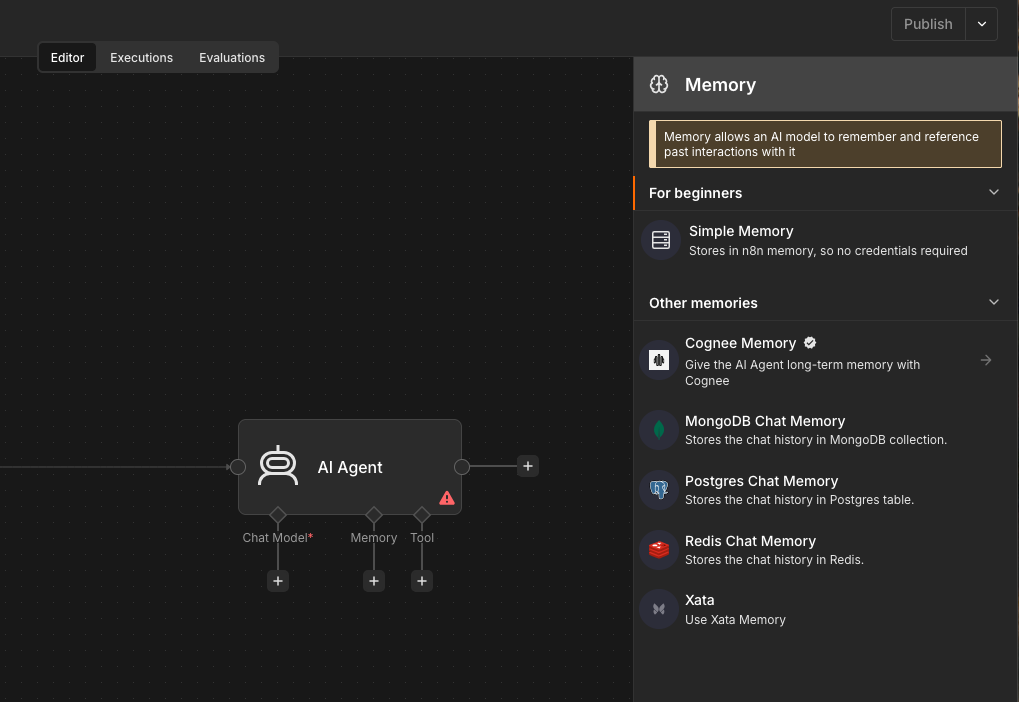
Chat memory, though, only remembers the conversation. Long-term knowledge, such as user preferences, the outcomes of past tasks and company context, needs more than a chat log. For that, connect a memory layer to the Agent's Tool port, where you attach add-ons the agent can use to access extra context or resources. The agent can then decide for itself when to remember something new and when to search what the company already knows. The result is an agent that holds the thread of the current conversation and can reach into shared company knowledge mid-task.
In short: n8n's built-in memory is a good starting point for a single chat agent. But if you want memory that evolves over time and is shared across workflows and agents, combine it with a memory layer: chat memory for the conversation at hand, and shared memory so every run starts from what the company already knows rather than from zero.
Conclusion
LLMs start every call from zero, so building AI agents that work reliably over time requires memory outside the model. But storing information is only half the challenge. Agents also need a way to capture, retrieve, and act on the right context across tasks and workflows.
n8n and Cognee solve these challenges together. n8n connects your apps, orchestrates AI agents, and automates how information flows between systems. Cognee turns that information into structured, persistent memory that agents can retrieve, update, and share.
Together, they let you build AI workflows that don't just execute tasks independently, but learn from previous interactions, maintain context across sessions, and work from a shared understanding of your company's knowledge.
Ready to build AI agents with long-term memory? Get started with n8n and connect Cognee to give your workflows a shared memory layer.