
This Verified Node Spotlight is a guest post written by Sundar Raghavan, Agentic AI Foundations Lead at AWS.
A customer messages your support bot that their nightly sync has been failing since they rotated their API keys. The triage agent reads it, decides this is a configuration problem, and hands off to your integrations specialist. The specialist asks which integration they mean.
The customer already said. They said it in the message that started the conversation, forty seconds ago, in the same thread they are still looking at. From their side this is one conversation with one company. From the workflow's side it was two agents, and the second one started with nothing. You can pass the full transcript to every specialist, which works until the conversation outgrows the context window. You can put the history in a vector database, which works and now you operate a database and an embedding pipeline. This post takes a third route.
Amazon Bedrock AgentCore is a platform to build, connect, and optimize agents at scale, with any framework or model. AgentCore harness, now generally available, provides the scaffolding around a model as a managed capability: you define an agent in configuration, including the model it uses, the tools it calls, the skills it has access to, and the instructions it follows, and AgentCore assembles and runs the loop for you. Two properties of that capability are what make a team of specialists practical.
AgentCore's Managed memory is scoped by actor and session, so an Actor ID that identifies the customer rather than any single agent gives every specialist the same history to read and write, and that history outlives an individual workflow execution. And because the tools, skills, model, and instructions travel with each invocation rather than being fixed on a deployed agent, one agent can serve all four specialists instead of provisioning four.
In this post you will build that support team in the n8n editor: a triage agent that classifies each incoming question and routes it to one of three specialists, one holding the AgentCore Code Interpreter, a capability of Amazon Bedrock AgentCore, for calculation, one holding the AWS skills catalog for architecture guidance, and one for everything else. The specialist answering the third question already knows what the first one learned, with no vector store to operate and no infrastructure to deploy.
In this post
How the team works
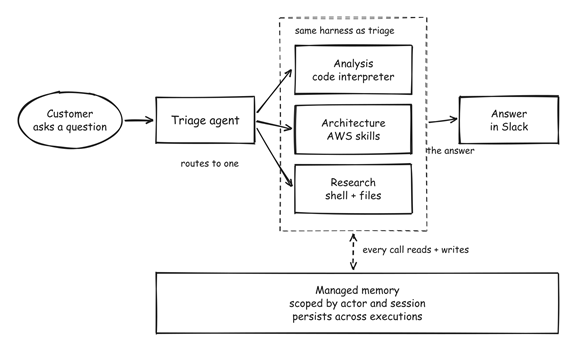
Figure 1: Triage picks one specialist per question. All four agents run on the same harness and read and write one memory of the customer.
A customer asks a question in When Chat Message Received. Set Customer Context turns the chat session into a customer identifier, which every agent then sends as both its Actor ID and its Session ID. The Triage Agent reads the question and returns a category as JSON, which Read Triage Decision parses. Route To Specialist sends the question to the matching agent, which answers using the tools granted for that call. Format Reply unwraps the answer and Post Answer To Slack posts it, tagged with the specialist that produced it.
Because every call carries the same Actor ID, every specialist reads and writes the same history, and the second question benefits from the first. A customer disputes their usage figures and the analysis specialist computes them. They follow up asking how to restructure, and a different specialist answers using those same figures without being told them again.
Where all of this runs matters as much as what it does, because it determines what you have to operate.
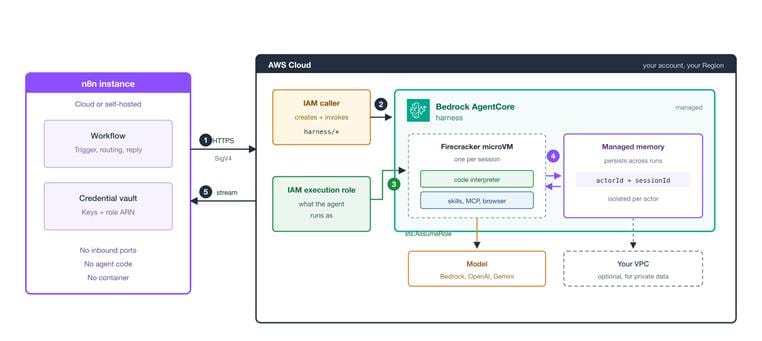
Figure 2: Your n8n instance holds the workflow and the credentials. AgentCore runs the agent in your AWS account, under the execution role rather than the caller's keys.
The division of responsibility is straightforward. n8n handles the trigger, the routing decision, and the reply. AgentCore handles the agent loop and memory that outlives a workflow run, and runs every session in its own Firecracker microVM with no shared state and no shared filesystem. Ten nodes on the canvas, two credentials, and one harness resource rather than four. Traffic is outbound only, so nothing on your side needs to be exposed to the internet: n8n signs each request with SigV4 and calls AWS. And two IAM identities are doing different jobs, which the next section sets up.
Before you start
- An n8n instance. Self-hosted or n8n Cloud both work with this node.
- The node installed. @aws/n8n-nodes-agentcore is a verified community node, so you can find it in the nodes panel. Add a node, search for Amazon Bedrock AgentCore, and select it. You can also install it from Settings > Community Nodes > Install by entering @aws/n8n-nodes-agentcore.
- An AWS account with access to AgentCore harness in a supported AWS Region.
- A foundation model enabled in the Amazon Bedrock console. Model access is opt-in per account and per Region, so enable the Claude model you plan to use before the first run.
- Two AWS IAM identities, described in the next section.
- A Slack credential for the reply. Delete that node if you would rather read the answer in n8n.
The two IAM identities
AgentCore harness uses two separate IAM principals, and knowing which is which saves most first-run debugging. The caller is the identity whose access keys go into the n8n credential; it creates and invokes the harness. The execution role is what the agent runs as at runtime, so it needs the permissions for the model, the code interpreter, the skills catalog and memory.
The AgentCore harness security guide holds the canonical policies for both, and its sample execution role policy already covers everything this workflow uses. The node repository ships the trust policy at `docs/iam-trust-policy.json`, and the README maps each feature to the block it needs. An AccessDenied on the first run is almost always a missing action on the execution role rather than on the caller.
Where you can, use temporary credentials from AWS IAM Identity Center or AWS STS.
A note on cost: there is no separate charge for the harness itself. You pay for the underlying AgentCore capabilities you use, and managed memory incurs standard AgentCore Memory charges for short-term events, stored long-term memory records, and retrieval requests. This workflow creates one harness for all four agents rather than one each. Delete the agent when you are finished, and see Amazon Bedrock AgentCore pricing.
Get the workflow
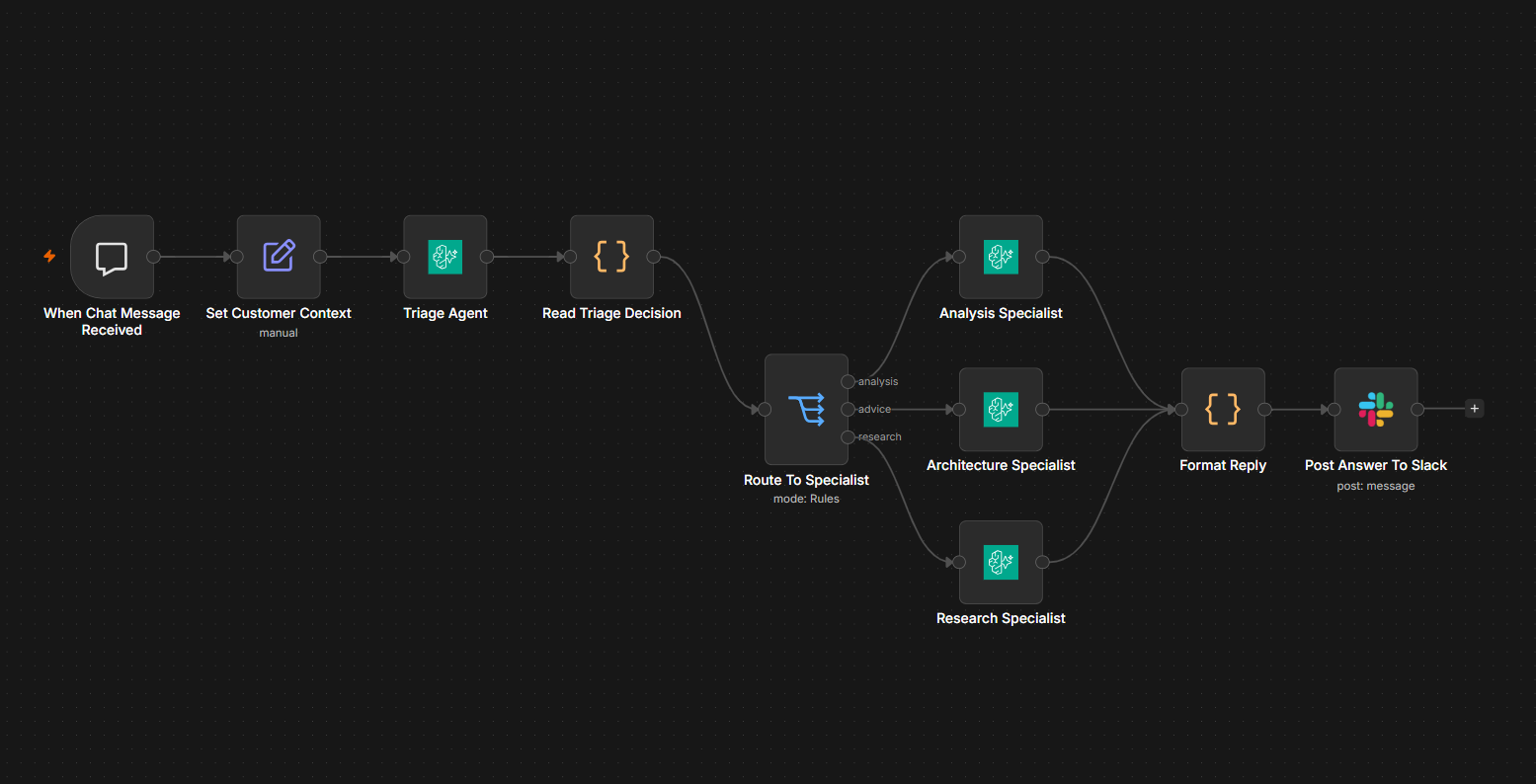
Import the free template to your n8n instance to follow along. The canvas will load with all ten nodes wired and configured.
Step 1: Connect your credentials
- Open each of the four agent nodes and select your Amazon Bedrock AgentCore API credential.
- Open Post Answer To Slack and select your Slack credential.
- In Set Customer Context, set slackChannel to a channel your bot has joined.
There is no harness to deploy, no container to build, no agent code to write, and no vector store to provision.
Before running, check the canvas for warning markers on any node. n8n validates every node before it runs any of them, so a single unset credential stops the workflow.
Step 2: See how one harness serves four agents
Open Triage Agent. Its Harness ARN field is blank, which tells the node to create the agent on the first run and reuse it afterwards. Under Provisioning Options, managed memory is enabled with the semantic, summarization, and user-preference strategies.
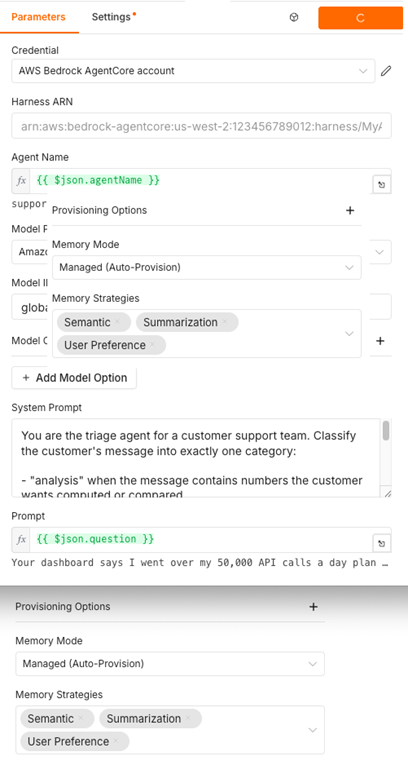
Figure 3: Only the Triage Agent provisions a harness. Memory is configured here because memory is a property of the harness rather than of an individual call.
Now open Analysis Specialist. Its Harness ARN is an expression:
Expression
{{ $json.harnessArn }}
That is the ARN the Triage Agent returned. The specialist invokes the same harness instead of creating its own, and grants itself the AgentCore Code Interpreter for that single call. The Architecture Specialist does the same with the AWS skills catalog.
Granting tools per call also keeps each specialist cheap, because tool definitions count toward model input tokens even when the agent never calls the tool. And every session arrives with two built-in tools regardless of what you configure, a shell and file_operations, which is why the Research Specialist works with nothing configured at all.
One detail to keep in mind: Agent Name in Set Customer Context is the cache key for the harness, and therefore for the team's memory. Changing it creates a new harness, and the accumulated customer history is no longer reachable from the workflow.
Step 3: The customer asks about their bill
Open the chat panel at the bottom of the canvas and send the kind of message a real customer sends, one with numbers buried in it:
Your dashboard says I went over my 50,000 API calls a day plan but my own logs for the five busiest days are 41200, 38900, 52300, 61800, 58400. Am I actually over on average?
The first run takes two to three minutes while AWS provisions the agent. Later runs answer in seconds.
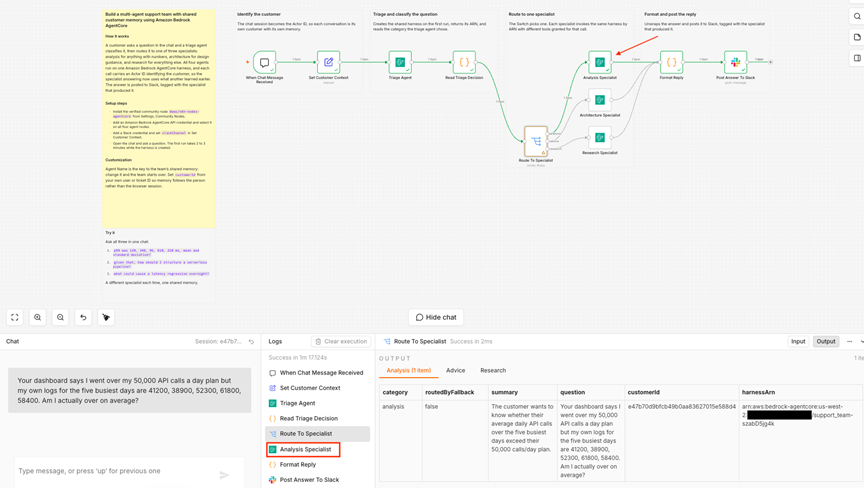
Figure 4: Triage classified this as analysis because answering it means computing something, and routed it to the specialist holding the code interpreter.
Open the Analysis Specialist's output and expand toolUses. It contains the Python the agent wrote and executed:
Python
import statistics
calls = [41200, 38900, 52300, 61800, 58400]
print(statistics.mean(calls), statistics.pstdev(calls))
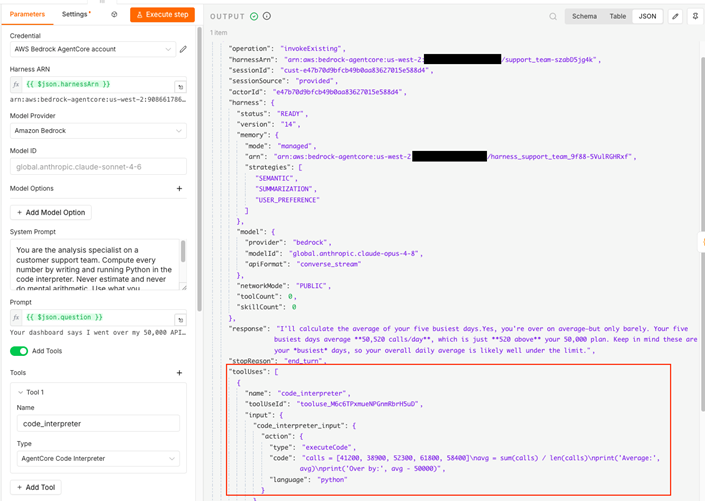
Figure 5: The AgentCore Code Interpreter runs Python in a sandbox, so the number in the answer is the output of an execution rather than a prediction of one.
The mean is 50,520. The customer is over, by 520 calls a day out of 50,000, which is one percent. Here the answer is an execution, and the trace shows exactly what produced it. On a billing dispute that difference is the whole conversation.
Step 4: The same customer asks what to do about it
Stay in the same chat and send a follow-up that contains no numbers at all:
That is closer than I thought. How should I restructure things so I stop going over?
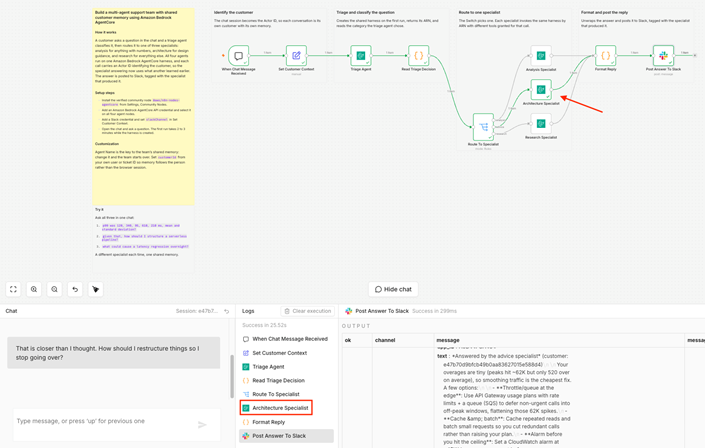
Figure 6: A different specialist answers, and it uses the call volumes from the first question.
Triage classified this as architecture guidance and routed it to a different agent with different tools: the AWS skills catalog instead of the code interpreter. That agent was never sent the customer's call volumes, and it uses them anyway, because both calls went to the same harness with the same Actor ID. The first exchange was written into this customer's memory and the second call read it back. Neither specialist needed to know the other existed.
This is the part a support team feels immediately. Without shared memory the customer would be asked to paste those five numbers again, in the same conversation, to a company that already has them.
One scoping detail matters before this faces real customers: memory events are scoped by Actor ID plus Session ID, so a different Actor ID on the same harness gets an entirely separate memory. In this template the Actor ID comes from the chat session; in production you would set it from your own user, account or ticket ID. See Memory for the retention strategies and how retrieval is tuned.
Now send something that is neither a calculation nor an architecture question:
Also, does the daily limit reset at midnight UTC or in my local time?
Open questions route to the Research Specialist, which works from the shell and file tools available in every harness session. Three messages from one customer, three specialists, one accumulating memory. From the customer's side it was a single conversation with a single company.
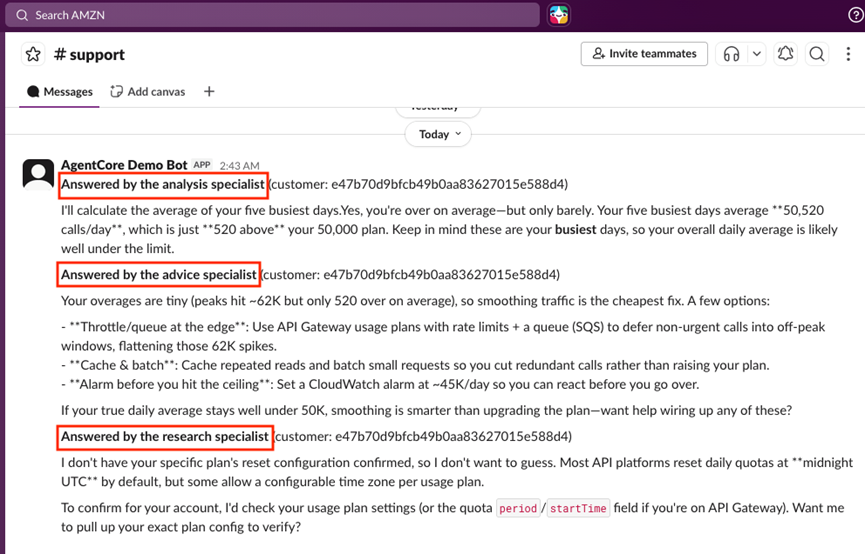
Figure 7: Each answer arrives in Slack tagged with the specialist that produced it.
Where to go from here
The template is a starting point, and each direction below is configured the same way as the features above.
Trigger it from where your customers already are. The chat panel needs no setup, which is why the template ships with it. A Slack Trigger or a Webhook is the natural production choice; both need an n8n instance reachable from the internet.
Use agents you have already built. Replace a specialist's Harness ARN expression with the ARN of a harness you created through the AgentCore CLI, the console, CloudFormation, or Terraform. The node invokes it directly, and the configuration fields become per-invocation overrides.
Add a specialist. One more branch on the Switch and one more agent node. Give it a remote Model Context Protocol server, an AgentCore Gateway for governed access to your own APIs, or the AgentCore Browser.
For private VPC networking, OAuth-authenticated invocation, multi-provider model switching and the rest of what the node supports, see the AWS Machine Learning Blog post.
Clean up
The team is one harness resource in your AWS account, and it provisioned a managed memory store. Delete it when you are finished to avoid ongoing charges.
List your harnesses:
Bash
aws bedrock-agentcore-control list-harnesses --region us-west-2
Then delete the one this template created, support_team:
Bash
aws bedrock-agentcore-control delete-harness \
  --harness-id <harness-id> --region us-west-2
Because the node reuses one harness per Agent Name, testing this workflow leaves a single resource behind regardless of how many questions you ask.
Conclusion
You built a team of specialist agents that share one memory of each customer, without a vector store, a database, or any deployed infrastructure. Three ideas make it work: specialists do better work than generalists because each has the right tool for its job, memory scoped to the customer lets a team hand work between its members without asking the customer to repeat themselves, and tools granted per invocation mean a team of specialists does not have to become a fleet of separate resources to operate.
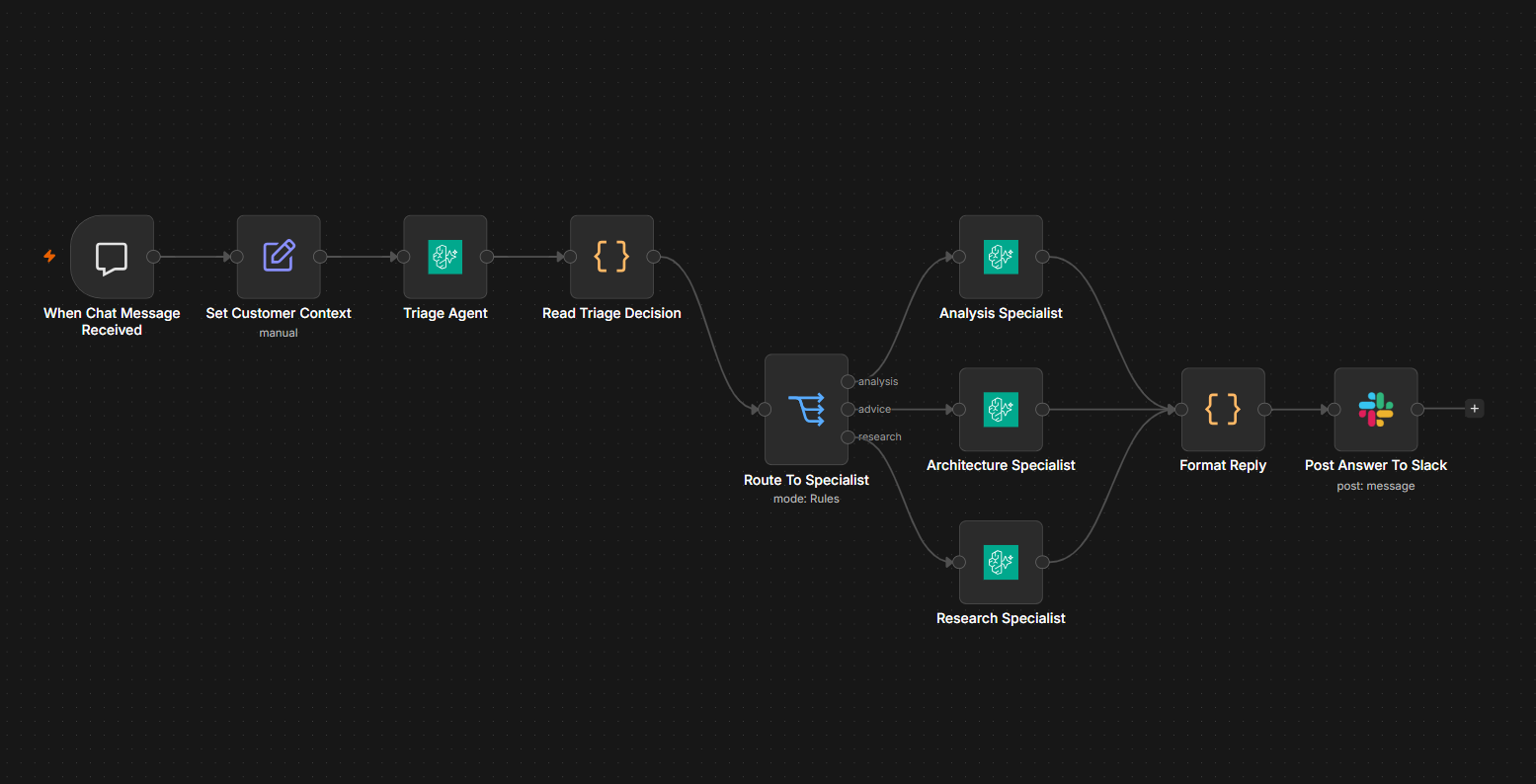
Import the workflow to drop all nodes, wired and configured, to your n8n instance.
For the rest of what the node supports, including private VPC networking and OAuth-authenticated invocation, see Run production AI agents in n8n with Amazon Bedrock AgentCore harness on the AWS Machine Learning Blog. To learn more about the underlying capability, refer to the AgentCore documentation.
The node is open source under MIT. AgentCore harness itself is powered by Strands Agents, the open source agent framework from AWS. Contributions and feedback are welcome on the GitHub repository.