
Prompt testing frameworks make it easier to catch regressions in LLM-powered projects before they reach production. Without testing, you tweak a prompt, spot-check a few examples, and ship when the results look better. Then it goes live and users start complaining because you missed a regression.
There’s a better way.
This guide covers how LLM evaluation frameworks make prompt quality assurance a measurable, repeatable process.
Why prompt testing requires a different approach than traditional software testing
Traditional software tests usually have a clear idea of what “correct” looks like. You expect the same output for a given input.
LLMs don’t behave that way. The same prompt can produce different responses from one run to the next, even when nothing in your workflow has changed. That makes exact-match tests a poor fit for many kinds of LLM evaluation.
There’s also more room for an output to be technically valid but still bad. One response might contain the right information but ignore the requested format. Another might sound convincing while getting an important detail wrong. And you can’t anticipate every input your users will eventually throw at the model.
Prompt testing frameworks account for that uncertainty by checking against representative examples and measuring the parts of an output that actually matter for your use case.
Popular prompt testing frameworks and tools
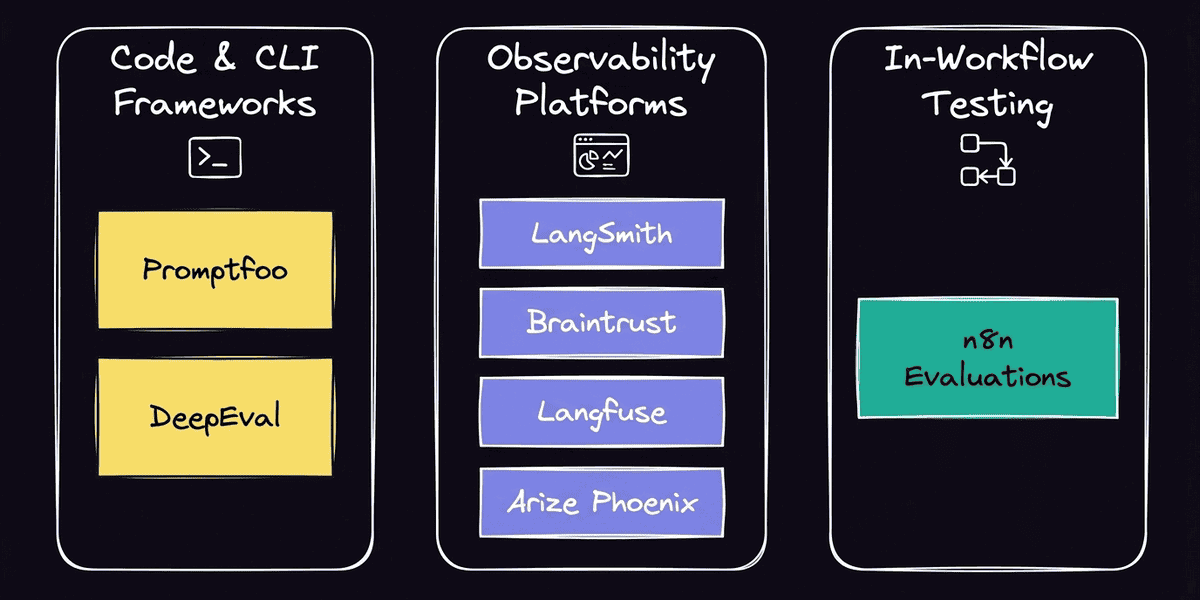
There’s no shortage of prompt evaluation tools, but they don’t all solve the problem in the same way. Some are designed to run evaluations from code or the command line, while others give teams a managed environment for testing and tracing LLM applications. The right fit for your system depends on where you want evaluation to live in your development process.
Here are some popular options:
- Promptfoo: An open-source, developer-focused framework for comparing prompts and models against test cases. It’s a good fit when you want evaluations to live alongside your code and CI/CD process.
- DeepEval: A Python-based evaluation framework built around automated tests for LLM applications. It’s useful for teams that want to treat LLM evaluation more like conventional software testing.
- LangSmith: A managed platform for tracing and evaluating applications built with LangChain and other frameworks. Its tracing capabilities are especially useful when you need to understand what happened inside a multi-step LLM or agent run.
- Braintrust: An evaluation platform for running experiments and comparing changes across prompts, models, and datasets.
- Langfuse and Arize Phoenix: Observability-focused tools that help teams inspect LLM behavior and evaluate application performance over time.
Evaluation methods: How to score prompt outputs
Not every prompt failure looks the same. A response can be factually wrong, miss the expected format, or simply be less useful than another version. That means there are various metrics that can tell you whether a prompt is working.
The best scoring method depends on what you expect the model to produce. Here are two distinct ways to evaluate.
Deterministic evaluation
Deterministic metrics work well when you can define success in advance. For example, you might check whether an output matches an expected string, belongs to the correct category, or uses the right tools.
These checks give you a consistent pass/fail result or numerical score. If a new prompt version starts producing the wrong category or drifting from an expected answer, the change shows up immediately.
In n8n, built-in metrics to measure quality include String Similarity, Categorization, and Tools Used. You can also create custom metrics inside the workflow when you need to check something specific for your use case. Custom regular expressions are just one of them: You can check if the LLM reply contains a substring in the expected format (e.g., valid product SKU, phone number, etc.)
LLM-as-a-Judge
Some outputs don’t have a single correct answer. If you’re testing a customer support response, for example, two very different answers might both be useful and accurate. An exact-match check won’t tell you much.
An LLM can instead evaluate the generated response against defined criteria and assign a score. n8n includes AI-based Correctness and Helpfulness metrics, both scored on a 1–5 scale, so you can compare prompt versions on qualities that are difficult to capture with deterministic checks alone.
This approach is particularly useful when you use a cheaper and faster model in production. It delivers cost-efficient outputs, and you can use a slower and more potent LLM for testing on a small subset of question/answer pairs.
Catching regressions across prompt versions
You can use prompt output scores to spot regressions. Start by comparing new prompt versions against a baseline, then track the metrics to see whether performance holds up over time.
Baseline runs and side-by-side comparison
A baseline gives every prompt change something concrete to beat. Run your current prompt against a fixed test dataset and save the outputs and scores. Then, after making a change, run the same cases again. Comparing the two runs side by side shows where the new version improved and where it slipped.
This makes prompt versioning especially useful. You can connect each version to actual evaluation results and make changes based on how the prompt performs across the dataset. That becomes crucial with AI agents, where a prompt change can affect behavior beyond the wording of the final response.
Reading metric trends to catch silent degradation
Some regressions are obvious in a side-by-side comparison. Others only become visible when you look at the scores across multiple test cases or runs. For example, a prompt might continue producing reasonable responses while its average correctness gradually drops.
Tracking metric trends with prompt regression testing helps you notice when scores are moving in the wrong direction, even if individual outputs still look fine. For more complex workflows, monitoring AI agent performance can help you evaluate whether changes affect how reliably the agent completes its task.
How to run prompt testing inside n8n workflows
You don’t need to separate prompt testing from the workflow you’re evaluating. n8n lets you use a test dataset, run it through your existing workflow, score the results, and compare evaluation runs on the same canvas.
Setting up a test table
Start with examples that represent the inputs your workflow actually needs to handle. In n8n, your test dataset can live in a Data Table or Google Sheet, with each row representing a test case.
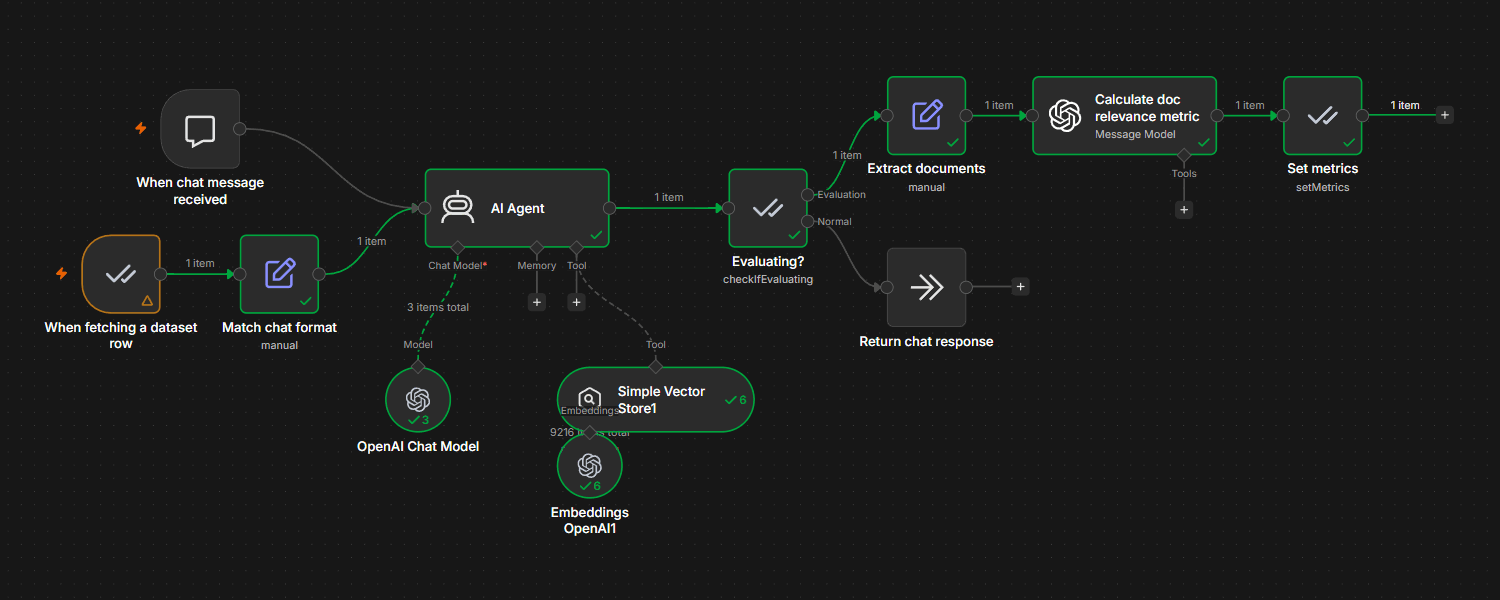
Include the input you want to send through the workflow and, where appropriate, the expected output or other values you’ll need for scoring. The Evaluation Trigger node runs the workflow once for each row so you can test the same cases whenever the prompt changes.
Running evaluations and scoring results
Once the dataset is ready, add the evaluation path to your workflow. The Evaluation node’s Set Outputs operation records the values you want to evaluate, while Set Metrics scores each run using built-in or custom metrics.
The Check If Evaluating operation keeps this logic separate from normal executions. Evaluation-specific steps only run during a test, so they don’t add unnecessary model calls, latency, or cost to your production workflow. Results then appear in the Evaluations tab, where you can compare runs across prompt versions.
Connecting to LangSmith for deeper tracing
Sometimes a score tells you that performance dropped without telling you why. For deeper debugging, self-hosted n8n instances support a LangSmith integration that adds tracing for LangChain-based workflows.* This lets you inspect spans within an execution when you need more detail about what happened along the way.
*Note: LangChain tracing is only available for self-hosted n8n instances, not n8n Cloud.
Running regression checks in n8n
After you have a baseline, rerun the evaluation whenever you update the prompt. Because the same dataset and metrics are used each time, the Evaluations tab gives you a consistent way to compare the new version with earlier runs.
Look at both the overall metrics and individual test cases. A higher average score can hide a regression on an important input, while a small change in the aggregate might come from only one difficult case. Reviewing both helps you decide whether the new prompt is ready to ship or needs another iteration.
Make prompt testing part of every change
Prompt testing works best when it’s a regular part of your development process. Keep the same representative test cases around as your prompts evolve. When you make an update, score the new outputs against the baseline before deciding whether it’s ready for production.
That turns prompt testing frameworks from an occasional quality check into part of the development process. You still have room to experiment with prompts, but you don’t have to rely on a few good-looking responses to decide whether a change is ready to ship.
With n8n, that testing loop can live alongside the workflow itself.