




Traditional software testing is straightforward: you give input X and expect output Y. If the function returns the wrong value, the test fails.
LLM-based agents don't work that way. They're non-deterministic which means the same prompt can produce different outputs across runs. They operate over multiple steps, making decisions about which tools to call, what parameters to pass, and how to interpret results.
An agent can complete an execution without errors and still hallucinate facts, miss the user's intent, or take unnecessary steps. Classical testing may not catch problematic outputs produced by an AI Agent.
When building AI Agents, you face three main evaluation challenges:
- You're evaluating trajectories, instead of just outputs. An agent might give the correct final answer but call the wrong tools, use the wrong parameters, or take five steps when one would do. If you only check the final result, you'll overlook these issues.
- Successful performance is harder to define. "Good" output often involves subjective qualities such as tone, helpfulness, and policy compliance. You need different evaluation methods for different quality dimensions.
- One-time testing isn't enough. Models get upgraded, new edge cases emerge over time, and user behavior may shift. This means that agents that work today might degrade tomorrow.
Systematic evaluation allows you to overcome these challenges and bridge the gap between AI Agent changes and their performance impact. The way you approach it depends on where you are in your journey.
How do I start evaluating an AI Agent?
As you scale your use of AI agents, evaluation typically evolves through stages. Most teams start with manual testing and expand as agents move toward production. Where you begin depends on your current stage and your risk tolerance.
| Stage | When it's used | How it's used |
|---|---|---|
| Ad-hoc | Prototypes, early development |
Manual spot-checking, eyeball results |
| Curated test suites |
During development, before major changes |
Structured datasets with a number of pre-defined test cases, manually triggered or semi-automated |
| CI-integrated evaluations |
Automated validation on every commit |
Automated tests in pipeline, pass/fail gates |
| Production monitoring |
Live systems | Continuous scoring, A/B tests, alerts on degradation |
What are the main approaches for evaluating AI Agents?
At a high level, evaluation happens in two contexts: offline (on test datasets) and online (in production). Each approach helps to catch different issues.
Offline evaluation
Offline evaluation runs your agent against curated test datasets during development or in CI pipelines. You define inputs, expected outputs, and success criteria. Then either manually check whether the agent meets your criteria or set up automated testing before you push to production.
Offline evaluation helps you:
- Catch regressions before they reach users
- Compare performance across prompts or model changes
- Validate that edge cases still work after updates
The limitation of this approach is that your test dataset only covers scenarios that you anticipated. Real users may hit edge cases outside your test coverage.
Online evaluation
Online evaluation scores live traffic and collects feedback from actual usage. It catches issues your test suite didn’t foresee, such as unexpected inputs, edge cases you didn't think of, gradual performance degradation as user behavior shifts.
Online evaluation helps you:
- Detect model drift over time
- Surface failure patterns from real conversations
- Collect user feedback on what actually matters
The downside of online evaluation is that you're catching issues after they've already affected users.
In practice, you may benefit from using both approaches. Offline evaluation catches issues before deployment. Online evaluation reveals unknown issues once they occur. A typical setup runs offline checks on every change, then monitors key metrics in production to catch what slipped through.
The next question to ask is how to evaluate the output of AI Agents. What methods work best for various quality dimensions?
Which evaluation methods exist for AI Agents?
Different quality dimensions require different evaluation methods. A single method won't cover all dimensions – you'll typically combine several.
Let’s look at the brief summary of the methods that most production setups layer:
| Method | Use for | Scales? | Cost |
|---|---|---|---|
| Deterministic checks | Objective criteria, formats, actions | ✅ Yes | Low |
| LLM-as-a-judge | Subjective qualities, open-ended outputs | ✅ Yes | Medium |
| Human review | High-stakes, complex reasoning, calibration | ❌ No | High |
| User feedback | Real-world value, satisfaction | ✅ Yes | Low |
You can combine evaluation methods: deterministic checks for fast validation before and during production, LLM-as-a-judge for offline quality assessment and sampled production monitoring, user feedback for capturing real-world satisfaction, and human review for calibration and high-stakes spot checks.
No matter which methods you prefer, you need to understand what exactly to measure. The right metrics depend on which quality parameters matter most for your use case.
Deterministic checks
Rule-based validation for objective criteria: regex patterns, schema validation (JSON validity checks), exact string matching, required field presence, output length limits.
- Best for: structured outputs, classification tasks, format compliance, action validation ("did the agent call the correct tool?")
- Strengths: fast, cheap, fully reproducible, no ambiguity
- Limitations: can't assess subjective qualities like helpfulness or tone
Start here. If you can define your success criteria as deterministic rules, this can be considered as the most straightforward evaluation method
LLM-as-a-judge
Use an LLM to score outputs against criteria like correctness, helpfulness, or tone. The evaluator model reads the agent's response (and optionally a reference answer) and assigns a score.
- Best for: subjective qualities, open-ended responses, cases where "correct" isn't binary
- Strengths: scales better than human review, handles nuance
- Limitations: costs tokens, can inherit biases (i.e. may prefer longer responses), results may shift when evaluation models update
Validate LLM-as-a-judge metrics against human ratings periodically. If your evaluator drifts, your scores may not reflect the actual outcome quality.
Human review
Domain experts or annotators grade outputs using structured rubrics. For agents, this often means reviewing execution traces – not just the final answer, but which tools were called, what parameters were passed, and how the agent reasoned through the task.
- Best for: high-stakes decisions, nuanced domain knowledge, calibrating automated evaluators
- Strengths: catches what automated methods miss, builds ground truth datasets
- Limitations: expensive, slow, doesn't scale
Use human review strategically – for validating edge cases, auditing samples, and building reference datasets that improve your automated checks.
User feedback
Direct signals from the people using your agent: thumbs up/down, ratings, follow-up questions, escalation requests.
- Best for: understanding real-world value, catching "technically correct but unhelpful" responses
- Strengths: reflects actual user needs, requires no ground truth
- Limitations: skews toward extremes (people respond when delighted or frustrated), low response rates, noisy signal
Combine user feedback with automated metrics. If evaluations show 95% correctness but users answer you with 3 stars, the agent might be accurate but unhelpful.
Which metrics can I use to evaluate AI Agent performance?
Broadly speaking, you can group metrics into two big categories based on how you measure them.
Deterministic metrics
Deterministic metrics are based on rules and fully automated. They're fast to compute, reproducible across runs, and don't add cost per evaluation.
| Common deterministic metrics | What each metric measures |
|---|---|
| Task completion rate | Did the agent finish the task without errors? |
| Tool usage accuracy | Was the correct tool called with the right parameters? |
| Exact match / categorization | Did the output match the expected value? |
| Format compliance | Are all required fields present, is the schema valid? |
| Step efficiency | Did the agent avoid unnecessary steps and loops? |
| Operational metrics | Are latency, token usage, and cost within targets? |
Use deterministic metrics when you can clearly define the rules without relying on LLMs. These methods are suitable for both offline and online testing and indicate potentially problematic cases that require a closer look.
Model-based metrics
Model-based metrics use an LLM to judge outputs. Their main advantage lies in handling subjective qualities that rules can't capture. The downside of LLM-based evaluations is that they cost tokens and may shift when language models update.
| Common LLM-based metrics | What each metric measures |
|---|---|
| Correctness | Does the output semantically match the reference answer? |
| Helpfulness | Does the agent answer the user's actual question? |
| Groundedness | Is the output supported by retrieved sources? (RAG) |
| Reasoning quality | Does the chain-of-thought make sense? |
| Tone / policy compliance | Does the output follow appropriate style and guidelines? |
| Instruction following | Does it respect system prompt constraints? |
For offline evaluation, it’s worth running model-based metrics on your full test dataset. For online evaluation, it's better to be selective and run them on a random sample of production cases, or trigger LLM-based checks only when deterministic checks show drops in quality. This way, you can keep costs manageable while still catching subjective issues.
Finally, some metrics work either way depending on implementation. For example, PII detection, toxicity, prompt injection can use keyword pattern matching (deterministic rules) or a classifier model. Choose based on your accuracy needs and cost constraints.
With your evaluation approach, methods and metrics defined, you need tools to put them into practice.
Which tools can I use for evaluating AI agents?
Evaluation software has evolved alongside LLM applications. Early tools focused on checking whether an LLM gave correct answers to benchmark questions. As teams moved from simple prompts to RAG pipelines and multi-step agents, the tools expanded too.
Today's platforms handle traces across multiple steps, score tool usage, and track metrics over time. But most of them weren't built specifically for agentic workflows and adapted to the new use-cases later. This means that you'll often need to combine tools. For example, you may use one tool for prompt-level testing, and another one for traceability.
Evaluation tools generally falls into several categories based on their overall functionality:
| Tool | Category | What it does |
|---|---|---|
| DeepEval | Evaluation library | Pytest-style testing for LLM apps with dozens of built-in metrics |
| RAGAS | Evaluation library | Focused on RAG evaluation, measures retrieval precision and generation quality |
| Promptfoo | CLI and evaluation library |
CLI-first prompt testing with red-teaming and security scanning, integrates with CI pipelines |
| LangSmith | Observability platform | Full tracing and evaluation from the LangChain team, strong for LangChain-based agents |
| Langfuse | Observability platform | Open-source, supports custom evaluators and human annotation |
| Arize Phoenix | Observability + evaluation platform |
Open-source observability with evaluation hooks, good for teams with existing ML monitoring infrastructure |
| n8n | Workflow automation + evaluation |
Build agents and evaluate them on the same platform, with native data tables, built-in metrics, and feedback collection |
Most tools in the list focus on evaluation as a standalone concept.
This integrated approach means you can go from building your agent to evaluating it without switching tools. Let's see how this works in practice with real examples.
How to evaluate AI agents in n8n?
n8n is a workflow automation platform with a visual builder for creating AI agents. You can connect LLMs to hundreds of integrations, add tools, memory, conditional logic and then deploy to production agents that interact with your actual business systems.
n8n includes built-in evaluation capabilities alongside the agent building tools. You can create test datasets, run evaluations, add human oversight, and inspect execution traces – all within the same platform where you build and deploy your agents.
Both offline and online evaluation patterns work natively in n8n.
Offline evaluation with n8n
n8n's Evaluations feature lets you run test datasets through your agent workflow before deploying changes.
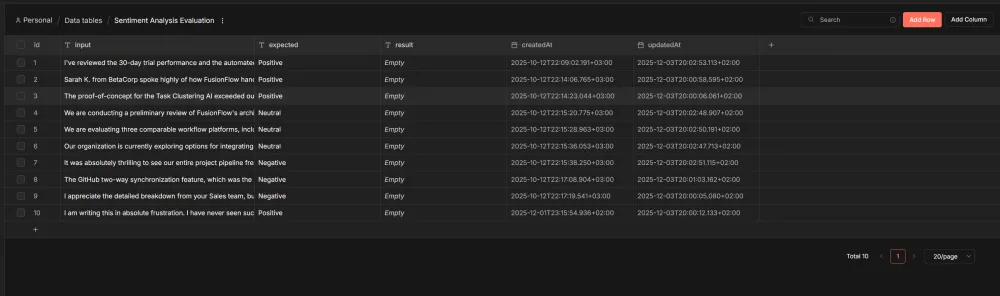
Store test cases in built-in Data Tables. Keep inputs and expected outputs in Data Tables or Google Sheets. Add context columns if your agent needs them: user type, conversation history, session data.
Run tests through your workflow. The Evaluation Trigger node runs each test case through your actual agent logic. The same workflow handles both evaluation runs and production traffic.
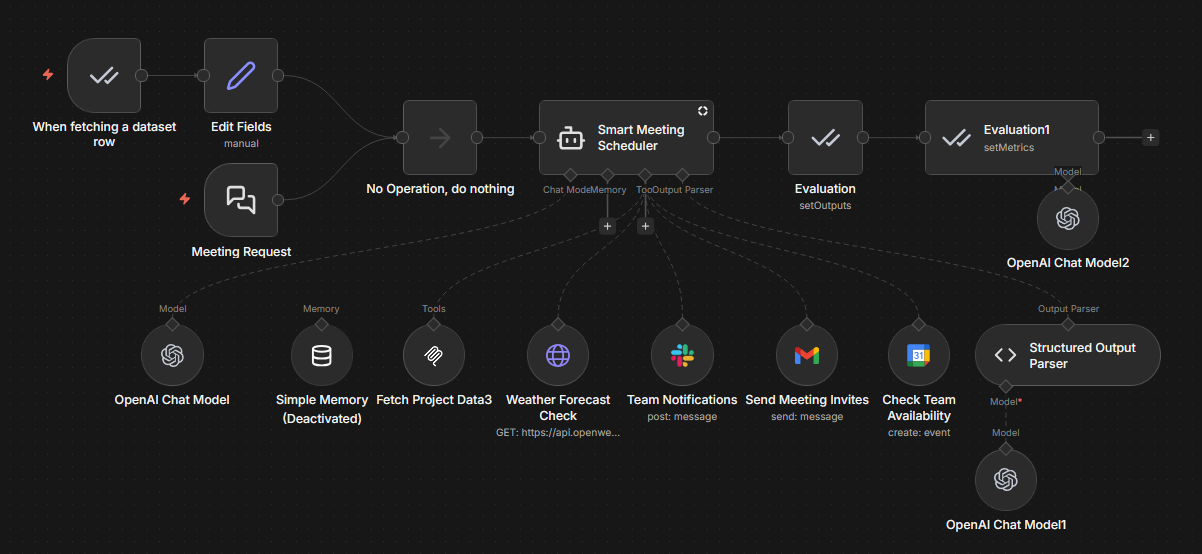
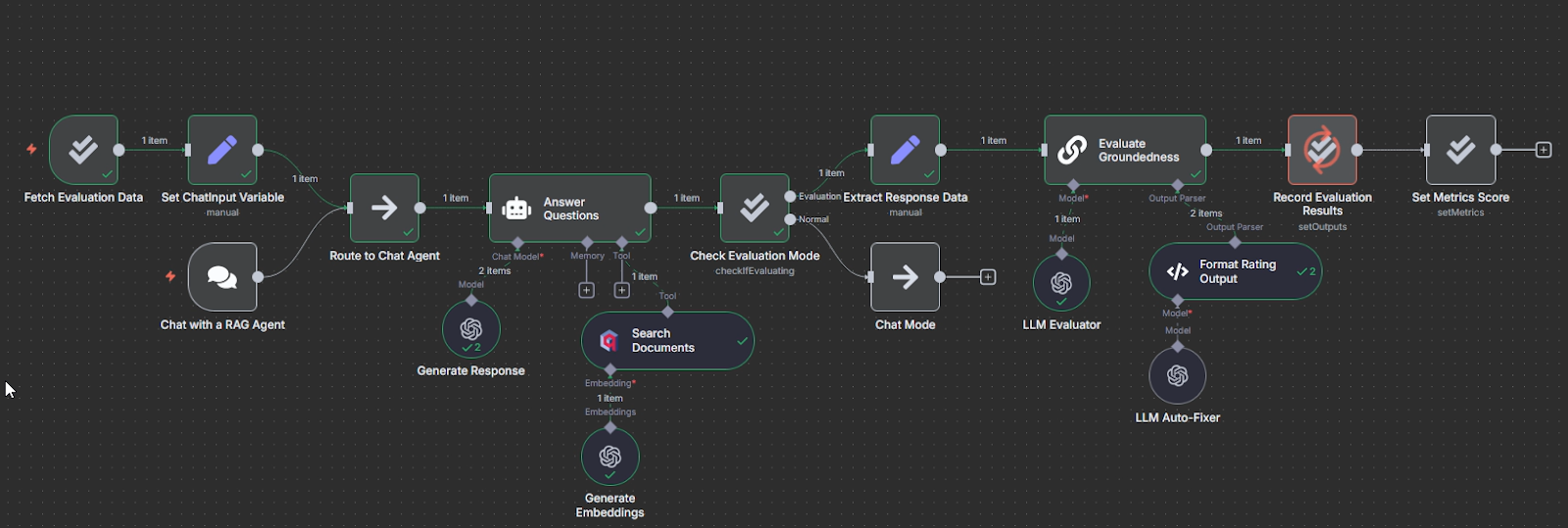
Score outputs. Use built-in metrics (Correctness, Helpfulness, String Similarity, Categorization) or define custom scoring logic with the Code node.
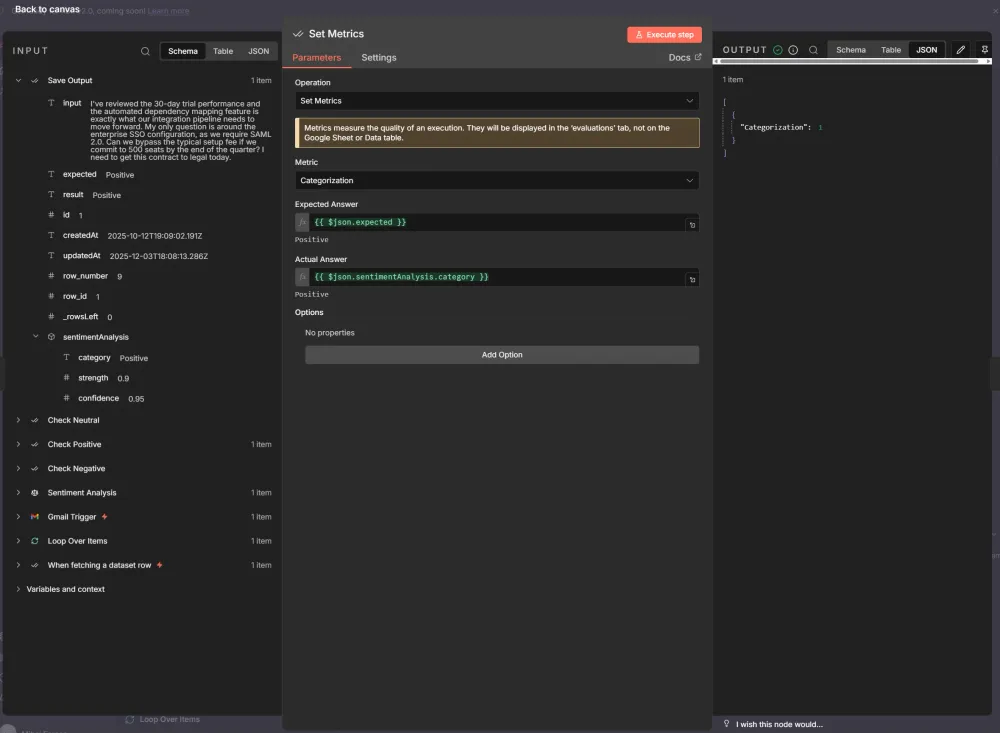
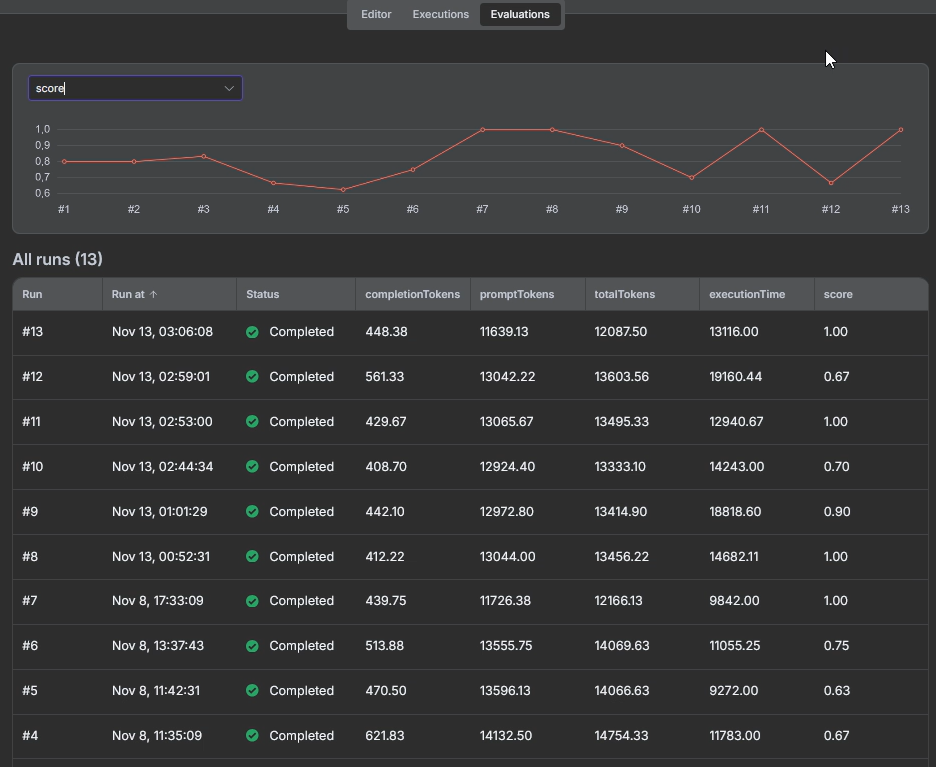
Review results. Check rates and quality scores before deploying changes to production.
Check n8n workflow templates with different Evaluation scenarios (tool usage, answer similarity, LLM as a judge, programmatic metrics).
Online evaluation with n8n
For live agents, n8n supports several monitoring patterns:
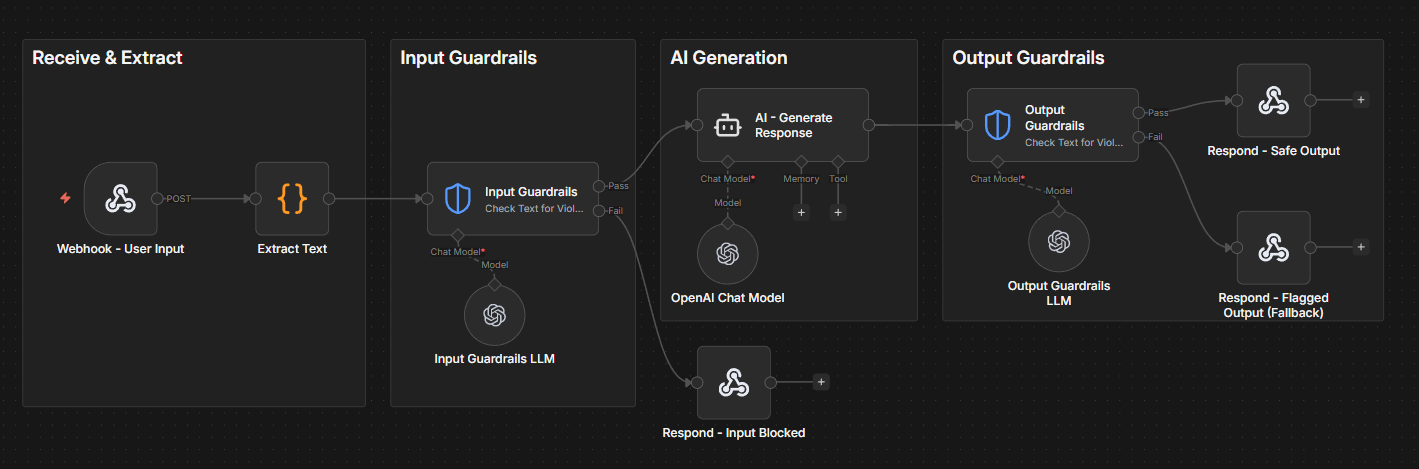
Guardrails on inputs and outputs. Place checks before and after your agent node to catch PII, policy violations, or malformed requests in real time.
Log metrics to a dataset. Capture data points from live executions, such as response quality scores, tool usage, latency and write them to a Data Table for trend analysis.
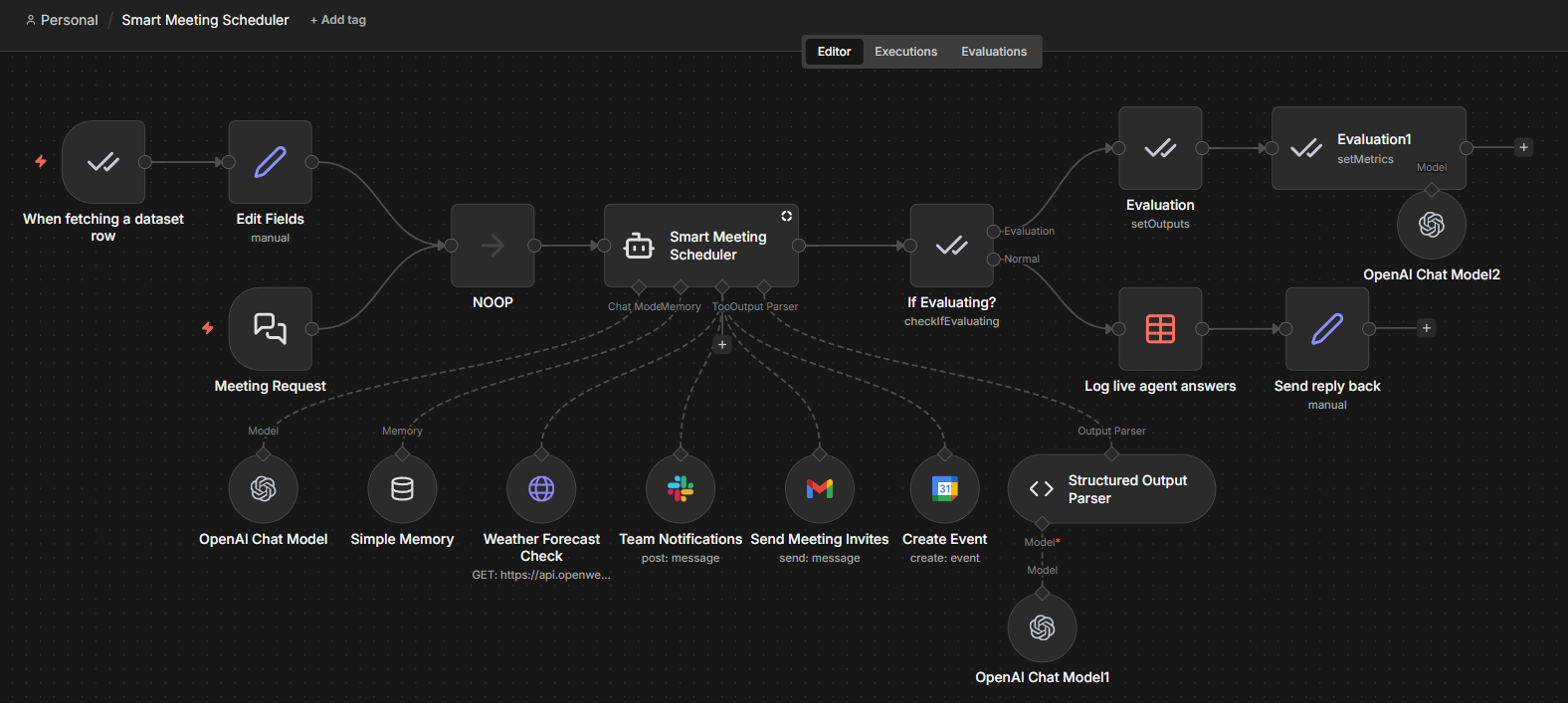
Separate monitoring workflow. Run periodic checks against your logged data to detect degradation or trigger alerts when metrics drop. You can launch a second workflow and apply the metrics on real agent's answers.
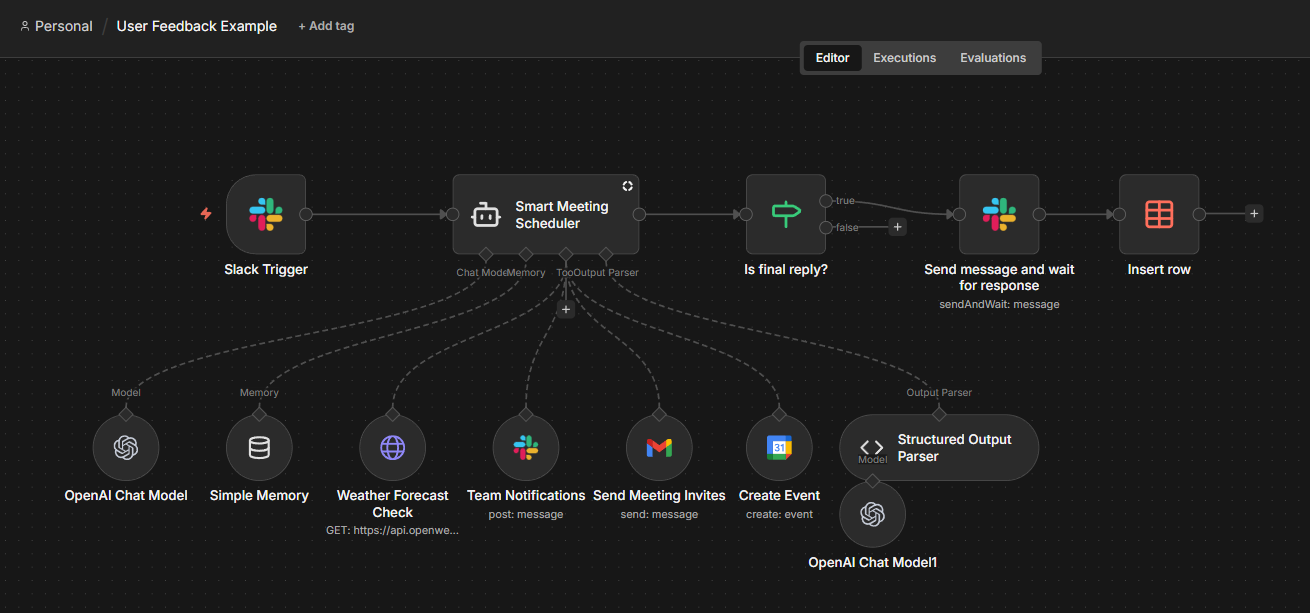
User feedback collection. This is how we can implement human-in-the-loop evaluation after the agent runs. Add feedback prompts (Slack reactions, email links) to agent responses once the task is complete.
Users rate the output, and their responses route back to n8n via webhooks for logging and review. Unlike usual approval nodes that pause execution mid-workflow, this setup lets you capture quality signals without slowing down the agent.
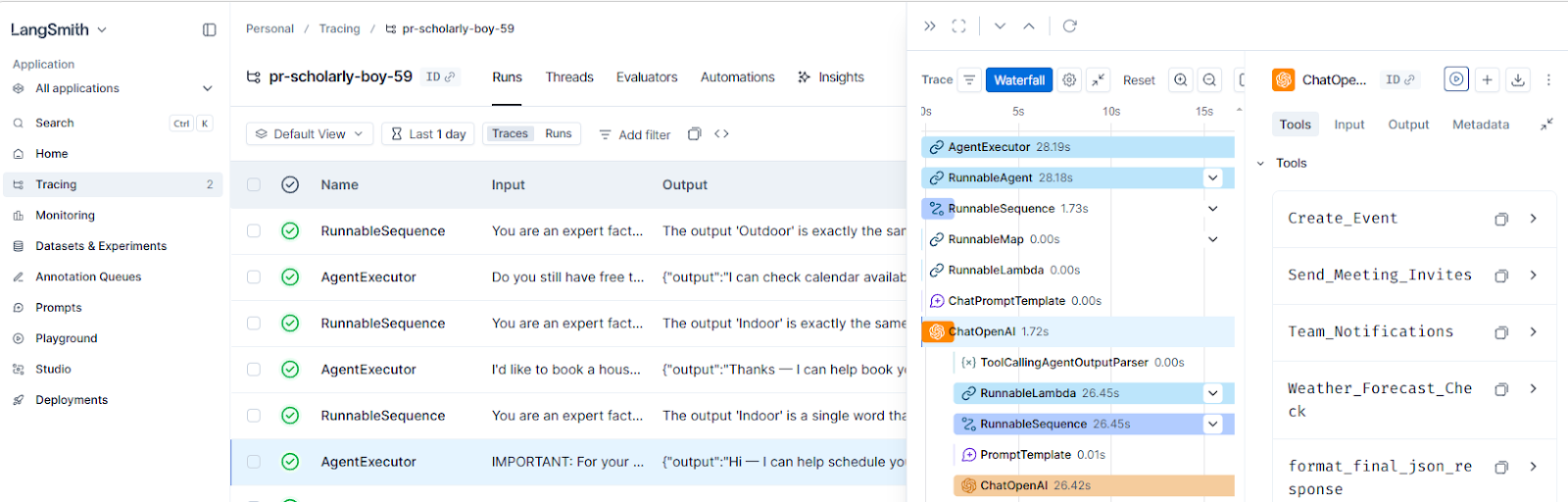
Connect external tools. For deeper observability, you can integrate your n8n workflow with such tools as LangSmith, or Promptfoo.
How does n8n fit into AI evaluation concepts?
Here's a quick reference connecting the evaluation methods we’ve covered to their n8n implementation:
| Concept | How to implement it in n8n/ |
|---|---|
| Test datasets | Data Tables store inputs, agent responses and expected outputs (ground truth) |
| Offline evaluation | The Evaluation Trigger node processes test cases through the same workflow that runs in production |
| Deterministic checks | n8n expressions, some built-in metrics like string similarity, categorisation and tools used; Code node for custom validation |
| LLM-as-a-judge | Correctness and Helpfulness (the other two built-in metrics) or custom metrics |
| Manual review | Check the trends in the evaluation summary dashboard, view the evaluation table directly, analyse the step-by-step execution logs |
| User feedback | "Send and Wait for Response" operation in various nodes to collect user ratings after the agent completes |
Wrap up
This article walks through how to systematically evaluate AI agents, from key challenges to offline and online approaches, as well as core evaluation methods.
It also shows how n8n supports agent evaluation with Data Tables, the Evaluation Trigger, built-in metrics, human-in-the-loop nodes, and external integrations.
A practical way to get started is to choose a small set of meaningful test cases, run evaluations before each change, and continuously expand your dataset with real production failures.
What's next?
With the foundation on how to evaluate the performance of AI Agents, you might want to dive deeper into the topic and explore our hands-on tutorial on building a complete evaluation system: Building your own LLM evaluation framework with n8n.
This guide covers the "LLM-as-a-Judge" pattern we’ve discussed today in more detail and shows you how to create custom evaluation pipelines.
Take your n8n knowledge further:
- Explore the AI integrations catalog to see available models and tools
- Browse through evaluation workflow templates for working examples
- Or start here if you’re new to n8n!