



A self-hosted LLM can give you more control over where your data lives. If the model and the workflow handling its requests both run on infrastructure you control, prompts can stay inside your network instead of passing through an external provider.
Self-hosting can be appealing for sensitive workloads. But it also requires hardware, maintenance, and operational overhead that cloud-based APIs mostly offload.
A hybrid option offers a way to route requests locally or to the cloud without managing two disconnected systems.
The best self-hosting LLM open-weight models
An open-weight model makes its trained model weights available for you to download and run on your own infrastructure.
Look at the tasks you want the model to do, try open-weight models via OpenRouter or another provider first. Once you have found the smallest model that handles your task reliably, you can deploy it on your infrastructure. A smaller model usually needs less compute and responds faster, so moving up in size makes sense when the extra capability measurably improves results for your workflow.
Params, short for parameters, measure a model’s size. For example, a 24B model has around 24 billion learned parameters. Larger models can be more capable, but they also need more compute and memory.
Min VRAM is the approximate minimum amount of GPU memory needed to run the model. If the model doesn’t fit into your available VRAM, you need a smaller model, or a quantized version of the model, or stronger hardware to support it.
Here are a few open-weight models for self-hosting, with their parameters and minimum recommended VRAM.
What you need to run an open-weight model
After choosing an open-weight model, check whether your hardware and inference can run it for daily workflows. VRAM sets the upper limit on what your GPU can handle, and quantization reduces the memory required to load the model.
The standard self-hosted LLM stack
A self-hosted LLM setup usually has five layers working together:
- Hardware: The GPU provides the VRAM and compute power that determine which models you can run and how quickly their response times are.
- Model: The LLM and open-weight model you choose for tasks.
- Inference runtime: Software like Ollama or vLLM loads the model and exposes it to other applications, often through an API.
- Retrieval layer: If the model needs private or domain-specific information, retrieval-augmented generation (RAG) lets the system search an external knowledge source for relevant information and add that context to the model’s request before generating an answer.
- Application layer: The chat interface, API, or workflow that sends requests to the model and uses the response.
VRAM and quantization
Model weights need VRAM while the model is loaded for inference. When the weights and runtime requirements fit in GPU memory, the GPU can perform the relevant computations without relying on slower system memory. If they don’t fit, an inference engine might offload data or compute to system memory or the CPU, which can reduce performance.
Quantization reduces the memory required by representing model weights with fewer bits. This means you can run a larger model on the same GPU. Moderate quantization can preserve most of the model’s output quality, but aggressive compression can affect complex tasks like numerical reasoning.
Self-hosting vs. cloud hosting explained
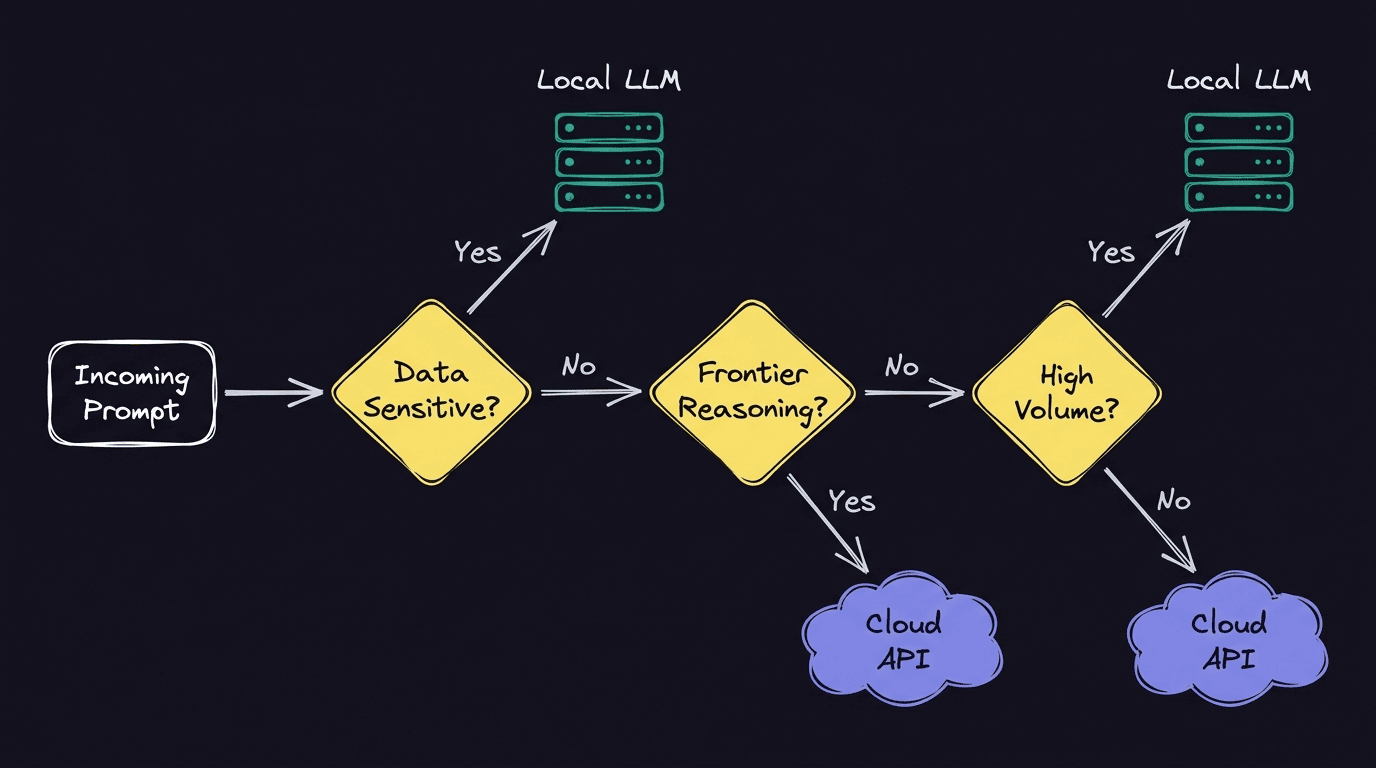
You can run an LLM locally, but that doesn’t mean you should run every request that way. Some workloads may benefit from keeping processing within your infrastructure, but others may need the scale or capabilities of a cloud provider.
A hybrid setup lets you choose the best path for each type of request, depending on a few factors.
Privacy and compliance requirements
AI systems may process sensitive or regulated data, and your organization may have legal, contractual, or internal restrictions on where that data can be processed or transferred. For example, GDPR Chapter V sets conditions for transferring personal data to third countries or international organizations.
Running the model locally makes data residency compliance easier because you control where the processing takes place. But self-hosting doesn’t make the system automatically compliant, as you need safeguards around access, logging, and storage. Some cloud-hosted models (especially those with enterprise SLA) may have stronger access controls and other guardrails.
Cost and breakeven volume
Cloud APIs typically charge based on usage, and more tokens means a larger bill. With self-hosting, you pay for the hardware and the people operating it and spread those costs across all the requests that the system handles.
The breakeven point is where the total cost of running your own setup becomes lower than the cost of using a cloud API. If your usage is low or unpredictable, using the cloud may be more economical. But if you process a large, steady volume of requests, self-hosting may be the better choice for your organization.
Latency and frontier capability
A local LLM model can provide predictable latency if you have the right hardware. It also avoids the network round trip to an external provider. But local inference isn’t always faster. A large model running on constrained hardware can be much slower than an optimized cloud service.
Cloud providers can offer highly optimized infrastructure and access to frontier models, which are the most capable models currently available for more complex reasoning tasks. If a task needs that extra capability, the frontier’s added latency may be worth sending it to a cloud model.
Here are the main differences between a self-hosted LLM and a cloud API.
Route between local and cloud-based LLMs in n8n
Once you’ve decided which requests run locally and which should go to the cloud, you still need a reliable way to apply rules for each one. You can hard-code that logic into individual apps, but that becomes harder to inspect and update over time as you add new models and rules.
This is where n8n comes in. n8n is a source-available automation platform where engineering teams can create AI agents and agentic workflows. You can also connect local and cloud-based models in the same workflow and use routing logic to decide which path each request takes based on workload type, complexity, or data sensitivity.
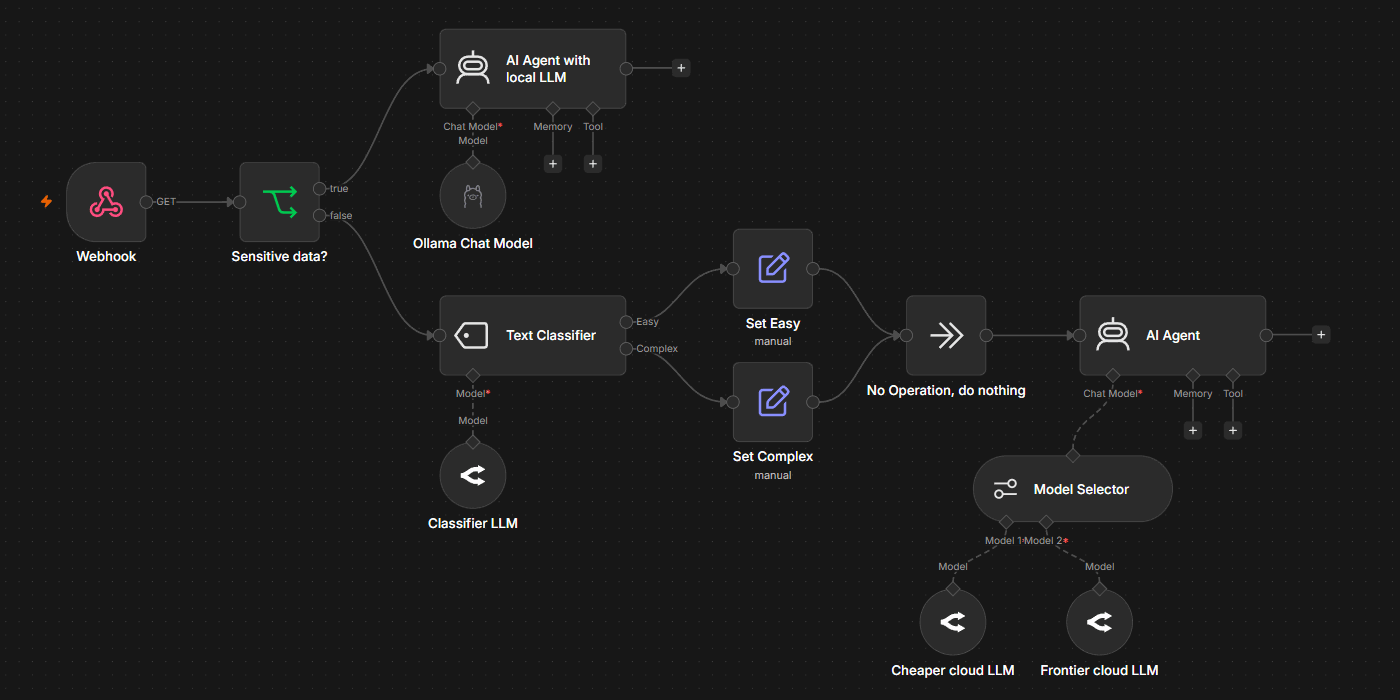
This is what a basic hybrid workflow looks like.
- Decide what information drives the route: Use information you already have, such as a sensitivity flag, task type, request volume, or complexity score wherever possible.
- Connect the local path: Add the Ollama Chat Model node and create an Ollama credential with your instance’s Base URL. If your workflows need an agent that can use tools, you can connect a chat model to the AI Agent node, which uses the model to decide what action to take.
- Add the cloud path: Add the chat model node for the cloud provider you want to use, such as the OpenAI Chat Model or Anthropic Chat Model node. This gives the workflow a second path for tasks that need to use cloud processing.
- Choose how to route the request: Use the Model Selector node when one AI agent or chain should use different language models based on your defined rules. It checks those rules in order and supplies the first matching model to the same agent or chain. Use an If node to split the wider workflow into two separate branches, or a Switch node when you need several branches with different downstream steps.
- Define rules: Route requests by task type, complexity, or data sensitivity. Apply data-sensitivity checks before sending the request to a cloud model. If an agent needs to inspect sensitive content to determine the appropriate route, run the inspection locally first.
- Test both paths: Run representative local and cloud requests through the workflow and check the execution to confirm that each rule goes through the intended model. Include a sensitive test case to verify that restricted data never reaches the cloud branch.
Keep your LLM setup flexible with n8n
A hybrid setup gives you room to change your self-hosted LLM strategy as models, workflow requirements, and costs scale. Instead of committing every workload to a single environment, you can adjust the split over time depending on different requests and keep the surrounding