




A burst of 429 (Too Many Requests) errors can bring an otherwise healthy workflow to a halt. Retrying is part of the solution, but timing matters: Retry too quickly and you’re likely to hit the same limit again.
Understanding throttling versus rate limiting helps you respond more intelligently, from pacing API calls upfront to backing off when the provider tells you to wait.
API throttling vs. rate limiting: Who enforces, who adapts
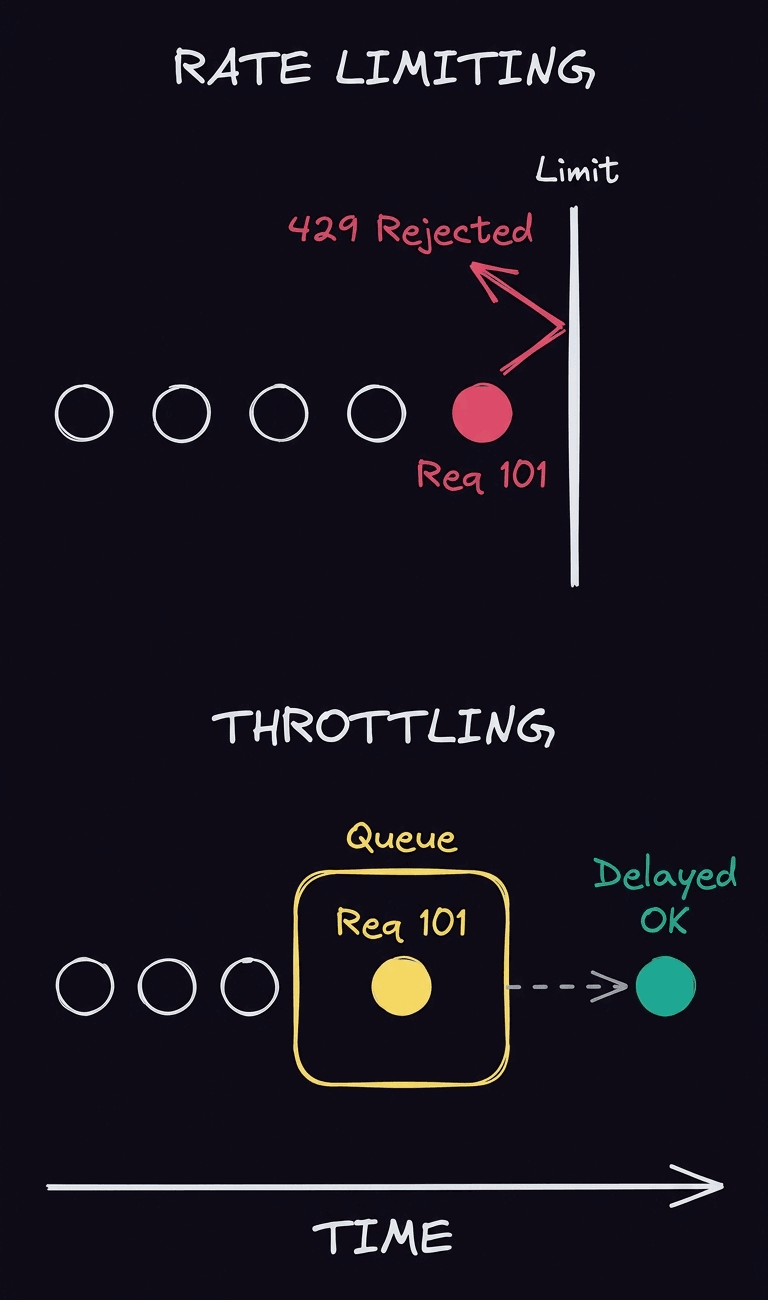
Rate limiting and throttling both control how much traffic reaches an API, but they don’t handle excess requests the same way. A rate limit sets a cap on how many requests a client can make within a given period. Once you cross that cap, the provider can reject additional requests, often with a 429 Too Many Requests response.
Throttling can instead slow or delay requests when traffic exceeds an allowed rate. Either way, the provider controls the limit. As the API consumer, you control how your workflow responds: pacing requests to avoid the limit where possible and backing off when you hit it.
What Is API throttling?
API throttling regulates request traffic by slowing its flow instead of just letting every request through at once. When demand gets too high, requests may be delayed or queued until capacity becomes available.
That doesn’t necessarily mean a request for your workflow fails just because the API is under pressure. But it can take longer to complete. Your workflow still needs to account for that delay, especially when later steps depend on the response.
Rate limiting vs. throttling: The practical difference
Imagine an API allows 100 requests per minute and your workflow sends request 101 before that minute is up. With rate limiting, that request may be rejected with a 429 error, leaving your workflow to decide when to try again. With throttling, the provider may hold request 101 in a queue and process it later instead.
That difference changes what your workflow sees (an error versus a delay) but not who’s in control. The API provider enforces the traffic policy. Your job is to adapt your request pattern so the workflow can keep moving without repeatedly overwhelming the service.
How rate limits work
Rate limits sound simple — make too many requests, and the API tells you to stop. What counts as too many, though, depends on how the provider measures traffic. Some APIs count requests within a fixed period, while others allow short bursts as long as your overall request rate stays within bounds.
For your workflow, the underlying algorithm matters because it changes how you should pace requests. A steady stream of calls might work well against one API but run into limits with another. And when you do cross the line, you’ll often encounter Error 429 — your first clue that it’s time to slow down.
Fixed vs. sliding windows
A fixed-window rate limit divides time into set intervals. An API might allow 100 requests every minute, then reset the counter when the next minute begins. While this makes the rule easy to understand, it can allow sudden bursts around the boundary between two windows.
A sliding window avoids that hard reset by measuring requests over a continuously moving period. Instead of asking how many requests you’ve made since the timer began, it considers how many you’ve made over the previous 60 seconds. Waiting for the clock to roll over may not immediately restore your workflow’s full request allowance.
Token buckets vs. leaky buckets
Token bucket algorithms give you some room to burst. Think of your API allowance as a bucket that receives tokens at a steady rate. Each request spends a token, and unused tokens can accumulate up to the bucket’s capacity. If enough tokens have built up, your workflow can send several requests at once without exceeding the limit.
A leaky bucket takes the opposite approach. Requests enter a queue and leave at a controlled rate. Bursts get smoothed into a steadier flow instead of consuming accumulated capacity all at once.
Don’t assume every API rewards the same request pattern. Check the provider’s rate-limit documentation before deciding how aggressively to batch or pace calls.
What a 429 (Too Many Requests) error tells you
When an API rejects a request because you’ve exceeded its rate limit, HTTP status 429 (Too Many Requests) tells you what happened. The response may also include a Retry-After header indicating how long the client should wait before making another request.
If Retry-After is present, use it instead of guessing when to retry. If it’s not, your workflow needs its own strategy for spacing subsequent attempts. That’s where exponential backoff comes in: Instead of retrying at the same interval (or immediately), you progressively increase the delay between attempts.
Exponential backoff
When an API tells you to slow down, immediately retrying the same request can recreate the problem. Exponential backoff avoids that loop by increasing the wait after each failed attempt. Instead of retrying every second, for example, your workflow might wait one second, then two, four, eight, and so on.
Set a maximum delay and retry limit so temporary API issues don’t leave your workflow retrying indefinitely. If the API provides a Retry-After value, respect that guidance rather than relying solely on your own schedule.
There’s another wrinkle. Multiple workflows that fail together can also retry together. Adding jitter, or a small amount of randomness to each delay, spreads those attempts out and helps prevent another traffic spike.
Make sure the request is safe to repeat. Requests with side effects can accidentally perform an action twice, so check whether the API supports idempotency before automatically retrying them.

Throttling and backoff patterns in n8n
You don’t need to build rate-limit handling from scratch. n8n is a source-available, AI-native automation platform that gives engineering several ways to handle rate limits with AI agents or agentic workflows. You can slow requests before they hit the API limit, retry after a failure, or route persistent errors elsewhere.
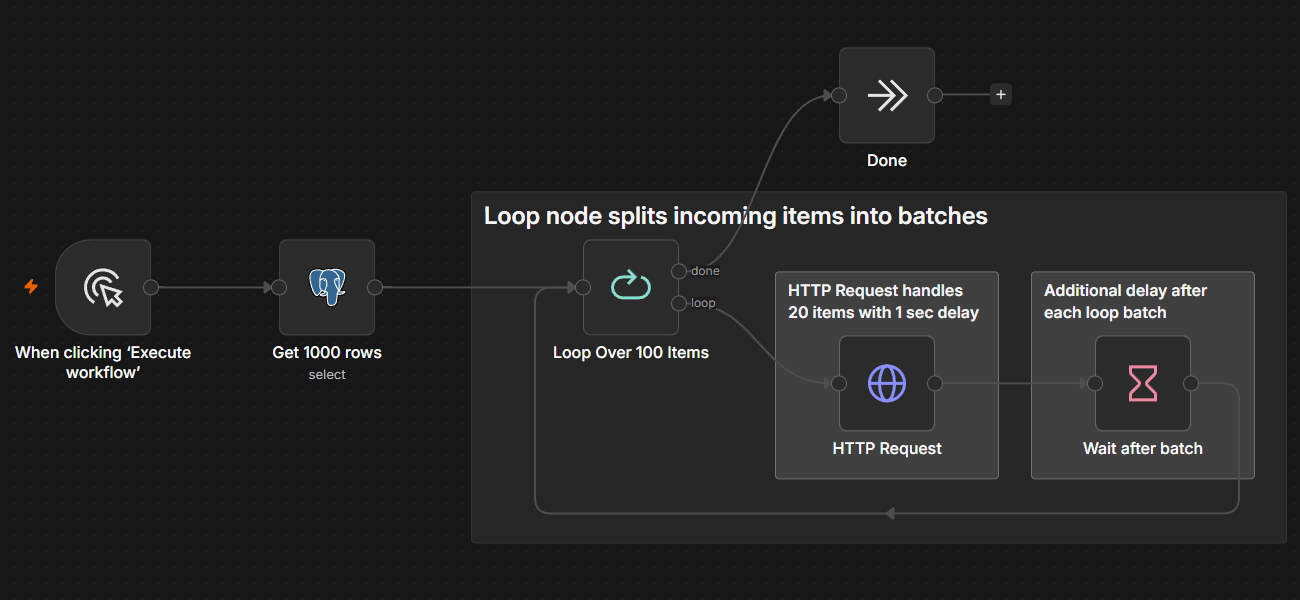
The right pattern depends on the API. You can batch and space requests to control traffic proactively, add waits between individual calls, or configure retries when an API responds with a 429. Concurrency controls can also cap parallel executions so multiple workflows don’t collectively overwhelm the same API. Pace requests first, then use retries and error handling as safeguards when limits still get in the way.
Pace requests with batching and wait nodes
For APIs with predictable limits, prevention is usually better than recovery. The HTTP Request node can process items in batches and pause between them using Items per Batch and Batch Interval. This lets you control how many requests go out at once and how long n8n waits before sending the next batch.
You can see the pattern in practice with this workflow for batching HTTP requests. When you need finer control, combine Loop Over Items with a Wait node to pace requests individually around the API’s limits.
Retry on fail with backoff
Pacing requests reduces the chance of hitting a limit, but it can’t prevent every 429. For those cases, Retry On Fail lets you automatically retry a failed node and configure the Wait Between Tries so you don’t immediately send the same request again.
For more complex cases, like increasing the delay between attempts, you can build more advanced retry logic into the workflow. This gives you control over when to try again and when to stop retrying altogether.
Catch persistent 429s with error workflows
Some requests will still fail after you’ve exhausted your retries. Instead of letting those failures disappear into the execution history, you can route them through a separate error workflow for logging, alerts, or other recovery steps.
With n8n, you can use the Error Trigger node to run a dedicated workflow when another workflow fails. That way, persistent 429 errors can trigger a defined recovery path instead of just ending the execution.
Take control of API rate limits with n8n
You can’t control the limits an API sets, but you can control how your workflow responds when it hits them. With n8n, that response becomes part of the workflow itself instead of custom retry code you have to build and maintain.