




Workflow security isn’t always the highest priority for maintaining security posture. But in healthcare, finance, and other regulated industries, automated workflows handle sensitive data every day. Gambling with the protection of this data could mean heavy fines and the loss of customer or patient trust.
Closed SaaS automation tools may add more vulnerabilities. The lack of code transparency makes it harder to complete independent security assessments, validate controls, and ensure compliance. Source-available, self-hosted platforms give teams direct insight into execution behavior and configuration, which in turn supports stronger governance.
This article covers six security controls for automated workflows in regulated industries:
- Role-based access control (RBAC)
- Secrets management
- Audit logging
- Data residency
- Environment isolation
- Monitoring systems
The security surface of a workflow automation platform
Workflow automation platforms handle more than task orchestration and integrations. They hold credentials for connected systems and fire automated processes at scale. When these parts aren’t reviewed or secured, they create openings attackers can use.
Here’s how these gaps appear inside a workflow engine and why they deserve closer attention.
Where credentials live and why it matters
Workflow credentials are only as safe as where you store them and the security measures guarding that location. One survey from 2024 found that 88% of respondents had concerns about secrets sprawl. Meanwhile, 96% of respondents stored some secrets outside of secure locations, like in cloud configuration files and source code.
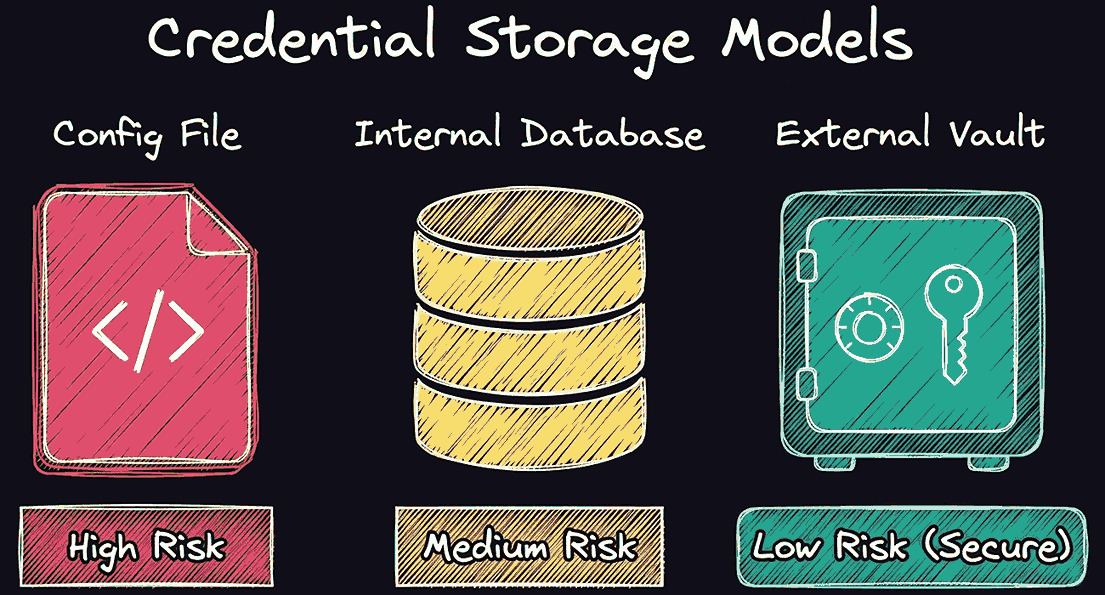
Misconfigured logging creates a common attack path. For example, a developer adds a debug logging to troubleshoot a failed API call. The log captures the full request headers, including the Authorization header, and writes it to a shared service. Poor secrets management exposes the header to anyone with log access.
Execution context and lateral movement risk
Workflows typically inherit the permissions of the service account they run under. If that account has broad access, a compromised workflow can reach systems it should never touch.
For example, an IT team configured a workflow to send Slack alerts, and it runs under a service account with read access to the customer database. If an attacker compromises that workflow, they don’t need a separate exploit. The workflow already has the necessary access to do damage.
Third-party integration vulnerabilities
Every external API used by automated workflows expands the attack surface because it’s a potential back door you can’t fully control. OWASP identifies third-party integrations as one of the top API security risks. Teams tend to validate user input carefully but don’t apply the same scrutiny to external API responses, allowing them to pass directly into workflow logic.
For example, your workflow pulls invoice data from a third-party accounting API and writes it to your ERP system. An attacker compromises the API and causes it to return manipulated amounts. Your workflow processes and commits this information automatically without a validation step for legitimacy and accuracy.
Access control architecture for regulated workflows
Access control is the foundation layer of workflow security. When the wrong user or service account accesses a workflow, the rest of your safeguards lose their value. The following sections highlight the access patterns that matter most in regulated industries and show how they influence the security of your automation stack.
RBAC at the workflow layer
RBAC restricts users’ access based on predefined positions or roles. Access level determines who can view or manipulate resources, such as viewing credentials or executing workflows.
RBAC differs from other identity management methods that set permissions at the individual level. Using RBAC helps organizations meet HIPAA’s Security Rule requirements and SOC 2 CC6.3, which requires limited access based on job function. It also supports GDPR’s data minimization principle under Article 5.
Environment isolation and multi-tenancy
Risk assessments show that cross-environment access can lead to accidental breaches in automated platforms. Production, staging, and development workflows should run in separate environments. These sandboxed environments should also use their own credentials and execution contexts, with no sharing of access controls. These practices support SOC 2 CC6.1 and HIPAA’s 45 CFR §164.312 requirements for logical access controls.
Least privilege for service accounts
The least-privilege principle limits access to what is strictly required to complete tasks. Security or platform teams regularly review these permissions and rotate credentials. This limits what an attacker can access or manipulate, even if they gain unauthorized access.
NIST SP 800-53 AC-6 requires least privilege as a baseline control. SOC 2 CC6.3 and HIPAA's access control standard under 45 CFR §164.312(a) both explicitly require access controls based on least privilege.
Human-in-the-loop gates
It’s tempting to automate every task in an organization to reduce complexity and achieve maximum efficiency. However, keeping a human in the loop for high-risk operations is critical for security control. For example, an attacker who compromises accounts in the finance department may attempt to transfer funds or disable IT accounts. But if a human has to review or approve transfers, it’s easier to detect unauthorized movements.
Human-in-the-loop gates support SOC 2 CC8.1 change management requirements. They also align with GDPR Article 22, which restricts the use of solely automated decision-making that leads to legal or similarly significant impact on individuals.
Audit logging, monitoring, and incident response
Implementing access controls and encryption reduces risk, but they’re not enough once a data breach actually takes place. You still need clear evidence to support HIPAA, GDPR, and SOC 2 compliance when something goes wrong. Here’s how audit logging and monitoring provide that visibility and help teams respond with confidence.
Audit trails and tamper-proof logging
A security incident is almost impossible to reconstruct without tamper-proof logs. Consequently, every action within an automated workflow should record the following in a secure, read-only format:
- Who or what triggered it
- What data it accessed
- When it ran
- What outcome it produced
GDPR Article 30 requires controllers and processes to maintain records of processing activities (ROPAs). Additionally, SOC 2 CC7.2 requires logging of system events.
Real-time anomaly detection and SIEM forwarding
Audit trails focus on past events, but monitoring systems, like vulnerability scanning, focus on current actions. Feeding workflow logs into a security information and event management (SIEM) platform lets your security team correlate events across systems and detect suspicious activity.
This helps organizations comply with SOC 2 CC7.2, which requires continuous monitoring for security events, and CC7.3, which requires analyzing those events to identify security incidents. HIPAA’s Audit Controls standard (45 CFR §164.312(a)(1)) also requires audit controls that monitor activity in systems that handle protected health information.
Incident response playbooks for workflow breaches
Systems need to respond quickly when they detect security vulnerabilities or threats. Automated processes can achieve this much faster than human-led processes, though human review is still critical for escalated issues. An incident response plan determines what should happen and who should own each task.
GDPR Article 33 requires data breach notification without delay after being aware of a cybersecurity incident, preferably no later than 72 hours. HIPAA’s Breach Notification Rule also requires informing impacted persons “without unreasonable delay”, no later than 60 days.
Implementing workflow security in n8n
Source-available and self-hostable solutions like n8n provide the technical security controls you need to support compliance. This full executional visibility contrasts with closed SaaS vendors that require you to trust that their security posture matches yours.
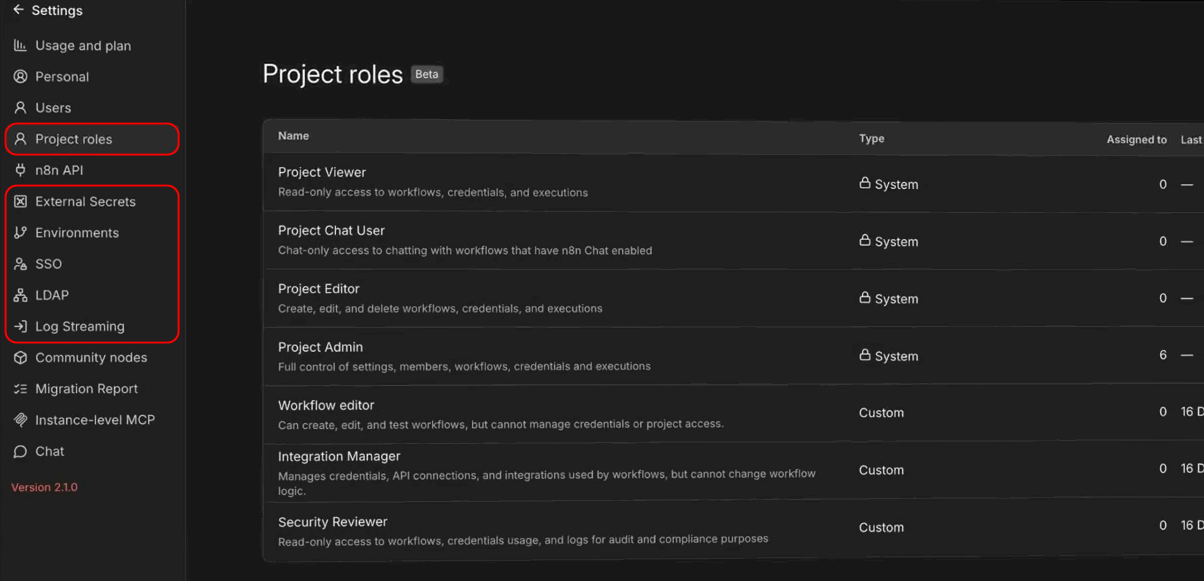
Here’s how n8n features map to common best practices and compliance requirements:
- External secrets: Use this integration feature to connect your vault so that you don’t store credentials inside n8n. The secrets isolation model supports compliance with SOC 2 CC6.1 and GDPR's data minimization requirements (paid feature).
- Projects: Group workflows and credentials by team or function, and assign user roles at the project level. It follows RBAC, which helps support SOC 2 CC6.3 and HIPAA's minimum necessary standard.
- Log streaming: You can send execution events to external destinations like Splunk, Datadog, and other security tools. This helps support auditability requirements for SOC 2 CC7.2 and GDPR Article 30 (paid feature).
- Data residency: Various requirements may dictate where you can store records, such as within a specific country or region. Self-hosting can help you meet these geo-restrictions on data storage and transfer required by GDPR Article 44 and HIPAA.
These features align with robust technical controls like RBAC, secrets management, audit logging, and environment logging. They work together as a system to support the continual monitoring and improvement of workflow security, and we make it easy to implement them at n8n.