



Your agents are already in production. They authenticate as real users, call internal APIs, and execute multi-step workflows without waiting for sign-off. That autonomy is the point — and the problem. AI agent governance grants permissions, proves past actions, and prevents unauthorized behavior. This guide shows you how to treat it as architecture, not a policy document.
Why is AI agent governance urgent?
The shift from prototype to production happens fast and rarely follows a planned release cycle. A weekend experiment becomes a customer-facing workflow before anyone files a review ticket. Risk climbs as the agent picks up integrations and inherits permissions that drift past its original purpose.
Higher autonomy and broader access call for stronger controls. When authority boundaries are vague during creation, the controls you add later tend to be reactive patches rather than preventative design. Enterprise AI agent governance has to start at deployment, or you spend the next quarter reconstructing what your agents can reach across identity, data access, and runtime behavior. Three forces make this issue a problem you need to address now:
- Cross-system reach: Agents operate across SaaS and cloud environments at once, so a single compromised agent affects multiple areas.
- Inherited identity: Delegated credentials and API access grant permissions the agent was never scoped to need.
- Scale outpacing oversight: Agent sprawl grows faster than governance programs can register and review each new deployment. This is especially common once teams move from a single bot to multi-agent systems.
Core pillars of AI agent governance frameworks
AI agent security and governance involves several key components. Engineering teams need each one defined before an agent reaches production — not bolted on after an incident.
Identity and access control
Every agent action should run with the original user’s scope rather than a shared, high-privilege service account. This is the core of AI agent identity governance: Tie each agent to a known identity, scope its credentials to the minimum it needs, and store secrets in a vault rather than a workflow parameter. OWASP flags this directly — excessive permissions are one of the three root causes of excessive agency, alongside excessive functionality and autonomy.
Runtime guardrails and policies
Controls that only live in a design doc can’t stop misfires at 2 a.m. Runtime enforcement means validating inputs and outputs as the agent runs: blocking prompt injection, redacting sensitive data before it leaves the workflow, and rejecting tool calls that fall outside policy. Guardrails belong in the execution path, where a failed check actually halts the action.
Observability and evaluation
You can only govern what you can see. Every tool call, decision, and credential use should be logged and replayable. Pair that record with ongoing evaluation — red teaming, adversarial testing, and anomaly detection on tool-call sequences — so unusual behavior surfaces as a signal before it becomes an incident.
Decision boundaries and compliance
Define which operations an agent may complete on its own and which require human approval: irreversible writes, external sends, and any action touching regulated data. Mapping these boundaries does double duty for compliance, since the EU AI Act and audit regimes expect a human-accountable record for automated decisions.
Inventory agents and ownership
You can’t secure agents you haven’t catalogued, and shadow agents are where governance quietly fails. Before anything reaches production, every agent needs a record answering who owns it, what it can touch, and how to trace what it did. Keep the inventory short enough that teams actually maintain it. Here are the main elements to include:
Treat the inventory as a living record across the agent lifecycle. An agent gets registered before deployment, then re-reviewed whenever something material changes — a new integration, an expanded permission, or a swapped model or tool. Retirement matters just as much: revoke the agent’s access, decommission its identity, and archive its logs so the audit trail outlives the workflow.
Visibility, monitoring, and oversight
Observability and governance are not the same thing. Observability tells you what an agent did; governance determines what it was allowed to do. Production needs both because a perfect log of an unauthorized action is still an unauthorized action. Here’s how observability fits into governance.
Audit logging and decision traceability
Each agent decision should leave a record you can reconstruct later: which tool ran, with what inputs, under whose identity, and what came back. That traceability turns a vague log into a specific, reviewable event, and it is what auditors and incident responders ask for first.
Log streaming and SIEM integration
Local logs are not enough once agents touch real systems. Streaming events to your existing security information and event management (SIEM) system puts agent activity next to the rest of your security telemetry, so anomaly detection and alerting work the same way they do for any other workload. Encrypted transport keeps that pipeline compliant with enterprise requirements.
How to implement AI agent governance in n8n
Frameworks are easier to read than enforce. The difference shows up in where the controls live. n8n runs agents on a visual, node-based canvas with deterministic and agentic execution.
Among workflow automation platforms, n8n enforces these controls where the agent actually runs — governance decisions execute inside the workflow, not in a separate policy layer. Each pillar maps to a concrete n8n feature.
Configuring RBAC and project-scoped permissions
Start with n8n’s roles-based access controls (RBAC), available on all paid plans. Gather workflows and credentials into projects, then give each user and each agent’s service identity the narrowest role possible. On Enterprise plans, custom roles let you separate the right to run a workflow from the right to edit it, a strong control for sensitive automations.
Setting up log streaming for agent workflows
Send execution events to your SIEM with log streaming so agent activity lands in the same place as the rest of your monitoring. Encrypted syslog over TLS keeps the pipeline audit-ready, and reveal events — when someone unmasks redacted data — are captured too.
Adding HITL approval steps to sensitive actions
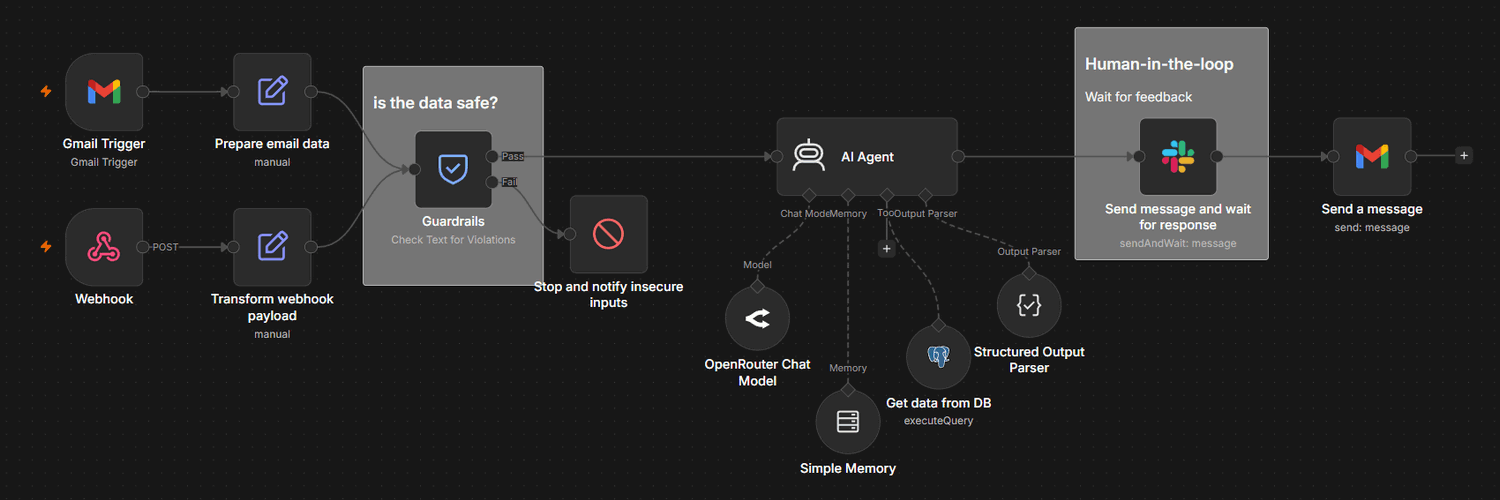
Gate actions you wouldn’t want an agent taking alone with human oversight. n8n’s human-in-the-loop tools let the AI Agent node pause before a specific tool runs and route an approval request to Slack, email, or chat. The reviewer sees the exact tool and parameters, then approves or denies before anything executes.
The same approval pattern works outside the agent loop — any workflow step can pause for human review using Send and Wait operations across Slack, email, Telegram, and other channels.
Enforcing output policies with the Guardrails node
The Guardrails node validates text as it flows through a workflow. Run it on agent inputs and outputs to catch jailbreak attempts, block specific keywords, and sanitize PII and secret keys before they reach a downstream system. In check mode, it splits the workflow into pass and fail branches; in sanitize mode, it redacts and keeps going.
For teams who want a hard ceiling, an n8n Code node can wrap a tool call with its own runtime limits. With custom code you can check an expiry window on every call and caps execution time before the tool runs, so an injected prompt cannot turn a quick lookup into a runaway process.
Self-hosting for data residency and air-gapped environments
For regulated or sensitive workloads, teams can self-host n8n so execution data, secrets, and logs never leave controlled infrastructure. This supports data residency rules and air-gapped environments where shipping agent telemetry to a third party is a non-starter. Execution data redaction, mentioned above, adds another layer, masking inputs and outputs at the API level.
Get AI agent governance in-platform with n8n
Governance is not the audit you run after something breaks. It’s the infrastructure that determines what your agents can do in the first place — identity, guardrails, logging, and approval gates wired into the workflow where the agent executes. Teams that get this right treat AI agent governance best practices as part of the build.
n8n keeps those elements in the workflow layer, so you don’t need a separate control plane. If you’re moving agents into enterprise production, try n8n Enterprise to access full governance controls from day one. Or sign up for n8n’s trial and try governance features, like workflow history and admin roles.