



Say a loan-approval AI agent ran in production last quarter, pulled a customer's financial records, and declined the application. Months later, a regulator asks why. Nobody can answer, because there’s no record of what the model saw or decided.
Traditional audit logging was built for deterministic software, where the same input always produces the same output. AI workflows break that assumption with non-deterministic models, multi-step tool calls, and data access that shifts from run to run.
Here’s what an AI audit trail should capture and how to implement one.
What’s an AI audit trail?
An AI audit trail is a structured, time-ordered, tamper-resistant record of every action an AI system takes. It should be detailed enough to reconstruct any execution in full after the fact. A trail captures inputs, outputs, and the data each step touched, so an auditor can replay what happened months later without depending on the engineer who built the workflow.
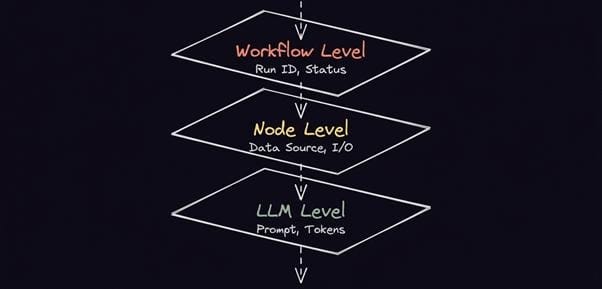
Most teams already collect logs. Few collect a complete AI audit trail that answers an auditor’s question rather than a debugging one. The difference comes down to three layers, each recording a different level of the same execution.
Workflow execution log
The workflow-level record captures the Run ID, workflow ID, trigger, start and end timestamps, and final status. It answers what ran and when. On its own it proves an execution happens, but it says nothing about the data inside.
Data access events
The node-level layer records which data each step read or wrote, the source system, and the fields involved. For audit trails, AI governance experts and regulators care most here. This shows whether protected information — PHI, payment details, financial records — entered the pipeline and where it went.
Model invocation log
An AI audit trail for LLM workflows has to log the call itself, not just its result. It captures the user prompt, the response returned, the model and version, the temperature, token counts, and any tool calls the model triggered. Without it, you can prove a model ran but not why it produced a given output.
AI audit trail vs. observability vs. monitoring
While audit trails, observability, and monitoring are related concepts, they all serve a distinct purpose. Let’s take a look at the differences:
| Concept | Primary purpose | Stakeholder | Retention requirement | Tamper-evident |
| Monitoring | Alert on system health and performance in the moment | On-call engineer or SRE | Short — days to weeks | No |
| Observability | Explain why the system behaved a certain way | Engineer or platform team | Medium — weeks to months, often sampled | No |
| Audit trail | Reconstruct and defend a specific decision after the fact | Auditor, regulator, or risk team | Long — months to years | Yes |
Monitoring catches the outage, observability explains the latency spike, but only the audit trail tells a regulator which records the model read before it declined the application. Pairing automated records with human oversight on high-stakes actions gives auditors both the machine log and the human sign-off.
Conflating an audit trail with observability is a common mistake in production AI systems. The two share plumbing — traces, spans, and structured events — but they serve different audiences. Observability tells you whether your agents are healthy right now; an audit trail proves what one agent decided six months ago. A trace sampled at 10 percent is fine for latency analysis and useless when the decision you must defend sits in the 90 percent you dropped.
What must an AI audit trail capture?
A useful field spec organizes capture by layer. Each layer carries a different retention and privacy weight, accounting for distinct governance programs. The tool and integration layer is the one most teams forget, yet it’s where the audit trail meets the real world: A logged decision means little if the refund it triggered didn’t log.
Here are the main layers a solid trail records:
What separates AI audit trail software that survives scrutiny from logs that merely look thorough. Let’s have a look at three design decisions.
Retention policy
How long you keep records is a compliance decision. The EU AI Act requires providers of high-risk systems to retain automatically generated logs for at least six months; HIPAA and the IRS often push retention to about seven years. AI audit trail solutions for financial services and healthcare face the strictest requirements, often layering tamper-evident storage on top of multi-year retention. Set it per layer — execution metadata can outlive raw prompts, which carry the heaviest privacy risk.
Prompt storage
Prompts and responses are the richest part of the record and the most sensitive. Storing them verbatim helps investigations but can capture PII or PHI you aren’t allowed to retain. Redact or hash sensitive fields before they reach long-term storage, and document what you dropped so auditors know the gap is deliberate.
Schema versioning
Your log schema changes as models and nodes evolve. Version it from the first release. An auditor reading a two-year-old record needs to know which schema produced it. Otherwise, fields shift meaning and the whole trail loses its authority.
How to implement an AI audit trail in n8n
n8n is a workflow automation platform built on a visual, node-based graph that supports both deterministic and agentic execution. Every run automatically generates structured records — workflow ID, run ID, node-level inputs and outputs, timestamps, and error states — with no extra instrumentation. That makes audit trail logging for AI a default property rather than a separate system to maintain.
You can self-host n8n, so sensitive prompt and response data never leaves your infrastructure. This doesn’t just affect data sovereignty and security. Because n8n is source-available and extensible, you control the log schema, can add custom nodes, and route records exactly where your compliance stack expects them. This is a level of customization that closed AI audit trail tools rarely allow.
Key n8n features for audit trail implementation
Here are a few key audit trail capabilities in n8n:
- Execution logs as the default substrate: Every run records node-level inputs, outputs, run IDs, and timestamps automatically. You can attach business identifiers through the Execution Data or Code node.
- Failure capture with error workflows: Error Trigger nodes catch any failed run and route it into a dedicated error workflow.
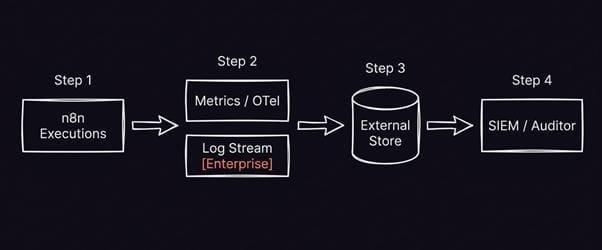
- Export to your own stack: n8n supports workflow and node execution tracing with OpenTelemetry on all self-hosted tiers, which means you can store logs in separate protected systems.
On Enterprise plans, log streaming forwards even more events happening inside your n8n instance to your logging tools in real time, and role-based access controls decide who can read execution data — the access record auditors expect alongside the data record itself.
n8n supports execution data redaction (Enterprise feature), which hides input and output payloads while preserving metadata like status and timing. It offers configurable pruning, so you can keep lightweight metadata long after your team purges the raw prompts. This is a clean way to satisfy long retention windows without hoarding the most sensitive part of every run.
Treat the audit trail as architecture
An AI audit trail is an architectural decision. Bolt it on after a regulator asks, and you’re reconstructing evidence from logs that were never built to hold it. Build it into the execution layer, and the record writes itself.
n8n generates that substrate by default, like execution logs, run IDs, and node-level I/O. It has clear export paths, plus Enterprise audit and access controls. Your team generates and retains a thorough, tamper-evident trail automatically, so auditors and engineers have instant access to decisions, failures, and paths.