




An API integration can work perfectly for months. Then the provider decides to improve its endpoints, change response formats, and retire old version behavior. If a breaking change reaches production before your workflow is ready, downstream steps may receive the wrong data before anyone notices.
API versioning reduces that risk by separating incompatible changes from the version your integration already uses. By keeping older behavior available while introducing a new version, providers let you update, test, and migrate integrations on your own schedule.
What is API versioning?
API versioning is the practice of maintaining distinct versions of an application programming interface (API) so providers can change how it works on their end without forcing every existing integration to update the moment those changes are released.
Each version represents a familiar interface that your workflow expects, including when API endpoints are available, the data they accept or return, and how requests and responses behave.
When you rely on a third-party API, the provider decides when new versions and API breaking changes are released. Pinning your integration to a specific version gives you time to review those changes and migrate at your own pace.
The same principle applies to REST API versioning. Providers can keep different interfaces available so they don't force new behavior on existing integrations. If a change is backward compatible, existing integrations can usually keep working without modification. Versioning comes into play when a change breaks that backward compatibility.
Common API versioning strategies
You’ll usually see an API versioned in the following ways:
- The URL path; e.g., `/v1/products `
- An HTTP header; e.g., `curl -H “Accepts-version: 1.0” http://www.example.com/api/products`
- As a date; e.g., `/2026.10/` as part of an API endpoint
- A query parameter; e.g., `example-api.com/products?version=v1`
The provider’s API design decides which approach to use, so your job is to understand where the version is and what it means for your integration. The design can affect how clearly caches distinguish between responses or how easily you can spot the active version while debugging.
Here are the four API versioning strategies in more detail.
1. URI versioning
With URI versioning, or URL path versioning, the version appears directly in the API’s URL. One version might have a URL structure containing v1, while the newer version uses v2.
The active version is easy to see in your workflow, logs, and API documentation. If an API request fails or returns data in a format your workflow doesn’t expect, you can check the URL immediately to confirm which version your integration used. You don’t need to look elsewhere in the request for that information. Since each version has its own URL, caching systems can also tell them apart easily.
2. Header versioning
In this type of versioning, the API URL stays the same, and your workflow sends the version in an HTTP header instead. A header is extra information attached to a request, such as authentication details or data type, and can tell the provider which API version you want to use.
URLs stay consistent even when the provider releases new versions. However, the version becomes less visible, so if an API starts returning unexpected data, looking at the URL won’t tell you which version handled the request. You need to check the header versioning versus the URI versioning.
Caching systems also need to account for the version header — two requests can use the same URL but ask for different versions.
3. Date-based versioning
With date-based versioning, the provider identifies a version by its release date instead of a version number like v1 or v2. This is different from semantic versioning for an API, where the provider uses a version number like 2.1.0 to distinguish major, minor, and patch releases.
If your workflow uses a version from a specific date, you can compare it with the provider’s release notes to see how the changes in later versions affect your integration.
However, the date itself doesn’t explain those changes. You have to review the provider’s documentation and test the newer version before switching. Some providers send the date through an HTTP header, so you can combine data-based versioning with header versioning.
4. Query parameter
In query parameter versioning, the version appears as an extra setting at the end of the API URL. The main part of the URL stays the same, while the added parameter tells the provider which version should handle the request.
The version remains visible when you inspect the request. You can see what resource the workflow asked for and which API version it asked to use without checking a separate header. That makes it handy for troubleshooting and confirming whether the workflow still points to the intended version.
A caching system, however, may see two URLs that differ only by their version parameter, even though each returns different data. If the caching system ignores the parameter, it could serve a response from the wrong version. When that happens, it’s best to set the version parameter for your integration and make sure the systems handling those requests can tell them apart.
What to watch for when a provider deprecates a version
Your API deprecation strategy should include monitoring headers and other metadata for signals that an API version is scheduled for retirement. A deprecation header is usually the first sign and tells you that the version is or will be deprecated. You should flag the integration for migration before it stops working, even if the API still works normally.
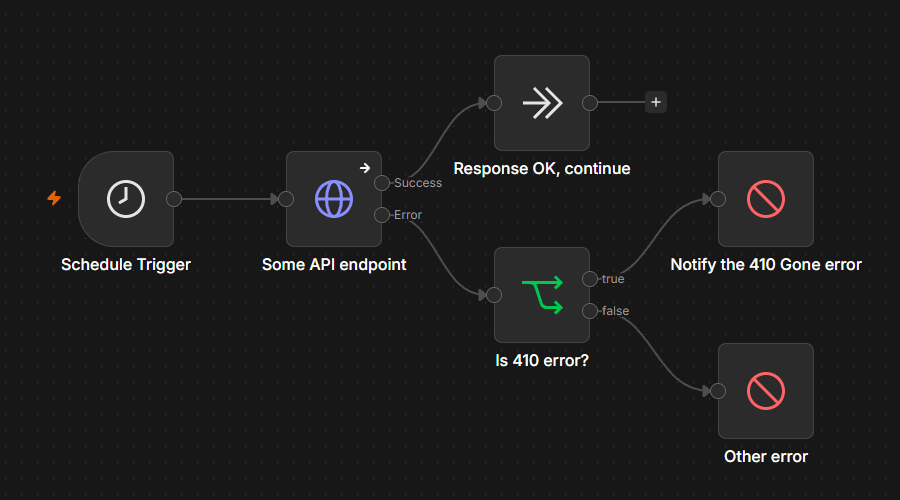
A sunset header adds an exact end date for when the version is expected to become unavailable. You can use the remaining time to test and switch versions. After that point, the provider may return 410 Gone, which means the requested resource is no longer available and the condition is likely permanent. Don’t retry the same version or send the same request. Instead, your workflow should detect the response and route it for handling.
Build version migration into your workflow before the provider forces it on you
Version migration is easier to manage when your workflow is purpose-built to expect API changes. n8n is a source-available, AI-native automation platform where engineering teams can create AI agents and agentic workflows that anticipate API versioning.
In n8n, built-in nodes handle API versioning for you. If a node is not available, you can use the HTTP Request node to connect a workflow to a third-party API and make the API version part of the workflow’s configuration. Instead of relying on whatever version the provider uses by default, you can specify the version yourself in the request URL, header, or parameter. That means the workflow keeps asking for the version you built and tested it against and won’t unexpectedly inherit different behavior when the provider changes its default.
You can also make the workflow respond differently when that version starts reaching the end of its life. Try inspecting the response status and headers and check for a deprecation warning or a 410 Gone response. A warning can trigger an alert or other workflow that gives you time to schedule a migration.
If the version is already gone, you can stop the normal path and send the failure to a separate error workflow, where an Error Trigger node can start a recovery process. If the recovery process needs custom parsing, you can add custom Code in n8n to normalize or validate it before deciding what happens next.
If the API provider explicitly specifies the deprecation date, you can add an IF node and route API requests based on the current server date.
n8n also maintains execution history so you can return to previous runs when troubleshooting. You can debug executions by loading data from a failed production execution back into the current workflow, checking what happened, making a change, and testing it again against the previous execution data. This feature is available on multiple editions, including all n8n Cloud plans and Registered Community, Business, and Enterprise editions for self-hosted n8n.
In n8n, you can build API integrations that are ready for version changes and give them a safer migration path.
Prepare for the API version changes you don’t control with n8n
API versioning becomes easier to manage when you separate what the provider controls from what you control. You can’t choose whether an API uses a URL, header, date, or query parameter, but you can decide whether your integration depends on the provider’s default or handles that version proactively.
In n8n, you can keep version-handling logic visible with the rest of the workflow. Prepare inside the workflow and watch the API request and its failure paths to make the best possible decision for migration and managing changes.
Try n8n Cloud for a hosted setup, or explore self-hosting in n8n if you prefer managing your own environment.