

Traditional APIs follow a simple rule: You send a request and wait for a response. That works well until you’re in an event-driven system where services react to events as they happen rather than pull data on demand. Teams transition to an asynchronous API to enhance resource utilization, improve system performance, and reduce coupling.
Discover what an async API is and how it compares to REST. Plus, learn how n8n, an AI workflow automation platform, processes and routes event data without a custom service for every event source.
What’s an async API?
An async API is an interface where the sender doesn’t wait for a reply, and there’s typically no direct HTTP request and response. The client sends a message and moves on to the next task while the receiver processes the message. This decouples the process so neither side needs to be available at the same time to make exchanges work, preventing front-end services from freezing up.
Async APIs run over several protocols depending on the use case. For example, it uses:
- AMQP for message brokers
- Kafka for high-throughput event streams
- MQTT for lightweight pub/sub and IoT
- WebSockets for bidirectional real-time communication
The protocol decides how to route, buffer, and deliver the data payload safely between microservices.
The AsyncAPI specification: How it works
The AsyncAPI spec is an open standard developers use to document and maintain async architectures. It aims to make event-driven systems more approachable.
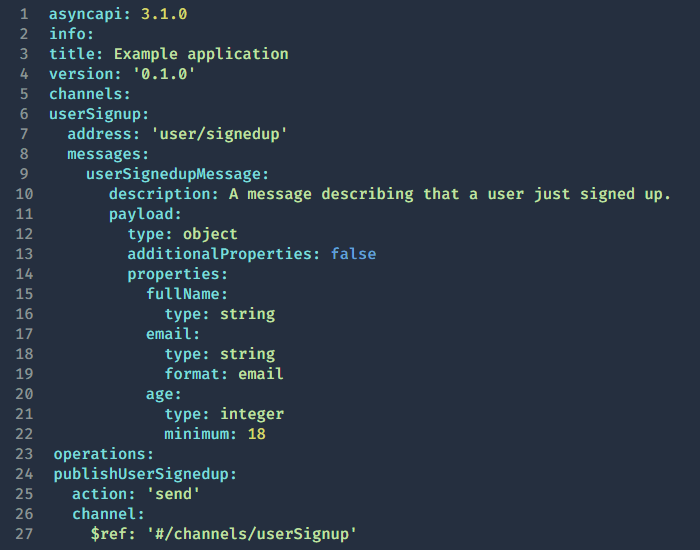
An AsyncAPI document is a YAML or JSON file that defines how your application either outputs or consumes messages. It typically includes:
- asyncapi: Field specifying the spec version
- info: Metadata that identifies the the API, including its title, version, and description
- servers: The message brokers or servers your application connects to, including URLs, protocols, and connection details
- channels: The pathways where messages are exchanged, such as topics or queues
- operations: The actions an application performs on specific channels
A tooling ecosystem has grown around this specification. It now includes validators, code generation tools, and documentation generators that work directly from the async API spec file.
Here’s a short async API example in YAML format:
Async vs. sync API calls: When each pattern applies
Choosing between asynchronous and synchronous setups is an architectural decision. The more compatible choice for your business and tech stack depends on how your microservices handle data, how they scale, and what response speeds your operations require.
When to use async
Async is the better choice when the operation outlasts a single request/response. For example, organizations use async for payment processing jobs, order fulfillment, and file conversions. One order fulfillment transaction may require multiple external dependencies, like checking warehouse databases and generating shipping labels. Sync systems risk a mid-transaction client timeout.
Async also makes sense when the producer and consumer need to scale independently, or when one event needs to spread out to multiple consumers at once. Holding the connection open while that work completes may waste resources and create unnecessary coupling between services.
When to use sync
Synchronous API is most suitable when a task cannot move forward without a direct and instant answer from a server. Generally, this is when you need fast response time, and the client needs to act on the data immediately. For example, a standard API call to check a user’s password needs to be near-immediate. The system needs an instant HTTP response to know whether to allow or block the task or access request, so it can’t happen asynchronously.
AsyncAPI vs REST: The architectural difference
AsyncAPI and REST APIs handle data flow differently based on communication styles. The main distinctions lie in how they connect services and route data payload.
Async API
Async API is channel-oriented, meaning that producers publish messages to a channel instead of specific endpoints. Consumers subscribe to the channel on their own. The two sides don’t need concurrent availability — they’re decoupled by design. This makes AsyncAPI a natural fit for microservices that need to share data across architectures without creating dependencies between them.
REST
REST is endpoint-oriented and synchronous by default. In a traditional REST API system, a client makes a direct API call to a specific URL resource over HTTP. The connection stays open until the server returns a final response, such as when checking for passwords. Both systems remain online and must be available at the exact same time for a successful exchange.
Building async API workflows with n8n
After publishing an event, a consumer service has to review it. The service then transforms the payload, routes it to the right services, and triggers downstream actions. Most teams end up writing a custom consumer service for every async source, but n8n replaces that with a visual workflow that handles it all without the need for writing custom code.
Receiving async events
The Webhook node in n8n is the main entry point for capturing incoming events that systems asynchronously fire. When a message arrives, n8n activates the workflow and passes the raw payload downstream. The trigger node generates an HTTP endpoint that accepts incoming requests from any producer, such as Webhook-enabled SaaS tools and custom services.
Transforming and routing payloads
After receiving the event, native n8n nodes let you manipulate the payload. Incoming data rarely matches the format your downstream services need, and this lets you clean and structure it. In complex cases, the Code node allows writing custom login in JavaScript or Python. Once the data is ready, you can route it to sub-workflows. This data flow pattern lets you distribute a single event to multiple downstream actions without cluttering your main workspace.
Triggering downstream actions
After transforming the payload, the HTTP Request node sends outbound calls to any REST API. This action completes the full consumer loop without leaving the workflow. n8n also handles the reliability layer that consumer services usually require you to build yourself:
- Queue mode uses a Redis queue and workers to process and retry executions asynchronously.
- Error handling routes failed executions to a separate workflow, reducing the chances of undetected failures.
- Workflow-level error triggers let you define a dedicated error workflow that fires automatically when an execution fails, providing visibility into what broke and why.
These features ensure you don’t need to rebuild the same reliability infrastructure every time you add a new async event to your stack. n8n saves your team time and centralizes your tech stack.
Simplify event-driven integrations with n8n
Async APIs are the right architectural choice when your system needs to:
- Decouple producers and consumers
- Handle high-throughput event streams
- Fan out a single event to multiple downstream services
Once you’ve made that architectural call, the consumer side still needs to receive, transform, route, and act on every payload. n8n handles that layer without custom solutions for every async source in your stack.