
With the general availability of Microsoft Agent 365, n8n users can now build AI agents that show up inside the Microsoft 365 applications where people get work done. Now you can @mention agents built in n8n from Microsoft Teams, add them to emails in Outlook, or tag them in Word to bring them into your work.
Video courtesy of Microsoft
Microsoft Agent 365 gives each agent its own Entra ID, so employees can grant it access to Microsoft 365 services like SharePoint and Teams channels the same way they would a teammate. Microsoft handles identity, access policies, and compliance through Purview and Defender. Agent 365 also handles agent lifecycle management actions, rules and policies, analytics in the Microsoft 365 Admin Center; providing an effective and scalable way to control agents at scale through familiar tools. The n8n canvas is where you design what the agent actually does: its system prompt, its connections to third-party tools, the logic that ties them together, and the actions it takes. When someone messages the agent in Teams, n8n orchestrates the work across whatever systems are needed and returns the result right back into the conversation.
Microsoft 365 is where so much of daily work happens. With Agent 365, n8n users can build agents that don't just automate in the background, they participate directly in that work. And for Microsoft developers, n8n gives them a visual builder and over a thousand native integrations to connect agents to the rest of their tech stack.
— Ben Kiziltug, Vice President, n8n
This builds on the collaboration announced at Ignite in November 2025. With Agent 365 now generally available, the full capabilities are accessible to any organization with a Microsoft 365 tenant and n8n. n8n is available at the Microsoft Marketplace for teams that want to deploy within their Azure environment. That means governed access to Agent 365's MCP tools directly from the n8n canvas, and the ability to deploy agents that show up as members of the team inside Microsoft apps.
We're happy to welcome n8n to the Agent 365 ecosystem. With Agent 365, partners like n8n can bring agents directly into the flow of work across Microsoft 365. It gives developers a secure, governed way to build agents that show up where people already collaborate, communicate, and create.
— Srini Raghavan, Corporate Vice President, Microsoft Copilot & Agents Ecosystem at Microsoft Corp.
Learn how to build an agent in n8n using the Microsoft Agent 365 Trigger node, connect it to the tools your team relies on, and put it to work inside Microsoft Teams, Outlook, Word, and SharePoint.
What you can build
Consider a customer support lead who starts each morning checking Zendesk for overnight escalations, pulling account context from Salesforce, reviewing PagerDuty for any open infrastructure issues that might affect customers, and then manually posting a summary in Teams and following up in email with the account team. With an n8n-powered Agent 365 agent, she @mentions the agent in a Teams channel and it handles the rest. The agent pulls the tickets, cross-references account data, and checks for any active incidents across three systems before posting a chat message and drafting an email with next steps and owner assignments.
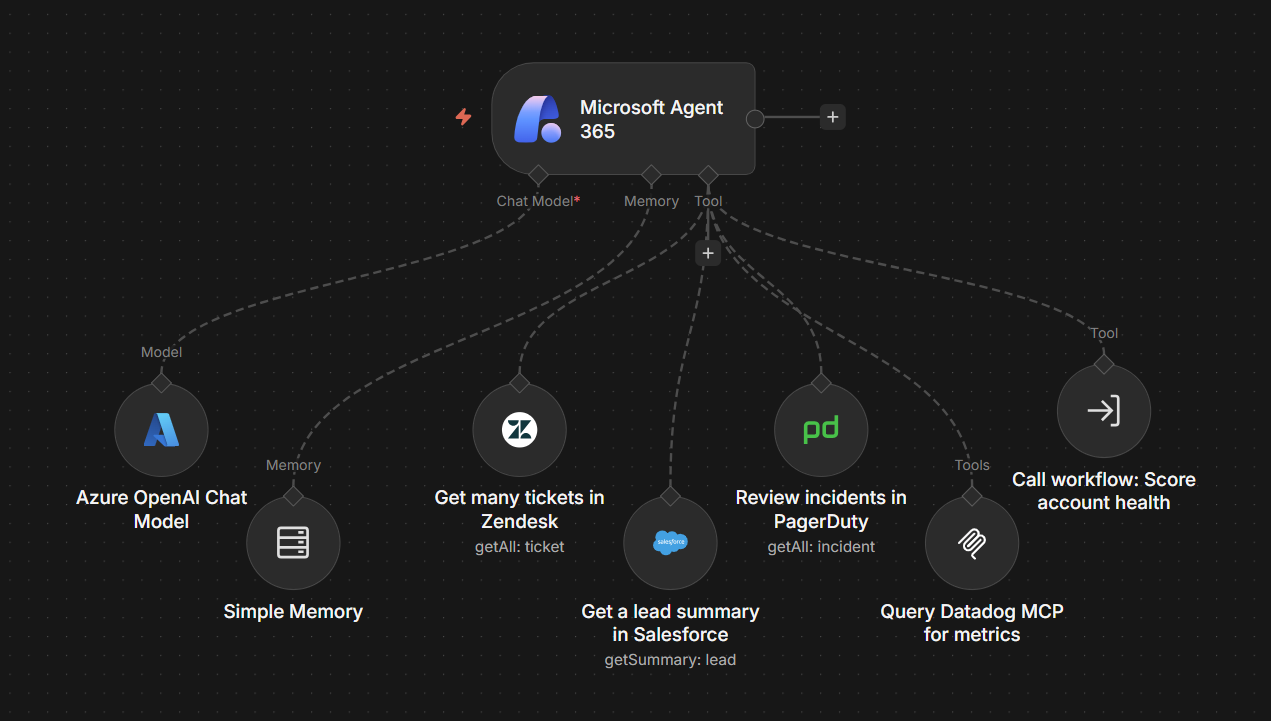
Coordinating across services is straightforward on the n8n canvas by adding them as tools for the Microsoft Agent 365 node. Zendesk is connected to the agent as a drag and drop node with its own credentials that can be configured once and reused across workflows. Salesforce, PagerDuty, each is added the same way. The agent calls whichever tools it needs based on the conversation and the context provided in its system prompt. The Microsoft services, like sending emails and posting in Teams, come through Agent 365's MCP servers and are enabled through a toggle in the Microsoft Agent 365 node configuration.
Existing n8n workflows and third party MCP tools make this even more powerful. Say that support lead built an n8n workflow that enriches a customer record by pulling in data from Salesforce, cross-checking contract status, and scoring the account's health. That workflow can be packaged as a sub-workflow and become a tool the agent calls. She doesn't need to rebuild that logic inside the agent. She just connects to it. If the team uses Datadog for observability, its MCP server can be connected as a tool through the MCP Client node, giving the agent real-time visibility into service performance when triaging customer issues.
Design visually, code when you need to, govern everything
When you need to go beyond the convenience of the built-in nodes, n8n lets you drop into JavaScript or Python at any point in the workflow. Use this option for custom data transformations and business logic, or call internal services through an HTTP request node. Write code where it makes sense, use visual nodes everywhere else, and combine them freely in the same workflow.
Governance works across two layers. Agent 365 handles identity, lifecycle management, security and compliance at the Microsoft level: Entra ID, conditional access policies, data protection through Purview, and threat detection through Defender, as well as agent registry, analytics, and policies in the Microsoft 365 Admin Center. n8n handles governance at the workflow level including RBAC for workflow access, credential management for connected services, guardrails for validating inputs and running safety checks like PII detection, error handling workflows if something goes wrong. Both layers work together so the agent is governed from identity all the way through to execution. If you have data residency or compliance requirements, n8n can be self-hosted on your own infrastructure giving you full control over where your data lives and how it's processed.
For teams that have struggled to get visibility into what’s happening in AI agents under the hood, building in n8n means you can see what the agent actually does at runtime. Every execution produces a detailed record of the agent's output and behavior, including each decision it made, every tool it called, and the data returned from those tools. The entire chain is visible, testable, and editable at any step.
Get started
If you already use n8n with Microsoft services through individual nodes, those workflows still work. Agent 365 is a new path for teams that want their agents to show up inside Microsoft apps and interact like a member of the team.
Getting an Agent 365 agent running involves some initial setup on the Microsoft side: registering the app in Entra ID, creating an agent blueprint through the Agent 365 CLI, and getting admin approval for the agent within your tenant. On the n8n side, add the Agent 365 Trigger node and connect your tools. Native nodes, MCP-connected services, and sub-workflows all work as tools the agent can call. Once the agent is approved, it shows up in Teams, Outlook, SharePoint, and Word, ready for your team to @mention and put to work.
The Microsoft Agent 365 Trigger node is available now in n8n. See n8n docs to set up and build your agent, and check Microsoft's Agent 365 documentation for how to provision for your organization.