

Large language models (LLMs) are brilliant reasoners. But without a way to interact with the world, they’re essentially locked behind a glass wall— they have enough knowledge to explain a refund policy in perfect detail but lack the hands to actually trigger one. For developers, this disconnect between reasoning and action is what separates sophisticated chatbots from production-grade agents.
LLM tool calling offers an escape from the training-data silo, allowing models to move from passive text generation to active system participation. But the real engineering challenge isn’t just getting the model to output a valid JSON or a tool call — it’s building the orchestration, security, and observability required to ensure those calls don’t fail in a production environment.
Here’s a rundown of what LLM tool calling is and how it works at scale.
What LLM tool calling means?
LLM tool calling is a mechanism that allows an AI model to generate structured requests — typically in JSON — to invoke external functions or APIs. Instead of the model guessing information it doesn’t have, it recognizes a gap in its capability and requests to use a specific tool to bridge it. It acts as the I/O layer that turns a text-based chat model into a functional system that can read live data and perform state-changing actions.
While people often use LLM “function calling” and “tool calling” interchangeably, the latter is the modern standard. Function calling originally referred to matching a specific JSON signature, while tool calling builds upon this idea and supports a wider range of capabilities including provider-built tools, such as code interpreters, web browsing, and RAG powered by a vector store.
By adopting a tool calling framework, developers can move away from brittle, prompt-engineered hacks and toward a structured execution. Instead of just generating text, the model generates a command, allowing the LLM to function as the reasoning engine within a larger, more complex software stack.
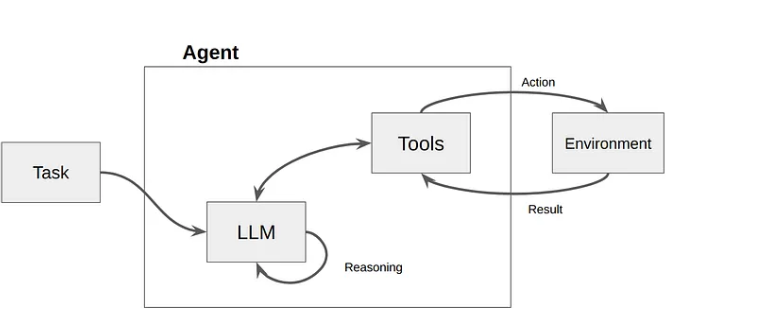
How LLM tool calling works?
Teams generally choose between two invocation modes depending on the level of autonomy required by the system:
- Automatic tool invocation: The LLM decides dynamically if and when to call a tool based on the user’s intent. This is the standard for conversational agents and open-ended assistants.
- Forced tool invocation: The system developer configures the model to always use a specific tool on every request, while the model still generates the arguments based on the input. This is ideal for deterministic pipelines, such as structured data extraction where you need the model to output a specific schema every single time.
In practice, LLMs often rely on data sequences that are interleaved, meaning the model processes a mix of natural language text and structured tool outputs within the same context window. This allows the AI agent to maintain a conversational flow while simultaneously evaluating the technical results of its previous actions.
Let’s take a deeper look at what LLM tool calling looks like.
Fetch context
The system prepares the environment by gathering the prompt, user history, and the tool definitions. You must provide the LLM with a JSON schema that describes each tool and its parameters, allowing the model to understand which tools are available and what inputs they expect before the first token is even generated.
Select a tool
The user submits a prompt. The LLM analyzes the request against its available tools. If it determines a tool is needed — for instance, to check a real-time stock price or query a database. . Instead of a text response, it returns a tool_call object containing the tool name and the arguments it has generated. If no tool is needed, it proceeds directly to generate a text response.
Validate the tool call
The application layer or an orchestration platform you’re using, like n8n, intercepts the model's request. It must validate that the generated JSON matches the expected schema and transform that data into the specific format required by the target API endpoint. This is a critical security and reliability checkpoint where you can catch "hallucinated" arguments before they hit your backend.
Execute the external call
The system executes the function or API call. This is where the actual work happens: tasks like fetching a row from a SQL database, updating a ticket in Zendesk, or performing a calculation in a Python environment. Note that the LLM doesn’t execute this code; the host environment does, which keeps your execution environment secure.
Feed results back to the LLM
The output of the tool is sent back to the LLM in a new message, providing the model with the missing context it requested in a previous step. By feeding the real-world result back into the context window, you ground the model in fact, preventing it from making up a plausible-sounding but incorrect answer.
Generate final response
With the new data in its context window, the LLM performs a final inference pass. It uses the tool output to answer the user's original query or determines if a second, sequential tool call is necessary to finish the job. Workflow orchestration platforms like n8n handle this loop automatically, chaining sequential tool calls without requiring custom code for each round trip.
How to implement tool calling in your AI workflows?
The six-step tool calling process above is provider-agnostic - it works the same whether you're calling OpenAI, Anthropic, or an open-source model (as long as the underlying LLM is modern enough for tool calling).
However, in real-world implementation, challenges arise in the infrastructure around the model: managing credentials across multiple APIs, handling failures, and maintaining visibility into what your agent actually did and why. That's where your choice of orchestration layer matters.
For teams building production AI agents, visual workflow platforms like n8n provide a structured approach to tool calling. Here's how it works.
How to implement tool calling in n8n?
In n8n, tool calling is built into the AI Agent node. You define the tools your agent can access, connect them visually, and n8n handles the execution loop - from the model's structured request to the API call and back. n8n also supports the Model Context Protocol (MCP), allowing your agents to connect to any MCP-compatible tool server for standardized tool execution.
Let's walk through a real workflow that demonstrates how n8n handles parallel tool calling where the agent invokes multiple tools simultaneously for independent tasks.
A user asks whether their cash in multiple currencies fits within the EU's €10,000 declaration limit. The agent needs to convert USD and CNY to EUR using live exchange rates, then calculate the total amount.
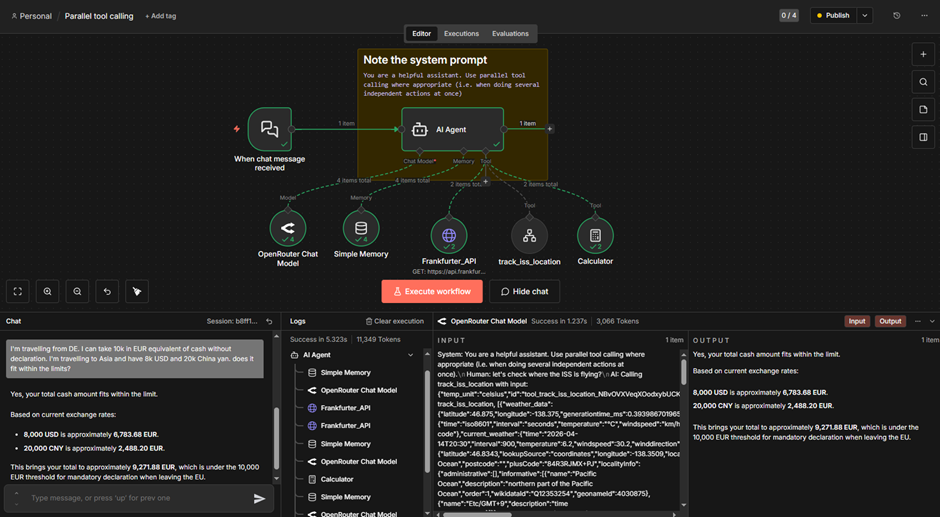
Step 1: Set up the AI Agent. The workflow starts with a Chat Trigger connected to an AI Agent node. The system prompt instructs the model to use parallel tool calling when performing independent actions. The agent is connected to an LLM via OpenRouter, a memory node for conversation history, and tools: a currency exchange API (Frankfurter API), and a Calculator. The agent also connects to a sub-workflow tool for ISS tracking, which is the extension of in this example.
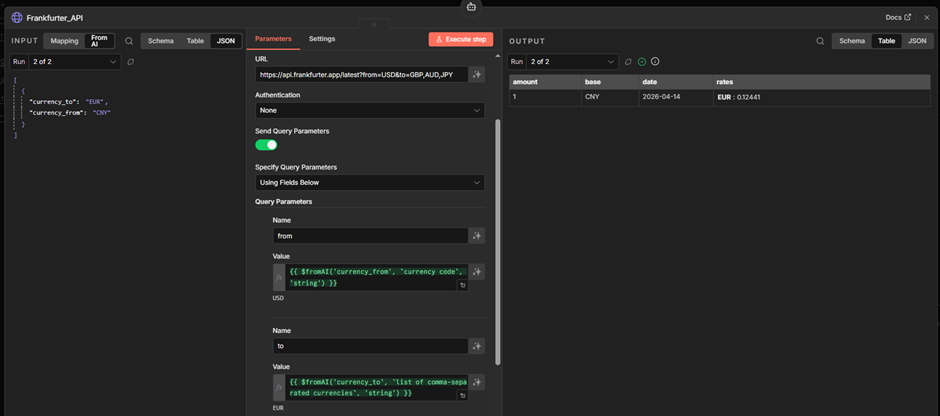
Step 2: The agent calls tools in parallel. When the user submits the prompt, the agent converts the currency. USD → EUR and CNY → EUR are independent tasks. Instead of calling the Frankfurter API sequentially, it fires both requests in parallel – you can see this in the execution logs as two consecutive Frankfurter_API entries before the model is called again.
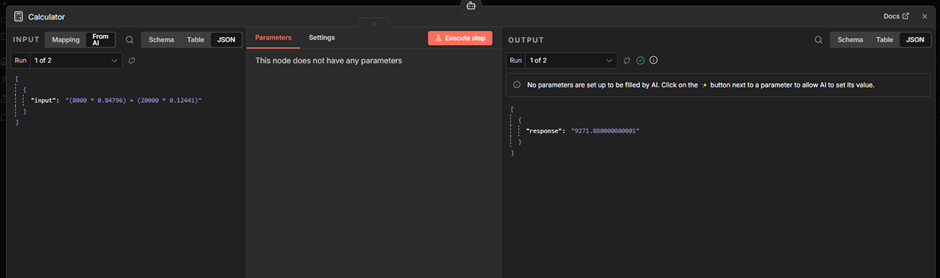
Step 3: Sequential follow-up with the Calculator. Once both exchange rates are returned, the agent calls the Calculator tool to compute the total. This step depends on the previous results, so it runs sequentially. Note that the model attempts to construct a complete formula so that the Calculator tool provides the final amount from the single run.
Step 4: Final response. With all tool outputs in its context, the agent generates the final answer.
This workflow shows two key capabilities: the agent decides when to parallelize (independent currency lookups) and when to sequence (final amount calculation depends on prior results) - all possible without custom code managing the execution order.
What production-ready LLM tool calling actually requires?
In a demo, a single failed API call is a minor inconvenience. In production, a failed tool call can result in duplicate charges, corrupted database records, or a broken agentic loop that consumes thousands of tokens in an infinite retry cycle.
To build a resilient system, technical teams have to solve for the following pillars of production reliability.
Authentication and credential lifecycle
LLMs are inherently stateless; they can’t manage OAuth 2.0 handshakes, refresh tokens, or securely store API_KEY variables. If you attempt to pass raw credentials into the model’s prompt or context, you risk leaking sensitive data through prompt injection or logging headers.
A production-grade orchestration layer must act as a secure proxy. When calling tools for an external system like Salesforce or Jira, the orchestration engine (like n8n) should intercept that request, inject the necessary Bearer tokens from a secure vault, and execute the call.
Heterogeneity of APIs and schema mapping
Every API has its own personality. One might return a 201 Created status code on success while another returns 200 OK with a success boolean. When an LLM calls multiple tools in a single loop, it has to manage this heterogeneity through a Transformation Layer.
The risk here is schema drift. If an external API updates its response format, the LLM may no longer understand the context it receives in the next turn of the loop. To mitigate this risk, production systems should implement a Transformation Layer between the tool and the model. This layer maps disparate API responses into a consistent, model-friendly format, reducing the cognitive load on the LLM and preventing hallucinations caused by unexpected data structures.
Error handling and soft failures
In standard software engineering, a 429 Too Many Requests or a 503 Service Unavailable error is handled by a simple retry logic with exponential backoff. But in LLM tool calling, error handling is more complex. You have two choices when a tool fails:
- System-level retry: The orchestration layer handles the error silently and retries the call.
- Model-level reasoning: The error message is fed back to the LLM as a tool result (e.g., “Error: The refund amount exceeds the daily limit”).
For technical errors (like rate limits), the system should handle the retry. For logic errors (like a validation failure), the error must be fed back to the LLM so it can "reason" its way to a different solution — perhaps by asking the user for a smaller refund amount or checking a different database.
Observability and tracing the agentic loop
While frameworks like LangChain make it easy to prototype agentic loops, debugging them in production is notoriously difficult. If an autonomous agent fails after five sequential tool calls, you need to know exactly where the chain of thought broke.
n8n visually surfaces every execution step in the workflow UI, providing a living trace of the agentic loop. Instead of digging through flat text logs to find a malformed tool_call ID, developers can see the exact data flow between the model and the API in real time. This observability is the difference between a "black box" AI and a maintainable production system.
The future of AI tooling: Scaling the agentic loop
As we move toward more complex AI tooling, the focus is shifting from single-tool execution to multi-agent orchestration. In these advanced architectures, one LLM might act as a "supervisor" that delegates tasks to specialized "worker" agents, each with its own set of unique tools.
This hierarchy increases the need for standardized protocols like MCP, but it also doubles the importance of a centralized orchestration layer. Whether you’re building a simple RAG-powered support bot or a complex, multi-agent system, the foundation remains the same: The model provides the reasoning, but the platform provides the reliability.
Turning LLM tool calling into production systems
LLM tool calling is the capability that lets AI break out of the chat window and into real action. By turning unstructured reasoning into ordered actions, it enables a new generation of systems that can manage everything from customer support to complex multi-step API workflows.
But moving from a prompt to a production system takes more than just a clever model. The model provides the reasoning, but the platform provides the reliability. It requires a strong framework for security, and the messy reality of API integrations.
While standards like MCP simplify how you connect data, the long-term success of agentic systems depends on how well you govern the agent loop. As your workflows grow more complex, the same tool calling foundations apply - whether you're running a single agent or coordinating multiple ones.
n8n turns LLM tool calling into a production-grade engine through visual workflow orchestration, offering code-level flexibility with no-code speed.
Start building with n8n’s AI Agent nodes today, and access built-in credential management and visual execution tracing.