

This post is part of a series that explores proven strategies and practical examples for building reliable AI systems. New to n8n? Start with the introduction.
Find out when new topics are added to the Production AI Playbook via RSS, LinkedIn or X.
The Silent Drift Problem
Your AI workflow passed every test. Classifications were accurate. Responses were on-point. You shipped it, and for two weeks, everything looked great. Then support tickets started trickling in. Customers were getting responses that missed the point. Classifications were landing in the wrong buckets. Nothing broke. No errors in the logs. The AI just quietly got worse.
This is silent drift, and it's one of the most common failure modes in production AI systems. Unlike traditional software, where a bug either crashes or doesn't, AI outputs degrade gradually. A model update changes behavior slightly. Input patterns shift as your user base grows. A prompt that worked perfectly for one product line falls apart when applied to another. The workflow keeps running, but the quality drops, and without measurement, nobody notices until the damage is done.
The fix isn't more testing before deployment. It's continuous evaluation after deployment. You need a way to measure AI performance on an ongoing basis, score outputs against meaningful criteria, and trigger action when quality drops below your threshold.
This post shows you how to set that up in n8n and build evaluation workflows you can apply today.
What Evaluation Actually Means for AI Workflows
Evaluation for AI workflows is fundamentally different from testing traditional software. With conventional code, you write a test, it passes or fails, and the result is deterministic. With AI, the same input can produce different outputs across runs, and "correct" is often a matter of degree rather than a binary.
In practice, AI evaluation means running representative inputs through your workflow, comparing the outputs against expected results or quality criteria, and producing scores that tell you how well the system is performing. The goal is to move from "it seems to work" to "we can measure how well it works and track changes over time."
There are two modes of evaluation that matter for production systems.
Pre-deployment evaluation. Before you push a change, run your workflow against a dataset of known inputs and expected outputs. This catches regressions. Did that prompt tweak improve classification accuracy, or did it break edge cases that were working before? Pre-deployment evaluation gives you the confidence to ship changes because you can see the impact before it reaches users.
Ongoing monitoring. After deployment, continuously sample production inputs and evaluate the outputs. This catches drift. Models change. User behavior changes. Data distributions change. Ongoing monitoring ensures that the performance you measured last week still holds this week.
n8n supports both through its Evaluations feature, which provides dedicated evaluation paths within your workflows, built-in metrics, and a centralized Evaluations tab for tracking results over time.
A Framework for Evaluating AI Agents
Not all AI outputs can be evaluated the same way. A classification task has a clear right answer. A generated email response is more subjective. You need different evaluation strategies for different types of outputs, and the best results often come from combining multiple approaches.
Here's a practical framework with five evaluation approaches, ordered from most.
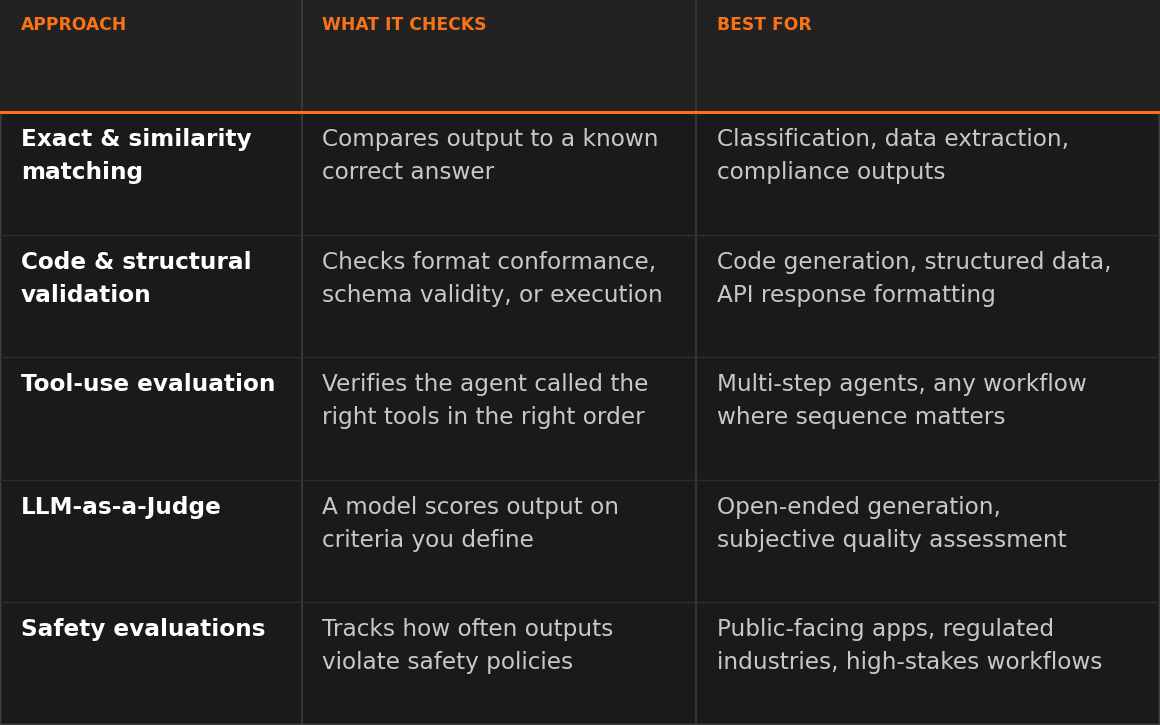
1. Exact and similarity matching. Compare the AI output directly against a known correct answer. Use exact match when the output must be identical (extracting a specific field, returning a status code). Use similarity metrics like Levenshtein distance or semantic similarity when close is good enough (summaries that capture the same meaning with different wording). These evaluations are fast, cheap, and fully deterministic.
Best for: data extraction, classification against known labels, compliance-sensitive outputs where precision matters.
2. Code and structural validation. Check whether the output conforms to expected formats, passes syntactic validation, or produces correct results when executed. JSON validity checks, regex pattern matching, and schema conformance all fall here. If your AI generates SQL queries, you can evaluate whether the generated query returns equivalent results to the expected query.
Best for: code generation, structured data extraction, API response formatting.
3. Tool-use evaluation. Check whether an agent called the right tools in the right order. n8n's Tools Used metric compares the agent's actual tool invocations against an expected sequence, producing a deterministic score without needing a judge model. This catches a failure mode unique to agentic workflows: the model can produce a reasonable-looking final response while skipping a required tool call, invoking the wrong tool, or running tools in the wrong order. These bugs are often invisible to output-quality checks because the final text can still sound correct.
Best for: multi-step agents, workflows that rely on external API calls, any case where the sequence of actions matters as much as the final output.
4. LLM-as-a-Judge. Use a capable model (like GPT-5, Claude, or Gemini) to evaluate the output of your workflow's model. The judge model scores the output on criteria you define: helpfulness, correctness, tone, factual accuracy, or any custom dimension that matters for your use case. This is the most flexible approach because it handles subjective quality assessment that deterministic methods can't.
Best for: open-ended generation, customer-facing responses, any output where quality is contextual and hard to reduce to a simple match.
5. Safety evaluations. Check outputs for PII leakage, prompt injection attempts, toxic content, or policy violations. Guardrails catch these in real time and are covered in a separate post in the Production AI Playbook. Evaluation adds the measurement layer: how often are safety issues occurring, and is the rate changing over time?
Best for: public-facing applications, regulated industries, any workflow where safety violations have outsized consequences.
The most robust evaluation strategies combine approaches. A customer support workflow might use exact matching for ticket classification (deterministic), LLM-as-a-Judge for response quality (subjective), and safety evaluation for PII detection (compliance). Each layer catches different types of failure.
Building It: Setting Up Evaluations in n8n
n8n's evaluation system is built around three core components: Data Tables for test cases, the Evaluation Trigger for running tests, and the Evaluation node for recording results.
Here's how to set up evaluation for an AI workflow.
Step 1: Create your test dataset. Open the Data Tables feature in n8n and create a table with your test cases. Each row should contain an input (the data you'll feed to your workflow) and the expected output (the ground truth you'll evaluate against). Start with real data that has already flowed through your workflow. Real-world inputs expose edge cases that manually crafted test data often misses.
Pro tip: Seed your initial Data Table with real inputs from your n8n execution history rather than writing test cases from scratch. Go to the Executions tab, find representative runs, and copy the inputs directly. This gives you a test set that reflects actual usage patterns from day one instead of idealized examples that miss the messy inputs your system really handles.
Pro tip (no execution history yet?): If you're evaluating a brand-new workflow, start with 10-15 hand-written cases that cover your core categories and the obvious edge cases (empty input, unusually long input, multilingual input, the most common real-world phrasings you expect). Treat this as a seed set, not a finished test suite. As soon as the workflow sees real traffic, swap in inputs from the Executions tab and retire the synthetic ones. The n8n Evaluations docs and the Data Tables docs are good reference points for setting up the dataset structure.
Step 2: Add the Evaluation Trigger. In your workflow, add an Evaluation Trigger node. This creates a separate execution path that runs alongside your production workflow without interfering with it. The trigger pulls inputs from your Data Table and feeds them through your workflow one at a time.
Step 3: Split evaluation from production. After your AI step, add an Evaluation node and set it to the "Check if Evaluating" operation. This routes execution differently depending on whether it's a real production run or an evaluation run. Production inputs flow to your normal downstream logic. Evaluation inputs flow to metric scoring. This separation is important because it prevents test data from polluting production outputs and keeps your evaluation logic isolated.
Step 4: Score with the Evaluation node. Add an Evaluation node at the end of your evaluation path. Configure it with the metrics you want to track. n8n provides built-in metrics for common scenarios and lets you define custom metrics for anything specific to your use case.
The Evaluation node supports two operations relevant for scoring:
- Set Outputs: stores workflow results in Data Tables for comparison against expected values
- Set Metrics: calculates and records performance scores
Step 5: Run and review. Execute the evaluation from the Evaluations tab in your workflow. n8n runs each test case through your workflow, calculates the metrics, and displays the results. You can compare runs side by side to see how changes to prompts, models, or workflow logic affect performance.
Try it yourself
Exercise 1: Ticket Classifier Evaluation
Import the Exercise 1 template that evaluates a support ticket classifier using n8n's built-in evaluation system to your n8n instance. The AI Agent classifies tickets by category and urgency, then the evaluation path compares outputs against expected results using exact match scoring.
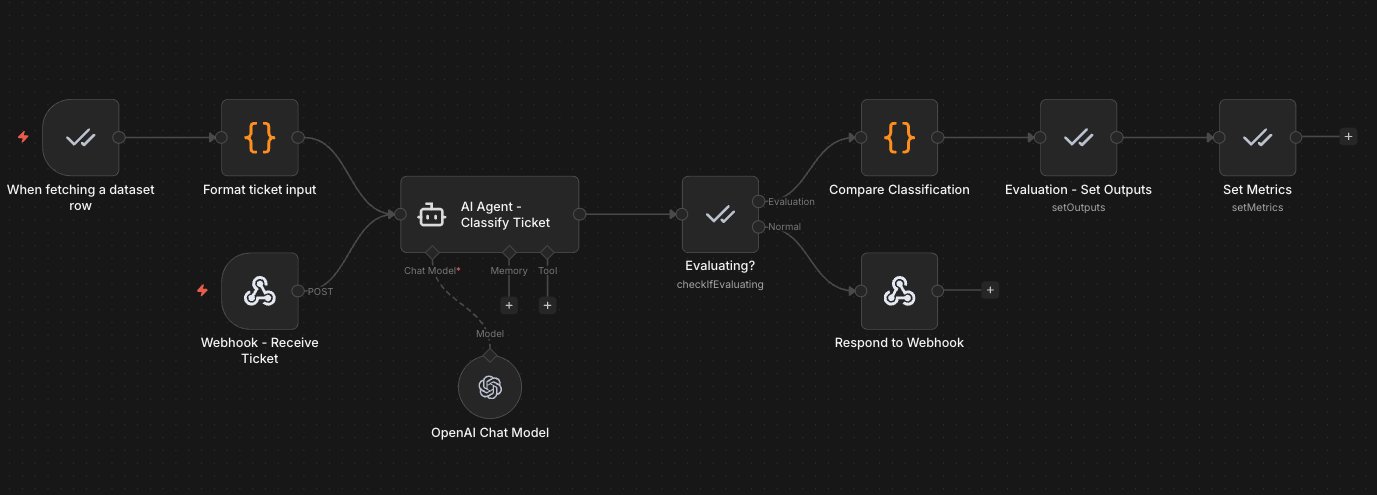
Production path: A webhook receives a support ticket, the AI Agent classifies it by category and urgency, and the result is returned via webhook response.
Evaluation path: The Evaluation Trigger reads test cases from a Data Table, feeds them through the same AI classification step, and a Code node compares the AI's output against expected labels. Metrics are recorded in the Evaluations tab.
The Data Table for this workflow includes test cases like:
| Input (Ticket Text) | Expected Category | Expected Urgency |
|---|---|---|
| "Cannot access billing portal, payment due tomorrow" | billing | urgent |
| "How do I export my data to CSV?" | technical | low |
| "We want to upgrade our team plan to Enterprise" | sales | normal |
| "Your API has been returning 500 errors for 2 hours" | technical | urgent |
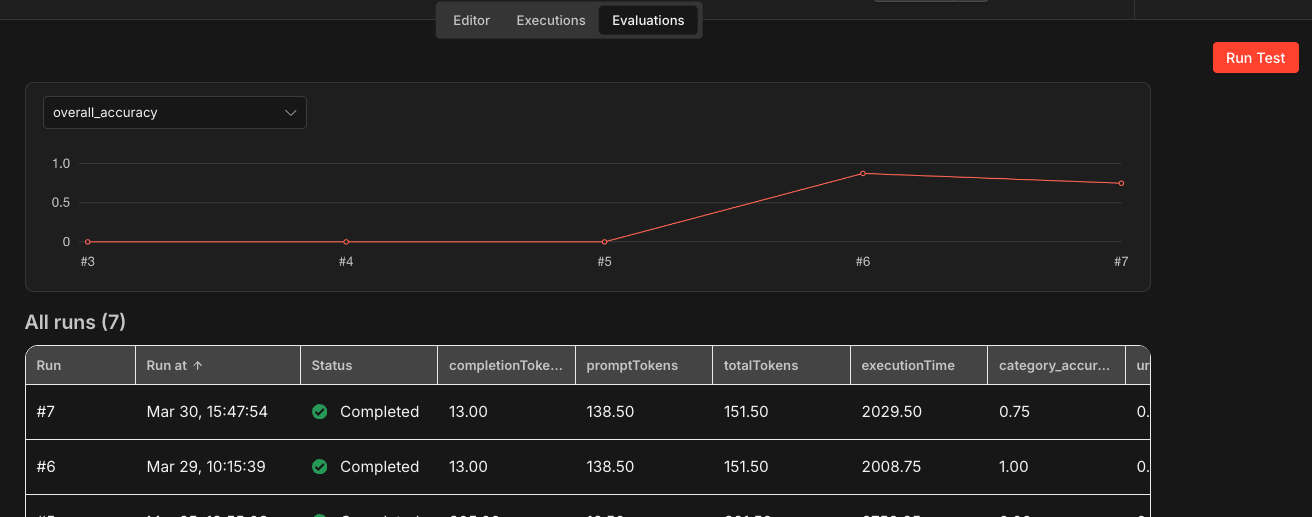
To run the evaluation, open the workflow and click the Evaluations tab at the top of the editor. Click Run Test to execute the evaluation suite. n8n feeds each row from the Data Table through the AI Agent, compares the output against expected labels using exact match scoring in the Code node, and records the results. Once the run completes, you can see per-test-case scores and aggregate metrics directly in the Evaluations tab, making it easy to spot which test cases passed and which ones the classifier got wrong.
This workflow demonstrates the deterministic evaluation approach: comparing structured AI outputs against known correct answers with exact matching. It is a good starting point for evaluating any classification or extraction workflow where you have clear expected outputs.
Download the workflow templateBuilding It: LLM-as-a-Judge Scoring
Deterministic metrics work well for structured outputs, but many AI workflows produce open-ended content where quality is subjective. This is where LLM-as-a-Judge becomes essential.
The idea is straightforward: you take the output from your workflow, pass it to a capable model along with scoring criteria, and the judge returns a score. n8n has two built-in LLM-as-a-Judge metrics that you can use directly.
Correctness. This metric evaluates whether the AI's response is factually accurate given the provided context. The judge model compares the output against reference information and scores it on a 1-5 scale. A score of 5 means the response fully aligns with the reference. A score of 1 means it contradicts or hallucinates information.
This is particularly useful for RAG (Retrieval-Augmented Generation) workflows where you need to verify that the AI's response stays faithful to the retrieved documents rather than generating plausible but incorrect information.
Helpfulness. This metric evaluates whether the AI's response actually addresses the user's query. The judge scores on a 1-5 scale based on relevance, completeness, and clarity. A helpful response directly answers the question with appropriate detail. An unhelpful response might be technically accurate but miss the point of what was asked.
Here's how to implement LLM-as-a-Judge in a typical evaluation workflow.
Step 1: Set up the evaluation path. Follow the evaluation setup from the previous section. Your evaluation path should have access to the AI's output, the original input, and any reference data (expected output, retrieved context, or ground truth).
Step 2: Configure built-in metrics. In the Evaluation node (with Set Metrics selected), select the built-in Correctness or Helpfulness metric. These use pre-configured prompts that have been tuned for consistent scoring. Connect a capable model (GPT-5, Claude, or similar) to power the judge. The judge model should generally be more capable than the model being evaluated.
Pro tip: Match the judge's capability to the stakes of the output. For routine checks (did the response include the right field?), a mid-tier model is fine. For nuanced assessment (did this reply handle a customer complaint with the right tone?), use the strongest model available. A judge weaker than the model being evaluated tends to miss the exact nuances you want to catch.
Step 3: Build custom criteria (optional). For domain-specific evaluation needs, build a custom LLM-as-a-Judge as a sub-workflow. Create a workflow that takes the AI output and reference data as inputs, sends them to a judge model with your custom scoring prompt, and returns a numeric score. Wire this sub-workflow into your evaluation path as a custom metric.
For example, a customer support evaluation might use a custom judge prompt like:
Prompt
You are evaluating a customer support response. Score the response on a scale of 1-5 based on:
– Tone: Is it professional and empathetic?
– Accuracy: Does it address the customer's actual issue?
– Actionability: Does it give the customer a clear next step?
Provide a single score from 1-5 and a brief justification.
Pro tip: When building custom judge prompts, ask the judge to return both a numeric score and a brief justification. The justification is what makes the evaluation actionable. A score of 2/5 tells you something is wrong. A justification like "The response addresses billing but ignores the customer's request for a timeline" tells you exactly what to fix in your prompt.
Step 4: Use comparative evaluation for prompt iteration. When iterating on prompts, use LLM-as-a-Judge to compare outputs from different prompt versions. Instead of asking the judge to rate on an absolute scale, frame it as a comparison: "Does Output B contain all the relevant information from Output A while improving on clarity?" Comparative evaluation tends to produce more consistent results than absolute scoring because the judge has a concrete reference point.
Pro tip: Periodically audit your LLM-as-a-Judge decisions manually. Judge models have their own biases. Review a sample of scored outputs to ensure the judge's criteria align with your team's quality standards. If the judge consistently scores something high that your team would flag, update the scoring prompt.
Try it yourself
Exercise 2: LLM-as-a-Judge Evaluation
Import the Exercise 2 template to see an LLM-as-a-Judge evaluation for a customer support AI agent. A separate judge model scores each response on correctness (1-5) and helpfulness (1-5), giving you subjective quality metrics that go beyond simple exact matching.
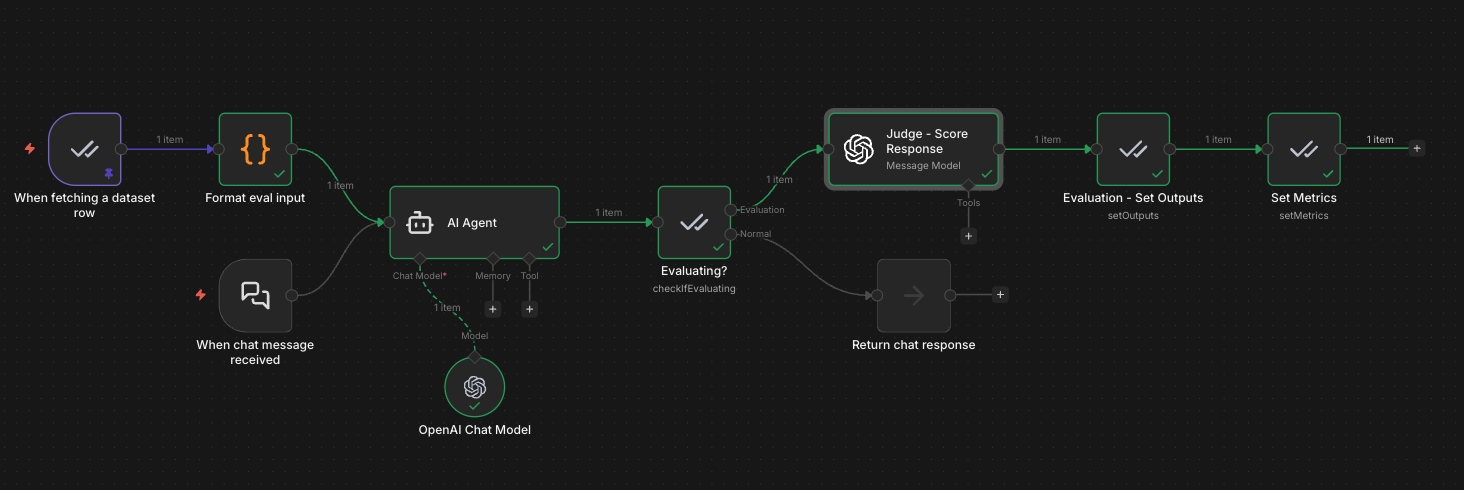
Production path: Chat Trigger receives a customer question, the AI Agent generates a support response, and the result is returned to the user.
Evaluation path: The Evaluation Trigger reads test cases (question + expected answer) from a Data Table, feeds them through the AI Agent, then a separate judge model (GPT-4o-mini) scores each response. The judge evaluates correctness (does the response match the expected answer?) and helpfulness (is it clear, actionable, and complete?). Scores are recorded in the Evaluations tab alongside token usage and execution time.
The Data Table for this workflow includes customer support scenarios like:
| Question | Expected Answer |
|---|---|
| "How do I reset my password?" | Step-by-step password reset instructions including checking the spam folder |
| "Why was I charged twice?" | Explanation of billing cycle with instructions to contact billing support |
| "My app keeps crashing after the update" | Troubleshooting steps: clear cache, reinstall, check system requirements |
| "Can I upgrade from Basic to Pro?" | Plan comparison with upgrade instructions and pricing details |
In this evaluation workflow, we are using a custom metric. But you can also use the built-in metrics with the Set Metrics, which provides options like AI-based metrics (Helpfulness and Correctness), standard metrics (String Similarity and Categorization), and more intricate metrics like Tools Used.
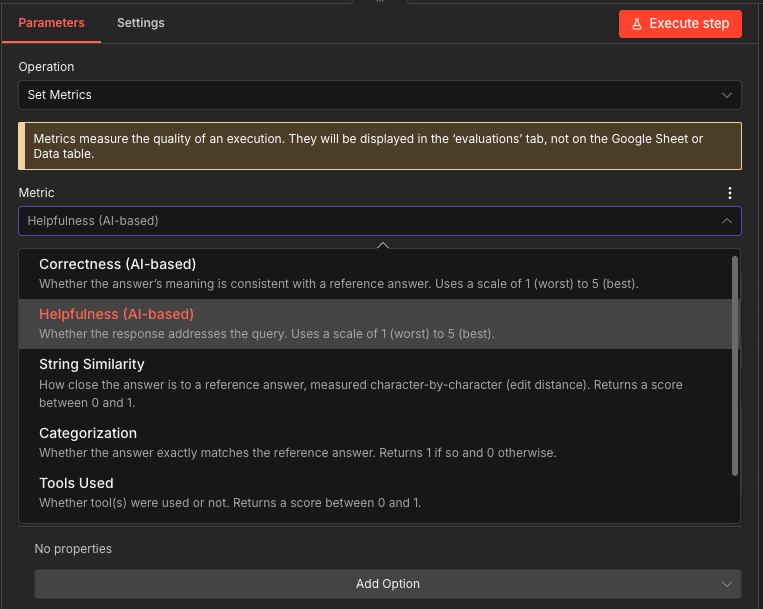
After running the evaluation, open the Evaluations tab to see per-test-case scores. The variation in scores across test cases is itself useful: it tells you which types of questions your agent handles well and which need prompt refinement.
Download the Exercise 2 workflow templatePro tip: When building a custom judge node (instead of using n8n's built-in metrics), the judge model often returns scores wrapped in markdown code blocks (```json ... ```). If you hit errors like "Value for 'correctness' isn't a number," parse the response with JSON.parse() and a regex to strip the markdown wrapper before extracting your scores.
Building It: Monitoring with Ongoing Evaluations
Evaluation at deployment time tells you the system works today. Monitoring tells you it's still working next week and the week after that.
The practical approach is to treat evaluation as a recurring process, not a one-time check. Here's how to set up ongoing monitoring in n8n.
Step 1: Build a golden dataset from production data. Periodically sample inputs and outputs from your production executions. Review and label a subset of these as your "golden dataset." These are real-world examples with confirmed correct outputs that represent the actual distribution of inputs your system handles. Update this dataset regularly as new patterns emerge.
n8n's execution history makes this straightforward. You can pull past execution data directly into a Data Table to build and maintain your test dataset without manual data entry.
Step 2: Schedule recurring evaluations. Set up a workflow that runs your evaluation suite on a regular cadence. Daily for high-volume workflows, weekly for lower-volume ones. Each run produces a set of metric scores that you can track over time. Consistent scores mean stable performance. Declining scores mean something has changed and needs investigation.
Step 3: Set alert thresholds. Define acceptable performance ranges for each metric. If your classification accuracy drops below 85% or your average helpfulness score falls below 3.5, trigger an alert. Use n8n's existing notification nodes (Slack, email, or webhook) to route alerts to the right team when thresholds are breached.
Step 4: Track the right signals. Combine quantitative metrics with qualitative ones for a complete picture.
Quantitative signals to track:
- Token count per response (cost indicator, sudden spikes suggest prompt issues)
- Execution time per AI step (latency changes may indicate model or API issues)
- Classification accuracy against the golden dataset
- Tool-call correctness for agentic workflows (n8n's Tools Used metric checks whether the agent invoked the expected tools in the expected order, catching regressions where a model stops calling a tool, calls the wrong one, or changes the order)
- Error rate (how often does the AI step fail entirely)
Qualitative signals to track:
- Correctness score (LLM-as-a-Judge, catches factual drift)
- Helpfulness score (LLM-as-a-Judge, catches relevance drift)
- Custom domain-specific scores (tone, compliance, completeness)
Step 5: Close the feedback loop. When monitoring catches a problem, use the evaluation data to diagnose it. Which specific inputs are scoring lower? Is the drop across all categories or concentrated in one? This diagnostic data feeds directly into your next iteration cycle. Update the prompt, re-run the evaluation suite, and verify the fix before redeploying.
This creates a continuous improvement cycle: deploy, monitor, detect, diagnose, fix, evaluate, redeploy.
Pro tip: When a monitoring alert fires, don't just fix the immediate issue. Add the failing inputs to your golden dataset as new test cases. Every production failure you capture makes your evaluation suite stronger and prevents the same class of issue from slipping through again.
Try it yourself
Exercise 3: Ongoing Monitoring with Alerts
Import the Exercise 3 template to see scheduled evaluation, LLM-as-a-Judge scoring, and alert thresholds tied together into a continuous monitoring loop. A daily schedule triggers evaluation runs against a golden dataset, a judge model scores each response, and a Code node checks whether the average score drops below your threshold. If it does, a Slack alert fires automatically.
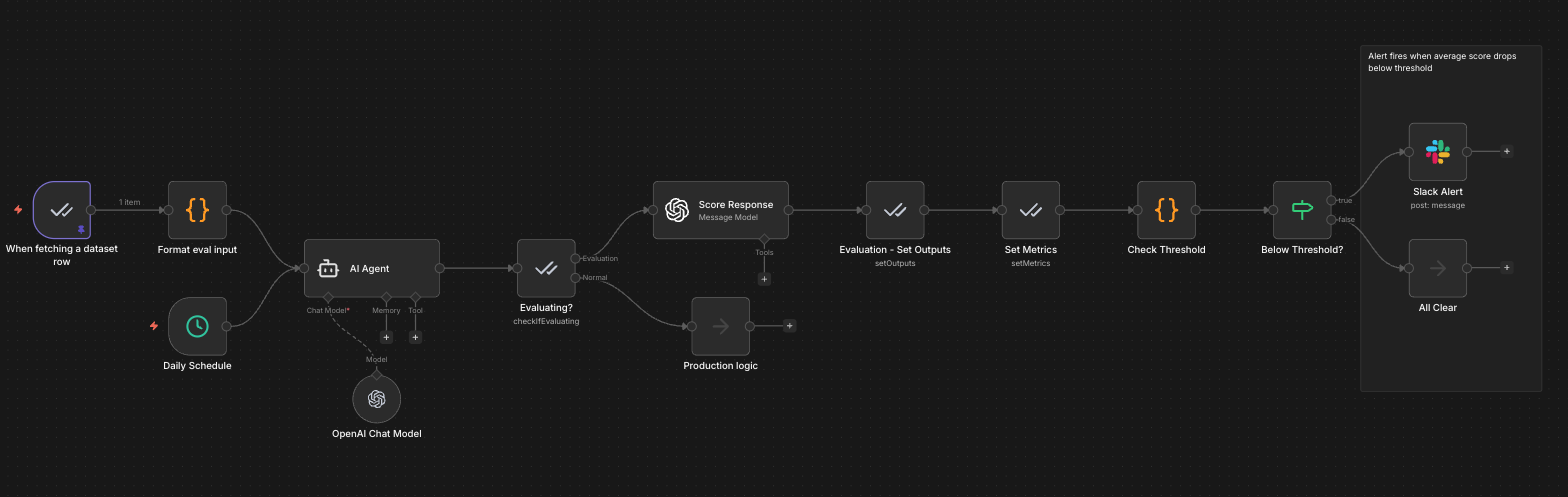
Production path: A Daily Schedule trigger kicks off the AI Agent on its normal cadence. After the agent responds, the Evaluating? node routes production inputs to downstream Production logic without interference.
Evaluation path: The Evaluation Trigger reads test cases (question + expected answer) from a Data Table called "Customer Support QA Test Cases" and feeds each one through the AI Agent as a separate execution. A separate judge model (GPT-4o-mini) scores each response on correctness (1-5) and helpfulness (1-5) via the Score Response node. The Evaluation - Set Outputs and Set Metrics nodes record results in the Evaluations tab. Then, a Check Threshold Code node averages the correctness and helpfulness scores for that test case and compares against the threshold (default: 3.5/5). If the score drops below the threshold, the Below Threshold? IF node routes to a Slack Alert. If scores are healthy, the flow routes to All Clear.
Because the threshold check runs per test case rather than across the full batch, it catches individual failures the moment they happen. A single bad response triggers an alert immediately, even if most other test cases score well. The Evaluations tab separately tracks aggregate metrics across all test cases in a run, so you get both views: per-case alerting in the workflow and trend-level tracking in the dashboard.
The Data Table for this workflow uses the same customer support scenarios from the LLM-as-a-Judge template:
| Question | Expected Answer |
|---|---|
| "How do I reset my password?" | Step-by-step password reset instructions including checking the spam folder |
| "Why was I charged twice?" | Explanation of billing cycle with instructions to contact billing support |
| "My app keeps crashing after the update" | Troubleshooting steps: clear cache, reinstall, check system requirements |
| "Can I upgrade from Basic to Pro?" | Plan comparison with upgrade instructions and pricing details |
Go deeper: Tune the threshold to your use case. A 3.5/5 default works as a starting point, but high-stakes workflows (customer escalations, compliance-sensitive outputs) should use a higher threshold like 4.0. Low-stakes workflows (internal summaries, draft generation) can tolerate a lower bar. The goal is a threshold that catches real problems without generating false alarms.
Download the Exercise 3 workflow templateWhen to Evaluate (and What to Measure)
Evaluation has a cost. Every LLM-as-a-Judge call uses tokens. Every evaluation run takes time. The goal is meaningful measurement applied where it matters, not comprehensive scoring on every possible dimension.
Evaluate when:
- You change a prompt, model, or workflow structure (regression check)
- You deploy to a new domain or user segment (coverage check)
- Monitoring detects a performance drop (diagnostic check)
- You're comparing two approaches and need data to decide (A/B evaluation)
- Regulatory or compliance requirements mandate ongoing quality measurement
Measure these baselines for every AI workflow:
- Accuracy/Correctness for any workflow that classifies, extracts, or answers questions with the right answer
- Helpfulness for any workflow that generates customer-facing content
- Execution time and token count for every AI workflow (cost and latency baselines)
Add a workflow-type metric where it applies:
- Categorization for classification workflows (n8n's built-in metric compares the AI's predicted label against the expected label)
- Tools Used for tool-calling agents (n8n's built-in metric checks whether the agent invoked the expected tools in the expected order)
- Groundedness/faithfulness for RAG workflows (catches hallucinations against the retrieved context)
Add domain-specific metrics when:
- Your industry has compliance requirements (add safety evaluations)
- Your output quality has dimensions that generic metrics miss (add custom LLM-as-a-Judge criteria)
Keep evaluation lean. Start with one or two metrics that directly measure what matters most for your workflow. Add more as you learn which failure modes actually occur in production. Over-measuring upfront creates noise without insight.
Tips and Tricks
Here are practical tips for implementing evaluation and monitoring effectively. These work well as quick-reference guidelines and are things you can start applying immediately.
1. Change one variable per evaluation run. When iterating on a prompt or swapping models, change only one thing at a time. If you change both the prompt and the model simultaneously, you can't attribute the performance difference to either change. Single-variable testing makes your evaluation data actionable.
2. Use real production data for your test sets, not synthetic examples. Manually written test cases tend to be cleaner and more predictable than real inputs. They miss the edge cases that actually cause problems in production. Pull from your execution history to build test datasets that reflect what your system actually encounters.
3. Match the judge model to the task complexity. For simple evaluations (did the output contain the right category?), a fast and affordable model works fine as the judge. For nuanced quality assessment (is this response empathetic and actionable?), use a more capable model. You don't need GPT-4 to check if a JSON field exists, and you don't want a lightweight model judging the quality of a customer escalation response.
4. Build your golden dataset incrementally. Don't try to create a comprehensive test suite upfront. Start with 20-30 real examples that cover your main input categories. Add cases whenever you find a failure mode in production. Over time, your golden dataset becomes a comprehensive regression suite built from actual failures, which is far more valuable than a theoretical test set.
5. Don't over-index on LLM-as-a-Judge scores. Judge models have biases. They tend to prefer longer responses, more formal language, and outputs that match their own generation patterns. Use judge scores as one signal among several, not as the definitive measure of quality. Cross-reference with human review on a regular cadence.
6. Separate evaluation infrastructure from production logic. Use the Evaluation node's "Check if Evaluating" operation to keep evaluation paths cleanly separated from production paths. This prevents test data from leaking into production outputs and makes it easy to add or modify evaluation logic without touching the production workflow.
What's Next
Evaluation and monitoring give you the measurement layer that turns AI deployment from a leap of faith into a data-driven process. With the patterns in this post, you can score AI performance against meaningful criteria, detect quality drift before your users do, and build a continuous improvement cycle that makes your workflows more reliable over time.
This post is part of a series that explores proven strategies and practical examples for building reliable AI systems. Find out what topics are already available in the Production AI Playbook here, or be the first to know when new topics are added via RSS, LinkedIn or X.
References: