
The DevOps automation tools that excel at CI/CD aren’t necessarily the ones you want provisioning infrastructure or monitoring production. But you’ll need to choose the right tools for each job without creating a stack that takes more effort to coordinate than the manual work it replaced.
Here are 11 options worth considering, their strengths, and the trade-offs that come along.
How to evaluate a DevOps automation tool
The right tool depends on what you’re actually trying to automate. A team looking to speed up builds and deployments has different requirements from one managing infrastructure at scale or trying to coordinate incident response across several systems. Before choosing a DevOps automation platform, decide on the job it needs to do, then look at how well it fits the rest of your stack.
A few things matter here:
- Scope: Does it handle CI/CD, infrastructure provisioning, configuration management, monitoring, or orchestration across those layers?
- Integration: Can it connect cleanly to the tools and APIs you already use, or will your team spend time maintaining custom glue code?
- Control: Can you add custom logic when the built-in functionality stops being enough?
- Reliability and visibility: When an automation fails, can you quickly see what happened and recover without reconstructing the entire run?
- Governance: Can you control who can build, edit, and run automations as more people start using them?
- Scale: Will the platform keep up as execution volume and workflow complexity grow?
In practice, most teams won’t choose one tool from the list below and call their DevOps stack finished. Technical teams typically use specialized tools for different layers, then connect them so deployments, infrastructure changes, alerts, and follow-up actions can move through the same operational process. That makes interoperability just as important as any individual feature.
11 of the best DevOps automation tools
Each tool in DevOps has a defined purpose. CI/CD automation tools focus on getting code from commit to production, while infrastructure automation tools handle the environments that code runs on. Other platforms specialize in configuration, container orchestration, or monitoring. That’s why some of the most useful DevOps tools of 2026 work together as different layers of the same stack.
Here’s a quick look at the 11 tools we’ll compare.
Jenkins
Jenkins is an open-source automation server built for highly customizable CI/CD pipelines, from automated testing to deployment. Its huge plugin ecosystem makes it a flexible choice for teams with complex or unusual build requirements. The trade-off is maintenance: Jenkins can require significant setup and ongoing administration, so it’s best for experienced engineering teams that want deep pipeline control.
GitHub Actions
GitHub Actions brings continuous integration and deployment automation directly into GitHub, letting teams trigger builds, automated testing, deployments, and other workflows from repository events. That tight integration makes it especially convenient for teams already developing on GitHub. However, complex YAML pipelines can become rigid and repetitive over time, making them harder to manage as workflows scale.
GitLab CI/CD
GitLab CI/CD integrates pipelines with GitLab repositories, allowing teams to automate builds, tests, and deployments from the same development platform. It’s a natural fit for teams already centered on GitLab, but organizations using a more fragmented development stack may get less value from that tight integration.
Terraform
Terraform is an infrastructure-as-code (IaC) tool for defining and provisioning cloud and on-premises resources with declarative configuration. It’s a strong fit for teams managing infrastructure across multiple providers. The trade-off is that state management and increasingly complex configurations can add operational overhead as environments grow.
Pulumi
Pulumi takes a code-first approach to IaC, letting developers define infrastructure with familiar programming languages rather than a dedicated configuration language. That makes it attractive to software teams that want infrastructure logic to resemble application development. The trade-off is added abstraction and tooling compared with simpler declarative approaches.
Docker
Docker packages applications and their dependencies into containers, helping teams keep development, testing, and production environments consistent. It’s an accessible foundation for container-based delivery and works well across many DevOps stacks. But since Docker handles containers instead of full production orchestration, larger deployments typically need additional tooling.
Kubernetes
Kubernetes automates how teams deploy, scale, and manage containerized applications. It’s especially useful for teams running distributed workloads that need resilient container orchestration at scale. That power comes with substantial complexity, so smaller teams or simpler applications may find that Kubernetes creates more infrastructure to manage than they need.
Ansible
Ansible automates configuration management, provisioning, and application deployment using human-readable playbooks. Its agentless architecture makes it relatively straightforward to introduce across existing infrastructure. But as playbooks and inventories expand, they can become difficult to organize and maintain. It’s best for teams standardizing configuration across many systems.
Prometheus
Prometheus is an open-source monitoring system built around time-series metrics and alerting. It’s a strong choice for engineering teams that want flexible, infrastructure-focused monitoring, particularly in cloud-native environments. The trade-off is that long-term storage and broader observability requirements often call for additional tooling around the core platform.
Datadog
Datadog is a managed observability platform that brings telemetry like infrastructure monitoring, logs, and traces into one environment. It’s well suited to teams that want broad visibility without operating their own monitoring stack. The main trade-off is cost, which can increase as infrastructure and telemetry volumes grow.
Azure DevOps
Azure DevOps combines pipelines with repositories, testing, artifacts, and project-management capabilities to support the broader development lifecycle. It can be an especially good fit for organizations already invested in Microsoft development and cloud tooling, but its breadth can also be a drawback: Teams looking for a lightweight or narrowly focused automation tool may find the platform larger and more complex than they need.
Where n8n fits into a DevOps stack
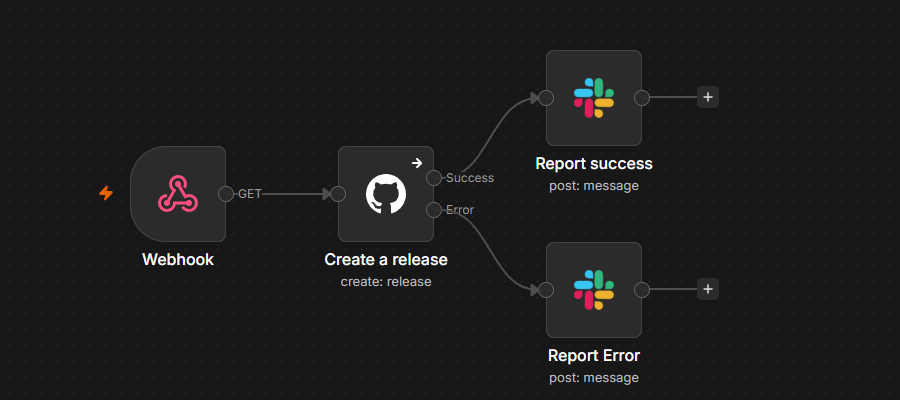
n8n is an AI-native, source-available automation platform that sits between the specialized tools in your stack, orchestrating the workflows that cross their boundaries. For DevOps pipeline automation, that means connecting tools and APIs while giving teams a central place to debug executions, handle failures, add custom logic, scale workloads, and test AI-powered steps.
Here’s how those capabilities work in practice.
Executions log with node-by-node inspection
When an automation spans several systems, finding the failed API call can be harder than spotting the failure itself. n8n records workflow executions so you can inspect the data and output at each node. You can also debug executions by loading data from a previous execution into the editor and rerunning the workflow.
Error Trigger node
Failures can become workflows of their own. The Error Trigger node starts a separate error workflow when an execution fails, letting you automate actions like sending an alert or routing the failure for investigation.
For shared DevOps automations, role-based access control also lets administrators set permissions and control who can access projects and workflows.
Code node
Not every DevOps API fits neatly into a prebuilt action. n8n's Code node lets you add JavaScript or Python directly to a workflow, so teams can handle custom transformations and logic without moving orchestration into a separate script or service.
Integration depth
DevOps workflows inevitably intersect with team chats, issue tracking systems, and incident response platforms. n8n offers integrations for 1,000+ apps via native and community nodes, making it easy to integrate your core DevOps stack with the rest of your operations. Teams can quickly build workflows that send deployment status updates to Slack, create tickets in Jira based on monitoring alerts, or trigger PagerDuty when a build fails.
Evaluations
AI adds a less predictable component to DevOps automation. If a workflow uses an agent to triage alerts or summarize incident logs, you can use evaluation datasets and metrics to test AI workflows and measure output quality before you trust that step in production. From there, evaluation and monitoring can help teams track how AI behavior holds up once the workflow encounters real production inputs.
Turn your DevOps tools into a connected stack
There’s no single best DevOps automation tool. Teams need to pick what suits the job, fits together, and continues efficiently as their stack grows.
n8n helps connect those moving parts so less of the work falls back on your team.
FAQ
What’s DevOps automation?
DevOps automation uses tools and repeatable workflows to reduce manual work across the development lifecycle, from continuous integration and testing to deployment and infrastructure management. The goal is to help DevOps teams ship changes consistently without manually coordinating every step.
How does continuous integration fit into DevOps automation?
Continuous integration automates the process of integrating, building, and testing code as developers make changes. CI/CD tools can run automated testing on each update, catch problems earlier, and prepare validated code to deploy through later stages of the pipeline.