
Model context protocol (MCP) servers give LLMs the ability to call tools, query data sources, and take action in the real world. But these extra capabilities create new risks. To stay safe, production MCP deployment needs a control plane.
This article explains how the control plane works in MCP server security, what enforcement looks like at the execution layer, and the controls for MCP authentication and authorization.
What makes MCP security a challenge
Traditional security models police human behavior. A person clicks a button, and a digital security guard checks if this action is allowed. With MCP, AI bots make autonomous choices. Instead of waiting for a person to authorize each action, the agentic AI decides what MCP tools to use and how to chain them together.
Passwords and digital keys also create vulnerabilities. These secrets usually stay locked in secured storage, but in an MCP system, there are new risks of exposing such keys when they travel around to help the agentic AI complete tasks. AI agents switch jobs and mix tools in unexpected ways, which means the danger zone is always changing. MCP security systems need to constantly check the AI’s identity, set limits on what it can access, and log every move it makes to avoid missing important vulnerabilities.
How attackers exploit MCP servers
MCP vulnerability risks fall into several main classes, which you can group into a few categories depending on the attack strategy.
Attackers whose exploits involve manipulating the agent behavior rely on prompt injection, tool poisoning, and confused deputy attack classes. Those who gain unauthorized access generally choose token passthrough, session hijacking, and excessive permissions. And attackers who directly exploit the server use command injection and server-side request forgery (SSRF).
Here’s a closer look at how each attack class works and its impact.
Unlike typical API attacks, new ways to exploit MCP servers don’t always look like threats.
A prompt injection often seems like a normal human input at first. Similarly, a confused deputy exploit follows a legitimate OAuth flow but then skips the consent step. And even for tool poisoning, the tool name remains the same so the agent keeps calling it as if nothing changed. For a traditional security tool, that means there’s no malformed request for it to block and no anomalous status code to flag. This is precisely why the attack succeeds.
How to prevent and mitigate MCP security risks
To prevent and mitigate vulnerabilities, production MCP deployments need an orchestration layer that scopes tool calls, isolates credentials, and logs every execution. Following MCP security best practices means having that layer in place before agents reach production.
Prompt and command injection
Attackers carry out prompt injection attacks by hiding malicious instructions inside content the LLM is already reading. This might include a document, an API response, or a tool output. The model usually can’t tell the difference between a real instruction and a planted one, so it follows both.
Solution: Treat all external content as untrusted before it reaches the model. Add guardrails to check for prompt intent, wrap the user input into pre-defined XML tags (i.e. <unsafe></unsafe>) to clearly separate from legit content and instruct LLM where the potentially malicious requests are located.
Tool poisoning and supply chain integrity
With tool poisoning, attackers change what a tool does but keeps the name the same. The agent keeps calling that malicious tool because it’s tricked into thinking it recognizes it. This is closer to a supply-chain attack on the agent’s context than typical jail-breaking from a user.
Solution: Dynamic registration is the most high-risk path because an attacker can use it to swap out an approved server. Verify the tool definitions before they load by signing them, pinning server versions, and reviewing your configuration settings for dynamic registration.
Capability scoping and least-privilege tool exposure
The most common model context protocol security vulnerability is over-provisioned tokens. Even without a sophisticated plan behind it, this approach can do plenty of damage, like successfully stealing sensitive information.
Solution: Start with read-only access and scope credentials to specifically what each of them may actually need.
How to enforce the authentication and limit token scope
When misconfigured, MCP tends to break and let attackers in. Most of the issues come back to three main sources related to authentication requirements. These, in turn, are tied to specific attack patterns that security tools, and the IT teams using them, must learn how to identify.
Here’s how to mitigate authentication-related MCP risks.
OAuth 2.1 and transport security
OAuth 2.1 gives MCP servers a standard way to verify who calls a tool before it runs. It accepts tokens issued by an authorization server and checks that each is valid, unexpired, and issued specifically for that endpoint.
Solution: All OAuth-related URLs should use HTTPS in production because insecure HTTP connections expose tokens in transit.
Confused deputy
The confused deputy problem happens when an MCP proxy shares the same client ID with a third-party authorization server. An attacker can then trick a user into clicking a malicious link that takes advantage of previously saved consent sessions. This can bypass the consent screen and send an authorization code to the attacker.
Solution: The MCP specification should require the proxy server to maintain a per-client consent registry. It should validate redirect uniform resource identifiers (URIs) with exact string matching before forwarding to the third-party authorization server and reject the request if the redirect URI changes.
Token passthrough
Token passthrough creates a similar risk as the confused deputy strategy. If a server accepts tokens not directly issued to it, the server can’t accurately confirm who made the request or track what actions they perform. This complicates monitoring, auditing, and compliance.
Solution: MCP servers should only accept tokens issued specifically to them and reject all others.
Scope minimization
When you give a digital key too much power, misuse and theft cause massive damage. Giving out broad access worsens the vulnerabilities, causes extra confusion, and makes it harder to track who did what.
Solution: Never provision full access from the start. Only grant more access when a specific task requires it.
Start building secure MCP workflows with n8n
MCP server security happens at the execution layer — where tools run, credentials get used, and every action leaves a trace. That's exactly where n8n sits.
n8n acts as an intermediary between the agent and the systems it touches. The LLM sees a clean tool surface; n8n holds the credentials, scopes the parameters, and logs the calls. The result is an MCP deployment where the agent has just enough capability to do its job, and nothing more.
Expose tools without exposing credentials
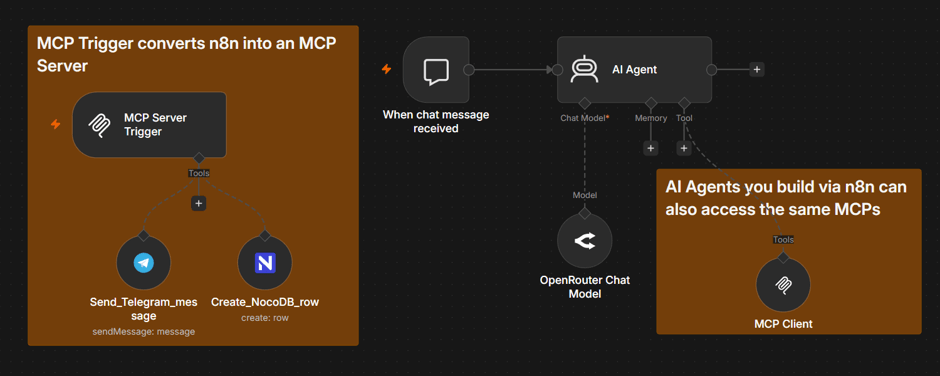
The fastest way to compromise an MCP deployment is to let auth tokens travel with the agent. With the MCP Server Trigger, n8n exposes workflows and external APIs as MCP tools that the agent can call by name — but the API keys, OAuth tokens, and database passwords stay in n8n's encrypted credential store and get injected at execution time. The LLM never sees them, which directly closes off token passthrough and confused-deputy attack paths.
Scope what the agent can control with tools
n8n lets you expose individual tools, not whole APIs. Instead of handing the agent a Slack or Salesforce integration with every endpoint attached, you publish individual API endpoints or bundle several steps into a sub-workflow, i.e. "post to #alerts channel," "create a support ticket" — as one named MCP tool. The agent's reachable surface is whatever you chose to expose, and nothing else.
Within each tool, parameter binding gives you fine-grained control over what the LLM can actually fill in:
- Static values are hardcoded in the workflow. The agent cannot override them. Use this for anything the LLM should never decide — an org ID, a target channel, a record type.
- Dynamic values come from workflow logic and prior node outputs. Still invisible to the agent.
- $fromAI parameters are the only fields the LLM is allowed to fill, and you opt into each one explicitly.
These two approaches limit excessive permissions risk and ensure a deliberate, per-tool and per-parameter least-privilege exposure.
Securing a server is a big task. Choosing the right tools and following best practices sets teams up for success.
It’s worth remembering that MCP server security doesn’t happen at the protocol level. It lives at the execution layer, where it runs tools, locks away keys, and tracks actions. For effective protection, the right security tool has to operate at this level. n8n does.
n8n is a source-available workflow automation platform built to give operators the control plane that MCP deployments need. n8n’s solutions treat MCP governance as an ongoing operational responsibility that scales with your systems, not a one-time hardening exercise.
FAQ
What’s the difference between MCP authorization and standard API authorization?
Standard API authorization asks if a caller can access a specific endpoint. The answer is usually fixed, which means that a route either allows a request or it doesn’t.
Instead, MCP authorization works at the tool level with a context-aware filter instead of a fixed one. It asks whether a caller can use a specific tool, with specific inputs, based on what their token says about their role and permissions.
What is MCP server chaining?
MCP server chaining happens when a malicious local MCP server waits in the path of a trusted remote MCP server integration, such as an official Slack or Google Drive integration. Attackers then exploit the sensitive data that passes through the authorized integration, so they don’t need to compromise the legitimate server.