
SOC 2 compliance automation promises to reduce the manual work that comes with audits. Yet engineers still spend time gathering evidence, exporting logs, validating access reviews, and chasing data across multiple systems.
As environments grow, a single control can hinge on evidence from cloud infrastructure, identity providers, version control systems, ticketing platforms, and internal tools. Keeping all of that evidence current quickly becomes a challenge of coordination, not collection.
Reducing audit work is the easy part. Building a repeatable process for monitoring controls, collecting evidence, and responding to issues is where compliance automation really gets interesting.
What SOC 2 compliance automation actually covers
When people talk about SOC 2 automation, they often focus on evidence collection. That's certainly part of the picture, but it's only one piece of a larger process.
To stay audit-ready throughout the year, teams need to monitor controls — the policies, processes, and technical safeguards that help meet SOC 2 requirements — collect evidence, identify gaps, and track remediation work across multiple systems. These activities help demonstrate compliance with the SOC 2 Trust Services Criteria and provide evidence that controls are operating effectively.
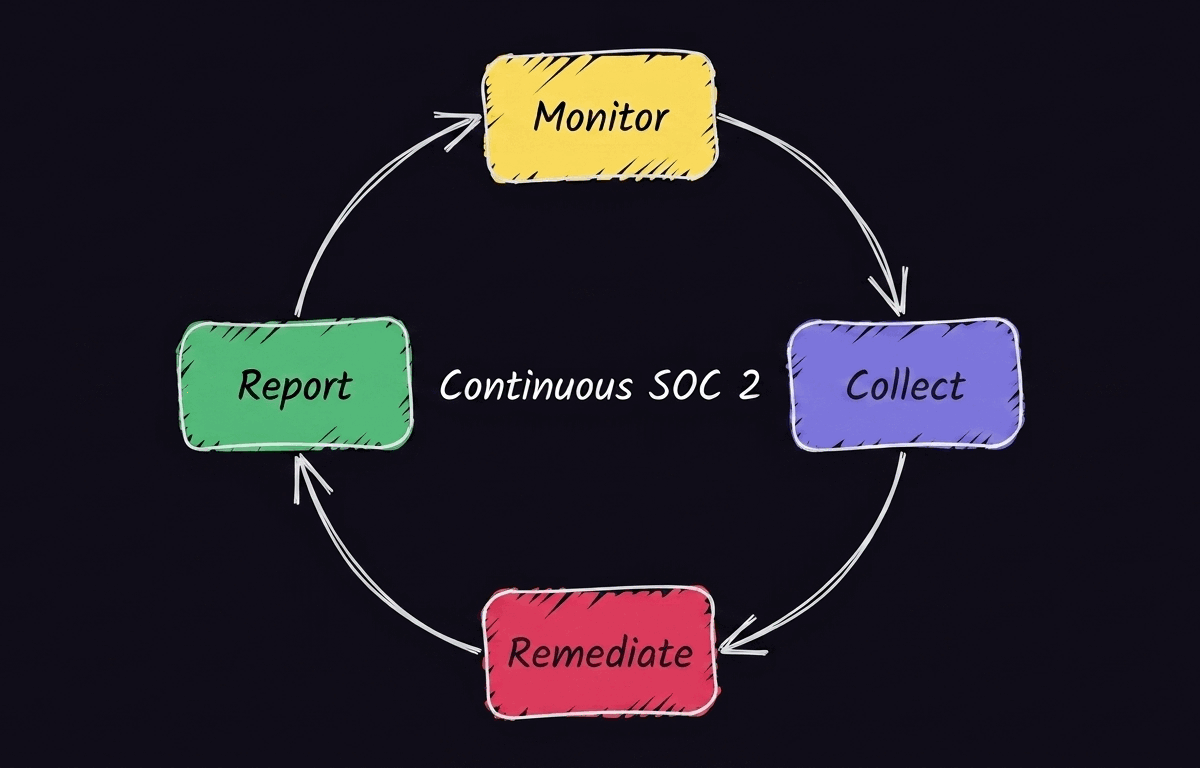
Most compliance automation efforts fall into four categories.
Continuous control monitoring
Controls don't fail on a schedule. Permissions change, configurations drift, and new resources get deployed every day.
Continuous control monitoring helps teams detect those changes as they happen. This form of continuous monitoring makes it easier to identify control failures before they become larger compliance problems.
Automated evidence collection
Auditors need evidence that security controls are operating as intended. Automated evidence collection pulls artifacts from systems like Okta, GitHub, and Jira on a recurring basis. This creates a consistent audit trail without requiring engineers to manually gather screenshots, reports, or logs.
Gap analysis and remediation tracking
Finding a control issue is only the first step. Teams also need a way to assign ownership, track remediation work, and verify that issues have been resolved. Automation can route failed checks into ticketing systems, notify the right stakeholders, and maintain a record of corrective actions for future audits.
Audit readiness reporting
The final layer brings everything together. Evidence, control status, and remediation history all need to be available when auditors request them. Audit readiness reporting gives compliance and security teams a current view of their environment. This makes it easier to identify missing evidence, unresolved issues, or controls that require additional attention before an audit begins.
What can and can’t be automated
Compliance automation works best when the task is repeatable, rules-based, and tied to system state. Once human judgment enters the picture, automation becomes a supporting tool instead of a replacement.
What you can safely automate
Many of the most time-consuming parts of SOC 2 compliance are good candidates for automation, including:
- Pulling evidence from cloud providers, identity systems, version control platforms, and other business systems
- Scheduling and tracking access reviews
- Monitoring controls for configuration drift or policy violations
- Routing alerts and failed control checks into ticketing systems
- Tracking policy acknowledgments and other compliance-related activities
- Maintaining audit trails and compliance records
These tasks follow predictable rules and rely on data that already exists inside your systems, making them well-suited for automation.
What still requires human judgment
Automation can surface issues and provide context, but it can't make governance decisions on your behalf. Tasks that typically require human judgment include:
- Defining controls and determining how they'll be implemented
- Setting audit scope and compliance priorities
- Evaluating vendors and reviewing third-party risk
- Approving exceptions and documenting compensating controls
- Assessing whether a particular risk is acceptable
- Participating in auditor interviews and responding to audit findings
The goal is to reduce the operational burden around compliance so teams can spend more time making informed decisions and less time gathering information.
The compliance automation gap and how workflow orchestration solves it
Governance, risk, and compliance (GRC) platforms play an important role in SOC 2 programs. They help teams map controls, manage auditor requests, and support day-to-day compliance activities from a central location.
The challenge is that compliance data rarely lives in one place. Evidence can come from cloud providers, identity systems, version control platforms, ticketing tools, vulnerability scanners, and internal applications. Even when a GRC platform supports many of those systems, teams often need to connect custom tools and proprietary APIs that span multiple environments.
Understanding that gap starts with understanding what compliance automation platforms, GRC tools, and workflow orchestration each bring to the table.
Self-hosted deployment for restricted environments
For some organizations, a SaaS platform simply isn’t an option. Teams operating under strict security, privacy, or data residency requirements often have to keep audit artifacts and compliance workflows inside their own infrastructure.
In these environments, the automation layer needs to run wherever the data lives. Self-hosted workflow orchestration gives teams a way to automate evidence collection and control monitoring without introducing another compliance concern.
Automated evidence collection pipelines
Evidence collection rarely starts and ends with a single system. One control can hinge on evidence from cloud infrastructure, identity providers, version control systems, ticketing platforms, and internal tools.
Workflow automation and orchestration turns those disconnected sources into a repeatable process. Teams can automatically collect, normalize, and route evidence to a central repository or GRC platform instead of scrambling to gather artifacts before an audit.
Event-driven remediation
Finding a failed control is only useful if someone acts on it. Event-driven workflows can automatically create tickets, notify the appropriate team, and document the response when a control check fails. That shortens the gap between detection and remediation and strengthens the security posture by creating a clear record of what happened and when.
Execution logging and workflow history
Compliance automation should be as auditable as the evidence it produces. Teams need visibility into when workflows ran, what data they collected, and whether any steps failed along the way. Execution logs and workflow history provide that record, making it easier to troubleshoot issues, validate results, and demonstrate how evidence was gathered during an audit.
Choosing the right automation approach for your environment
For some teams, a GRC platform provides everything they need. Others benefit from adding workflow automation to connect systems and automate processes that fall outside a GRC platform’s capabilities.
The right approach depends on your environment. Here are a few common scenarios to help you choose.
Your GRC platform covers most of your stack
If your GRC platform already connects to the systems you use and meets your compliance needs, you may not need much beyond a few custom integrations or workflows. In many cases, the platform can handle evidence collection, control monitoring, and audit management on its own.
You work across a heterogeneous tech stack
Things get more complicated when your evidence lives across cloud services, internal applications, legacy systems, and custom APIs. That's where workflow automation tools like n8n can help. Instead of replacing your GRC platform, they connect the gaps between systems, automate evidence collection, and keep remediation workflows moving.
You have strict security or data residency requirements
Some organizations can't send compliance data through a third-party SaaS platform. If audit artifacts and workflows need to stay inside your own infrastructure, self-hosted workflow automation gives you the flexibility to collect evidence and manage compliance without moving sensitive data outside your environment.
Where n8n fits in your compliance automation stack
SOC 2 compliance automation can eliminate much of the repetitive work that surrounds audits, but collecting evidence is only part of the challenge. Teams also need to monitor controls, coordinate remediation, and maintain a clear record of what happened across a growing number of systems.
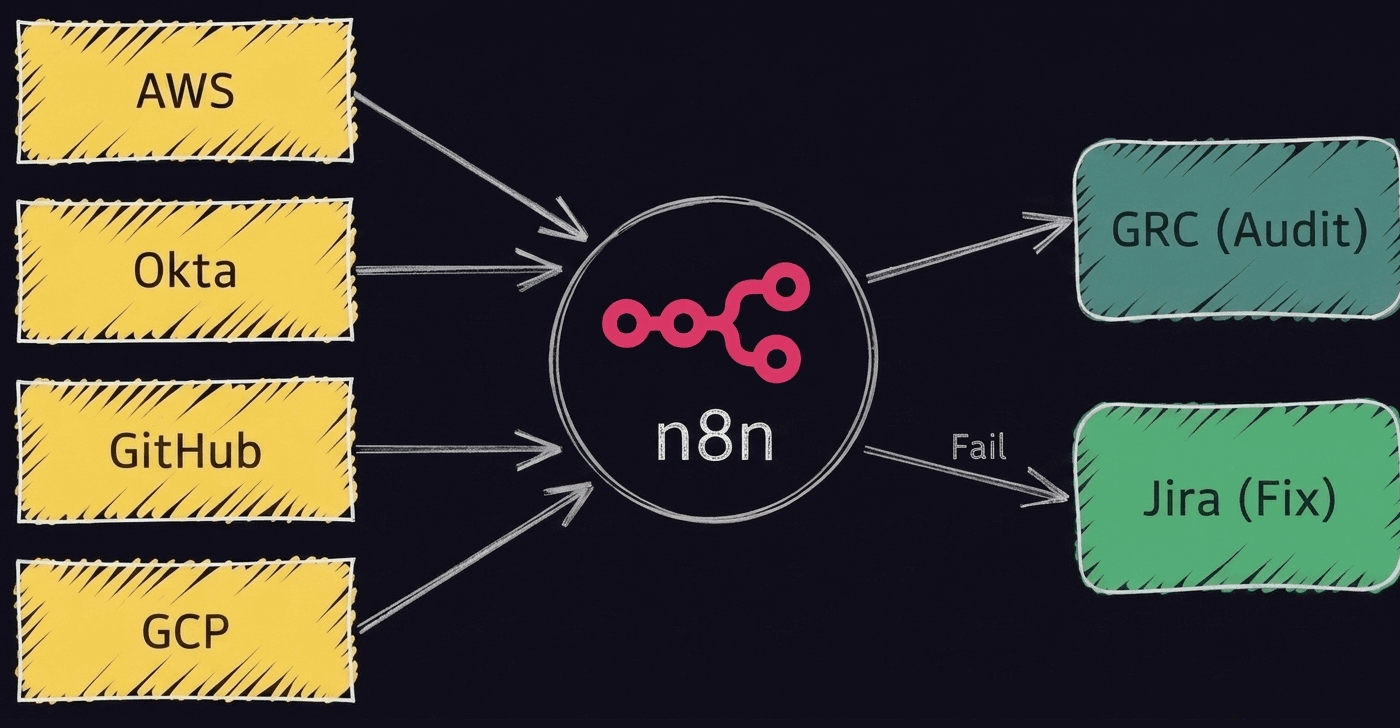
For many organizations, that means adding a workflow orchestration layer between evidence sources, GRC platforms, and remediation systems. Acting as a compliance control plane, n8n connects those systems without forcing teams into proprietary integrations or a black-box automation platform they can’t inspect or migrate away from.
Whether you're working in a cloud-native stack, a highly customized enterprise environment, or a data residency-constrained deployment, n8n gives you the flexibility to build compliance workflows around your environment — not the other way around.
FAQ
What’s SOC 2 compliance automation software?
SOC 2 compliance automation software helps organizations automate evidence collection, control monitoring, audit preparation, and remediation workflows. While GRC platforms often serve as the system of record for compliance programs, many teams also use workflow automation tools like n8n to connect evidence sources, trigger actions, and coordinate processes across multiple systems.
Can SOC 2 compliance be fully automated?
No. Automated SOC 2 compliance can significantly reduce manual work, but it can't replace human judgment. Teams still need people to define controls, approve exceptions, work with auditors, and make risk management decisions. Automation is most effective when it handles repetitive operational tasks so compliance and security teams can focus on decision-making.
How does automation make managing compliance easier?
The more new systems, teams, and controls your organization adds, the harder managing compliance will be. Compliance automation reduces that complexity by continuously collecting evidence, monitoring security controls, tracking remediation work, and maintaining audit records across the tech stack.
Instead of relying on manual processes and periodic reviews, teams can use automation to support continuous monitoring, strengthen their security posture, and stay audit-ready throughout the year.