
Changing something small, like a single field mapping or expression, can have negative downstream effects that stop an entire workflow. Without version history, figuring out what happened means searching Slack threads or relying on someone to remember what they changed.
Workflow versioning in n8n offers a reliable record where you can track and restore working states, making automation easier to manage and safer to scale.
What workflow versioning means for automation infrastructure
Workflow versioning means keeping a traceable record of how automation changes over time. Each workflow version is a saved snapshot of the workflow definition at that moment. It captures the configuration of each integration, along with the logic and settings that determine how the workflow runs. When its behavior changes, you have a reliable reference point to compare it against.
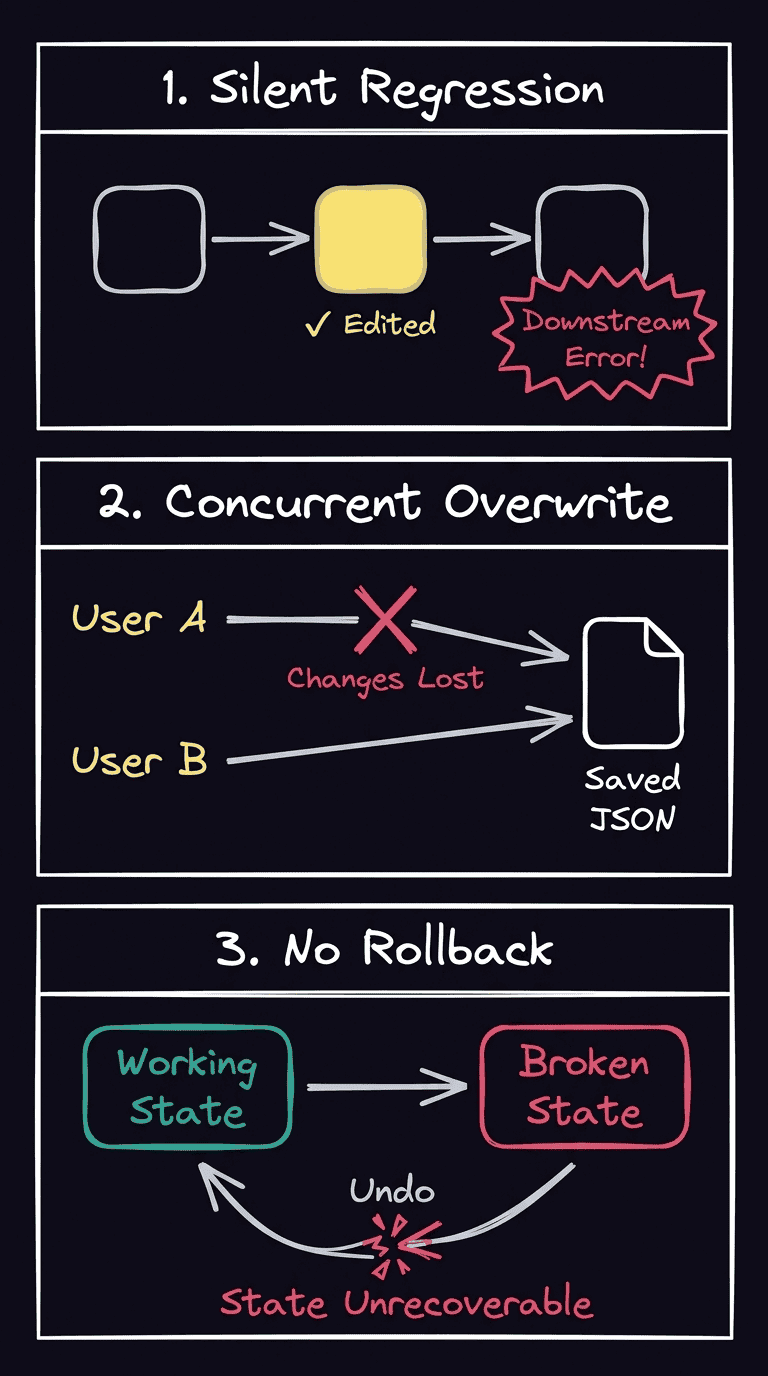
Versioning helps you manage three common operational risks:
- Silent regressions: A change fixes one part of the workflow but disrupts a later step. Comparing versions helps you find the exact update that introduced the problem.
- Concurrent overwrites: Two people edit the same workflow, and one person’s changes replace the other’s. Version tracking makes those competing changes easier to track and resolve.
- No rollback path: A workflow breaks, and there’s no reliable way to return to the last working state. Saved versions give you a trusted working state to restore instead of manually rebuilding from scratch.
How Git maps onto workflow definitions
Git is a version control system that records how text-based files change over time. Developers usually use it for application code. n8n is a source-available, AI-native workflow automation platform that uses JSON files.
That JSON file describes how the workflow is built and how it should run. It includes the nodes, their configuration, the connections between them, and the workflow’s logic and settings. However, it excludes runtime information, like execution history and usable credential secrets, which remain separate for security and operational reasons.
Keep in mind that not every platform approaches workflow versioning the same way. n8n uses Git, while Temporal workflow versioning handles workflows that are still running when developers update the underlying code.
In Temporal versioning, the SDK can replay a workflow’s event history to rebuild its working state. That history should always produce the same result. An incompatible change can make the workflow non-deterministic, so Temporal uses patching and GetVersion (an API for safely updating workflow definition code without causing non-determinism errors) to assign a version number. Existing executions can then follow the old version, while new ones take updated code paths.
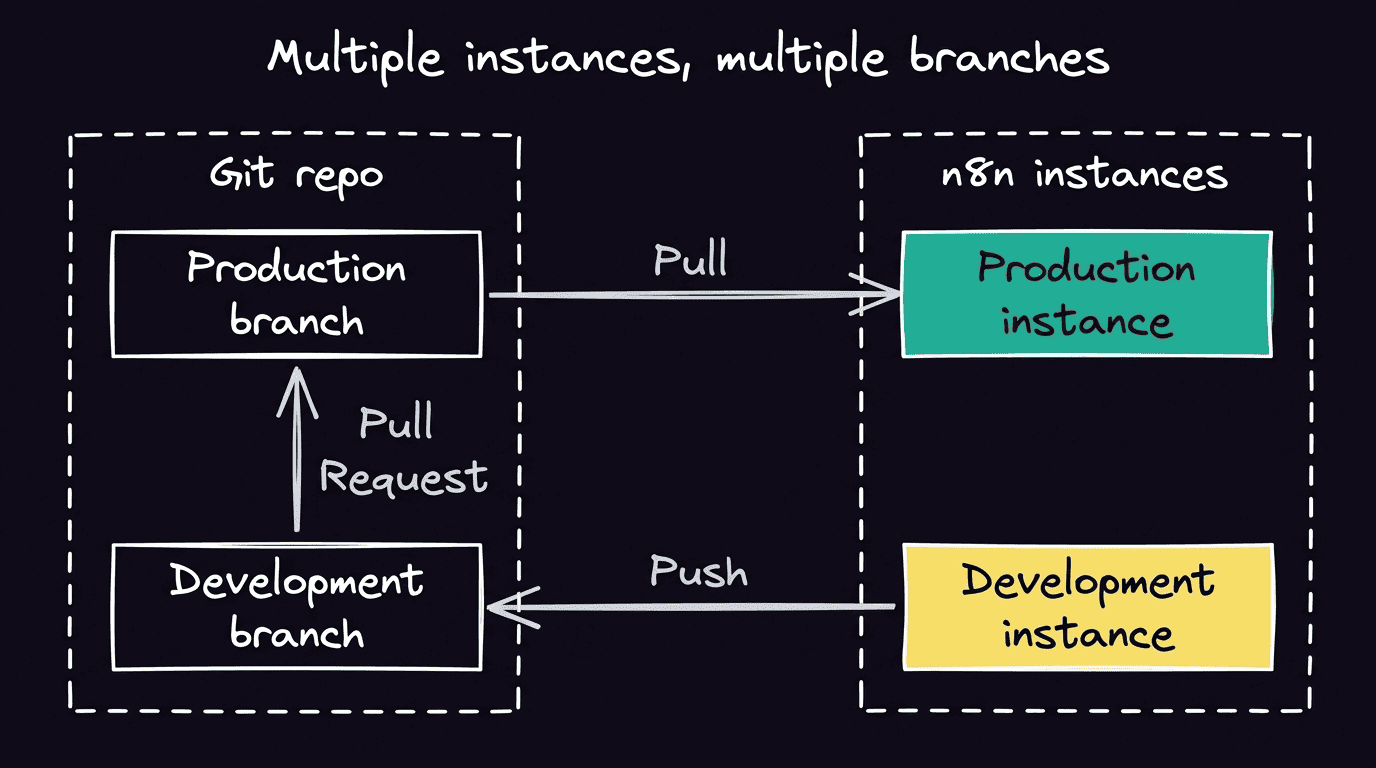
Once Git stores workflow definitions, branches can represent different states of the same workflow. A development branch holds work in progress, while a staging environment gives you a place to test it. A production branch contains the approved version running in the live environment. Keeping the states separate lets you experiment without changing the live workflow that customers depend on.
The workflow definition moves between n8n and the Git repository through a push-and-pull process. You push the latest saved version from an n8n instance to its connected branch, while a pull brings an approved version back, which you can then choose to publish.
Best practices for managing workflow versions at scale
As more workflows and contributors enter the picture, version control should become a consistent company-wide practice rather than a frenzied response when something goes south. Follow these best practices to manage workflows at scale.
Write descriptive commit messages
A commit message should tell the next person what changed and why. Avoid vague labels like “Updated workflow,” as they offer little help when you’re investigating a failure months down the line.
Instead, use a specific message like “Prevent duplicate confirmation messages after payment retries.” It names the behavior that changed and gives the next person relevant context.
Use branch-per-environment consistently
Give development, staging, and production their own branches, then use the same naming and promotion path across your projects to create familiarity and avoid confusion.
Across any workflow, it’s important to have a standardized direction each time you deploy a change:
- Build in development
- Test in staging
- Pull approved work into production
Avoid casually pushing and pulling from the same instance, as competing states can overwrite one another.
Gate production with a pull request
A pull request creates a checkpoint between development and production. Before promoting a workflow change, ask a teammate to review it in your Git provider, confirm the intended behavior, and flag anything that needs more testing.
It’s an extra step that gives you a shared point of responsibility and reduces the likelihood of one person’s unreviewed change becoming a live incident. The review occurs in your Git provider, while n8n handles the workflow changes and environment sync.
Keep credentials out of the repository
Never hardcode API keys, passwords, or access tokens inside Git workflow fields. Keep confidential information in your credential store. n8n fetches credentials and environmental variables without revealing sensitive keys.
Keep the repository private because workflow definitions and those references may reveal useful details about your system, like integrations and naming conventions.
Build a backup workflow for Community Edition
Native source control is available on our Business and Enterprise plans. When you use Community Edition, you can create a scheduled workflow that retrieves your workflow definitions through the n8n API and saves changed JSON files to a private Git repository.
However, treat this as a backup process and not a full replacement for native environments. Add clear commit messages and regularly test whether you can restore exported workflows. n8n’s workflow library includes GitHub synchronization that can serve as a starting point.
Setting up workflow version control in n8n
n8n’s native source control connects workflow development to Git, so you can move definitions between controlled environments instead of editing every instance independently.
Connect a repository
Give n8n a shared place to store workflow definitions. In Settings > Environments, connect a private repository from a provider like GitHub, GitLab, or Bitbucket using SSH or HTTPS. Keep the repository private, as it can contain workflow structures, tags, and credentials, even though n8n doesn’t push the secret values.
Map branches to environments
After connecting a repository, decide how changes should travel toward production. You can connect separate n8n instances to development, stages, and production branches and give each stage its own workflow state. Isolating each state prevents an incomplete project from accidentally affecting a live automation.
Protect production
After mapping the production instance to its branch, mark the instance as protected. n8n will then prevent users from editing source-controlled resources there directly, making production a deployment target rather than an additional editing workspace. This reduces concurrent overwrites, as people make changes upstream and promote them intentionally instead of modifying the live workflow.
Review workflow diffs
Before you push or pull, workflow diffs compare the version on your n8n instance with the latest version in the repository. The visual view shows added, modified, and deleted nodes or connections, while modified nodes expose a JSON-level configuration diff. This gives you a final check before one state replaces another.
Use workflow history as a fallback
Workflow history automatically records saved versions inside your n8n instance, separately from Git:
- All users can access versions from the last 24 hours
- Cloud Pro users receive five days
- Enterprise Cloud and Enterprise self-hosted plans provide full history
You can use this access feature if Git sync wasn’t configured or you need to undo a recent local change. However, it doesn’t create environment branches or a Git-based release process.
Understand the boundaries
n8n’s source control isn’t a complete Git implementation, so it’s important to understand what it doesn’t do. You handle pull-request reviews and merges in your Git provider, and pulling a remote workflow overwrites unpushed local changes rather than merging them. Community Edition doesn’t include native source control, so you need a separate backup process using the Git node or external tooling.
Make workflow safer with version control in n8n
Workflow versioning gives you a reliable path from development to production. You can see what changed, review it before release, and return to a known working state if something breaks. As your automation footprint grows, workflow versioning offers a structure to fix problems without slowing down day-to-day development.
Explore source control and environments to learn how the setup works in n8n, or try n8n Cloud to start building workflows on a shared automation platform.