




Batch processing gets complicated with large loads. A workflow that breezes through 200 records might stop on 20,000. You’ll suddenly find yourself faced with memory limits, API quotas, and the question of what actually finished.
The patterns in this guide will help you keep those problems from derailing the whole workflow.
Batch processing in workflow orchestration
Batch jobs often start life as scripts, with job scheduling handled separately for each one. That works well enough at first, but add a few systems and soon you’re juggling separate schedules, credentials, logs, and failure handling. When something breaks, figuring out where (and what already ran) can become a job of its own.
With workflow orchestration, those jobs can run across apps, databases, and APIs from one place. The workflow defines when a batch runs, how data moves between systems, and what happens when a step fails. That gives you a single execution path to monitor and troubleshoot instead of a collection of scripts running independently.
Batch processing vs. stream processing
The biggest difference between batch and stream processing is timing. Batch processing collects data and processes it in groups, while stream processing handles data continuously as it arrives. They both have uses:
- When to use batch processing: When results don’t need to be immediate, like with scheduled data syncs, reports, or bulk updates
- When to use stream processing: When timing is essential and you can accommodate the always-on infrastructure and added operational complexity that come with faster speeds
Three batch processing patterns
Once volume goes up, a single batch may put more pressure on memory, APIs, and downstream systems than they can comfortably handle. These batch processing patterns give you more control over how much work happens at once, how quickly it moves, and what happens when individual records fail.
Chunking: Splitting large datasets
Chunking breaks a large dataset into smaller groups that move through the workflow one at a time. Instead of asking a downstream system to handle thousands of records in a single batch operation, you might send 100 or 500 at a time.
Smaller batches use less memory and make failures easier to isolate, while larger batches can reduce the overhead of processing each group. The goal is to find a size that keeps the workflow moving without overwhelming the next step.
Rate limiting: Pacing batches within API limits
Smaller batches can still cause trouble if you send them too quickly. Many APIs cap the number of requests they'll accept within a given period, so a fast workflow could start receiving rate-limit errors even when each individual request is valid.
You can handle rate limits by adding pauses between requests or batches and configuring retries when an API asks you to slow down.
Per-item error handling and retry
One bad record shouldn't set a healthy batch back. Per-item error handling lets the workflow separate failed items from successful ones, then retry or route those failures without repeating work that's already complete.
Deduplication can add another safeguard when a rerun might contain records you’ve already processed. It’s one part of idempotency: designing a workflow so retrying the same work doesn’t create unintended duplicate results.
Scaling batch processing with n8n
The best batch size and processing speed depends on the workload, available memory, API limits, and number of running executions.
n8n is an AI-native, source-available automation platform that can help teams scale batch processing. It’s been tested with up to 220 workflow executions per second on a single c5a.large instance running a two-node workflow.
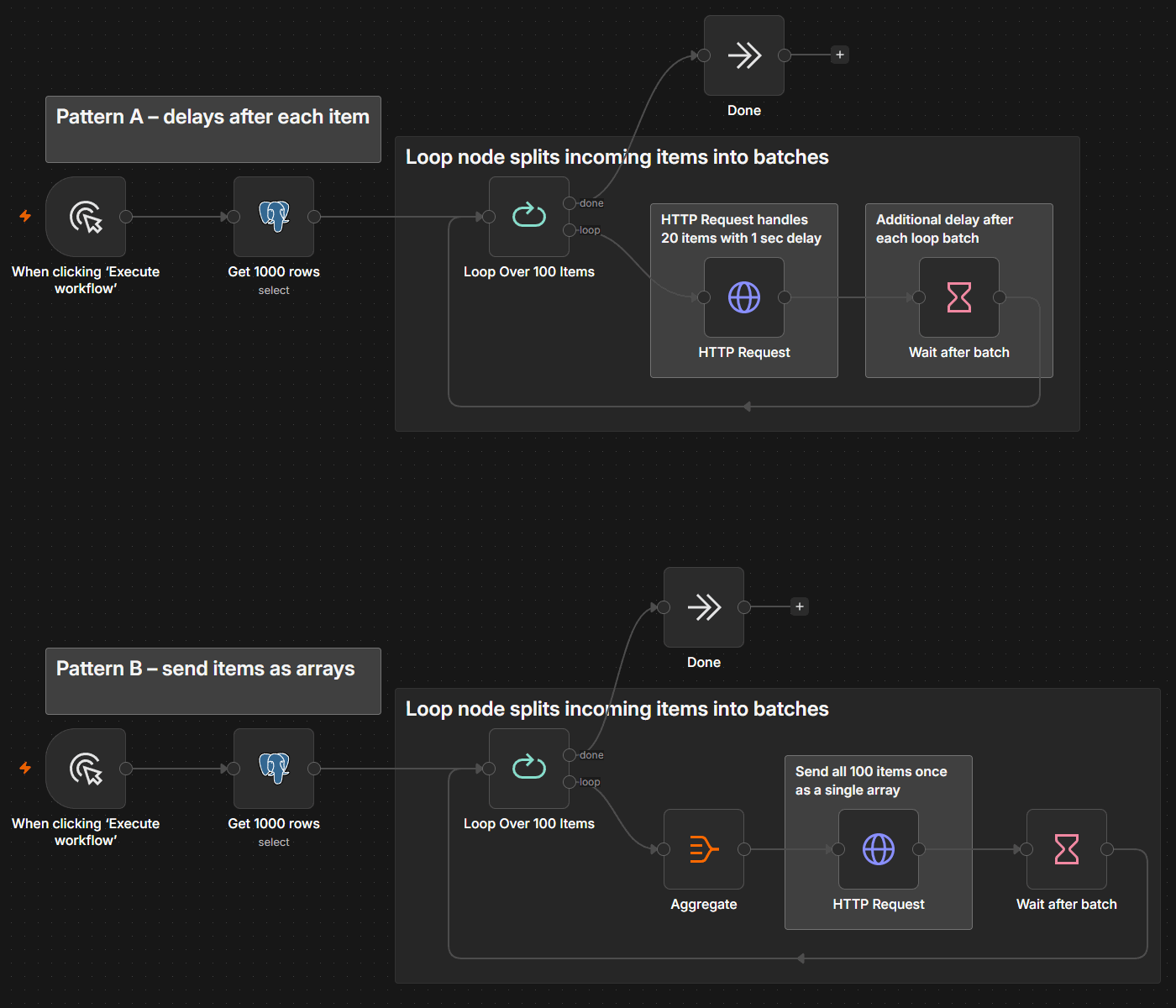
Instead of assembling separate batch processing tools, you can handle most of the steps directly in the workflow:
- Split Out node: Turns a list inside a single item into individual items that can move through the workflow separately
- Aggregate node: Combines separate items or selected fields back into a single list when the next step needs them together
- Loop Over Items (Split in Batches) node: Sends a set number of items through the workflow at a time, giving you direct control over batch size
- HTTP Request node: Sends batched data to APIs and gives you control over request behavior when there’s no dedicated integration
- Wait node: Pauses execution between batches or requests, helping you stay within API rate limits
- Remove Duplicates node: Filters repeated items before they move to the next step
- Debug executions: Loads previous execution data to debug failed runs (available on n8n Cloud and registered Community plans)
You can also split workflows into sub-workflows to manage memory limits. These sub-workflows return a restricted amount of data to the parent workflow.
For larger self-hosted workloads, queue mode lets you distribute workflow executions across workers. That gives you another lever for scaling throughput as volume grows, without changing the batching logic inside the workflow.
Build batch processing workflows that can handle the load
As batch workloads grow, the problems usually show up at the edges: too many records hitting one step, an API that can’t keep pace, a failure that leaves you wondering what needs to run again.
Chunking, rate limiting, and per-item error handling give you ways to control each of those pressure points. n8n brings those controls into the workflow itself, letting you adjust how data moves without rebuilding the process around it.
Start with a batch size your systems can comfortably handle, watch how the workflow behaves under load, and tune from there.
FAQ
How do you make batch processing safe to rerun?
A failed batch shouldn't force you to choose between starting over and risking duplicate work. The key is making each operation idempotent. That way, processing the same record twice produces the same result instead of creating a duplicate.
One approach is using upserts when writing to a database or data warehouse. Instead of blindly inserting each record, the workflow updates an existing record when its unique identifier already exists. Checkpointing can help too: Save a checkpoint as batches finish (for example, mark processed records as “done”) so a failed job can resume from the last known successful point rather than replaying the entire dataset.
How do you choose the right batch size?
Start with the limits around the workflow. Consider the memory and computing resources available to the workflow, the request limits of downstream APIs, and the amount of data each item contains.
Then test under a realistic load. If batches consume too much memory or trigger API errors, reduce their size or processing rate. If the workflow spends more time managing tiny batches than processing data, increase the batch size. Tune the size further as the workload changes.
Where is batch processing commonly used?
Batch processing works well for jobs where some delay is acceptable and there’s enough data to make processing records together worthwhile. Common examples include scheduled ETL, data transformation, database migrations, bulk API updates, and loading records into a data warehouse.
For applications like fraud detection, where new events may need an immediate response, real-time data or stream processing is usually a better fit.