
How much do workflow automation versus orchestration architectures differ at scale?
Each solves different problems.
Workflow automation handles individual tasks, while orchestration coordinates multiple tasks into end-to-end processes. Choosing the right approach or combining them shapes how your processes behave under real-world conditions.
This article breaks down the architectural differences between workflow automation and orchestration. You’ll see how those differences affect reliability and behavior in production systems and learn how to choose the right approach for your needs.
What is workflow automation?
Workflow automation runs a sequence of tasks when triggered by a preset event or criteria. It’s designed for a bounded scope where logic flows from point A to point B. These systems prioritize efficiency in repetitive business processes (sending notifications, updating records, moving data between systems) by relying on stateless execution/focusing on task-level execution.
Traditional (stateless) automation workflows usually run independently and work well for simple triggers, but offer limited observability for complex setups. Without workflow-level coordination, the system struggles with cross-service dependencies and sophisticated error handling.
Consequently, workflow automation is better suited for simple, straightforward processes than for complex observable end-to-end workflows. The core technical properties include:
- Trigger-based invocation: Ensures tasks only execute after meeting specific criteria (new email, database update, scheduled time), which reduces operational overhead/complexity.
- Independent execution/Task-focused scope: Each automation runs without coordination across related tasks
- Sequential logic execution/Limited cross-workflow coordination: Provides a predictable path for automated actions but not for end-to-end business processes, shared workflow state or orchestration layer.
What is workflow orchestration?
Some people view orchestration as just workflow automation on a larger scale. However, orchestration is more like a central controller that manages multiple automated tasks across different domains. While stateless workflow automation operates at the task level, orchestration provides a unified production control plane to manage complex business processes.
A dedicated orchestrator solves the “double-execution problem.” Without a record of state, a system that fails midway would restart a half-finished process and create duplicate data. Orchestration prevents this by tracking the entire sequence/maintaining a record of which steps succeeded, enabling precise recovery from the failure point.
Here are some of the advantages of workflow orchestration when deployed at scale:
- Centralized state management: Enables sophisticated error handling and recovery - retry failed steps, rollback completed actions, or trigger compensating transactions - capabilities that simple task-level automations lack.
- Cross-domain coordination: Allows you to streamline business processes across infrastructure and apps, which helps prevent tool sprawl by consolidating complex processes in a single control system.
- Deep observability: Provides the visibility into workflow execution needed to optimize both sequential and parallel processing in real time: which steps completed, which failed and how data flows between steps.
Workflow automation vs. orchestration: Key differences
It would be a mistake to view this as a binary choice. Real-world systems use both patterns to support different parts of a business process. You can use simple process automation for lightweight repetitive tasks, while orchestration manages mission-critical data pipelines.
The goal is to match the right tool to the specific use case. This approach maintains scalability without sacrificing control. The comparison table below highlights workflow automation versus process orchestration across dimensions that affect platform selection and production reliability:
| Dimension | Workflow Automation | Workflow Orchestration |
| State Management | Tracks state within an isolated execution. Stateless between executions. | State-aware; tracks the entire process context and history. |
| Failure Semantics | Basic stop or retry logic at the task level. | Sophisticated recovery: workflow-level sagas or automated rollbacks. |
| Governance Posture | Decentralized; separate automations risk causing tool sprawl. | Centralized; provides a unified view for security and reliability. |
| Execution Flow | Simple, task-focused: trigger-action sequences execute independently. | Complex, workflow-focused; supports parallel and asynchronous execution paths. |
| Observability | Automation-level visibility; logs individual task executions with limited cross-workflow tracing. | Workflow-level observability; unified execution graph showing dependencies, data flow, and process state. |
When to use workflow automation?
Workflow automation is the right choice when your process is self-contained and straightforward. Look for specific signals. The process should:
- Have a clear start and a predictable end state
- Require minimal state management
- Does not require coordination across multiple dependent steps in external systems
- Have independent execution without dependencies on other automation runs
Choose workflow automation when the cost of a full production control plane outweighs the task’s complexity. Short-lived execution flows don’t require deep observability. Simple process automation will streamline your work without unnecessary overhead.
Here are examples of the kinds of problems workflow automation can handle:
- Lead routing: A form submission triggers a Slack alert and creates a CRM record for a new potential customer.
- Document approval: An uploaded file triggers a signature request and moves to a completed folder once signed.
- Automated invoicing: A closed deal in the CRM triggers an invoice generation in the accounting software.
Here’s an example of a simple lead notification workflow built in n8n:
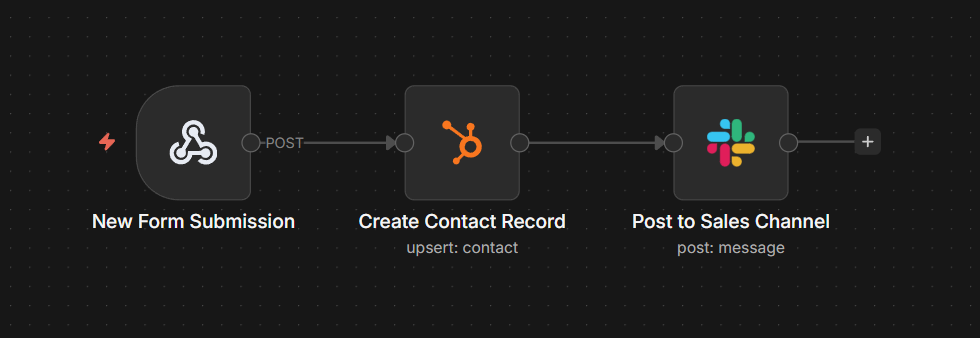
A workflow consists of three nodes. Test each node individually, inspect the data at every step, and deploy. When a form submits, the entire sequence executes automatically — you don’t need to code, though you can add JavaScript or Python in the Code node if needed.
When to use workflow orchestration?
You need workflow orchestration for more complex processes that span across multiple systems. It’s the right choice for long-running systems with sophisticated error recovery or tasks with a high failure cost.
Signs that your workflow requires orchestration include:
- Parallel processing
- Complex error handling
- Cross-service coordination
If your workflow requires a single source of truth to prevent the double-execution problem, simple automation solutions won’t be enough. Mature strategies incorporate orchestration into existing workflow automation processes. Orchestration provides workflow-level state management, dependency tracking, and unified error recovery.
Orchestration handles what automation can’t: retries with backoff, compensating transactions, conditional branching based on runtime data, dependencies, and end-to-end observability across distributed systems.
Situations that require orchestration include:
- E-commerce order fulfillment: An order simultaneously triggers inventory checks, payment processing, and printing shipping labels. If the customer’s payment method fails, the orchestrator triggers a rollback on inventory reservation.
- Supply chain restock: When inventory drops across multiple warehouses, the orchestrator places vendor orders and updates the storefront. If the primary vendor is out of stock, it switches to a backup option to maintain inventory levels.
- User onboarding: A new signup triggers a request for identity verification. If the user fails the identity verification process, it removes their welcome email from the queue.
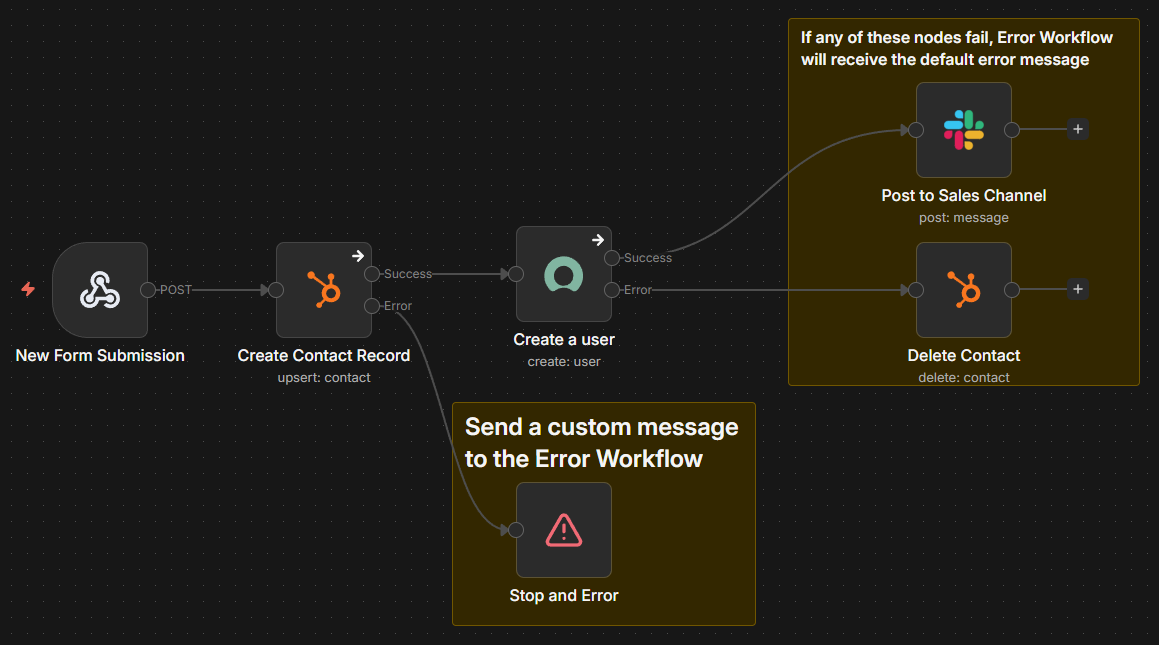
Error workflows automate failure handling with retry logic, fallback paths, and alerting. Sub-workflows break complex processes into reusable components that can be called from multiple workflows. Wait nodes pause execution for external events — webhook responses, human approvals, scheduled times — allowing workflows to coordinate with systems that operate on different timescales.
The execution history shows exactly which steps were completed and which failed, letting you inspect data at each node and resume from the failure point without re-executing successful steps.
Visual debugging lets you click any node to see input/output data and testing workflows step-by-step before deploying to production.
Production considerations when using both layers
Layering orchestration on top of workflow automation tools requires a clear boundary. Your team must decide where a simple task-level automated workflow ends and the central controller’s work begins. That line defines on-call ownership and deployment architecture. If it’s blurry, you end up with fragmented governance. When that happens, ownership splits across different teams in ways that don’t match how the workflow actually runs.
Defining this boundary also supports your observability strategy. Your automation layer should catch individual API failures. The orchestration layer should monitor the health and reliability of the entire business process. Misplacing these responsibilities can lead to tool sprawl and complicated error handling across distributed systems.
Prioritize these technical considerations when using both layers/when moving from automation to orchestration:
- Idempotency design: Ensure that re-running an automated task produces the same result every time.
- Compensation handlers: Design undo logic to maintain a consistent state if a step in the sequence fails down the line.
- Layered instrumentation: Use automation for pass/fail metrics and orchestration for end-to-end latency and dependencies.
- Unified governance policies: Check that each automated action follows your security and reliability standards through a central production control plane. For example, n8n's Business and Enterprise plans provide SSO, RBAC (role-based access control), audit logs, and extended workflow version control via Git – ensuring every automation and orchestration follows organizational policies without managing separate governance systems.
Teams often start with simple automation, hit complexity limits, then swap one platform for an orchestration tool. n8n eliminates this migration. The workflow you build today with three nodes connecting a webhook to Slack can run alongside the 50-node orchestration you build next year. Same platform, same visual canvas.
Here’s how n8n supports both automation and orchestration:
- Execution history with state awareness: n8n tracks which steps have been completed, enabling safe retries from failure points.
- Automated failure handling: Error workflows let you define cleanup actions when specific nodes fail.
- Granular, step-level visibility: Execution logs let you inspect input/output data at each step and track workflow performance over time. Enterprise plan adds log streaming to external monitoring systems (Datadog, Splunk) for centralized observability.
As complexity grows, you can implement advanced features without migration:
- Queue mode for horizontal scaling (multiple worker instances)
- Error workflows for automated failure recovery
- Sub-workflows for reusable process components
- Git version control for workflow change management
- SSO and RBAC for team governance at scale
Your simple automations keep running, while your orchestrations use the same nodes, same integrations and same debugging tools on the same platform. You don’t lose implicit company knowledge and avoid migration downtime.
Common challenges of workflow orchestration vs. workflow automation
Poor design choices for orchestration and automation can lead to architectural debt. If you build complex orchestration logic with task-level automation tools/engine, your system may lose its “memory” mid-process/may lose track of which steps are completed. These issues compound as pipelines scale and governance gaps become more pronounced. No single production control plane enforces standards, which can lead to fragmented ownership and compliance issues.
Here are some common challenges across design-time mistakes and runtime failure patterns:
- State corruption: Partial failures leave data in an inconsistent mess because the system can't trigger a safe rollback.
- Brittle retry-by-re-trigger: Restarting a failed sequence from the beginning can create a double-execution problem.
- Observability gaps: It’s difficult to track a single logic flow across multiple distributed systems without centralized tracing.
- Secrets sprawl: Managing credentials across disconnected layers creates security and reliability issues.
Modern orchestration platforms address these challenges through unified architecture. Workflow-level state management prevents partial failures from corrupting data — orchestrators track which steps have been completed and trigger rollbacks or compensating transactions when failures occur.
- Visual execution traces provide end-to-end observability, showing exactly where workflows break and what data flowed through each step.
- Centralized credential management (like n8n's encrypted secrets store) consolidates authentication across integrations, reducing exposure and simplifying compliance.
- Enterprise features like external secret store integration (HashiCorp Vault, AWS Secrets Manager) enable rotation policies without updating individual workflows.
Scale using both: Workflow and orchestration
Scaling systems effectively isn’t about choosing between workflows or orchestration — it’s about knowing when to use each.
Workflows are ideal for simple, linear processes. But as systems grow in complexity — with dependencies, failure handling, and state — orchestration becomes necessary. A useful rule of thumb: When the cost of a single failure outweighs the effort of building centralized control, it’s time to move beyond basic workflows.
Platforms like n8n enable this transition without forcing a re-platform. You can start with simple automations and progressively evolve into state-aware orchestration as your needs grow — all within the same system.
This approach avoids the risks and overhead of rebuilding your architecture as complexity increases.
Choose the right pattern for each process, adopt tools that support both, and build systems that can evolve from straightforward workflows to robust orchestration on a single foundation.
FAQ
How can I implement workflow automation and orchestration in my organization?
Start by automating simple, straightforward tasks to gain quick wins. Add a central controller. Implement workflow-level coordination when your processes grow in complexity or involve multiple distributed systems.
Is orchestration just advanced workflow automation?
No. While they use similar building blocks (triggers, actions, integrations), orchestration is a separate architectural layer on top of individual automated tasks. It coordinates complex dependencies and ensures production reliability across multiple automated tasks.
Can n8n handle both workflow automation and orchestration patterns?
Yes. n8n is a flexible tool that supports both patterns. It handles simple, trigger-based process automation while providing multi-step state management and error handling needed for orchestration.