




Data rarely lives in the same place it was created. Every time you sync customer records between systems, you’re forced to deal with different schemas. Without a systematic approach, pipelines become a tangle of undocumented scripts and fragile ETL data mapping logic that breaks the moment a source system changes.
n8n helps you implement data mapping best practices by moving that logic onto a visual canvas where every transformation is explicit and inspectable. This keeps integrations resilient and audit ready as they scale.
What data mapping actually does in a pipeline
Data mapping is an architectural contract between a producer (a place where the data is coming from) and a consumer (where the data lands). This "contract" defines how fields move from a single source to a destination without losing meaning. It ensures a user_id in one place becomes a customer_account_number in another with full integrity.
Data mapping differs from raw data transformation and schema migration:
- Transformation changes the format or value of data, like turning an ISO string into a Unix timestamp.
- Schema migration implies moving data between different versions of the same system.
- Data mapping is the set of rules and relationships that governs the entire ETL pipeline.
Treating data mapping as a one-off scripting task across disparate data sources creates black-box integrations. Without a clear strategy, you often discover data quality issues only after corrupted data reaches production, which results in costly cleanup and downtime.
Data mapping techniques
Instead of looking for a universal solution, match the type of mapping to the specific integration pattern you’re trying to support. Here are the core techniques for mapping data.
Manual mapping
Manual mapping assigns each source field to a specific target field. For example, Source A (fullname) goes to Destination B (customer_name). This handcrafted approach works for small-scale integrations and high-stakes data where every field needs human oversight, but fails at scale. As soon as you move data between multiple systems, the number of integrations proliferates, so manual mapping becomes a bottleneck and a constant source of human error.
Schema-based mapping
Schema mapping focuses on the structural level. Instead of looking at individual fields, you review entire data objects and how they relate to one another. This is the standard for structured databases where the schema matching must be precise to avoid ingestion errors, but the limitation is flexibility. If you’re dealing with polymorphic JSON responses from a modern API, rigid schema mapping can break the moment a vendor introduces a new field.
Automated (rule-based) mapping
Rule-based data mapping tools use logic to automatically link fields with identical names or types. This accelerates large-scale data integration and reduces repetitive work. But it often trips over semantic mapping challenges, such as when two fields represent the same concept but use different terminology like zip_code versus postal_code.
AI-assisted/semantic mapping
Advanced semantic mapping uses metadata or AI to understand the context of the data. This is useful when you need to reconcile data from third-party vendors with inconsistent naming conventions. The risk here is black box logic. If an AI incorrectly matches two fields, you need execution logs to audit exactly why the system made that decision.
6 data mapping best practices for production pipelines
Building a pipeline that works today is easy. Building one that stays stable after three API updates and a database migration requires more foresight. The following practices help create high-quality data mapping workflows.
1. Treat the mapping spec as a first-class artifact
A mapping specification shouldn't live in a stale spreadsheet or a comment at the top of a script. It needs to live inside your documentation and remain current. By visualizing the mapping process on a canvas, the workflow becomes the documentation. Anyone on the team can look at it and see exactly how data moves through the workflow.
2. Enforce type coercion explicitly
Never let your destination system guess what your data types are. If a source API returns a price as a string ("19.99"), use an additional data transformation step to explicitly convert it to a float. This prevents a database from rejecting a record because of a type mismatch.
3. Handle null and missing fields with fallbacks
Production data is messy. You’ll eventually hit a record with a missing required field, so design your mappings with fallback strategies. Use expressions to provide default values (like N/A or 0) to prevent the entire pipeline from halting because of one incomplete record.
4. Design for schema evolution
API schemas aren’t static. When a vendor updates their API, your mapping shouldn’t just break. Using versioned workflows or environment variables to toggle between different mapping versions allows you to support legacy data while transitioning to newer structures without a risky cutover.
5. Separate mapping logic from transformation logic
Decoupling is the most effective way to keep a pipeline clean. Mapping defines where data goes, while transformation defines how it's changed.
6. Validate at the mapping boundary
The closer you validate to the source, the easier it is to fix errors. Instead of waiting for your destination database to throw an error, validate your data against the required schema at the mapping stage. This ensures only clean data moves forward.
How to prevent common data mapping failure modes
Even if you follow every best practice, things can still go sideways.
Here’s how to diagnose problems and use n8n’s visual toolset to proactively mitigate them:
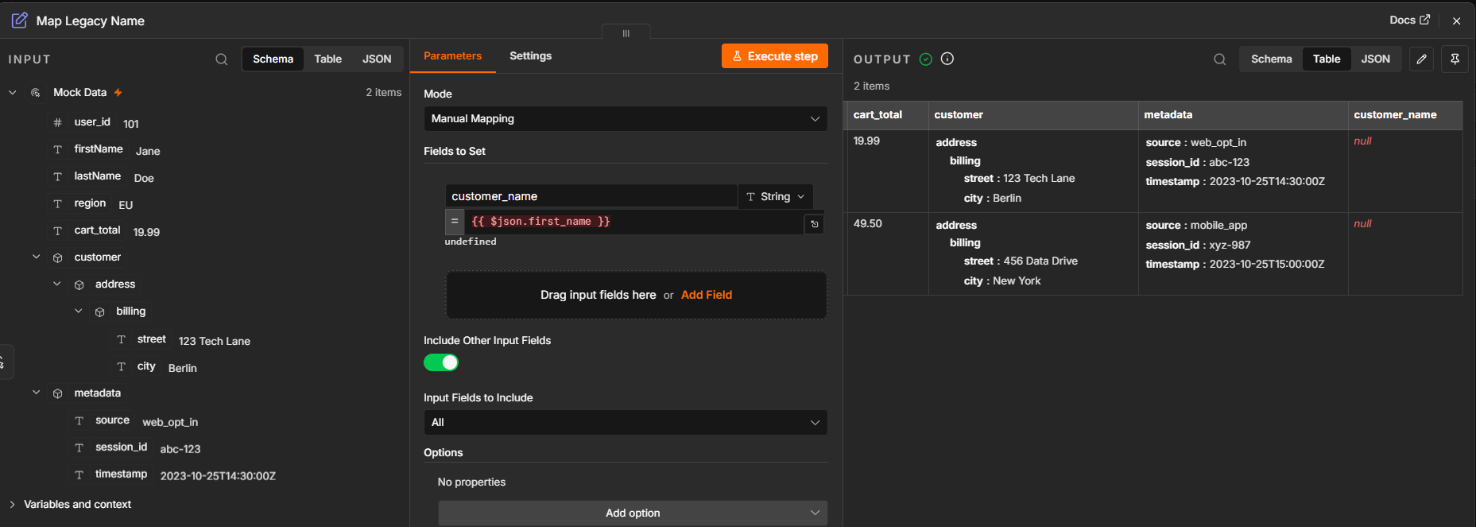
Unmanaged schema drift
- The problem: A source system changes its payload structure (like renaming a field or removing an object) without notice, causing downstream nodes to fail.
- The fix: Visual workflows surface these changes immediately. If a field name changes at the source, the mapping node shows a “missing” indicator, letting you update and test the mapping before deploying.
Lossy transformation chains
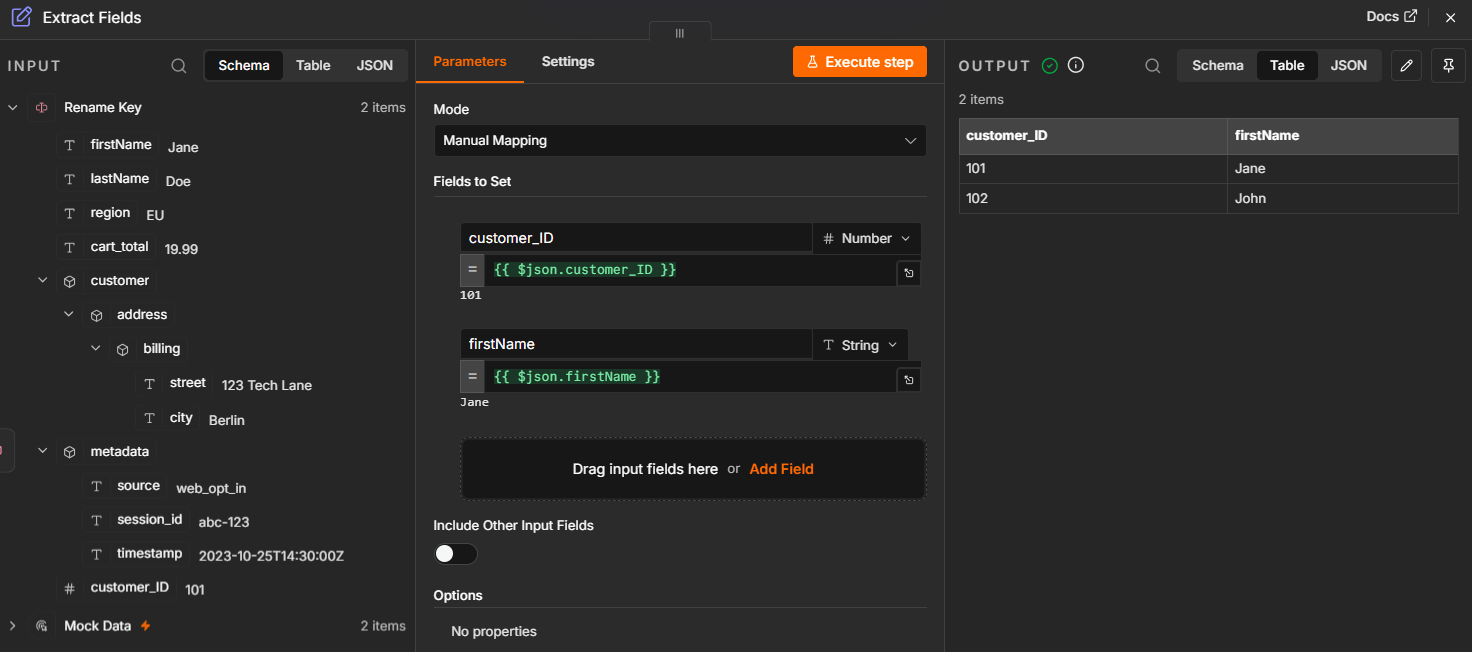
- The problem: Data precision or essential metadata is stripped away during multiple intermediate transformation steps, leaving the destination with incomplete records.
- The fix: Use node-level execution history to inspect data after every step. Instead of running an entire pipeline to find a bug, you can verify the output of a single node to catch data loss before it compounds.
Nested structure flattening errors
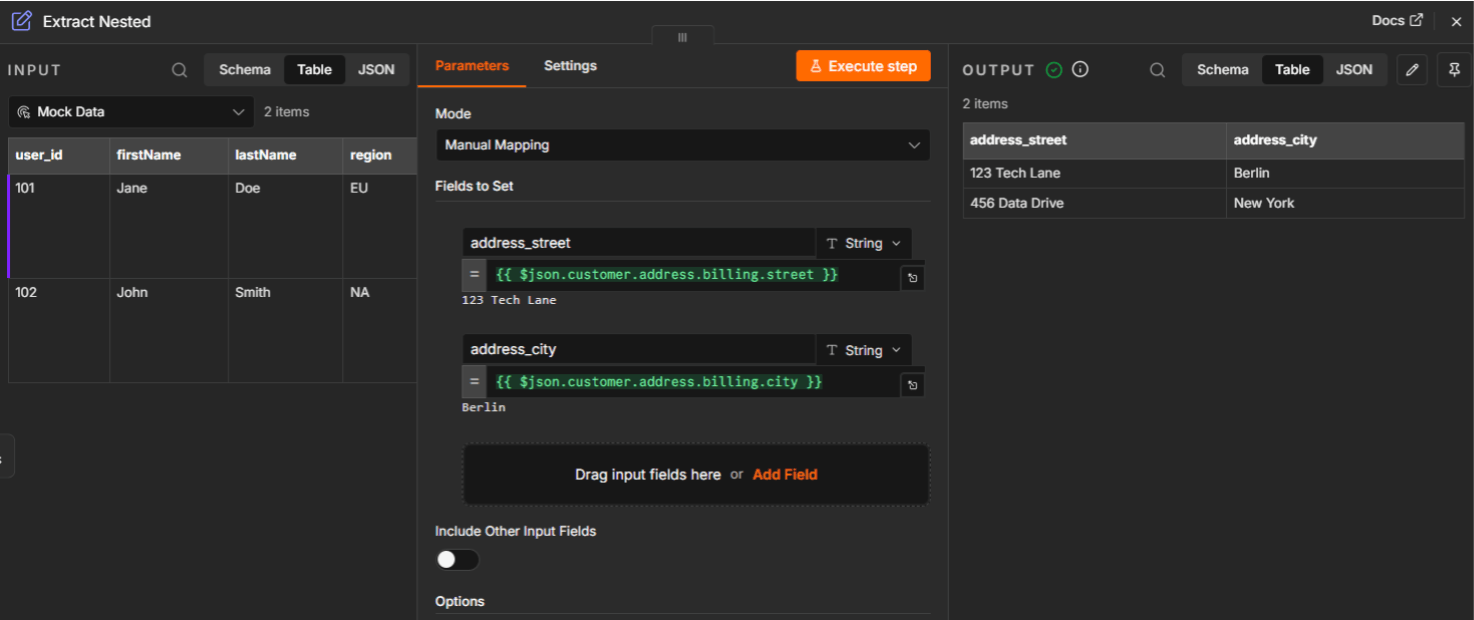
- The problem: Attempting to extract data from deeply nested JSON often leads to undefined errors if the path is miscounted or the structure is inconsistent.
- The fix: Use the live data preview in your expression editor. By building expressions against real response data (like {{$json.customer.address.billing.street}}), you avoid the guesswork associated with deeply nested JSON.
Implicit type coercion failures
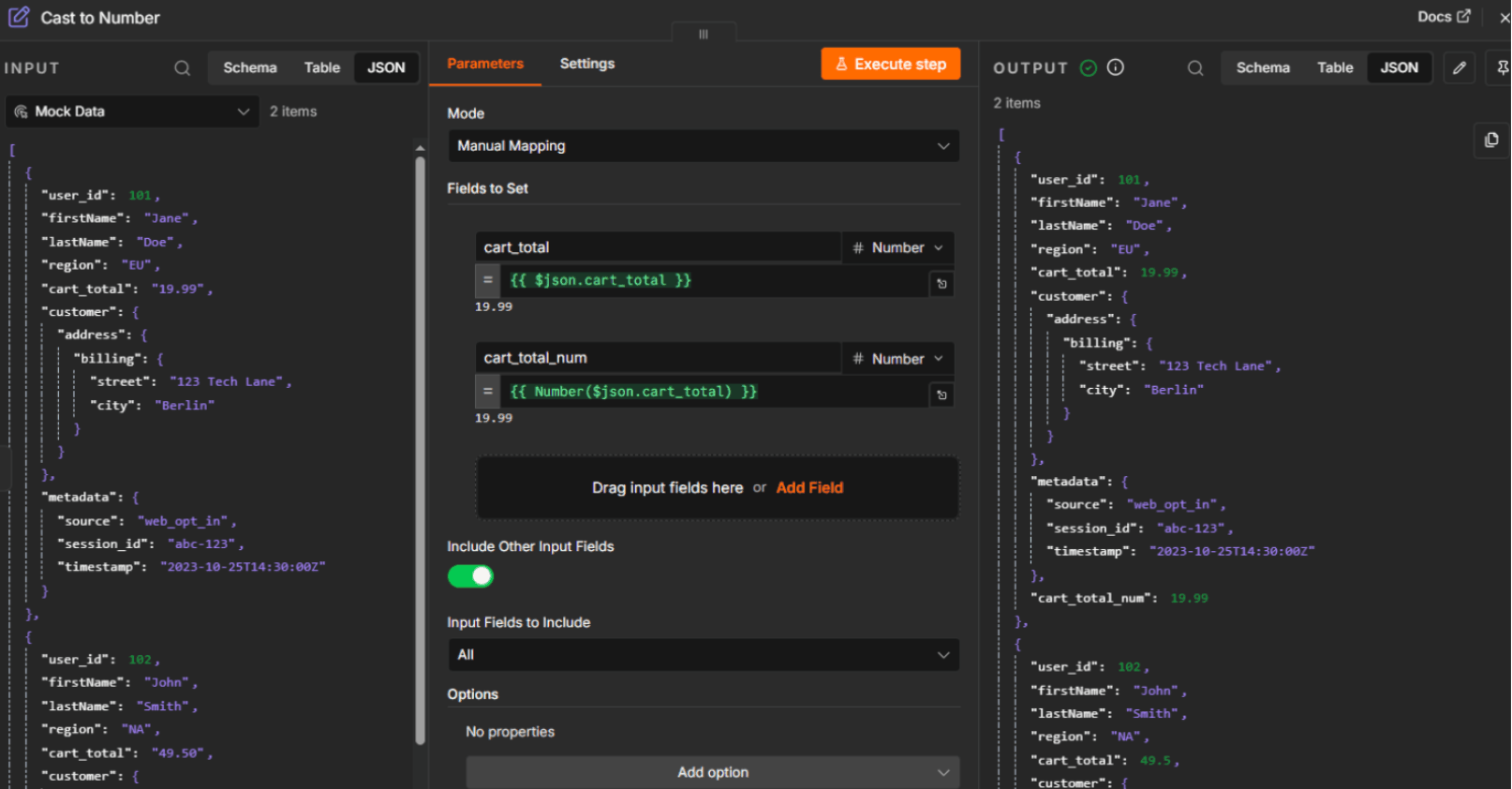
- The problem: Destination databases may reject a record because a field was passed as the wrong type like a string “100” instead of an integer 100.
- The fix: Cast your data types as early as possible using explicit transformation nodes to ensure a string never reaches an integer column in your destination database.
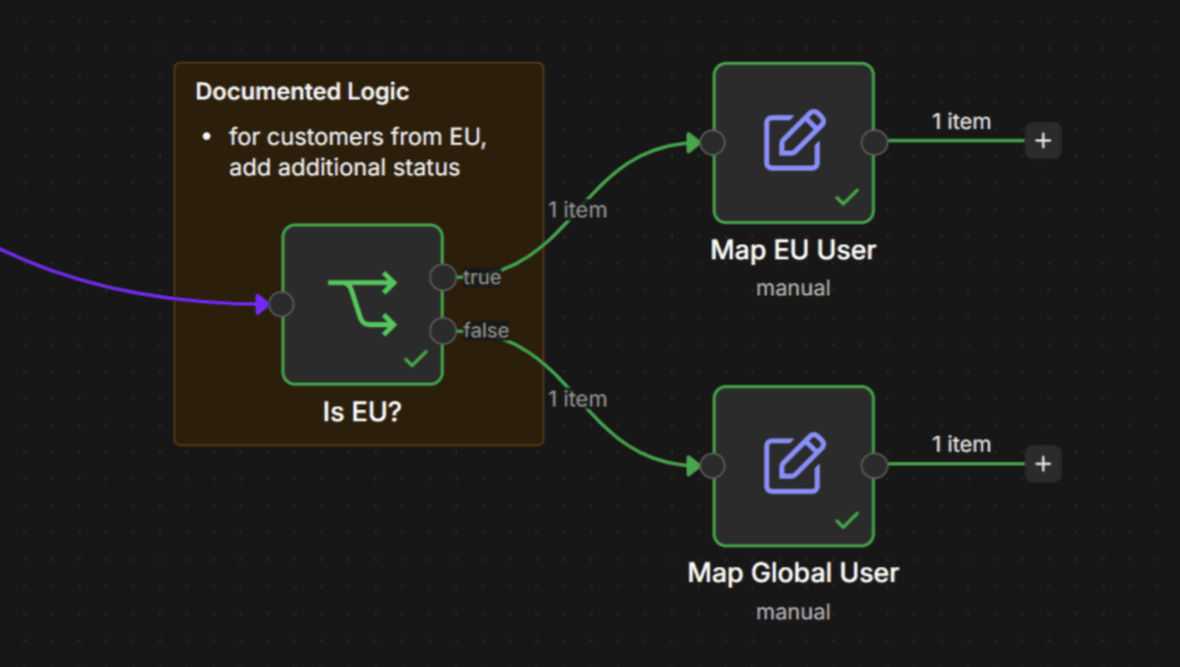
Undocumented conditional mapping logic
- The problem: Important business rules like “only map this field if the user is in the EU” are buried inside a script, making it difficult for other team members to audit the logic.
- The fix: Move conditional logic out of scripts and into dedicated branching or “if” nodes. Place a sticky note with additional comments for better visibility. This makes the “why” behind a mapping decision obvious to any engineer auditing the flow.
Automating data mapping in workflow pipelines
In a production context, mapping is a core component of data orchestration. It requires creating configuration-driven flows that can handle data integration at scale. The goal is to stop writing custom code for every new field and move toward a system that handles mapping systematically.
n8n provides the production-grade features needed to scale these operations. It lets technical teams build low-ops pipelines where the logic is visible. This makes it possible for non-specialists to debug issues without diving into a codebase they didn't write.
Here are some key n8n features for mapping at scale:
- Compare Datasets node: Detects changes between any dataset like reconciling geographic location data between a CRM and a shipping platform;
- Edit Fields (Set) node: Provides a visual way to handle field mapping and type coercion without code;
- Rename Keys node: The simplest way of data mapping by renaming variables
- Merge node: Powerful way of combining of multiple data streams
- Data Pinning: Uses real-world test data to verify your mappings work as expected before deploying to production;
- Execution History: Provides full visibility of each transformation step for debugging.
Build for the long haul with n8n
The best way to think of data mapping is as an engineering discipline. The integrations that stay stable under the pressure of schema evolution are the ones built with visibility and a clear separation of concerns. By prioritizing explicit type handling and making your transformation logic audit-ready, you protect the integrity of your data and save time.
Using a platform like n8n turns these mapping and validation steps into first-class concerns. It gives you the power to inspect, version, and scale your data flows with the same rigor you apply to any other part of your codebase, without the overhead of maintaining custom ETL scripts.