



Anthropic's work with dozens of production teams revealed that the most successful LLM agents use simple, composable patterns rather than complex frameworks. However, even simple agents introduce a problem that traditional automation doesn't have.
A standard workflow either runs or errors out. An agent can run successfully and still hallucinate facts, call the wrong tool, return malformed data, or ignore instructions entirely. An agent’s execution completes, but the result is wrong.
You can reduce these failures significantly through layered controls. These controls also help answer a common production question: how can I restrict the actions AI agents are allowed to take without removing their usefulness?
This article covers industry best practices for AI agent reliability. We focus on proactive controls and design choices that make runtime behavior more predictable. Improved agent performance reduces the cost of subsequent evaluation and monitoring.
Layered controls for reliable AI agents
Reliability isn't a single setting. Different failures have different causes, and each requires a different type of control layered on top of each other. Below is the overview of the controls that matter most often in production and how changing each one can impact the accuracy of the AI Agent output.
| Control type | What it achieves |
|---|---|
| Model selection & config | Appropriate output randomness and reasoning depth for the task |
| Prompt structure | Clear context, specific instructions the agent can act on |
| Output schemas | Predictable data formats, valid structures for downstream systems |
| Tool design | Accurate tool selection and correct parameters |
| Guardrails | Safe inputs and policy compliance |
| Workflow routing logic | Controls which branch, agent, or tools handle the request at any stage of the workflow |
The following sections walk through each control type with implementation patterns and practical guidance for how to optimize agent reliability in n8n.
Applying controls across the AI agent lifecycle
The controls below are ordered roughly by how early they are involved in the agent lifecycle:
- Model selection and configuration happen before the agent runs;
- Prompt structure shapes what the agent knows when it starts;
- Output schemas validate what the agent produces;
- Tool design defines how the agent calls external tools and with what parameters;
- Guardrails filter inputs before processing and outputs before delivery;
- Routing logic determines which branch handles the request and what the agent can do - before, during or after the result generation.
As you test your agent, you'll see which controls need adjustment – maybe outputs are too inconsistent, maybe the agent picks the wrong tool for certain queries. Each layer gives you a specific lever to tune without rebuilding the entire agent.
How do I choose the right model configuration?
Most LLM providers allow configuring several model parameters. Here are the most important ones which matter in live systems:
- Temperature controls randomness. Lower values produce consistent, focused outputs. Higher values introduce variety but also unpredictability.
- Top P (nucleus sampling) limits which tokens the model considers before making a choice. A value of 0.1 means the model only picks from the top 10% most likely tokens. A value of 1.0 considers all tokens and a more diverse word choice.
- Reasoning/thinking modes change how some models behave. They dedicate more compute to complex reasoning before responding.
Some LLMs such as OpenAI's o3 or Anthropic’s Claude models use chain-of-thought reasoning by default and restrict temperature settings: it’s not possible to set arbitrary values.
How should I structure my prompts?
Your prompt largely shapes what the agent does. Vague instructions without specific context lead to ambiguous and inaccurate responses.
The more relevant information you provide up front, the less the agent needs to guess or speculate.
A solid prompt typically includes a few key elements:
- Role: what the agent is and is not (E.g. "You are a technical support specialist. You are not a sales representative.").
- Context: all relevant data the agent needs to do their job.
- Task: what you want the agent to accomplish.
- Constraints: what the agent is not allowed to do, topics to avoid, tone requirements.
- Output format: how the response should be structured.
- Examples (optional): input/output pairs that show the expected behavior.
When you make changes to your prompt, it’s easy to lose track of your progress unless you save it. That’s why version control is critical when tweaking words, adding constraints or changing formats: this way, you can remember what worked and why you made changes in the first place.
With a dedicated prompt repository which keeps prompts separately from workflows, you can:
- Compare performance across different prompt versions
- Roll back quickly when a new prompt underperforms
- Reuse proven prompts across multiple agents
- Track who changed what and when
Beyond structure and version control, it’s equally important to be aware of the most common mistakes when prompting an AI Agent, such as:
- Assuming the agent knows what they don't know. If the agent needs the current date, inject it. If it needs to know your company policies, provide them.
- Overloading the agent with irrelevant context. More doesn’t always mean better. Add only what's needed for the current task, not every piece of information you know.
- Neglecting the boundaries. Without explicit restrictions, agents act without a sense of direction. Let them know what's off-limits.
How do I enforce consistent output formats?
When your agent's output gets sent to the subsequent steps, unpredictable data formats can interfere with the next steps in your workflow. One effective way to achieve a consistent result is to use structured outputs with clearly defined JSON schemas.
Most LLM providers allow generating structured outputs out of the box. For example, OpenAI and Anthropic both support JSON schema-based output validation at the API level.
How do I design tools for accurate selection?
Every tool your agent connects to needs a clear name, a description, and well-defined parameters. The agent uses this context to select the tool. Broad or misleading descriptions can cause incorrect tool selection. Specify exactly what the tool does, what it returns, and when it should be used.
Here’s a brief overview of what a good vs. bad tool description looks like.
| Bad | Good |
|---|---|
| Tool name: getData Description: Gets data |
Tool name: Search_Customer_Orders Description: Finds orders for a specific customer by customer ID or email address. Returns order ID, status, items, and total amount. Use this when the user asks about their orders, order status, or purchase history. |
Not all parameters should be decided by the agent. You can fix values that should never change, pull data dynamically from previous workflow steps, and let the agent decide only where user intent matters.
How do I handle unsafe inputs and outputs?
Guardrails act as a checkpoint that scans data for policy violations, sensitive data, or malicious inputs. Place it before your agent to filter incoming messages, after the agent to sanitize outputs, or at both steps for stronger data protection.
Common use cases for using guardrails include blocking prompt injection attempts, redacting personal data before passing it to the model, and validating outputs for compliance before sending out the final result.
How do I control and restrict AI agent capabilities at each stage?
One of the most important reliability questions is: how can I restrict the actions AI agents are allowed to take? The answer is to apply capability controls at every stage of execution. When building AI agents, you can add fixed logic. Define rules to control which tools and instructions your agent has access to based on conversation state, user input classification, or workflow variables.
Routing logic can apply at any point: before the agent, to decide which agent or branch handles the request; during the agent execution to limit available tools per stage; and after the agent responds to send output to review or a follow-up workflow.
Any multi-stage process can involve workflow routing patterns:
- intake → processing → confirmation,
- free trial → paid features, or support triage → a specialist handoff.
The controls above apply to any platform where you decide to build and execute your AI Agents. But the effort to implement them varies significantly depending on your tool's functionality.
How to make AI Agents reliable in n8n
n8n provides dedicated nodes for each control type, so you can apply them visually without building the implementation from scratch.
Model configuration
Every AI Agent node connects to a chat model sub-node with configurable temperature, Top P, and reasoning mode settings. You can switch between providers (OpenAI, Anthropic, Ollama) without rebuilding the workflow - the control layer stays the same regardless of which model you use.

Dynamic prompts
Instead of hardcoding prompts, n8n expressions let you inject live data from previous workflow steps - customer name, order status, session history - directly into the system prompt. The agent works with real context for every execution. Expressions also support conditional logic, so the same prompt can adapt based on user type, conversation stage, or any workflow variable.
You are a customer support agent for Acme Corp.

Customer context:
- Name: {{ $json.customerName }}
- Order ID: {{ $json.orderId }}
- Order status: {{ $json.orderStatus }}
- Support history: {{ $json.supportHistory }}
- Current date: {{ $now.toISO() }}

Help the customer with their question. If you don't have enough information to answer, say so.
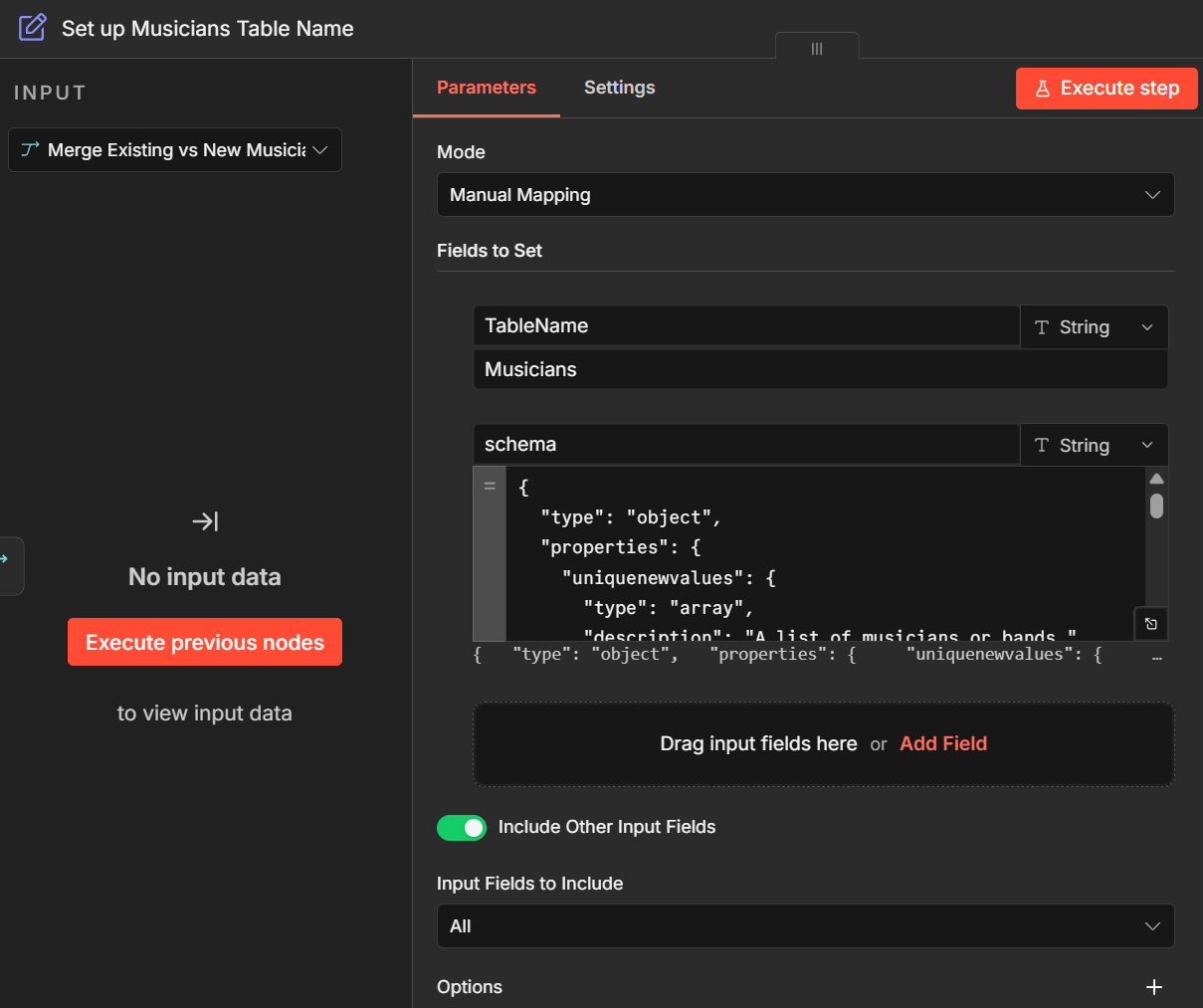
For prompt versioning, you can store, compare, and roll back previous prompt without touching the workflow itself with the n8n Data Tables feature.
Structured outputs. The Structured Output Parser node enforces JSON schemas on every agent response. You define the allowed values, types, and required fields once - from that point, outputs are consistent and readable by machine. After the agent responds, the parser validates the output against strict rules.
This makes values extremely consistent. With fields like category, the output is always exactly "billing" - never "BILLING", or "Payment" that can cause disruption in your downstream logic.
Tool parameters. n8n gives you granular control over what the agent decides. It lets you mix all three parameter types within a single tool: for a customer order lookup, the customer ID would come from session data, cancelled-order filtering is activated for passing data dynamically, and only the time range is left to the agent.

Sub-workflows. Complex operations like order cancellation involve multiple steps that must execute in a specific order and stop if one of them fails. Wrapping them into a sub-workflow means the agent sees one tool while the internal logic can process sequencing, validation, and error handling. The agent doesn’t have the freedom to skip steps or call them out of order.

Guardrails. The Guardrails node scans for policy violations, sensitive data, or malicious inputs - before the agent processes them, after it responds, or in both scenarios. This means that you can catch unsafe content at the workflow level, without leaving it to the model.
Here are some practical examples for how to make the best of the Guardrail node in n8n:
Routing logic. IF and Switch nodes let you split the workflow into stages: each with its own AI Agent node, tool set, and prompt. For example, a customer chatbot can be split into separate branches: first qualify and then book - with each connected to a different AI Agent node using its own tool set and prompt.
For deeper implementation details of different control layers for AI Agents in n8n, see the Production AI Playbook and AI agentic workflows guide.
Wrap up
Reliable agents aren’t built overnight and are the result of continuous layered control. In this article we've covered:
- Model configuration: temperature and Top P settings that reduce output randomness;
- Prompt engineering: injecting context directly and structuring prompts consistently;
- Version control: storing prompts outside agent workflows for rollback and version control;
- Logical routing: using branching logic to keep agent capabilities within boundaries at each stage;
- Output schemas: enforcing predictable JSON formats with the output parser;
- Tool design: clear descriptions and strategic use of static, expression, and agentic parameters:
- Sub-workflows: wrapping multi-step operations into controlled, testable units;
- Guardrails: filtering problematic inputs and outputs before they cause problems.
Start with the basics - temperature settings, structured prompts and output schemas. Add guardrails and routing logic as your use case becomes more advanced. Test each layer before adding the next one.
What's next?
Even with these controls, agents will occasionally misbehave. The next article in this series covers how to debug AI agent failures – using execution history, tagging executions for filtering, and tracing tools like LangSmith for detailed analysis.
The rest of the series:
- Evaluating agent performance – running systematic tests with the n8n's Evaluations feature;
- Metrics that matter – which numbers to track and which to ignore;
- Monitoring in production – log streaming, dashboards, and output visibility.
If you're building your first agent, start with How to build an AI agent in n8n. For infrastructure and deployment strategies, see 15 best practices for deploying AI agents in production.