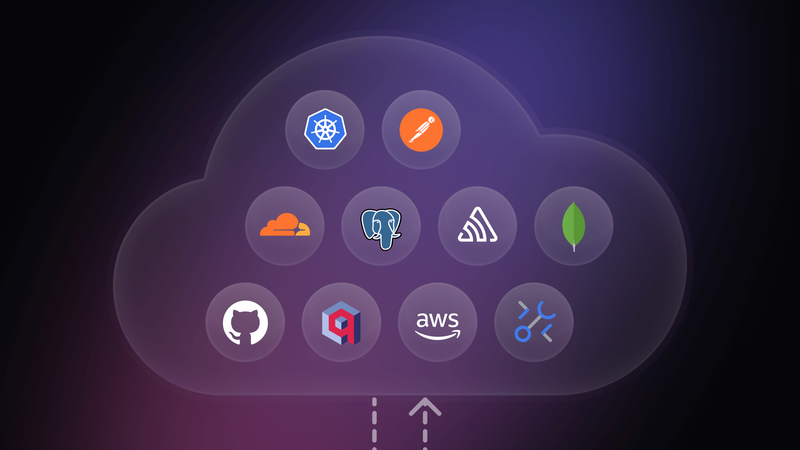
The Model Context Protocol (MCP) feels like magic until you try to deploy it. You connect Claude to your local database, ask a question using natural language, and it executes complex SQL instantly. But the moment you close your laptop, that agent dies. It cannot react to customer emails, run on a schedule, or trigger alerts. Your powerful tools are trapped in your local IDE.
In this guide, we will break down these barriers. We will categorize the best MCP servers for coding, data, and ops, and then show you how to orchestrate them using n8n. By the end, you will have a curated toolkit and a method to turn temporary chats into persistent, automated systems.
This guide is optimized for developers who understand LLM basics but want to build production-grade AI workflows. Let's dive in!
How we composed this MCP server list
The MCP ecosystem is exploding. A search on GitHub today yields hundreds of repositories, but many are experimental "Hello World" implementations or unmaintained hobby projects.
To filter the noise, we evaluated lots of servers against strict criteria. We didn't just look for stars; we looked for production readiness.
- Official and mature implementations: We prioritized "Official" servers maintained by the vendors themselves (like Sentry or Stripe). When an official option wasn't available, we selected "proven community" projects with active maintenance and high adoption, strictly avoiding abandoned weekend projects.
- Architectural stability (Docker vs. raw): We prioritized servers that offer Docker implementations (like the PostgreSQL or Puppeteer servers). Running complex dependencies directly on your host machine via npx is fragile; containerization ensures the server works regardless of your local Node.js version or OS libraries.
- Orchestration potential: Finally, we asked: "Can this scale?" A server that only works in a chat window is a toy. We selected servers that expose structured tools capable of being chained together into larger, automated workflows using n8n.
What are the 20 best MCP servers for developers?
In the list below, you will see two key tags. Here is what they mean for your setup:
- Docker (best for self-hosting): These servers include a Dockerfile or a pre-built image. This means you can host them entirely on your own infrastructure, whether that is a VPS, a home lab, or a private cloud. You own the data, you control the logs, and you don't entirely rely on a third-party.
- Remote: This tag is the key to automation. It means the server isn't stuck inside your local command line; it can expose a URL. This allows tools like n8n to connect to the server over the network, enabling your workflows to "reach out" and use these tools without them being installed on the same machine. This makes everything easier with n8n Cloud, as you can simply plug in the URL of a remote server without worrying about DNS or complex networking.
Data and memory
Give your agent persistent storage and RAG capabilities.
PostgreSQL MCP by CrystalDBA
Website: crystaldba/postgres-mcp
Deployment: Docker (self-hosted)
Why use it: Instead of asking an LLM to write a query that you have to copy-paste, this server gives the agent direct execution access. It can inspect schemas and run SELECT statements to answer questions about your data instantly.
Note: If you use Neon PostgreSQL, check out the Official Neon Remote MCP as a remote MCP option.
Qdrant MCP Server
Website: qdrant/mcp-server-qdrant
Deployment: Docker (self-hosted)
Why use it: This can be the vector store for your RAG implementation. But since it exposes tools to both store and retrieve information, it can also act as autonomous long-term memory for your agent. Your agent can autonomously store and retrieve "memories" or technical context, preventing it from hallucinating on older data.
MongoDB MCP Server
Website: mongodb-js/mongodb-mcp-server
Deployment: Docker (self-hosted)
Why use it: The official integration for NoSQL data. It translates natural language questions into complex aggregation pipelines, allowing the agent to query unstructured data without you needing to remember specific operator syntax.
Cloud and infrastructure observability
Manage infrastructure, Kubernetes clusters, analyze logs, and alerts without leaving your workflow.
Kubernetes MCP
Website: containers/kubernetes-mcp-server
Deployment: Docker (self-hosted)
Why use it: A wrapper around kubectl that allows safe interactions with your cluster. Your agent can list pods, describe failures, and even restart services in your Dev/Staging environment securely.
AWS MCP
Website: awslabs/mcp
Deployment: Docker (self-hosted), Remote
Why use it: The official reference implementation for AWS. It exposes various AWS SDK capabilities to the agent, allowing for resource inspection and management directly from your chat interface.
Azure MCP Server
Website: Azure.Mcp.Server
Deployment: Docker (self-hosted), Remote
Why use it: The official Microsoft implementation for Azure resource management. It enables the agent to interact with Azure Resource Manager (ARM) to audit and modify resources.
Google Cloud MCP Servers
Website: googleapis/gcloud-mcp
Deployment: Local only
Why use it: Provides agentic access to Google Cloud resources. Useful for listing compute instances, checking storage buckets, or managing IAM roles via natural language.
Cloudflare MCP Servers
Website: Cloudflare Agents
Deployment: Remote
Why use it: Allows the agent to interact with Cloudflare Workers, KV, and DNS settings. Ideal for quickly checking deployment statuses or clearing caches without logging into the dashboard.
Vercel MCP
Website: Vercel Official
Deployment: Remote
Why use it: Tightly coupled with the Vercel ecosystem. It allows the agent to inspect deployment logs and runtime errors. If a build fails, the agent can pull the logs, analyze the error, and propose a configuration fix immediately.
Grafana MCP
Website: grafana/mcp-grafana
Deployment: Docker (self-hosted)
Why use it: It connects your agent to your metrics and dashboards. It enables the agent to query data sources and retrieve visualization snapshots to diagnose performance anomalies.
PagerDuty MCP Server
Website: PagerDuty/pagerduty-mcp-server
Deployment: Docker (self-hosted), Remote
Why use it: The ultimate "On-Call" assistant. Instead of waking up to manually check an alert, an automated agent can fetch incident details, check who is on call, and trigger resolution workflows automatically.
Sentry MCP Server
Website: Sentry Official
Deployment: Remote
Why use it: It connects your agent directly to error tracking. You can ask "What is the most frequent error in production?" and the agent will retrieve the stack trace, read the corresponding file from GitHub, and propose a fix.
Development and testing tools
GitHub MCP Server
Website: github/github-mcp-server
Deployment: Docker (self-hosted), Remote
Why use it: Essential for any coding workflow. It allows the agent to read file contents, search repositories, manage branches, and create pull requests without needing a local git client.
Postman MCP Server
Website: postmanlabs/postman-mcp-server
Deployment: Docker (self-hosted), Remote
Why use it: Allows the agent to run and test your API collections. When you deploy a new endpoint, the agent can verify it actually works by executing the existing Postman test suite.
Context7 MCP Server
Website: upstash/context7
Deployment: Docker (self-hosted), Remote
Why use it: A specialized search tool optimized specifically for technical documentation. Unlike a generic web search, it is tuned to find the most up-to-date framework syntax and coding patterns to feed into the agent's context window.
Playwright MCP
Website: microsoft/playwright-mcp
Deployment: Docker (self-hosted)
Why use it: Enables the agent to run end-to-end tests or browse the web as a user. Useful for verifying UI changes or automating browser-based tasks that lack an API.
Product and business operations
Notion MCP Server
Website: makenotion/notion-mcp-server
Deployment: Docker (self-hosted), Remote
Why use it: Provides read/write access to team wikis. The agent can read a "Product Requirements" page in Notion and generate the corresponding code skeleton, or document technical decisions back into the wiki.
Stripe MCP
Website: Stripe Official
Deployment: Remote
Why use it: Ideal for debugging billing issues. You can query customer subscriptions or check failed transactions in Stripe's test mode without needing to log into the dashboard UI.
Jira MCP
Website: atlassian/atlassian-mcp-server
Deployment: Remote
Why use it: Bridges the gap between project management and code. It allows the agent to find tickets, log work, and transition issues in Jira Cloud, keeping the backlog updated as you code.
How to run, manage, and orchestrate MCPs efficiently (with n8n)?
A successful agentic system requires more than just a collection of disconnected tools; you must orchestrate these MCP servers into a cohesive workflow.
n8n provides a straightforward environment to handle this orchestration, effectively bridging the gap between autonomous execution (always-on, trigger-based background processes) and agentic AI (dynamic reasoning and tool utilisation).
Before we build our first pipeline, we must establish the underlying communication layer.
How AI agents communicate with MCP servers
The Model Context Protocol uses two distinct transport methods, and mixing them up is the most common reason for integration failure.
- Stdio (local context)
This is the default mode for desktop applications like Cursor, Claude Desktop, or GitHub Copilot. The way this works is you start the MCP server as a local sub-process (literally running a command like npx run). The problem is that It requires the AI agent and the Server to be on the same physical machine. This makes it unusable for cloud automation or background workers.
- Streamable HTTP
For autonomous agents, the ecosystem has shifted to Streamable HTTP. It allows for stateless, reliable connections over any network, whether that is your internal Docker network or the public internet. It decouples the agent from the tool. Your n8n instance can be in one container, and your PostgreSQL MCP server can be in another, communicating via standard HTTP requests.
Connect MCP servers to n8n: Docker or remote
Depending on your infrastructure, there are two primary ways to configure this in n8n using the MCP Client Tool node.
- The Docker-Compose setup
If you are self-hosting n8n, the most robust approach is to run your MCP servers as companion containers within the same Docker network.
Because Docker provides built-in DNS resolution for containers on the same bridge network, you do not need to expose your MCP server ports to the public internet. n8n can communicate with the server directly using the Docker service name.
- The remote MCP server setup
If you are using n8n Cloud or connecting to a third-party hosted MCP server (like the official GitHub Copilot endpoint), the architecture relies on standard web requests. This approach usually requires some sort of authentication.
Use MCP servers in your Agentic automation workflows
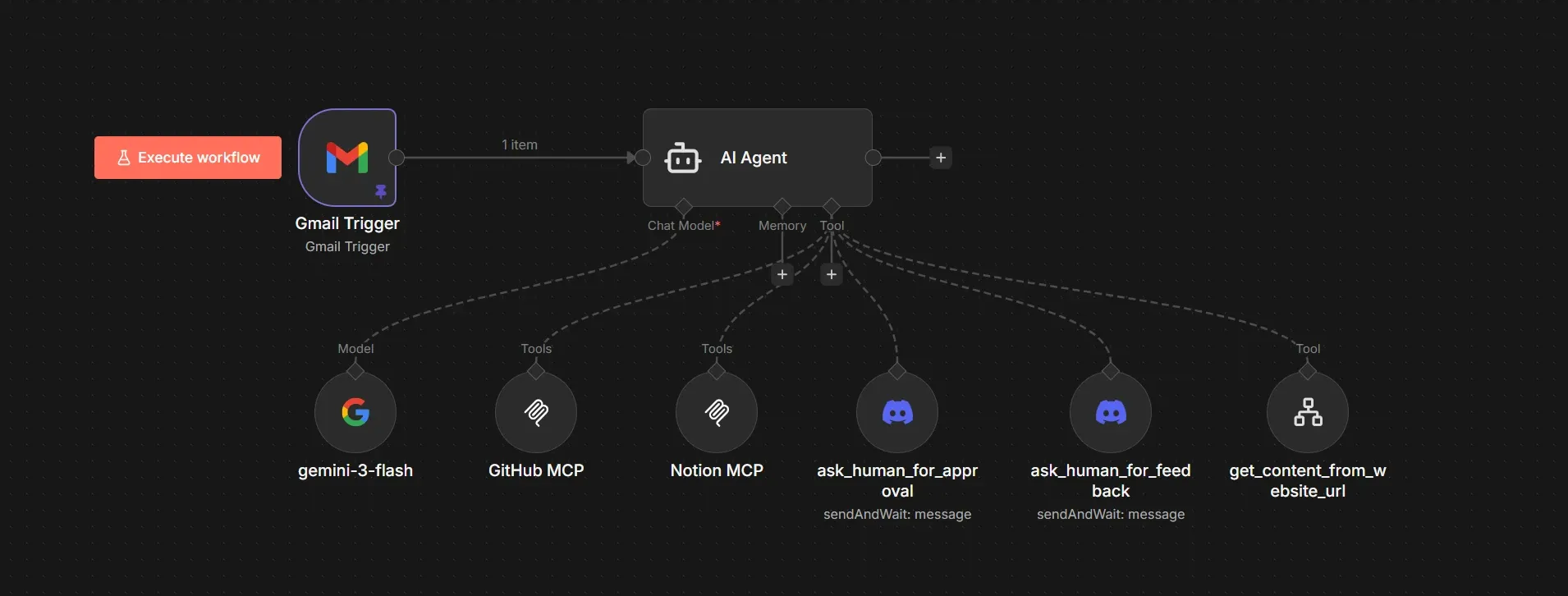
We are going to build an autonomous loop that turns reading newsletters into blog ideas using n8n with the GitHub MCP and Discord for human-in-the-loop. Instead of just sitting in a chat window, this agent is triggered by an incoming email:
- A Gmail listener filters for technical newsletters.
- A LLM-powered agent analyzes the email body to decide if the content matches the portfolio’s topics, in this case, technical blog articles, or a watchlist for new technologies etc.
- If something relevant to the portfolio website is found in the newsletter, we enhance the context of the agent by scraping the actual links from the newsletter.
- A Discord "Human-in-the-loop" node requests approval before taking action.
- The GitHub MCP server creates detailed issues and assigns them to Copilot.
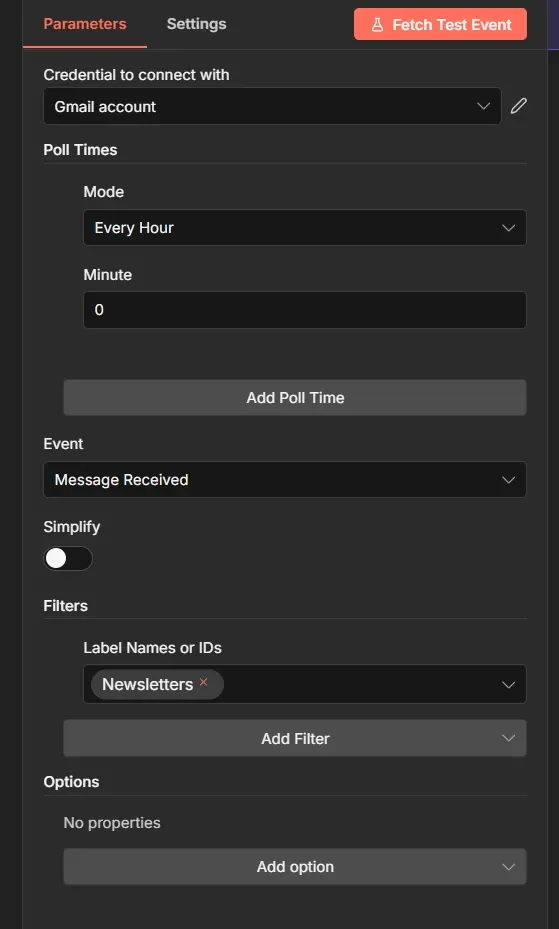
First, we configure the Gmail Trigger node. To avoid noise, we set the poll time to Every Hour and strictly filter for the label Newsletters.
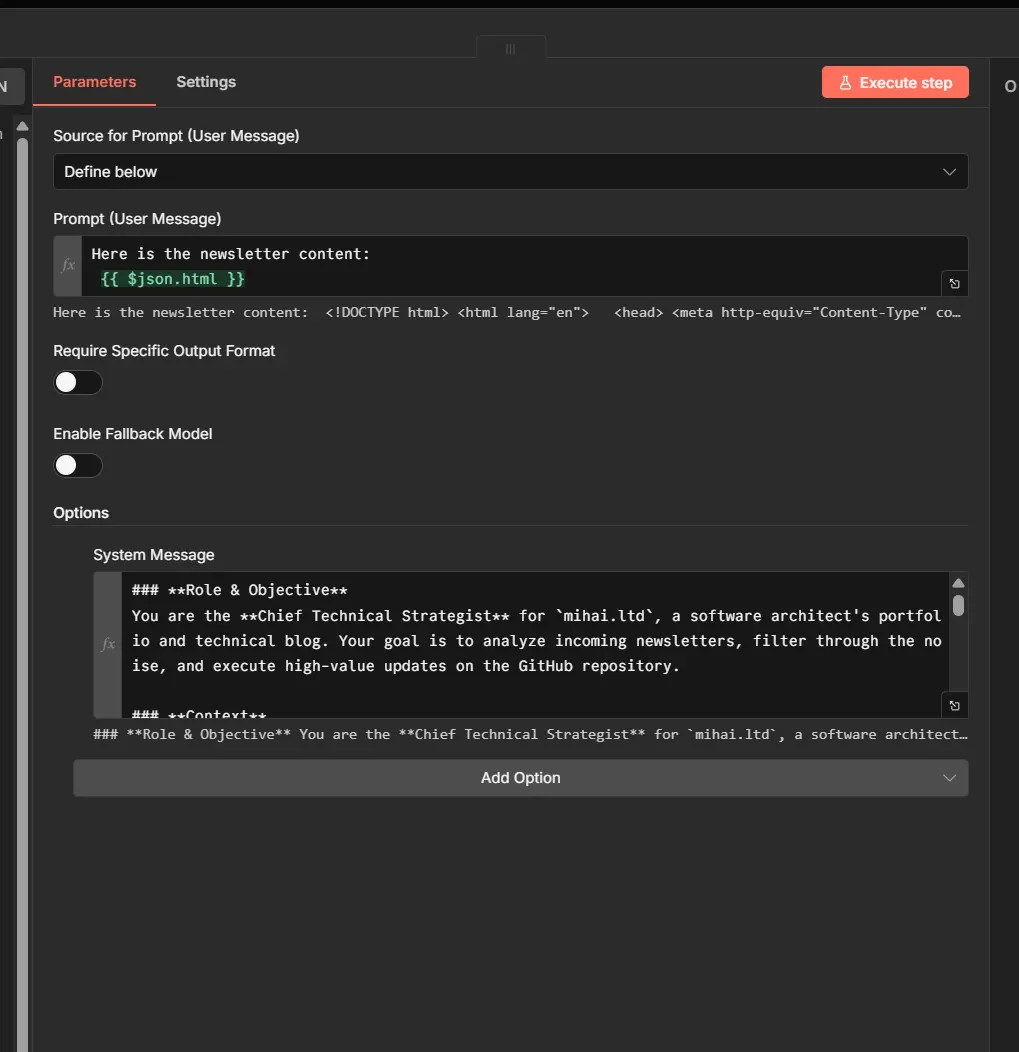
In the System Message, we define the persona along with the following workflow instructions:
- It reads the newsletter and tries to find fitting ideas for the website or the blog, generating 10 ideas.
- Asks for feedback via Discord, to pick and choose and improve the ideas.
- Once ideas are approved, it then fetches additional content relevant to the ideas, from the links to articles or documentation found in the newsletter.
- Then plans concrete and detailed GitHub issues including acceptance criteria so that this work can be picked up.
- It can delegate all or some of these issues to the GitHub Copilot to start the actual implementation.
- Using the Notion MCP, it can read or save information to a Notion database, acting like the agent’s memory and audit trail.
Next, using the MCP Client Tool node, let’s connect to the GitHub MCP Server using the public endpoint https://api.githubcopilot.com/mcp/. Select HTTP Streamable as the transport and authenticate via Bearer token.
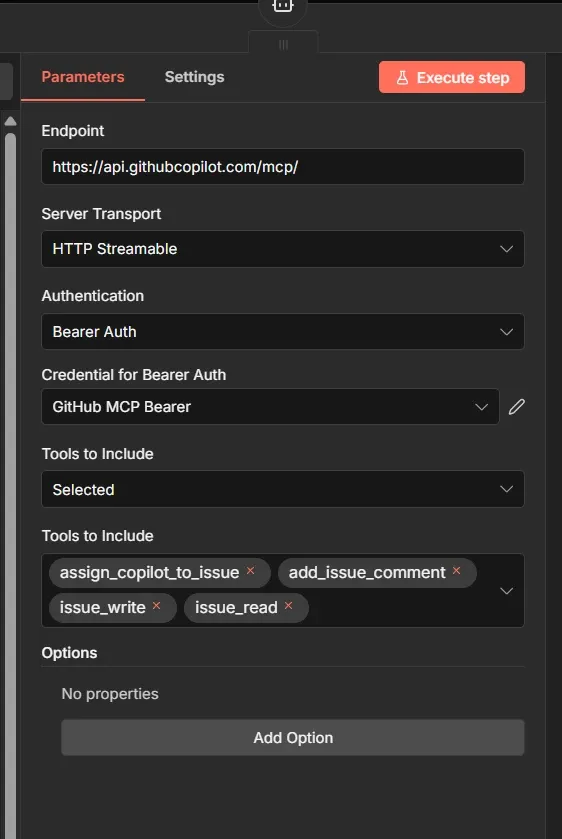
The agent will only have a specific subset of tools available from the MCP server: assign_copilot_to_issue, add_issue_comment, issue_write and issue_read. So it will never read or edit the actual code on a repository, it will just create issues and delegate them to the GitHub Copilot.
We then configure the two types of user interaction:
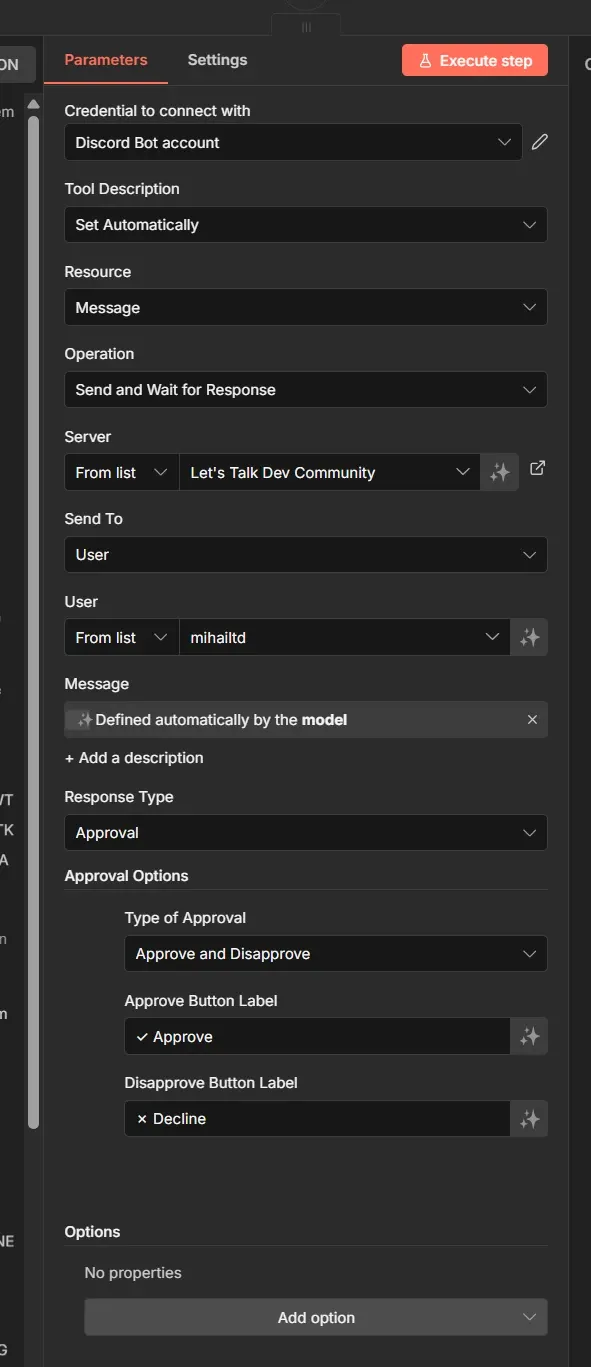
- Approval via Discord - you will get a message on Discord, and two buttons so you can quickly approve or reject an action.
- Ask for feedback: instead of buttons, this allows text input. You can reply with specific instructions or corrections, guiding the agent to revise its plan before it commits any code.
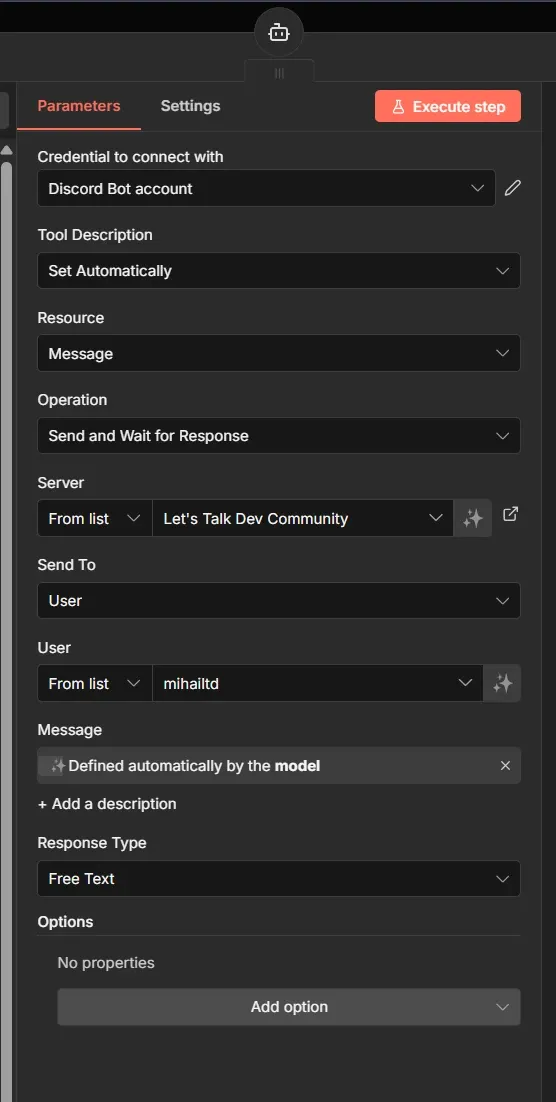
The main functionality that allows for human-in-the-loop is the Send and Wait for Response function in the Discord node.
You can also add other n8n workflows as tools to your agent, which can lead to some creative ways of combining and composing agents. For example, we have a web scraping n8n workflow that we turned into a tool for the agent to use for scraping websites and use the content as context using the Call n8n Workflow Tool node.
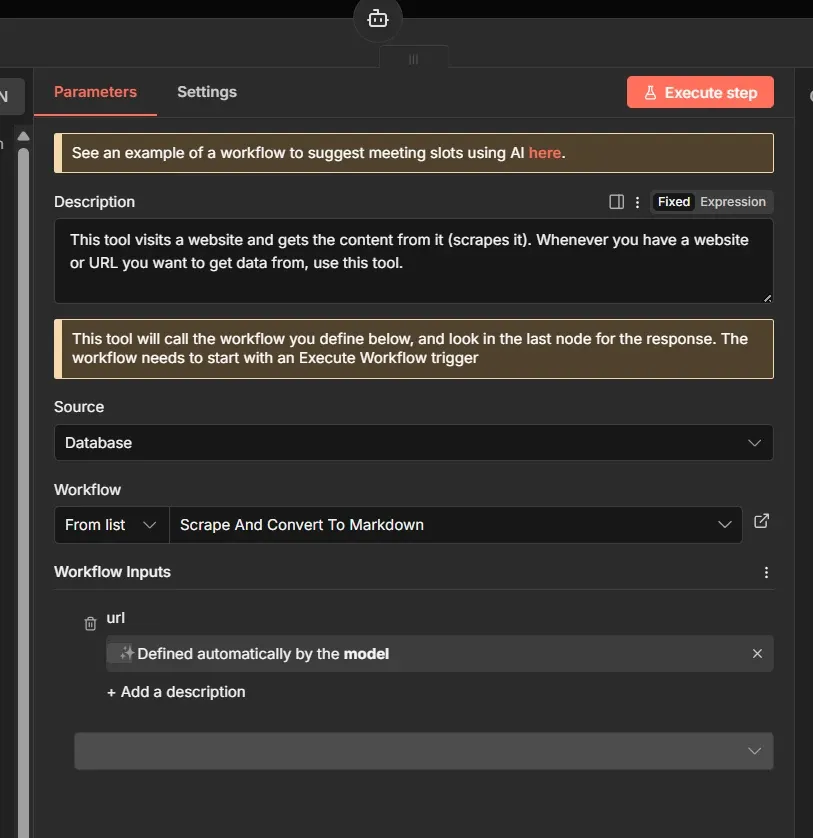
At this point, we can start testing this workflow. It grabs the latest newsletter article you received, and you should start seeing interactions on Discord:
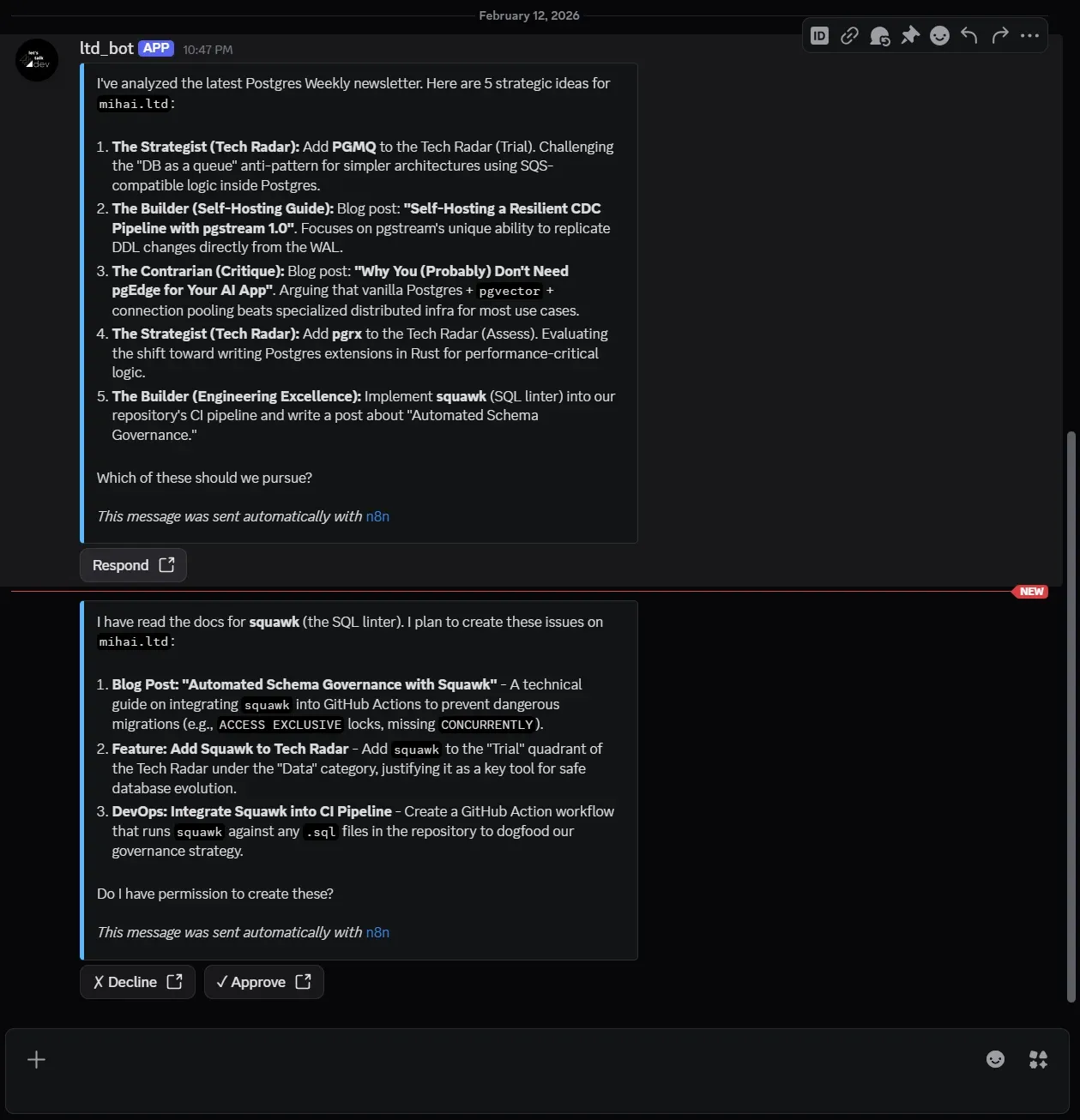
In the example above, the AI agent identified a few ideas for my portfolio website, then proceeded to create GitHub Issues on that repository, so I can review, start implementing, or assign them to GitHub Copilot.
Awesome!
No MCP server? No problem.
Let's say you want your AI agent to log research notes into a Google Sheet, but you can't find a "Google Sheets MCP" on GitHub. You don't need to write a new server in TypeScript. You can build it visually in n8n in 5 minutes.
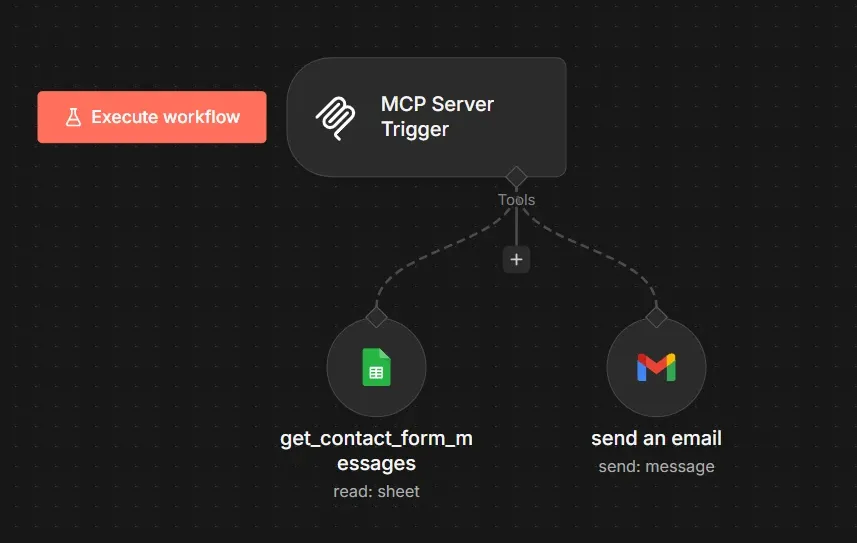
To create an MCP Server in n8n, we use the MCP Server Trigger node. We can then expose regular n8n nodes such as Google Sheets node or Gmail node.
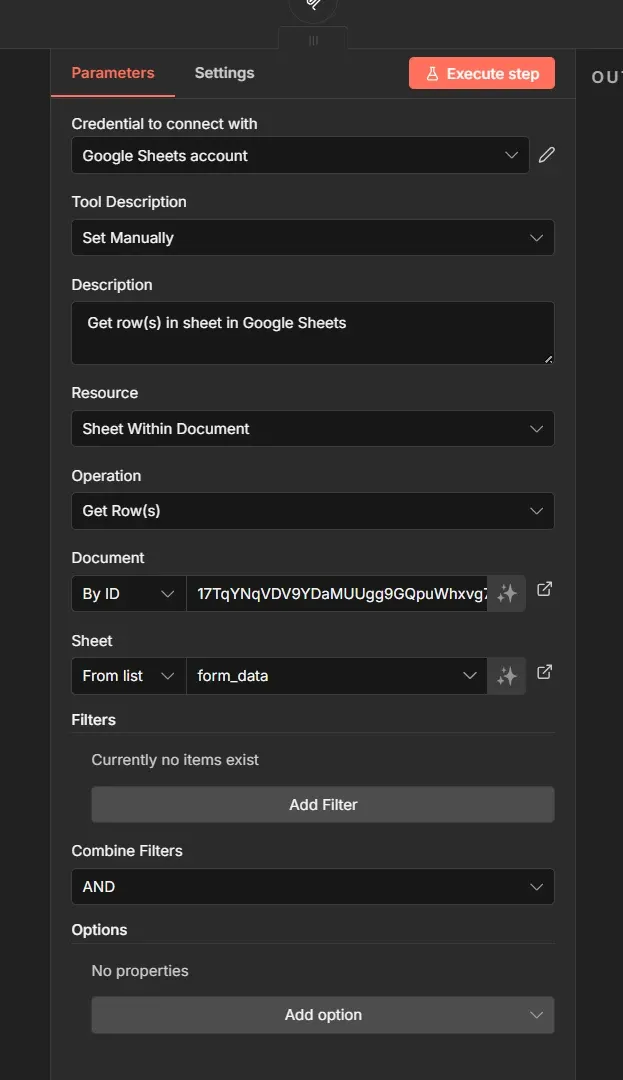
We can configure the Google Sheets tool to allow reading rows from a sheet and the Gmail tool to allow sending of emails.
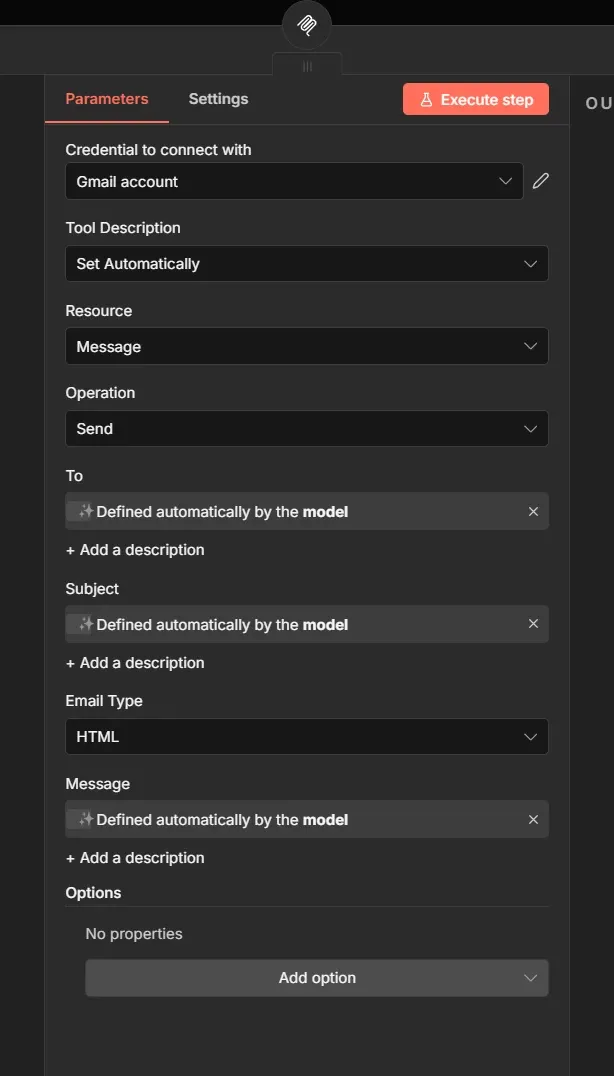
The To, Subject and Message fields are to be filled automatically by the AI agent using this MCP server.
Now you can use the n8n URL for this MCP server and add it to your favourite Copilot app like Claude or VSCode Copilot. In this case I provided my Github Copilot from VSCode a way to ask questions and interact with my newsletter content from the google sheet and gave it the ability to forward or reply to an email. Now you can have this sort of interactions with your chosen AI agent:
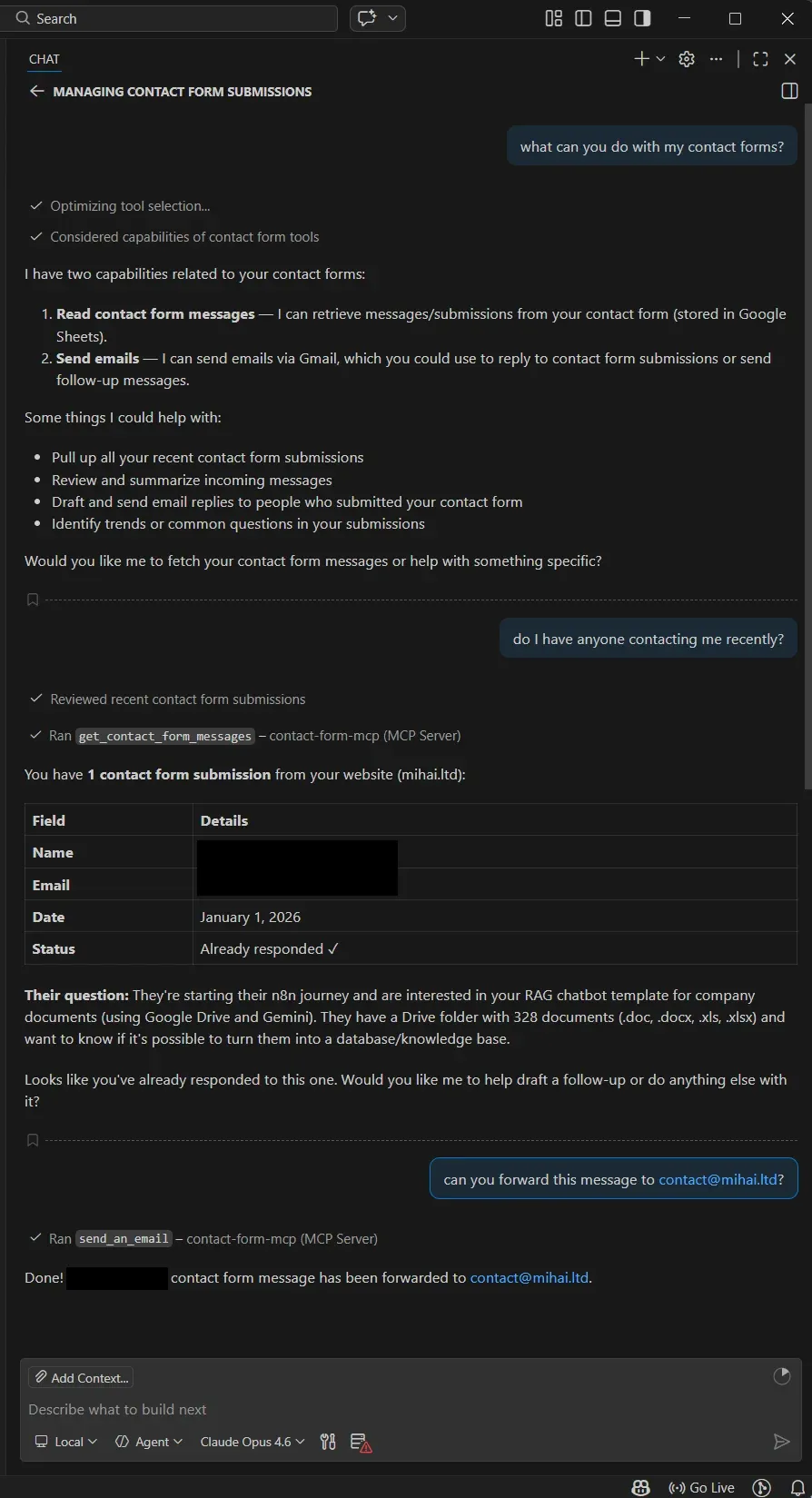
We prompted the copilot to forward me the message from the Google Sheet to my email. You could also ask it to reply directly to your contact enquiries.
Wrap up
We started this guide with a common frustration: the "Smart but Siloed" agent.
Using n8n to orchestrate these MCP servers, we moved past that limitation. We didn't just give the agent "access" to tools; we built an autonomous agentic assistant.
Instead of manually prompting an LLM to check emails, we built a system that wakes up, reads and analyzes an email, then creates and delegates tasks to GitHub Copilot while you are asleep.
What’s next?
Don't let this architecture sit in your bookmarks. Here is your roadmap to move from "reading" to "shipping" this weekend:
- Deploy n8n: Get your local or cloud instance running
- Connect n8n agents to MCP servers, or explore the wider library of n8n AI integrations to expand your agent's capabilities.
- Construct your agentic loop from scratch, or reverse-engineer production-ready patterns from the n8n AI workflow templates directory
If you didn't find the tool you need on this list, don't wait for a vendor. You can use n8n to wrap any API (HubSpot, Salesforce, your internal legacy app) and expose it as a custom MCP server.
Happy Automating!