Your AI workflow drafts customer emails, schedules social posts, and approves expense reports — seamlessly, most of the time. But one misinterpreted instruction or a single hallucinated fact can suddenly create angry customers, compliance headaches, or costly mistakes.
The problem isn’t that AI can’t handle these tasks. It’s that AI shouldn’t handle them alone… at least not yet.
Since ChatGPT became widely available, AI has made incredible strides. Yet we’re still far from artificial general intelligence (AGI), the kind of superintelligent AI capable of human-like reasoning and judgment. For now, the smartest approach is a partnership: humans and AI working together, each covering what the other can’t.
That’s where human-in-the-loop (HITL) automation comes in. By building checkpoints where humans can review, approve, or adjust AI decisions, you get the efficiency of automation without sacrificing accuracy or accountability.
In this guide, we’ll break down HITL automation: what it is, why it matters, where to add review points in your workflows, and how to implement these safeguards in n8n, with practical human in the loop examples you can start using today.
Key takeaways:
- Human-in-the-loop (HITL) automation combines AI speed with human judgment, adding review checkpoints at critical moments to prevent costly errors, compliance issues, and brand damage.
- HITL is most valuable at irreversible or high-risk decision points, such as publishing content, sending customer communications, approving transactions, or modifying sensitive data.
- Well-designed HITL workflows don’t slow automation down — they route only edge cases or low-confidence outputs to humans while letting high-confidence paths run autonomously.
- With flexible tools like n8n, you can build practical HITL patterns using Wait nodes, notifications, branching logic, timeouts, and audit logs across real-world use cases.
Trustworthy AI systems combine deterministic workflows, probabilistic models, & human oversight. Automation ensures control, AI handles complexity, & humans own risk, edge cases, and final responsibility. - Jan Oberhauser, Founder and CEO of n8n
What is human in the loop automation?
Human in the loop (HITL) is a system in which humans oversee automated processes. Although the concept predates its current use in artificial intelligence and machine learning applications, it's strongly associated with these applications today.
The goal is creating a feedback loop: AI handles the heavy lifting (e.g., data processing, pattern recognition, draft generation) while humans provide judgment, context, and course correction. This partnership ensures outputs are accurate, contextually appropriate, and aligned with your standards before they're acted upon.
HITL checkpoints are useful in workflows that:
- Involve risky or low-confidence output
- Operate in regulated industries where compliance and accuracy are non-negotiable (such as healthcare, finance, or legal services where errors have serious consequences)
- Require human judgment to make a final decision
Furthermore, HITL can manifest in several ways. For example, you might have multiple HITL checkpoints within a single workflow or execute an entire workflow with a final HITL checkpoint at the end.
Whether incorporated intermittently or as the final step, HITL checkpoints tend to revolve around these significant actions:
- Approve output
- Reject output
- Get clarification or alter a course of action
Why is human in the loop important?
HITL rightfully anticipates that AI can and oftentimes will be wrong and accounts for that.
According to LangChain's State of Agent Engineering report, the vast majority of organizations still maintain human oversight of AI systems, with most implementing approval checkpoints as their primary guardrail. AI agents and workflows without HITL guardrails are the minority at this point.
And it's not something you should necessarily try to avoid, especially because AI is still very much in its infancy. Current AI models, including the ones you're likely using right now, are known to be non-deterministic and prone to errors, while confidently incorrect, necessitating human review.
Furthermore, for users executing AI workflows at scale, the ability to more effectively direct workflows or stop them before they complete can help optimize token usage and associated spend. It's helpful to understand human in the loop automation in terms of how it works in real workflows and where to incorporate it, which we'll cover next.
As for the consequences of skipping HITL checkpoints?
Ultimately, it would be easy to set and forget AI automations and accept outputs as "good enough" if you don't have to interact with them directly. Adding HITL puts a human decision point directly in your workflow's path, so you must address issues and prevent bad outputs from progressing and causing bigger problems.
How human in the loop automation works
To implement human in the loop automation in a helpful way, you must decide where in your workflow to add checkpoints:
- Whenever incorporating AI steps.
- To verify facts, to review outputs for legal compliance or other sensitive data, and when an automation’s output results in extreme actions like deleting or overwriting data.
- To review outputs before proceeding when an agent completes a task.
- To add necessary context or nuanced human judgement and to address edge cases (or whenever dealing with ambiguity).
- For creative review and brand alignment for workflows that result in AI-generated content.
- For marketing workflows (or with any client-facing outputs), where brand trust is essential.
- To add approval steps, pausing the workflow until a human approves an action (such as financial transactions above a certain threshold).
- To escalate the resolution to a human if confidence is low or an action fails.
For example, in a recent ActiveCampaign webinar for “The Autonomous Marketer Live” series, I shared a workflow I originally built in Zapier, then rebuilt in n8n for a client.
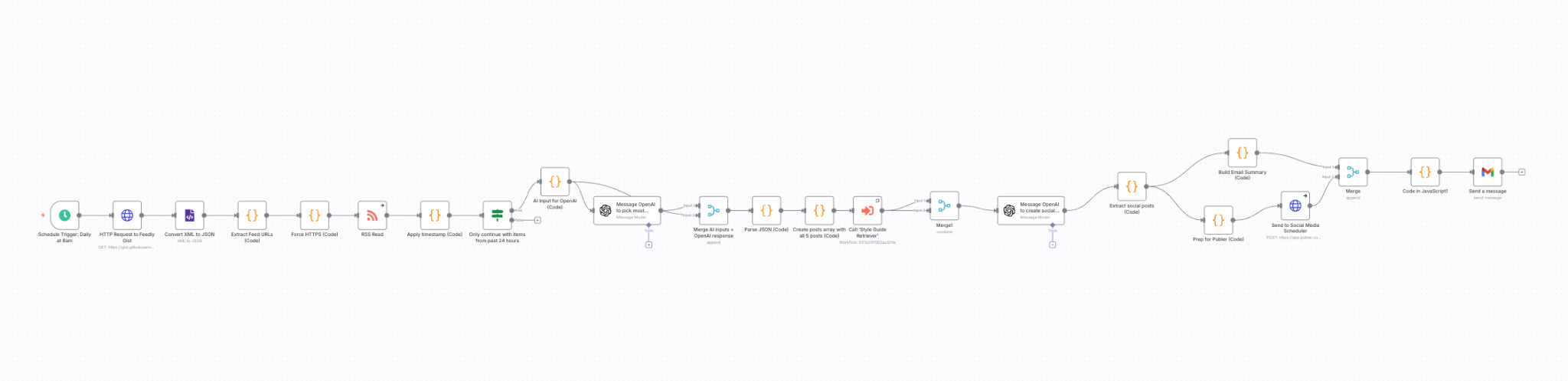
The workflow identifies relevant industry news and drafts social media posts in my brand voice.
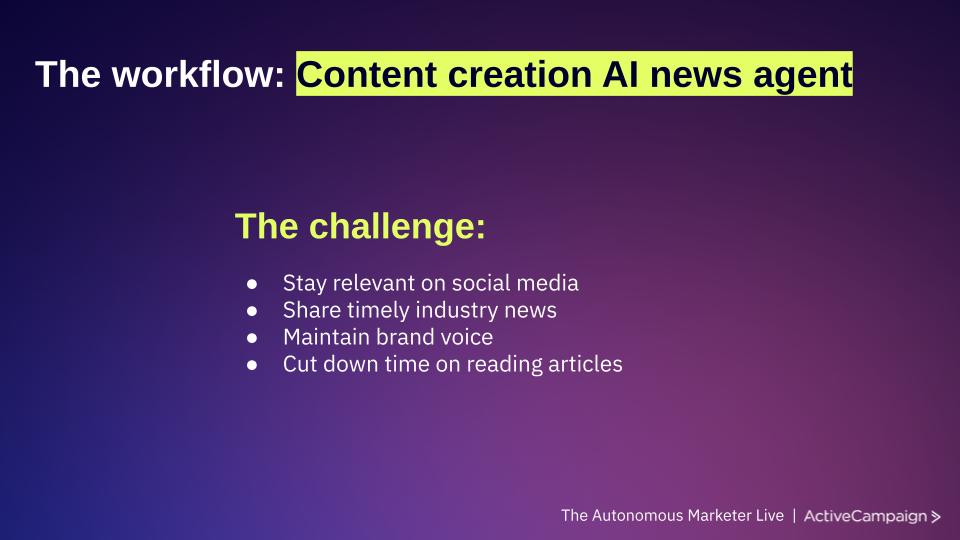
Here’s where HITL makes a difference:
Although I added a social media scheduling component, the resulting posts are not automatically published — I added an HITL checkpoint to first review and approve them in Slack.
The workflow does the work of finding news, drafting posts, and even preparing them in my scheduler. But the final "publish" action only happens after I give explicit approval. This way, AI handles the time-consuming research and drafting, while I maintain final say over what my audience sees.
The takeaway? AI can handle complex, multi-step workflows, but strategic HITL checkpoints ensure the right decision gets made at critical moments. And the more context you provide upfront (through detailed prompts, clear criteria, or examples), the better your AI outputs will be, reducing the friction at approval time.
Here’s another example of a workflow I’ve built to provide additional guidance to help you decide how and where to review workflow outputs with HITL checkpoints:
I created a system to automatically respond to journalist requests (such as those from the now-defunct Help a Reporter Out (HARO)) based on the expert insights I’ve previously shared in published content on both my website and for clients. It runs whenever I receive a new Gmail from senders associated with a “PR” label, searching for relevant insights within a RAG knowledge base I built in Pinecone that stores my chunked content and the associated published URL.
Importantly, it doesn’t automatically respond to these journalists' requests. It prepares a response with all relevant details (including the journalist’s contact information). It delivers the proposed response and relevant details in Slack, where I already do much of my daily work.
Besides using Slack as a HITL checkpoint, I’ve also set up Gmail nodes in n8n for myself and clients.
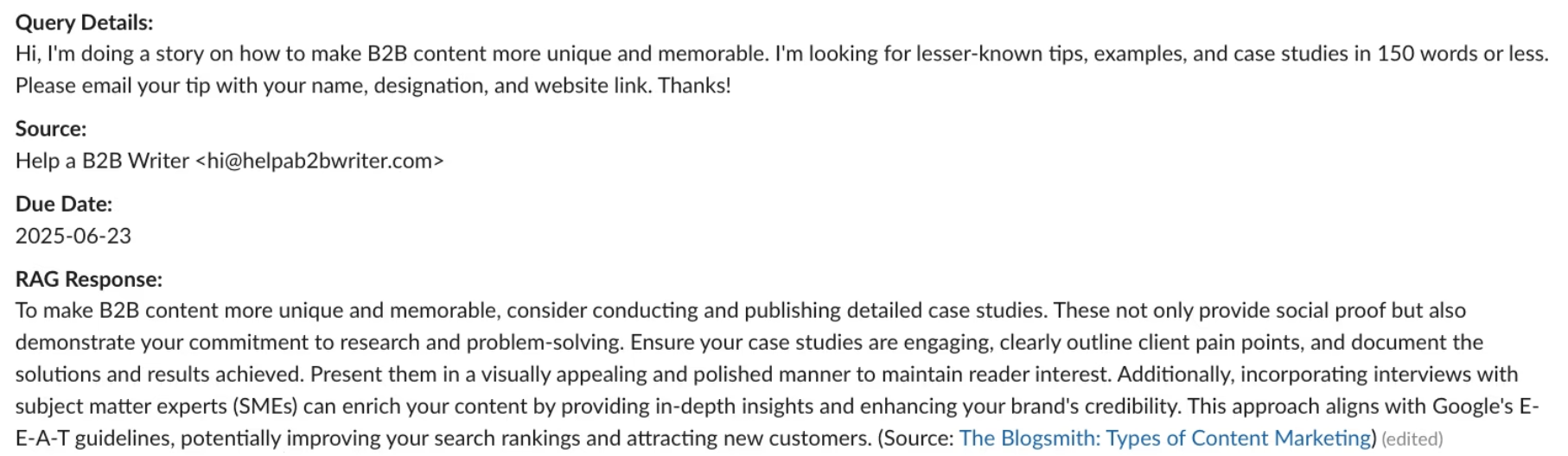
The lesson here? Your HITL checkpoints should incorporate your preferred tools where you already work, so that necessary approvals are convenient and provide a straightforward path to actually using automation outputs.
5 human in the loop automation examples
Now let's look at five proven HITL workflows you can build in n8n. Each demonstrates a different use case and checkpoint strategy.
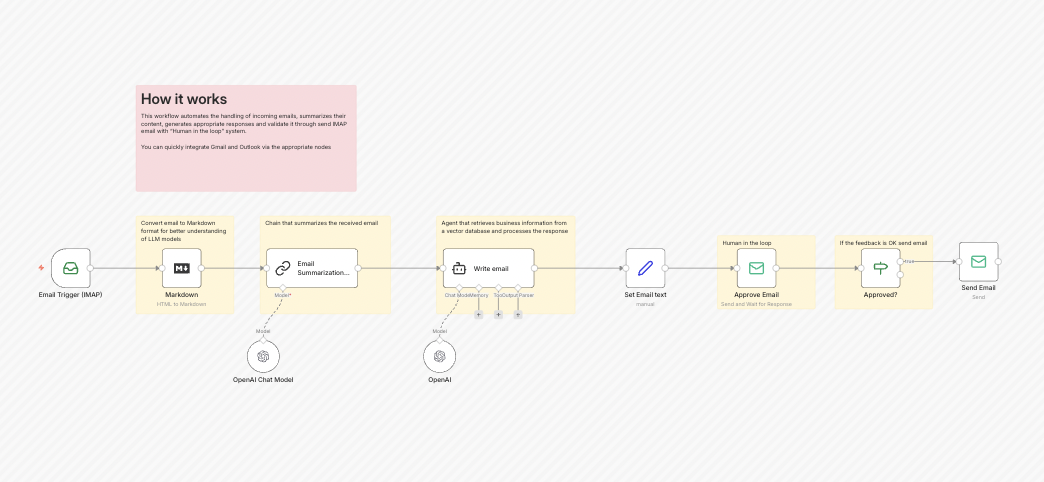
1. AI email response system with human approval
This workflow monitors your inbox via IMAP and uses AI to draft context-aware replies, but nothing is sent automatically. Instead, the AI-generated responses are sent to you for review through your preferred channel — email, Slack, or another platform.
You can approve them as-is, make edits, or reject them entirely. This human-in-the-loop step ensures that every message reflects the right tone and accuracy, making it perfect for customer support, sales follow-ups, or any high-stakes communication.
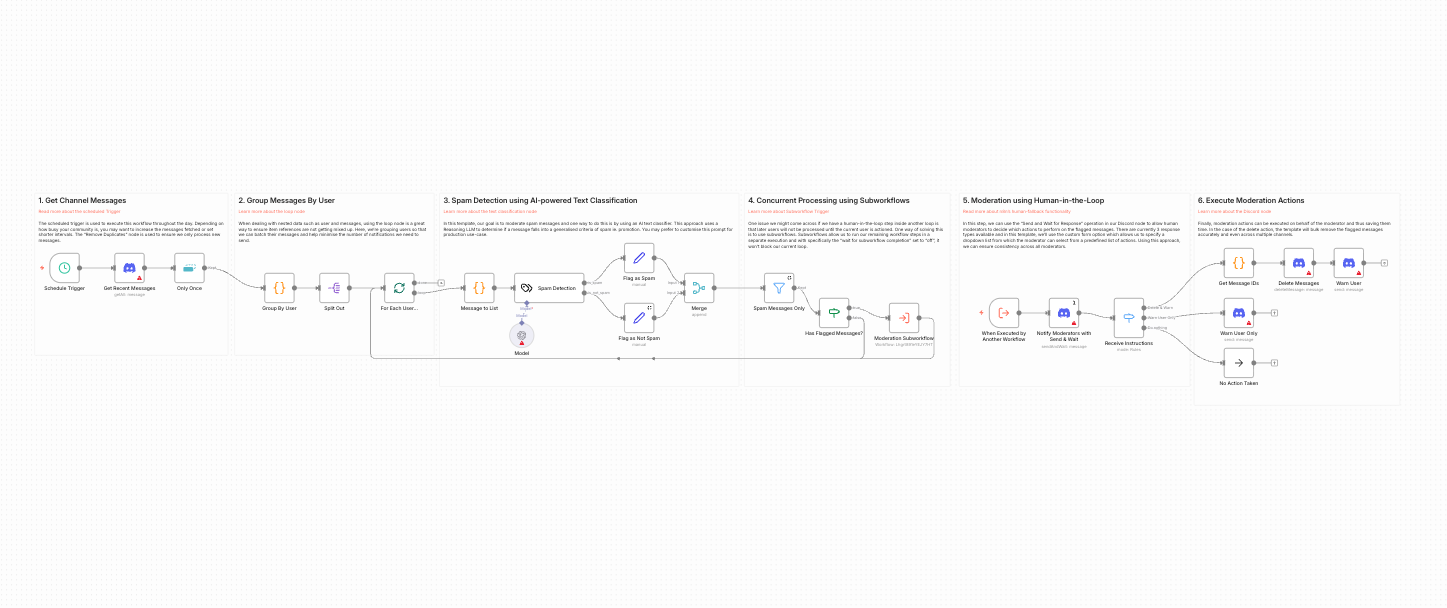
2. Discord spam moderation with AI detection
This workflow continuously scans Discord messages for spam using AI and then alerts moderators with a dropdown menu of possible actions: delete, ban, warn, or ignore.
Moderators receive the flagged message along with the AI’s confidence level and choose the appropriate response. The workflow executes their decision, preventing false positives while keeping your community safe.
3. WordPress content automation with deep research
This workflow functions as a complete content creation engine, with Airtable as the command center. The AI performs deep research, drafts articles, and prepares content for publication. However, multiple human checkpoints are embedded throughout the workflow: reviewing research quality, approving outlines, editing drafts, and giving final publishing approval.
Each step guarantees that content meets editorial standards and aligns with your brand voice. By combining AI speed with human oversight, this workflow reduces the time spent on content creation while maintaining quality and consistency for WordPress publishing.
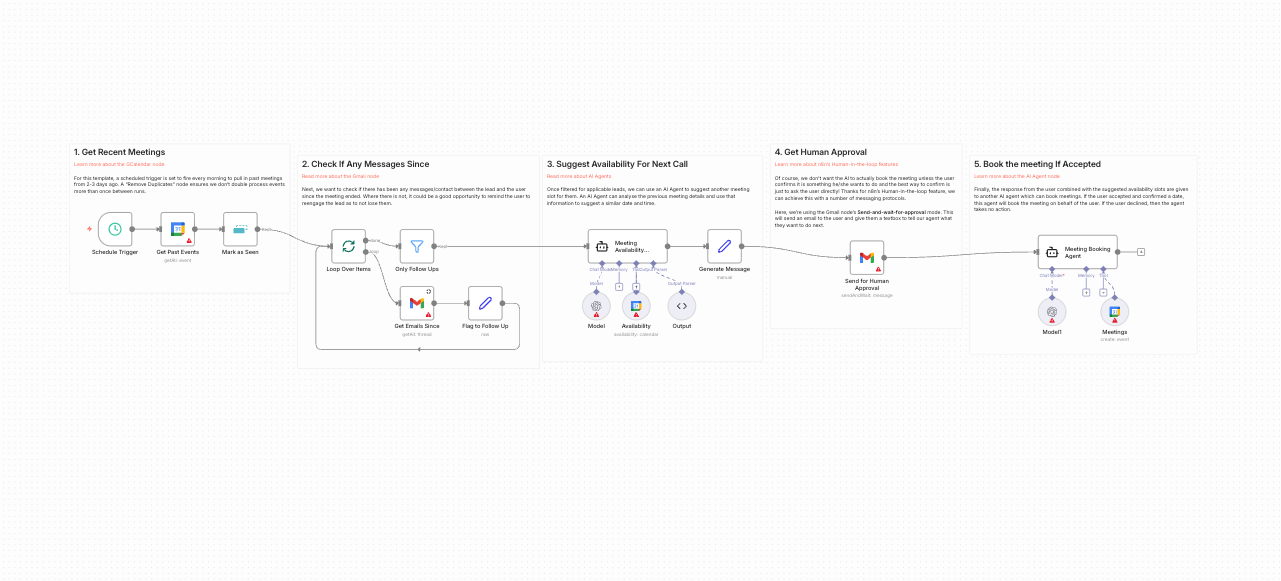
4. Automatic follow-up reminders with Gmail approval
This workflow scans your Google Calendar for past meetings and identifies which are missing follow-ups. AI then drafts suggested next steps and meeting slots in natural language and sends the message to you via Gmail.
From your inbox, you can approve the follow-up to send it immediately, modify the draft, or decline it if a follow-up isn’t needed. By keeping the review in your familiar email environment, the workflow saves time without sacrificing control.
5. Secure approval flow with Postgres and Telegram
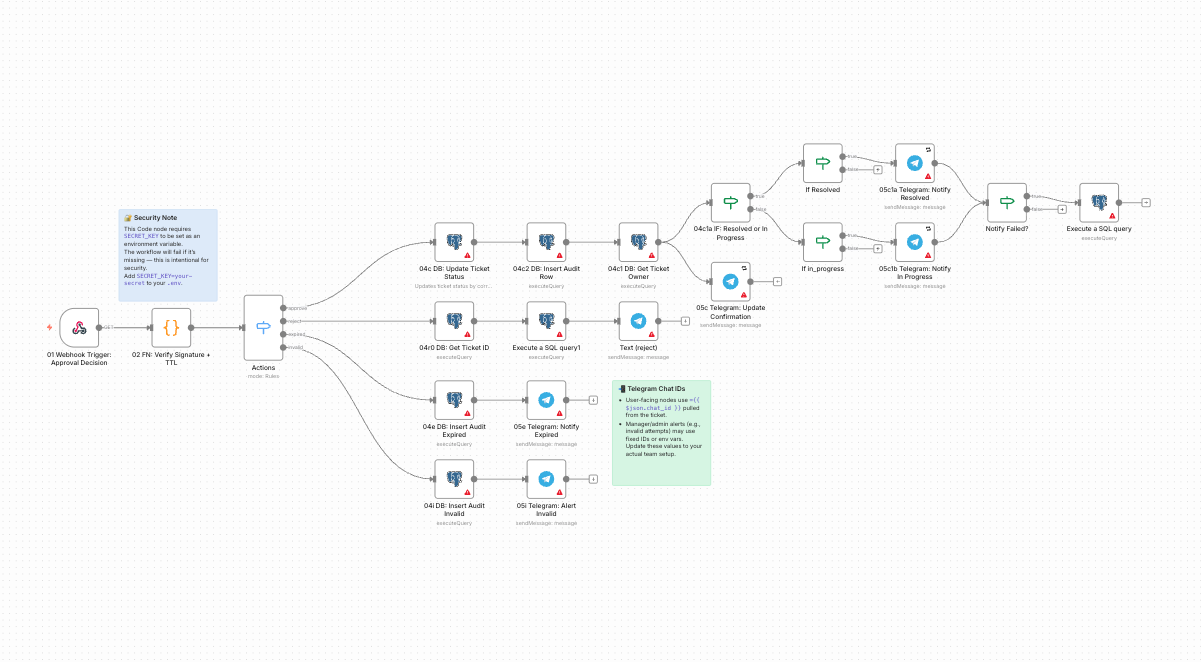
This workflow automates internal approval processes for tickets, requests, or status changes, using Postgres to manage state and Telegram to send notifications.
When a request requires approval (such as a refund, access grant, or policy exception), the workflow sends a Telegram message to the appropriate manager with approve/reject buttons. The manager’s decision updates the database and triggers downstream actions.
Best practices for HITL automation in n8n
You’ve now seen HITL automation in action with real n8n examples, so let’s get tactical.
These best practices come from builders across industries who’ve implemented HITL successfully, backed by measurable results like fewer errors, faster workflows, and smarter automations over time.
Build around decision points, not process steps
One of the most common HITL mistakes is placing human approval nodes too early or too often in the automation. Instead, review steps should appear only at irreversible decision points — moments like publishing content, updating customer records, processing payments, or deleting data.
As Adam Yong, Founder and CEO of BrandPeek, explains: “Only irreversible points in decision making should be reviewed by humans… publishing content, updating customer records, or spending would be good. All that should precede that should be left to run freely.”
This model works because it lets AI run autonomously through data gathering, analysis, enrichment, and draft generation without interruption, then pauses only when a real human decision is needed.
A strong example of this comes from Anthony May, Co-Founder and CMO of NeedAnAttorney.net, who built an n8n workflow that matches legal cases to attorneys. AI handles classification and urgency scoring automatically, but humans only intervene when the confidence score drops or when conflicting signals appear. “We cut response time from hours to seconds, without losing the quality that attorneys expect,” May explains.
Rahul Jaiswal, Senior SEO Consultant at GeeksProgramming, also applies this as a "timing control system": "I will only add human checkpoints where I know that the judgment actually brings a better outcome."
In n8n, this pattern is easy to build: route high-confidence outputs directly using IF nodes, and send only edge cases to human review. That approach keeps automations fast, efficient, and reliable while guarding high-stakes moments with human oversight. Depending on the nature of the workflow and the outcome you’re after, you may want to consider designing sensible fallback options in case a human isn’t able to respond in a timely manner.
Use the Wait node with smart notifications
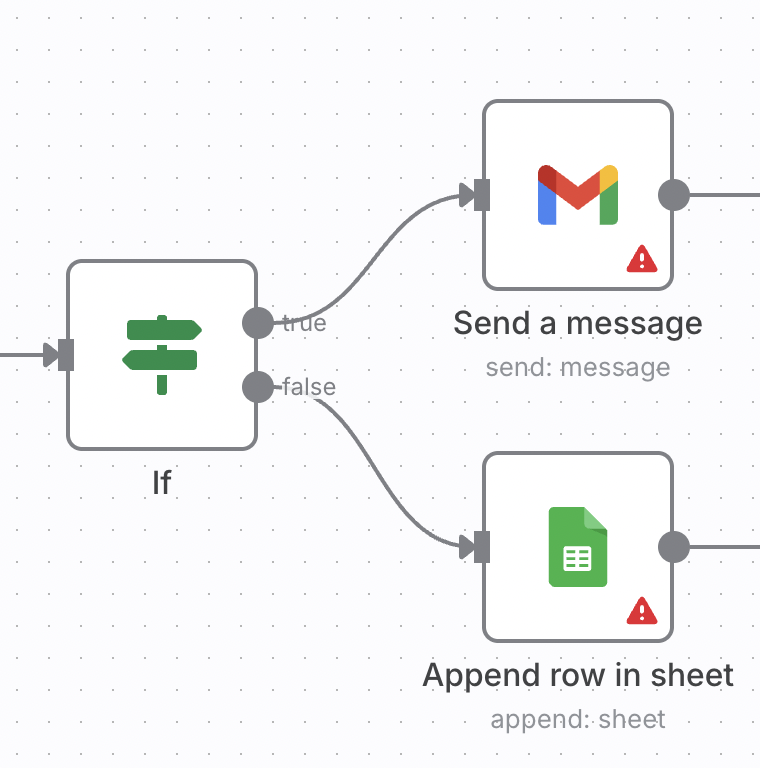
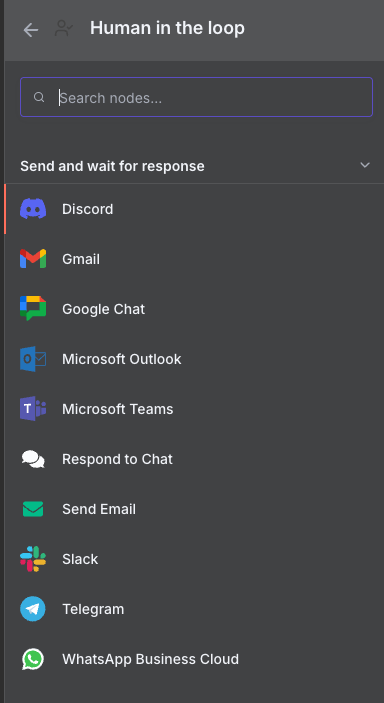
In n8n, the Wait node is the core building block for HITL review steps, but it’s only effective when combined with notification tools that surface decisions in the places people already work. Slack, Gmail or email, Telegram, Microsoft Teams, and Discord are all ideal options depending on team size, urgency, and context.
You’ll find all compatible HITL integrations listed in n8n’s integration category.
A great real-world illustration comes from Dennis Vong, Founder and Owner of Inland Powerwash, who uses Telegram approval steps for quoting. When a customer request comes in, his n8n workflow scrapes the address, pulls Google Street View imagery, generates a cleaning recommendation, and drafts pricing.
That output is then paused and sent to a technician through Telegram so they can adjust or approve before it reaches the customer. Vong highlights why this matters: “You should not be making decisions using the automation… human control is extra insurance to your margins and reputation, especially in home services.”
To make these checkpoints effective, always include meaningful context in notifications. As Taimur Ijlal, Information Security Leader at Proxy Coupons, puts it: “I always provide the context that the reviewer needs: what has changed, why it was flagged, the effect it has, and the safe choices.” Full context leads to faster decisions and fewer errors, especially when approvals happen on mobile devices.
Design clear, single-action approval gates
HITL checkpoints should streamline judgment, not complicate it. The most effective approval steps offer a concise context summary followed by a binary choice: accept, reject, or minimally edit. Anthony May describes this well: “The human step should be binary: approve, correct, or re-route. The more open-ended it is, the more likely the step will become a bottleneck.”
Clarity is the theme here. Approval screens should explain why the item was flagged, what outcome the choice drives, and what happens if no response arrives within a certain timeframe. Aziz Bekishov, CEO of DC Mobile Notary, stresses this principle: “I build HITL workflows with clear branching, so that the humans see straightforward tasks rather than the clutter of the whole workflow.”
A perfect example comes from Taimur Ijlal’s phishing email triage workflow email triage workflow. n8n nodes parse suspicious emails, extract security indicators, and let AI suggest a verdict.
The HITL step then presents investigators with key evidence and a simple decision: approve, quarantine, or escalate. Ijlal structures this using layered data-quality, policy, and final-approval gates: short, context-rich, binary decisions that keep the entire workflow moving.
Build in timeout and escalation paths
Every HITL checkpoint needs a safety net. Human reviewers sometimes miss notifications, and workflows can’t sit idle indefinitely. In n8n, combining a Wait node timeout with IF branching allows tasks to auto-escalate, shelve for later review, notify backup owners, or default to the safest outcome.
This structure is widely used in production. Adam Yong’s team employs approval nodes with strict time limits to avoid stalled workflows: “In case of no reply, the workflow leaves in a graceful manner or shelves the task.” This approach reduced processing mistakes in one AI monitoring pipeline by 30%.
Timeouts also handle real customer unpredictability. For instance, Douglas Van Soest, Owner of Storology Storage, noted that before adding timeout logic, edge-case reservations were slipping through on weekends.
His n8n workflow now inspects incoming requests, checks unit capacity and keywords, then pauses whenever uncertainty is detected. A manager receives the scenario and must approve, deny, or redirect. “The pause is the secret,” Van Soest explains. Standard reservations run automatically, while unusual cases wait, escalate, or branch safely when no timely reply is available. From the human perspective, it’s important to monitor escalation rates, as high rates may indicate the agent needs improvement and fine-tuning.
Create audit trails for every decision
Every human interaction in your workflow is valuable data, and logging it unlocks insight into both system accuracy and future automation opportunities. Taimur Ijlal recommends tracking every decision into a datastore because “you will require it in a post-incident review.” His phishing triage system records verdicts, timestamps, outcomes, and reasoning for each HITL step.
This philosophy is shared by David Hunt, COO of Versys Media, who suggests logging decisions into Postgres, Notion, Airtable, or other n8n-friendly stores to build a feedback loop, eventually reducing the need for human review as patterns emerge.
A strong example comes from Wojciech Jagla from Windoorfull Imports, who uses an audit trail within his custom window quote system. The automation calculates pricing automatically, but quotes above $5,000 require manual review. By logging every override reason, his team discovered recurring dimension issues.
That dataset led them to add a “rough opening compatibility check,” allowing the system to auto-flag 70% of these cases before review. Audit logs transformed manual oversight into a training asset and significantly improved workflow accuracy over time.
Human in the loop AI FAQs
What platform enables human approval checkpoints?
Several automation platforms support human approval checkpoints, including n8n, Zapier, Make, Workato, and LangGraph. n8n stands out for its flexibility and transparency: you can see exactly how data flows through your workflow, customize approval logic with conditional branches, and integrate with virtually any tool via its extensive node library or custom webhooks.
Unlike black-box solutions, n8n gives you complete control over when, where, and how approval checkpoints work.
What tools support human-in-the-loop with AI agents?
AI agents with HITL checkpoints can be built on platforms like n8n and Zapier. These tools allow agents to branch, pause, or change course based on human approval rather than running fully autonomously.
n8n is particularly well-suited for agentic workflows because of its visual workflow canvas, which makes it easy to see decision trees and approval paths, and its AI Agent node, which can be configured to require human approval before executing high-risk actions or when confidence thresholds aren't met.
What solution enables human fallback in chatbot workflows?
In n8n, human fallback in chatbot workflows can be implemented using the Wait node combined with webhook triggers or the Respond to Chat node. These allow the workflow to pause and route the conversation to a human when automated responses aren't sufficient, or confidence is low.
You can also set conditions based on sentiment analysis, confidence scores, or specific keywords to determine when to escalate. This aligns with HITL use cases involving ambiguity or risk.
What solution supports human review of LLM output before continuing workflows?
Many AI workflow automation tools now support HITL approval checkpoints. In n8n, this is commonly implemented with the Wait node combined with integrations like Slack, Gmail, Discord, or Send Email to surface outputs for review before the workflow proceeds.
How do you route AI outputs to human review in real time?
Use an AI workflow tool like n8n to build your desired approach, including the ideal notification mechanism that makes it convenient to add human judgment at critical decision points. The key is routing outputs to tools you already use (Slack, email, Telegram, or even SMS) so approvals don't require context switching.
Combine a Wait node with your preferred notification integration, include relevant context in the message (like confidence scores or preview links), and provide clear approve/reject options.
Wrap up
When it comes to AI and HITL, at this point in time, it’s better to err on the side of more approval checkpoints than necessary. From there, test workflows and make adjustments, dropping checkpoints if output is consistently reliable for your purposes.
To build your ideal automations, including human in the loop checkpoints wherever you need them and the ability to review outputs in the most convenient way for how you work, you need a flexible AI automation platform that doesn't force you into rigid templates.
n8n gives you that flexibility. With 1,200+ integrations, a visual workflow builder, and powerful nodes like Wait and AI Agent, you can design HITL checkpoints that work exactly how you need them to — whether that's a Slack approval button, an email review loop, or a custom form for detailed feedback. You get full transparency into how your workflows operate, complete control over approval logic, and the ability to iterate quickly as AI capabilities improve.
Experience the difference in automation and try HITL with a free trial of n8n.
What’s next?
Want to dive deeper into AI automation and HITL best practices? Check out these resources:
- n8n’s advanced AI documentation - Learn how to build AI-powered workflows with n8n's AI nodes
- n8n’s workflow templates library - Explore pre-built HITL workflows you can customize
- n8n’s community forum - Connect with other builders and share HITL strategies
- IBM's Guide to Human in the Loop - Technical deep-dive into HITL concepts and applications
- LangChain's State of Agent Engineering - Industry research on how teams are implementing AI with human oversight
- McKinsey's State of AI Report - Enterprise perspective on AI adoption and governance