In our previous article on AI agent orchestration frameworks, we explored why multi-agent systems work: specialized agents perform certain tasks better than a generalist.
However, this specialization comes at a price. Research by Antropic shows that multi-agent systems outperformed single agents by 90.2%. They also consumed 15× more tokens. Token usage alone explained 80% of the performance differences in Anthropic's internal tests.
The trade-off is real. Multi-agent systems quickly burn through API budgets, coordination becomes complex, and debugging becomes more difficult.
So when does it make sense?
- when your task involves multiple domains that require deep expertise,
- when you need parallel processing across different data sources,
- when a single context window can't hold everything
This guide breaks down multi-agent system architectures: what they are, how they work, when to use them, and which frameworks support different patterns. We'll cover real-world applications, common failure modes, and practical implementation in n8n.
- What is a multi-agent system?
- How do multi-agent systems work?
- Examples of multi-agent systems applications
- Popular frameworks for multi-agent systems
- How to build a multi-agent system in n8n?
- Advantages of multi-agent systems
- Challenges of multi-agent systems
- FAQ
- Wrap up
- What’s next?
What is a multi-agent system?
A multi-agent system (MAS) consists of several autonomous AI agents that interact within a shared environment to accomplish tasks. Each agent specializes in a specific domain – data analysis, content generation, API integration – rather than one agent handling everything.
These agents coordinate through communication protocols, share context through memory systems, and hand off tasks based on their specialization.
What's the difference between multi-agent AI and single-agent AI?
Single agents use one model with one system prompt. Multi-agent systems distribute work across specialized agents with different models, prompts, and tools. Trade-offs: multi-agent offers better specialization and parallel execution but requires coordination logic and uses more tokens.
| Aspect | Single-agent | Multi-agent |
|---|---|---|
| Architecture | Monolithic | Distributed |
| Specialization | Generalist | Multiple specialists |
| Scalability | Limited (vertical only) | High (horizontal scaling) |
| Cost | Requires expensive models | Mix of model sizes but more tokens |
| Failure Mode | Single point of failure | Isolated failures |
Instead of packing more instructions into one system prompt, you build specialized agents that excel at narrow tasks and coordinate when necessary.
How do multi-agent systems work?
Individual agents still follow the basic perception → decision → action cycle. Multi-agent systems add a coordination layer on top.
To see how this works in practice, let's look at a customer support system:
- The router agent reads the incoming message
- Based on keywords, it determines that it’s a billing question
- It forwards the message with the full conversation context to the billing specialist
- The billing agent queries the database, checks the account status
- It generates a response and forwards it to the email agent
- The email agent formats the message and sends the email back to the customer
This requires three critical additions that go beyond the capabilities of a single agent:
Agent-to-agent communication: passing data and context between specialized agents without loss of information.
Shared memory: maintaining state across handoffs so the billing agent knows what the router agent has already discussed.
Orchestration logic: deciding which agent processes what, when to hand off, and how to merge results from multiple agents.
How do agents communicate in multi-agent systems?
Agents can coordinate through standardized protocols or framework-specific methods:
- Model Context Protocol (MCP): developed by Anthropic, standardizes how agents access tools and external resources
- Agent-to-Agent (A2A): Google's protocol for peer-to-peer agent collaboration
- Custom approaches: framework-specific communication like LangGraph's state handover or task delegation from CrewAI
Most production systems use a mix of standard protocols for tool access and custom logic for workflow-specific coordination.Communication can be synchronous (agent waits for response) or asynchronous (message queues), depending on the architecture pattern.
Examples of multi-agent systems applications
The coordination mechanisms we just discussed - agent-to-agent communication, shared memory, orchestration logic - are already working in production systems.
Multi-agent architecture is increasingly a built-in feature rather than something you have to build from scratch. Instead of discussing theoretical examples, we’ve focused on systems that you can access today as well as research with proven implementations.
Here are some common categories where AI multi-agent systems already exist:
- Customer support: platforms route inquiries through specialized agents: well-known examples include Intercom Fin 3, Respond.io, Inkeep.
- Deep research: these systems parallelize information gathering with the subsequent re-ranking / summary: Perplexity, GPT Researcher, and Tongyi Deep Research.
- Software development: Cursor 2.0 runs up to 8 parallel coding agents, Claude Code enables 10+ simultaneous instances for coordinated development.
- Data analytics: organizations deploy agents that query databases on behalf of users. Shopify built internal tools using LibreChat with 30+ MCP servers. cBioAgent enables researchers to query cancer genomics through plain text using a similar tech stack.
- Content creation: research papers show sequential refinement (EditDuet) and 4-agent pipelines (AniMaker) for video and animation production.
| Use Case | Application | Pattern |
|---|---|---|
| Customer support | Intercom Fin 3 | Procedures + Simulations |
| Respond.io | Role-based routing | |
| Research | Perplexity | Parallel retrieval |
| GPT Researcher | Planner + executor | |
| Tongyi | Hierarchical agents | |
| Software development | Cursor 2.0 | Up to 8 parallel agents |
| Claude Code | Multi-instance | |
| Data analytics (LibreChat examples) |
Shopify | 30+ MCP tool servers |
| cBioPortal | Database query agents | |
| Fetch FAST | BI intelligence agents | |
| Content creation | EditDuet | Editor + Critic |
| AniMaker | 4-agent pipeline |
These examples show three recurring coordination patterns:
- Handoff-based: specialized agents pass on the context between stages (customer support and data analytics)
- Parallel execution: multiple agents work simultaneously and then combine the results (research, software development)
- Sequential refinement: agents process in stages, each building on the previous output (content creation)
Popular frameworks for multi-agent systems
Now that you've seen what multi-agent systems can accomplish, let's look at how you can build them. We can divide the landscape of possible solutions into two categories: visual builders for rapid development and code-first frameworks for detailed control.
Visual builders and low-code platforms
These platforms let you design agent workflows using graphical interfaces. Some offer a code fallback when visual tools hit limits.
| Builder | Overview | MAS use case examples |
|---|---|---|
| n8n | Hybrid low-code/full-code platform with 1000+ integrations and MCP support. Visual workflows with JavaScript customization when needed. |
Customer support routing, document processing pipelines, data enrichment workflows and much more |
| Flowise | Visual builder on LangChain/LlamaIndex with Agentflow for multi-agent systems. Quick prototyping with RAG capabilities. |
Chatbot prototypes, RAG applications, LangChain workflow visualization |
| Zapier Agents | No-code extension of Zapier's 8000+ app ecosystem. Limited to prompting, no code customization. |
Simple business automation, data syncing between apps, scheduled tasks |
| OpenAI AgentKit | Emerging product based on OpenAI Agents SDK. Combines visual builder interface with SDK export for self-hosting. OpenAI models only. |
OpenAI-native applications, quick agent prototyping with SDK flexibility |
| Vertex AI Agent Builder | Google Cloud managed platform with no-code interface and enterprise data integration. |
Google Cloud workflows, enterprise RAG, Gemini-based agents |
Code-first frameworks and SDKs
These frameworks enable you to programmatically control agent behavior, state management, and coordination patterns. Better suited for complex custom logic.
| Framework | Overview | MAS use case examples |
|---|---|---|
| LangGraph | Graph-based state management with explicit control over agent workflows. Advanced checkpointing and human-in-the-loop. |
Complex multi-step workflows, conditional routing, state-dependent agent coordination |
| CrewAI | Role-based teams framework independent of LangChain. Crews (autonomous) + Flows (event-driven). |
Collaborative research teams, content creation pipelines, sequential task execution |
| AutoGen | Conversational multi-agent across Python/C#/Java/JS. Group chat capabilities with integrated code execution. |
Code generation systems, conversational debugging, peer agent collaboration |
| Google ADK | Workflow-based framework with A2A protocol support and native Vertex AI integration. |
Google Cloud workflows, sequential/ parallel patterns, loop-based processing |
| Semantic Kernel Agent Framework |
Skill-based architecture for C#/Python/Java with Azure integration. Hierarchical agent patterns. |
Enterprise .NET applications, Azure workflows, plugin-based systems |
SDK frameworks work best when you need precise control over agent behavior, have complex state management requirements, or are developing systems that require extensive customization.
How to build a multi-agent system in n8n?
n8n is a node-based AI workflow automation builder that allows you to start simple and add complexity only as needed. We can easily demonstrate in n8n how to connect several services, triggers, and sequential steps in a single automation.
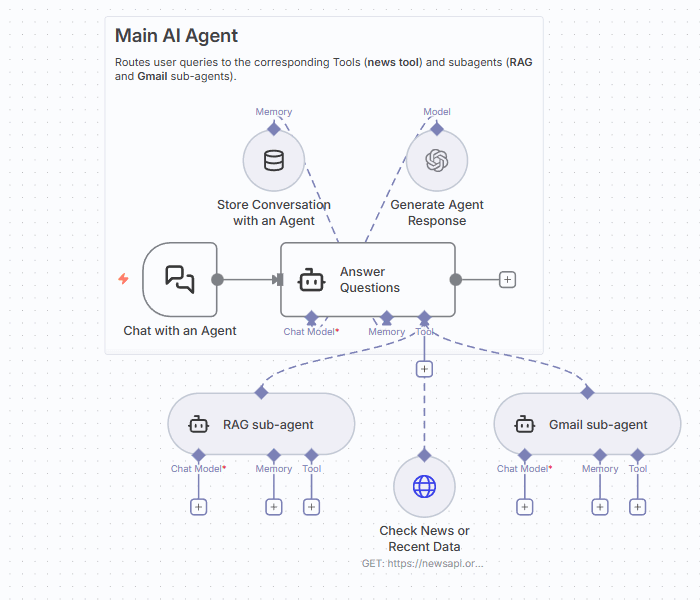
We’ll build a hierarchical multi-agent system in which a main agent coordinates two specialized sub-agents: one for email operations, another for document search and summarization. This represents a pattern from a broader set of multi-agent architectures.
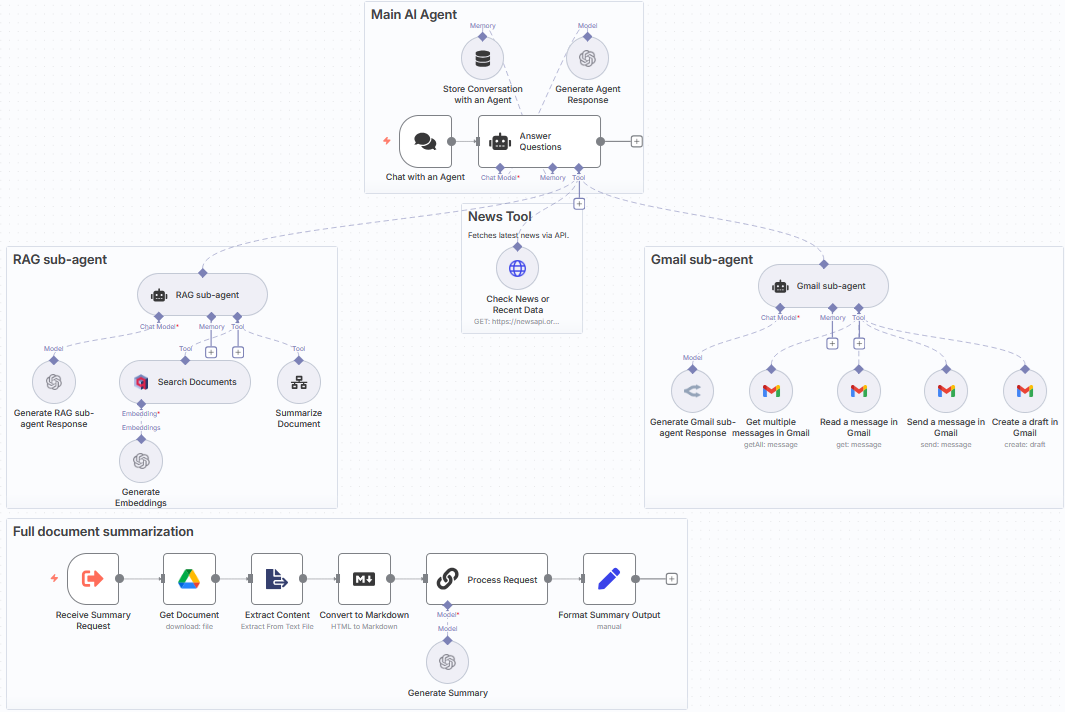
Our example focuses on the supervisor pattern as it’s practical for most business automation scenarios. We assume that you already have some experience in building AI agents and focus mainly on a few useful techniques. If you just start, we have multiple videos and tutorials on developing AI agents. The community forum is the best place to start learning.
Step 1. Set up the main agent as the coordinator
The AI Agent node acts as a central coordinator with Simple Memory to maintain the conversation context.
Step 2. Add and configure the email sub-agent
The email sub-agent includes several Gmail operations (retrieving multiple messages with filtering, preparing drafts, sending replies, and reading the whole content of a single email). When a user requests the latest emails from a specific user, the main agent delegates to the sub-agent, which executes the necessary Gmail API calls and returns the results.
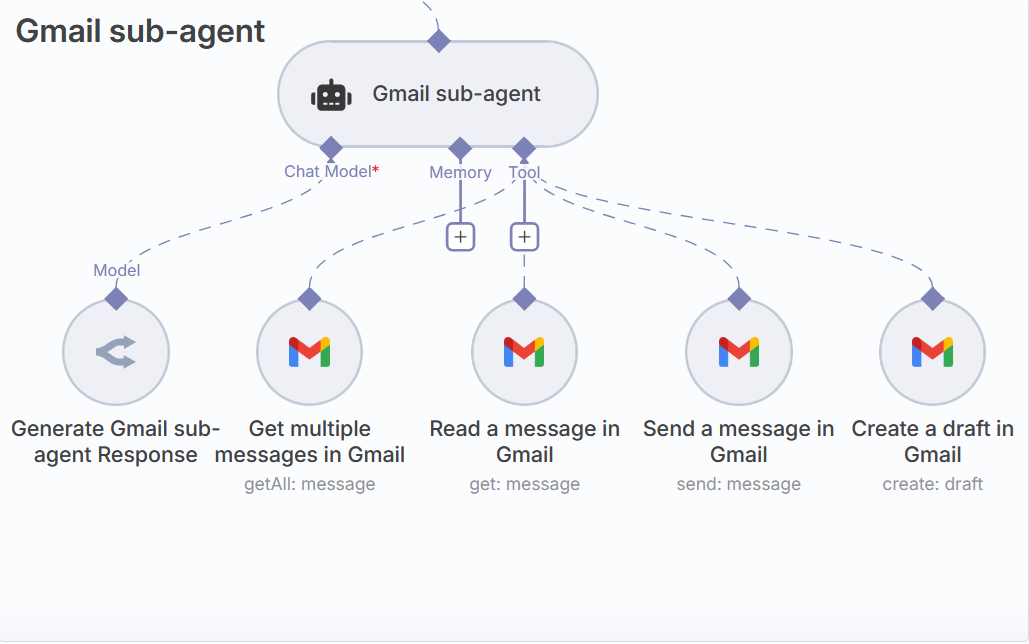
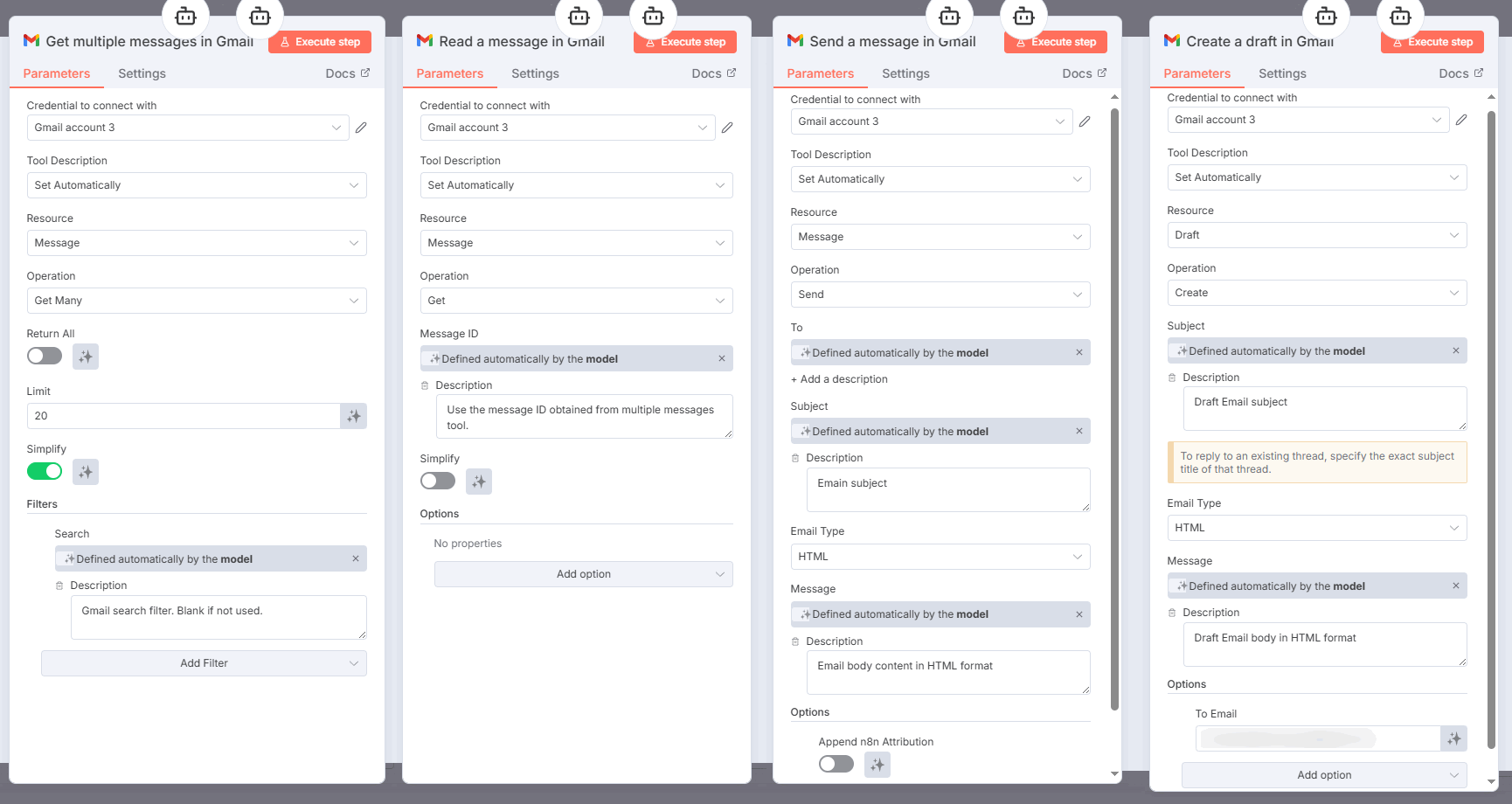
- Each of the Gmail sub-nodes is similar to the standalone Gmail node with two key differences:
- The sub-nodes are only connected to the root AI nodes
- Each sub-node has dynamic tool parameters. Dynamic parameters are filled in during LLM runtime. Your only task is to provide clear descriptions for each field.
Learn more about the AI Agent Tool node:
Step 3. Build a RAG sub-agent to modularize data access
Finally, we create a dedicated RAG sub-agent which handles all document operations - searching embeddings, retrieving relevant content and summarising the whole document.
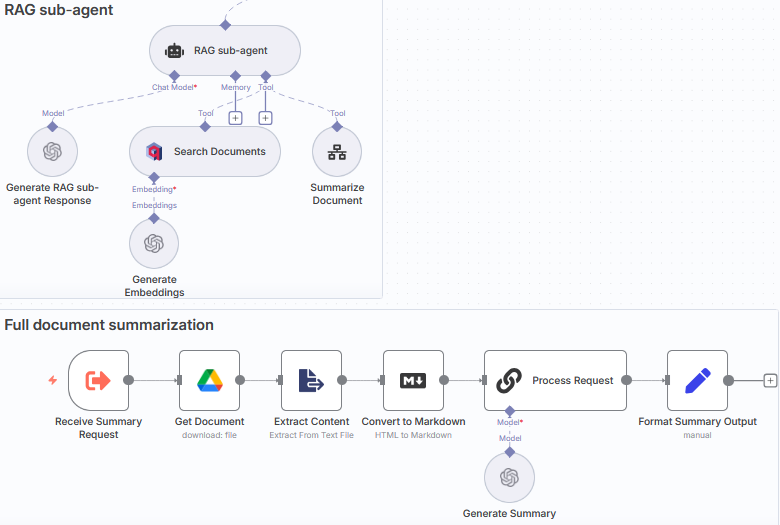
We’ve already prepared the Qdrant collection which you can import into a free Qdrant cloud or self-hosted account.
The document processing workflow is useful for capturing the context of the entire document (rather than just the chunk from a vector store). It includes predefined steps: download file → extract text → convert to markdown → prepare a summary text → send back to the sub-agent. These sequences are wrapped in a sub-workflow, making them reusable across different agents and reducing execution overhead. When you need to change document processing logic, you update one subworkflow instead of modifying multiple agents.
Alternatively, you can use the Memory Manager node to load the file content into the chat history once and connect the same memory node to all sub-agents. This ensures that the file content is not lost when agents interact with each other.
Grab the free n8n template and adjust this multi-agent system to your needs.
Step 4. Optimize task handover between agents
Currently, agents track their intermediate steps in a scratchpad and only pass the final messages to each other. This significantly reduces the overall token consumption but some of the context is lost.
There are two strategies to mitigate this:
- First, add critical intermediate results to shared memory so other agents can access them.
- Second, for large data transfers between agents, pass file identifiers or URLs instead of the full content. This way multiple agents can read the same source data without creating lengthy outputs in their communication.
In the example setup, sub-agents report only to the main agent. But you can configure peer-to-peer communication if your workflow requires agents to coordinate directly without going through the supervisor.
The complete workflow demonstrates how to convert a monolithic agent (all tools are directly attached) into a modular multi-agent system. Swap out the email sub-agent for Slack operations, add a database query sub-agent, change models per agent based on the task complexity - the architecture supports these modifications without rebuilding from scratch.
Advantages of multi-agent systems
The specialization approach creates four core benefits that matter in production:
Task specialization reduces token consumption
A generalist agent that processes a simple data validation task uses the same costly model as complex multi-step reasoning. Multi-agent systems let you match model size to the task complexity. Simple tasks (data validation, format checking) can run on smaller models. Complex synthesis and decision-making use larger models only when necessary.
Parallel execution improves throughput
Single agents process sequentially - they finish one task and then start the next. Multi-agent systems can perform independent operations simultaneously. A research system can query three data sources at once, rather than one after another. This is important when response time directly impacts user experience or when you're processing large amounts of data.
Isolated failures improve reliability
When a single-agent system fails, everything stops. Multi-agent systems contain failures to specific components. Your billing agent crashes? Customer support and technical support agents keep working. The system degrades gracefully instead of going completely offline. This also speeds up debugging - you know exactly which agent has failed.
Modular updates reduce deployment risk
To update the behavior of a single agent, you don't have to redeploy the entire system. You can test changes to a specialist agent without risking cascading issues. This becomes critical as systems scale. A customer support system with 10 specialized agents can update its billing logic without affecting order tracking, account management, or technical support agents.
Challenges of multi-agent systems
Multi-agent systems introduce additional complexity that does not arise with single agents. Here are the four most common challenges:
Coordination overhead scales with agent count
The communication complexity grows exponentially with the number of agents. Three agents coordinate three relationships. Ten agents need forty-five. This manifests itself in increased latency, higher token consumption due to context sharing, and more failure points in the coordination chain.
Mitigation: Choose architecture patterns that limit connections. Hierarchical structures with supervisor agents reduce direct agent-to-agent communication. Sequential pipelines eliminate parallel coordination overhead.
Token costs multiply across the system
Multi-agent systems use significantly more tokens than single-agent approaches. This seems to contradict the "reduced token consumption" advantage. The paradox resolves when you consider the allocation strategy: you're using more tokens overall, but they’re distributed more efficiently.
Mitigation: Mix different models based on the task complexity. Implement prompt caching to reuse repeated context across agent interactions. Monitor token usage per workflow and optimize high-cost handoffs.
Quality drift compounds through agent chains
An error made by one agent affects downstream processes. A data extraction agent misreads a field, the validation agent approves it based on an incorrect schema, and the reporting agent presents incorrect information to users.
Mitigation: Set up validation checkpoints between agents for critical operations. These checks can be LLM-powered or use simple regex rules. Alternatively, you can run parallel agents for the same task and select the mode value (the most frequent result).
Security depends on your threat model
Internal systems that operate with trusted data are exposed to different risks than client-facing agents processing external input.
Client-facing systems are vulnerable to prompt injection attacks where malicious instructions manipulate agent behavior. Brave's research on Perplexity Comet demonstrated how hidden instructions in webpage content can steal credentials and exfiltrate sensitive data - completely bypassing traditional web security mechanisms.
Mitigation: Treat all external input as untrustworthy for customer-facing agents, require explicit user confirmation for sensitive actions, and isolate the agent's functions from regular operations.
FAQ
What are common multi-agent architecture patterns?
Hierarchical (supervisor manages worker agents), sequential (pipeline where each agent processes then hands off), parallel (multiple agents work simultaneously), handoff (dynamic routing based on context), and network (agents communicate peer-to-peer).
How do I evaluate multi-agent system performance?
Track overall efficiency with the built-in n8n Evals feature, save task completion time, token usage per workflow, error propagation rates, and overall cost per task. Use tracing tools like LangSmith or LangFuse to visualize agent interactions and identify bottlenecks.
What are the best tools for building multi-agent systems?
n8n works well for hybrid visual/code systems with 1000+ built-in integrations. Code-first SDKs (LangGraph, AutoGen, Semantic Kernel) offer precise control over state management and coordination patterns - choose based on your team's language preferences (Python, C#, Java, JavaScript). If you're locked into AWS, Google Cloud, or Azure ecosystems, their managed platforms provide native integrations.
When should I use multi-agent instead of single-agent systems?
When tasks span multiple domains that require deep expertise, when you need parallel processing across data sources, or when a single context window can't hold everything. Don't use multi-agent for simple tasks where the coordination effort exceeds the benefit.
What security risks do multi-agent systems face?
Internal systems face credential management challenges across multiple agents with different permissions. Client-facing systems face prompt injection issues where malicious instructions in external data manipulate agent behavior. More agents mean more access points to secure and more potential attack surfaces.
Wrap up
Today we've covered multi-agent system architectures, coordination patterns, real-world applications, and available frameworks. We've also examined the core trade-offs - specialization benefits versus coordination complexity, parallel execution versus token costs.
There are three distinct ways of creating such systems:
- Visual building: n8n provides the hybrid option - visual workflow design, code fallback when needed, and no vendor lock-in. Better than pure no-code (Zapier), faster than code-first frameworks for non-developers.
- Code-first development: various SDKs give precise control over state management and coordination logic. Choose based on your team's language. Be aware that Google ADK and Microsoft Semantic Kernel optimize for their cloud ecosystems.
- Enterprise platforms: AWS Bedrock, Google Vertex AI, and Azure offer managed infrastructure. Such SDKs tend to be vendor lock-in in exchange for managed convenience. Evaluate against your multi-cloud strategy.
In the practical part, we’ve demonstrated how to build a multi-agent system using n8n's sub-agents for task delegation, individual tool nodes for agent capabilities, and workflows-as-tools for controlled multi-step operations. This shows hierarchical patterns in action.
What’s next?
Ready to build multi-agent systems? Here's where to go from here:
- Start with AI agent fundamentals if you're new to agent architectures - covers perception, decision-making, and action cycles.
- Review 4 practical AI agentic workflow patterns to understand coordination approaches before building complex systems.
- Compare AI agent orchestration frameworks in detail - includes deployment options, pricing, and trade-offs we didn't cover here.
- Explore production-ready AI workflows from the n8n community to see multi-agent patterns implemented.
Finally, try n8n's AI capabilities for free and check the AI integrations catalog to see what tools your agents can connect to.