This post is part of a series that explores strategies, shares best practices, and provides practical examples for building reliable AI systems in n8n. Find out when new topics are added via RSS, LinkedIn or X.
The Control Problem Nobody Talks About
You built an AI agent that drafts emails, summarizes support tickets, and updates your CRM. It works flawlessly in testing. Then you deploy it to production, and suddenly you're explaining to your VP of Sales why a prospect received a reply promising a 90% discount that doesn't exist.
The technology is capable, but capability without oversight is a liability. Every team deploying AI into workflows that touch customers, data, or decisions eventually hits the same realization: you need a way to keep humans in the loop without killing the speed that made automation worthwhile in the first place.
The good news is that human oversight doesn't mean babysitting every AI output. It means building workflows where humans step in at the moments that matter and letting automation handle the rest. Done right, you get the best of both worlds. The throughput of AI with the judgment of your team.
This post shows you how to design human oversight into your AI workflows, with real examples you can apply today.
Here's what we'll cover
- What Human Oversight Actually Means in Production
- Three Patterns for Human-in-the-Loop AI Workflows
- When to Add Human Oversight (and When Not To)
- Tips and Tricks
- What's Next
What Human Oversight Actually Means in Production
Let's be clear about what we're solving for. Human oversight in AI workflows comes down to designing systems that match how your business actually operates. Most decisions in an organization aren't fully autonomous, and they shouldn't be. Contracts get reviewed. Budgets get approved. Communications get checked. AI workflows should work the same way.
In practice, human oversight means inserting decision points into automated workflows where a person can review, approve, modify, or reject what the AI has produced before the workflow continues. The key is making those decision points surgical, placed exactly where human judgment adds value, without creating bottlenecks everywhere else.
There are three scenarios where human oversight consistently proves essential.
High-stakes outputs. Any AI-generated content that reaches customers, partners, or the public. A misclassified support ticket is annoying or may negatively affect the user experience. A misclassified legal document is just a lawsuit waiting to happen. The higher the stakes, the more you need a human checkpoint before execution.
Irreversible actions. This includes database writes, financial transactions, account modifications, and anything you can't easily undo. If the AI is about to do something permanent and is critical, have a human confirm it first. This type of verification is an industry standard and is critical to build reliable AI systems.
Novel or ambiguous inputs. It is well known that AI models are confident even when they're wrong. This has led to one of the most common issues of AI systems, known as hallucinations. When inputs fall outside the patterns the model has seen, or when the AI's confidence score drops below your threshold, routing to a human prevents quiet failures that compound over time.
Three Patterns for Human-in-the-Loop AI Workflows
In n8n, the implementation approach depends on the type of interaction. Here are three patterns that cover the majority of production use cases, each suited to different levels of complexity and team structure.
Pattern 1: Inline Chat Approval
In the simplest and most direct approach, the AI produces an output, presents it to a human in a chat interface, and waits for approval before proceeding. This works well for conversational workflows, content review, and quick yes/no decisions.
Best for: Single-reviewer scenarios, real-time interactions, and content approval before sending.
How it works in n8n: The Chat node now includes two operations. "Send a message" is fire and forget, while "Send a message and wait for a response" pauses until the human replies. The wait version supports both free text responses and inline approval buttons. You can also add these as tools for an AI Agent, so the agent itself decides when to ask for clarification or send progress updates during long-running tasks.
Several other integrations, like Slack and Telegram, have similar functionality, but we'll walk through a concrete example using n8n's built-in Chat node.
Building It: Chat-Based Human Oversight
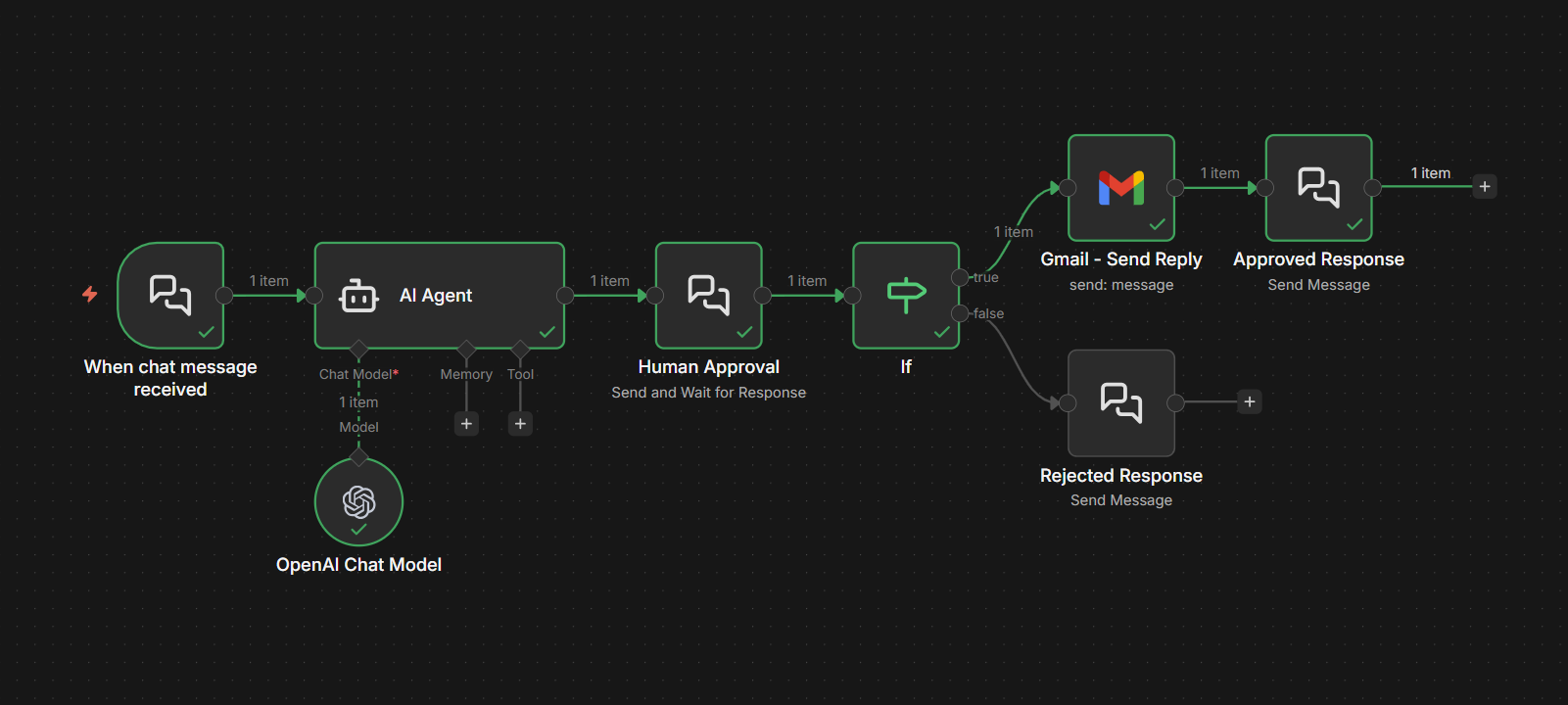
Let's walk through a concrete example. Say you have an AI agent that handles customer support inquiries. It reads incoming emails, drafts responses using an LLM, and sends them. You want a human to review the draft before it goes out.
Here's how to build this workflow:
Step 1: Set up the Chat Trigger. Configure a Chat Trigger node with the Response Mode set to "Using Response Nodes." This tells n8n that response handling will happen through Chat nodes later in the workflow rather than automatically.
Step 2: Process the incoming request. Connect your AI processing steps. Pull the customer email content, run it through your LLM with the appropriate system prompt, and generate the draft response.
Step 3: Present the draft for review. Add a Chat node configured with the "Send and Wait for Response" operation. Set the Response Type to "Approval." The message should include the original customer inquiry and the AI's drafted response so the reviewer has full context. Customize the button labels to match your process, something like "Send to Customer" and "Revise."
Step 4: Branch based on the decision. After the Chat node, add an IF node that checks the approval result. If approved, the workflow proceeds to send the email. If rejected, you can route back to the AI with revision instructions or flag it for manual handling.
This pattern works because the reviewer sees the full context, the AI's proposed output, in a familiar chat interface. The interaction is lightweight: click a button, done. But the protection it provides is significant. Every customer-facing message gets a human sanity check before it leaves your system.
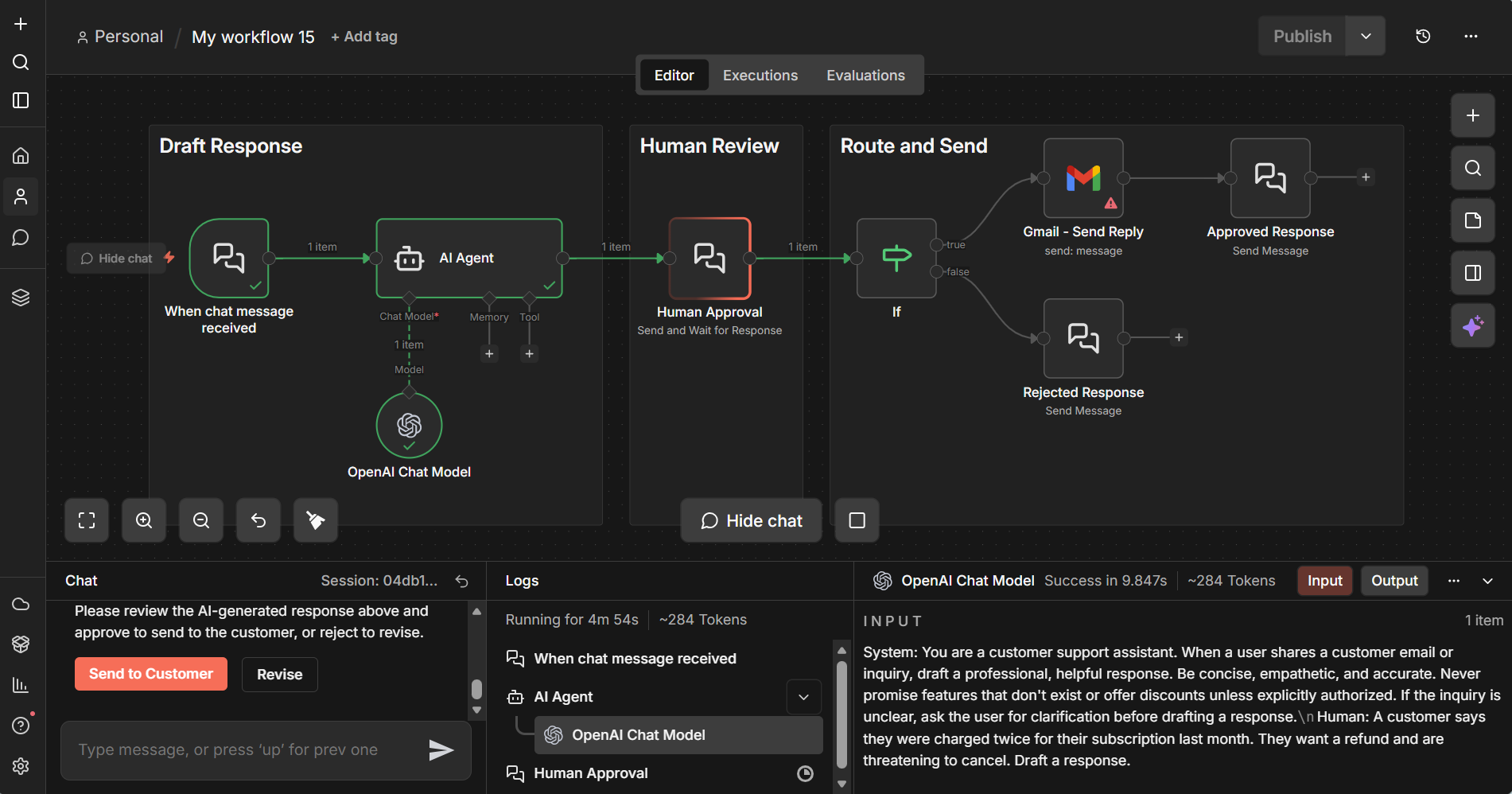
1️⃣ Examine the workflow:
Import the Exercise 1 template to your n8n instance and set up the required credentials to explore this example. Inspect the setup details by clicking into these nodes: Chat Trigger node, AI Agent node, Chat node (with send and wait response), and IF node (to see routing for approved vs. rejected responses).
If you don't have an n8n instance, you can set up a free trial here.
2️⃣ Try these test prompts:
- "A customer says they were charged twice for their subscription last month. They want a refund and are threatening to cancel. Draft a response."
- "Hi, I bought the Pro plan, but I can't access the API features. My account email is jane@example.com. Can you help?"
- "We've been a customer for 3 years and are evaluating competitors. What can you offer to keep us? Our contract renews next month."
- "Your product broke our production deployment last night after the update. We need immediate rollback instructions and a credit for downtime."
- "I'd like to upgrade from the Team plan to Enterprise. Can you walk me through pricing and what changes for our 50-person team?"
Pattern 2: Tool Call Approval Gates
This is where things get interesting for agentic workflows. Instead of reviewing final outputs, you review the AI's intended actions before they execute. An AI agent decides it needs to update a database record, send an email, or call an external API. Before the tool actually runs, a human reviews the proposed action and approves or rejects it.
Best for: AI agents with access to tools that modify external systems, high-risk operations, and compliance-sensitive workflows.
How it works in n8n: With Human in the Loop (HITL) for Tool Calls, you click the "+" on the connector between an AI Agent and any tool, then select "Add human review step". Pick an integration (Slack, Gmail, Teams, or n8n Chat) to route the approval request. When the agent tries to call that tool, execution pauses until a human approves or denies. This approach enforces approval, removing the uncertainty of prompt-based safeguards.
Building with Pattern 2: Approval Gates for AI Tool Calls
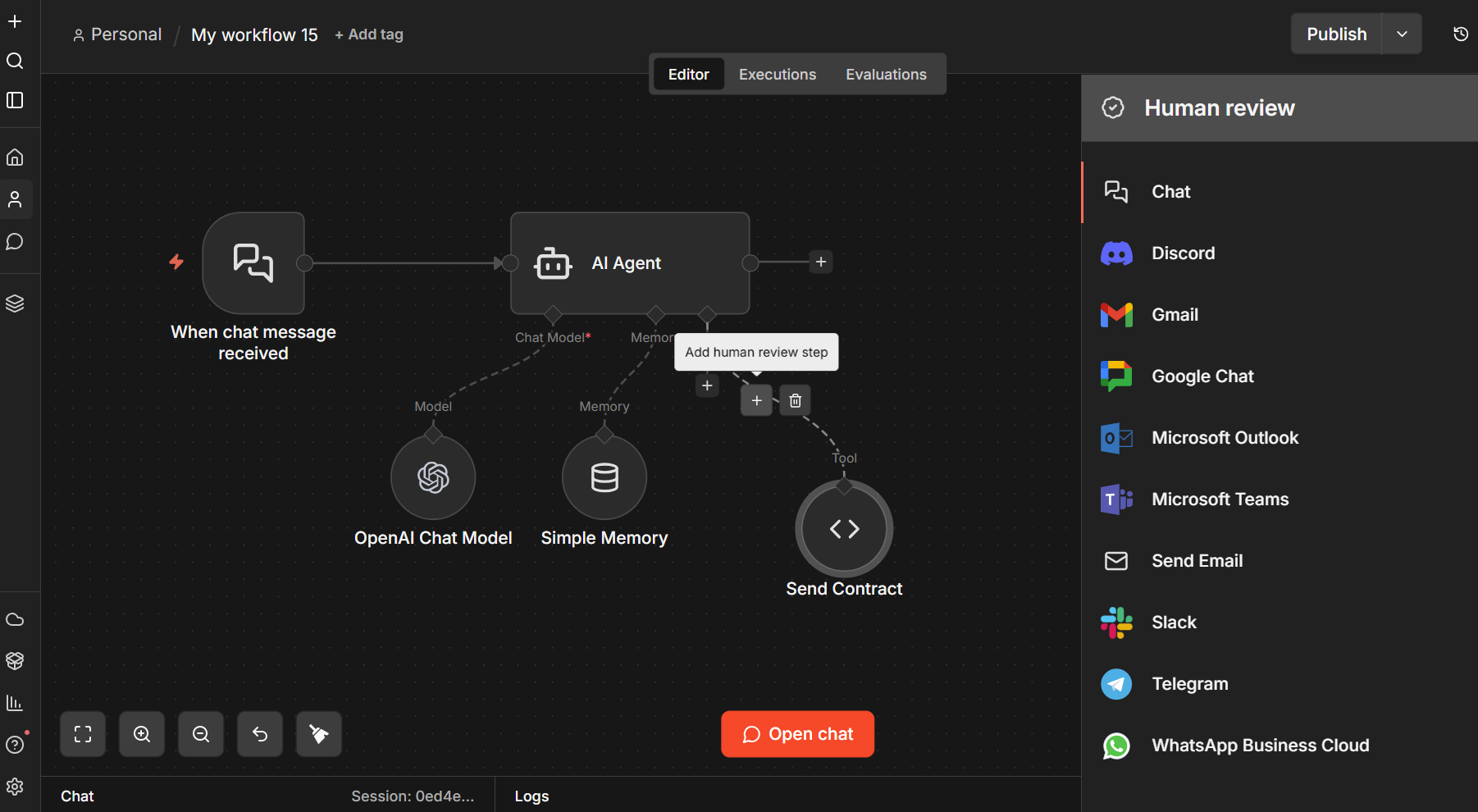
The chat approval pattern works great for reviewing outputs. But what about reviewing actions? When an AI agent has access to tools that modify external systems, you want approval at the point of action, not just at the point of output.
Consider an AI agent that sends contracts to prospects. The agent takes a deal ID and email address, then fires off the contract. That's an action you don't want happening without a human signing off first. One wrong email, one wrong deal, and you've sent a binding document to the wrong person.
This is exactly what HITL for Tool Calls solves.
How it works: The AI Agent node in n8n connects to tools that execute actions. With HITL for Tool Calls, you add a human review step between the agent and any tool you want to gate. When the agent decides to call that tool, execution pauses. A message appears in the chat showing the reviewer what the agent intends to do. The reviewer approves or declines, and only then does the tool execute (or not).
In the template shown below, the workflow has a single tool (Send Contract) with a human review gate in front of it. When you ask the agent to send a contract, it doesn't just fire it off. Instead, the chat displays "The agent wants to call Send_Contract" along with Approve and Decline buttons. The contract only goes out after a human clicks Approve.
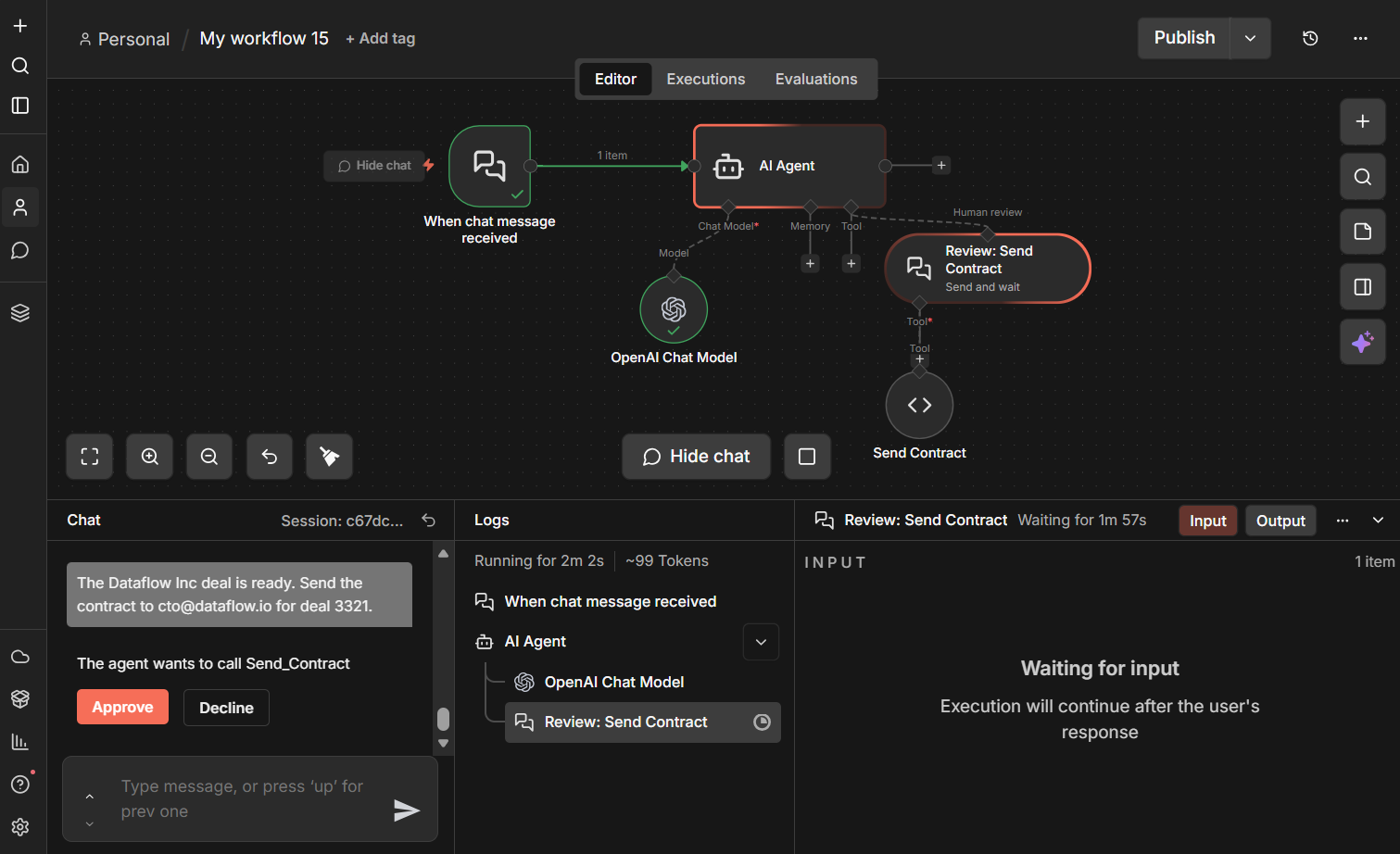
1️⃣ Examine the workflow:
Import the Exercise 2 template to your instance to explore this sales review pipeline example. You'll see how the Send Contract tool is gated from the AI Agent node with a human review step. The agent can only send a contract after a human approves.
2️⃣ Try these test prompts:
- "Send the standard Enterprise contract to john@acmecorp.com for deal 4521."
- "Send a contract to sarah@globex.com for deal 8890, they signed up for the Pro plan."
- "The Dataflow Inc deal is ready. Send the contract to cto@dataflow.io for deal 3321."
In production, you'd extend this pattern by adding multiple tools to the same agent, some gated and some autonomous. Low-risk tools like web search or data lookups can run freely, while high-risk tools like contract sends, payment processing, or record deletions go through human review. That selective approach gives you the throughput of automation where it's safe and the protection of human judgment where it's needed.
Pattern 3: Multi-Channel Review Workflows
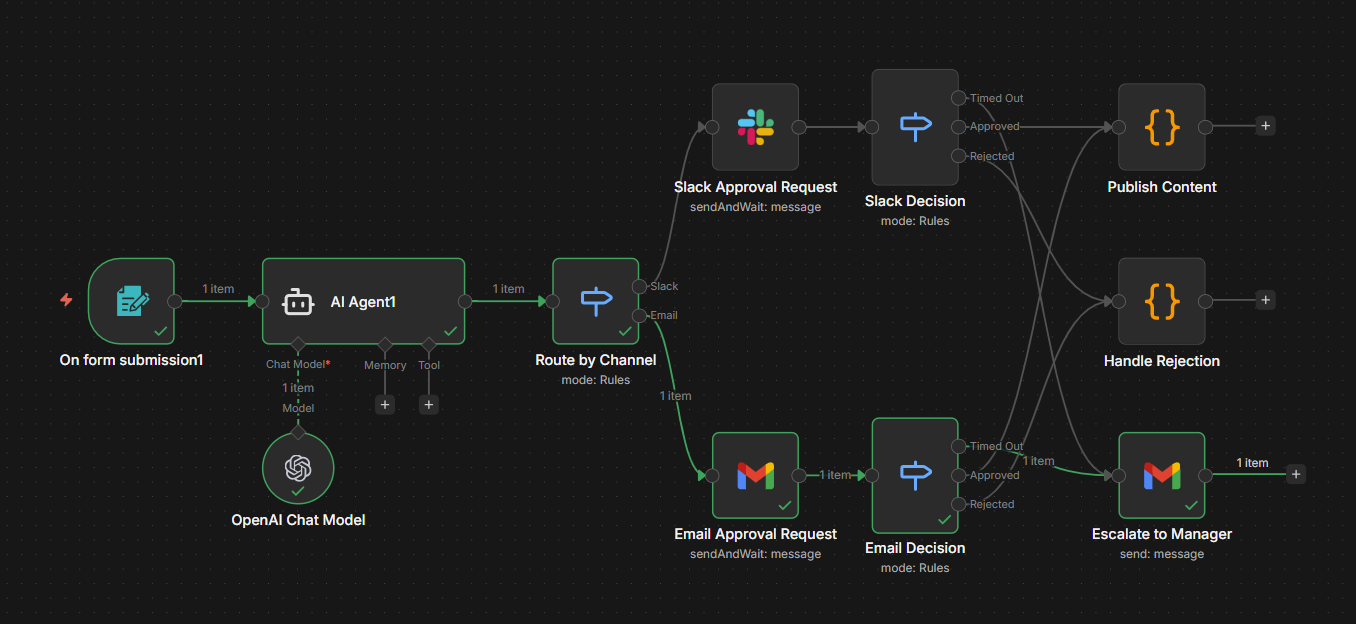
For teams where the reviewer isn't sitting in a chat window, you route approvals to wherever your team actually works, whether that's Slack, Microsoft Teams, email, or a custom dashboard. The workflow pauses, sends the review request to the appropriate channel, and resumes when the approval comes back.
Best for: Team-based review processes, asynchronous approval workflows, multi-stakeholder decisions.
How it works in n8n: Slack, Gmail, and Microsoft Teams nodes each support a "send message and wait for response" operation that sends approval requests with built-in Approve/Reject buttons directly to the channel your team already monitors. A Switch node at the front routes requests to the right channel, and each approval node pauses the workflow until the reviewer responds. You can configure a wait time limit on each node so that if the reviewer doesn't respond within a set timeframe, the workflow resumes automatically and routes to an escalation path, like notifying a backup reviewer or manager via email.
Another option worth noting: the n8n Form node lets you collect structured input or approval mid-execution through a web form. This is useful when you need reviewers to fill in fields (revision notes, classification labels, or approval reasons) rather than just clicking approve/reject. You can insert a Form node at any point in a workflow to pause execution and present a custom form, then continue once the reviewer submits.
Building It: Multi-Channel Review Workflows
Not every team lives in a chat window. For workflows where the reviewer is a manager approving expenses, a legal team reviewing contracts, or a compliance officer signing off on communications, you need to meet them where they are.
Here's how to build a multi-channel approval workflow:
Step 1: AI does the work. Your workflow processes the input, generates the output or proposed action, and packages it for review. Include all context the reviewer needs, including the original input, AI output, confidence score, and any flags.
Step 2: Route to the right channel. Use a Switch node to route the approval request based on the reviewer's preferred channel. Each output connects to a different approval node: Slack for quick operational approvals, Gmail for formal email sign-offs, or Teams for cross-functional reviews. Configure each node with the "send message and wait for response" operation. n8n automatically generates Approve/Reject buttons in the message, so you just write the review content and n8n handles the interaction.
Step 3: Set a timeout. On each approval node, configure a wait time limit. This defines how long the workflow pauses for a response before resuming automatically. For operational approvals, 2-4 hours is reasonable. For strategic decisions, 24 hours. When the timer expires without a response, the workflow continues with no approval data attached.
Step 4: Handle three outcomes. After each approval node, add a Switch node with three routing rules. First, check if the response data exists at all. If it doesn't, the request timed out, so route to an escalation path (e.g., email the manager). If the data exists and the reviewer has approved, route to publish or execute. If the reviewer rejected, route to rejection handling. This gives you clean three-way branching: approved, rejected, and timed out.
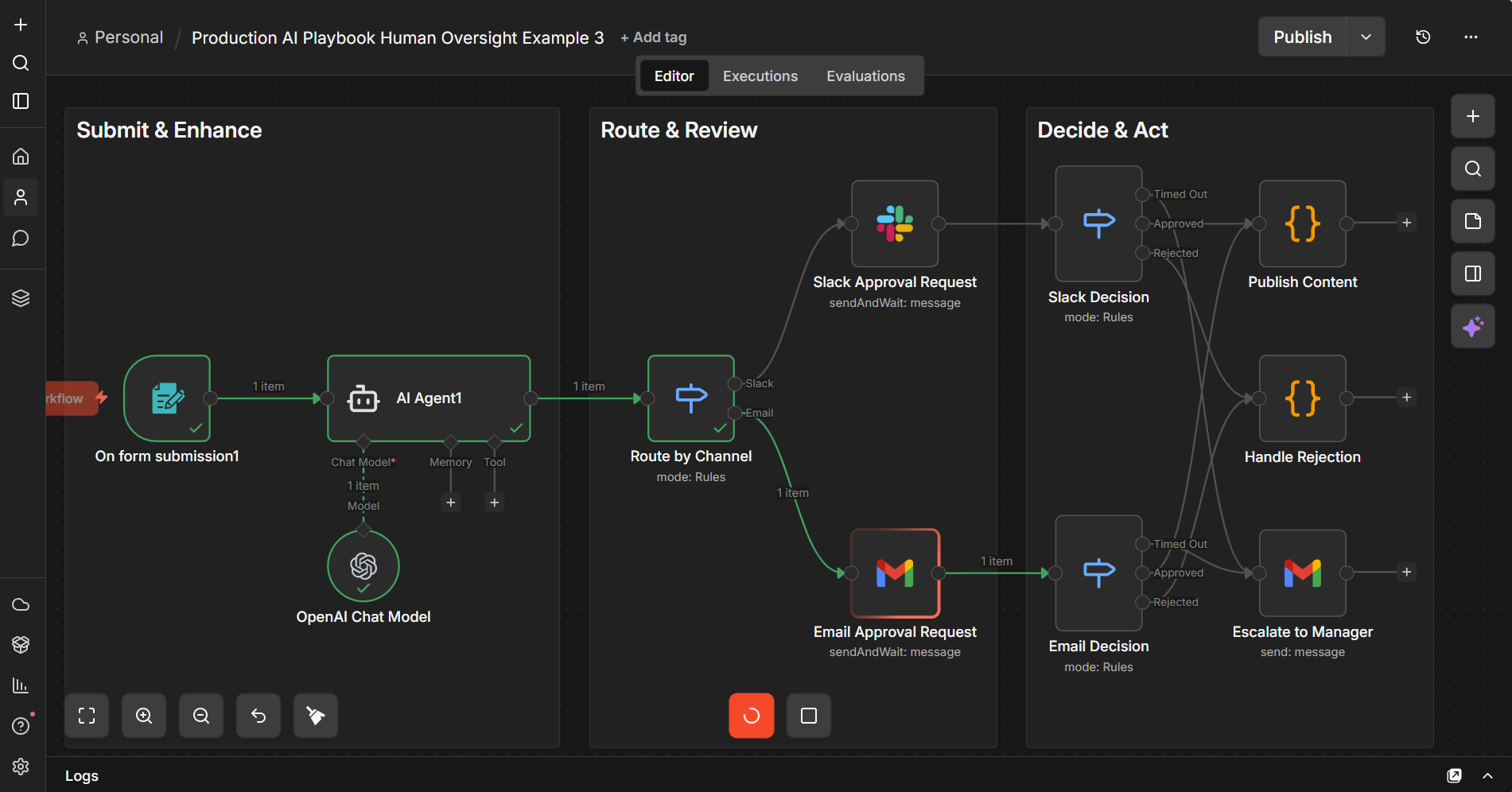
1️⃣ Examine the workflow:
Import the Exercise 3 template to your instance to explore this example of a multi-channel content approval with Slack and email escalation. This template includes a Form Trigger, an AI Agent for content enhancement, Switch-based routing to Slack or Email approval nodes (with built-in Approve/Reject buttons and configurable timeouts), three-way decision routing (approved, rejected, timed out), and a timeout escalation path to a manager via email.
2️⃣ Submit Form to test:
After you have set up credentials as advised in the template, select Execute the workflow to bring up a sample form.
- Submit any article, blog or AI-generated content and see how it is enhanced before being routed to for approval.
- Notice the option to limit wait time in the approval node parameters.
When to Add Human Oversight (and When Not To)
Human oversight has a cost. Every approval step adds latency and requires someone's attention. The goal is appropriate oversight, applied where it matters most. Here's a practical framework with example scenarios where you want to apply oversights and when not to.
Add oversight when:
- The output reaches people outside your organization (customers, partners, vendors)
- The action modifies production data or external systems
- The financial impact of a mistake exceeds your comfort threshold
- Regulatory or compliance requirements mandate human review
- The AI is operating in a domain where it has limited training data
Skip oversight when:
- The action is easily reversible (draft saved internally, soft-delete operations)
- The output is for internal consumption only and low-stakes
- The AI has been validated extensively on this specific task, and error rates are within acceptable bounds
- Speed is critical, and the cost of a mistake is low (like auto-tagging internal documents)
Tips and Tricks
Here are practical tips for implementing human oversight effectively. These work well as quick-reference guidelines and are things you can start applying immediately.
1. Always show the "why" alongside the "what." When presenting an AI output for review, include the inputs that led to it. A reviewer who sees the customer's original email alongside the AI's draft response can make a faster, better decision than one who only sees the draft.
2. Set timeouts on every approval node. Workflows that wait forever are workflows that fail silently. Configure a wait time limit on your approval nodes and build explicit escalation paths. A good default is 2-4 hours for operational approvals and 24 hours for strategic decisions, with an automatic escalation to a backup reviewer after timeout. These approval times will be based on resources and requirements.
3. Log every decision. Every approval and rejection should be logged with the reviewer's identity, timestamp, and the content they reviewed. This is your audit trail. You'll need it for debugging when something goes wrong, and for compliance if you're in a regulated industry.
4. Use approval rates to tune your workflows. Track the percentage of AI outputs that get approved vs. rejected for each workflow. High rejection rates mean your prompts or model needs improvement. Consistently high approval rates mean you might be over-reviewing and can safely reduce oversight.
5. Don't route everything to the same person. Build routing logic that distributes review tasks based on expertise, availability, or workload. A customer support lead reviews AI-drafted responses. A sales manager reviews CRM updates. A legal team member reviews contract modifications. You should always aim to match the reviewer to the decision.
6. Test your timeout and escalation paths. It's easy to build the happy path and forget edge cases. What happens when the reviewer is on vacation? When the Slack message doesn't get seen? What happens when the email lands in spam? Test these scenarios before they happen in production.
7. Start with the highest-risk workflow first. Don't try to add oversight to everything at once. Identify your single highest-risk AI workflow, the one that keeps you up at night, and implement human oversight there first. Learn from that implementation, then expand.
What's Next
Human-in-the-loop is one way to gain more control over your AI in production. It ensures that humans stay in control of the decisions that matter. In other segments, we'll cover how to combine deterministic steps with AI steps to keep outputs grounded and predictable, and how to evaluate and monitor these outputs to increase reliability. Combined with what you've learned about human oversight, you'll soon have a solid foundation for building AI workflows that are both reliable and accountable.
Find out when new topics are added to Production AI Playbook via RSS, LinkedIn or X.
References to review:
- n8n Community: New Human-in-the-Loop Capabilities – Covers HITL features in v2.5/v2.6.
- n8n Docs: Human-in-the-loop for AI tool calls -- Official docs for HITL tool call approvals.
- n8n Docs: Form node -- Official docs for the Form node (mid-execution input collection).
- n8n Docs: Chat node – Official docs for the Chat node.