A simple retrieval augmented generation architecture (RAG) setup usually works fine with a few documents and a basic retriever, but those setups fall apart quickly once you try to run them in production. Small issues that don’t matter much in controlled settings — slightly off chunks or slow lookups — turn into high latency, dangerous AI hallucinations, and spiraling API costs in real-world use.
In this guide, we’ll break down the RAG system architecture components and the trade-offs to consider when implementing production-ready RAG architecture, challenges, and best practices.
What is RAG architecture?
RAG architecture refers to how you design your retrieval system: which embedding models and vector types to use, how to chunk and index documents, and whether to add reranking. This is different from the RAG pipeline (the step-by-step data ingestion) and RAG application (the complete end-user solution).
The RAG process itself combines large language model (LLM) capabilities with information retrieval. When a user submits a prompt, the model goes beyond its pretraining data to retrieve relevant information. A retriever selects relevant data. This can be chunks loaded from a vector store or even data extracts from an SQL database.
The LLM then uses these chunks as context to produce grounded answers that match user intent.
In this article, we focus on the RAG architecture with vector stores, showing you how different design choices impact retrieval quality and when to use each approach.
RAG system architecture components
When building a production-grade RAG system, engineers must manage the trade-offs between accuracy, latency, and scaling costs. Here's a look at the main components needed and how they shape a reliable RAG architecture.
Data sources and ingestion
In production, RAG sources are rarely static PDFs. Instead, engineers use dynamic internal datasets or live API feeds. These sources require cleaning to prevent inaccurate chunks from entering the index.
Engineers must also choose between data freshness requirements and cost-effectiveness. While push-based ingestion provides real-time updates, it’s more complex and costly than pull-based batch processing.
Vector type selection
When you set up your RAG architecture, you can use different vector types for retrieval:
- Dense vectors: They capture semantic meaning and work best for conceptual similarity. Most developers are familiar with the naive RAG - single vector dense embeddings.
This approach works when you have small document sets, however it may not be enough once you scale.
- Sparse vectors (keyword-based like BM25): They focus on exact term matching and perform well for specific keyword queries.
Sparse vectors are especially effective for domains with specialized vocabulary (legal, medical, technical documentation) where exact phrase matching matters more than semantic understanding.
- Hybrid: Combine both dense and sparse vectors for better query coverage
Hybrid approaches use dense vectors for semantic search and sparse vectors for keyword precision, then merge the results.
This gives you the best of both worlds: catching semantically related content and making sure that you don’t miss chunks with exact matches. The trade-off is increased complexity and storage requirements: you have to maintain two indexes instead of one.
Embedding model selection
Choosing an embedding model starts with understanding how each option affects retrieval quality and overhead.
A cloud-hosted model like one built by OpenAI offers strong semantic search performance but often results in higher costs. Alternatively, a self-hosted model better preserves data privacy and helps to avoid ongoing API costs over time but requires infrastructure investment, maintenance and may need fine-tuning for your use case.
Model dimensionality also matters: higher-dimensional embeddings (1536-dim, 3072-dim) can improve retrieval precision and better catch semantic similarity. But they take up additional space in your vector database and can slow information retrieval when the index grows.
Popular embedding models include OpenAI’s text-embedding-3-small and text-embedding-3-large. They offer high-dimensional accuracy but rely on external APIs, which adds both costs and latency.
Beyond text-only embeddings, multimodal embeddings can encode images, audio, or documents alongside text. This enables retrieval across different content types. Models like OpenAI's CLIP or Google's multimodal embeddings support this functionality.
The choice depends on whether you prefer ease of use and performance or cost control and data privacy.
Vector database architecture
Your vector database works like a specialized storage layer that facilitates high-speed search across embeddings. It determines how fast the retriever can locate relevant chunks and how well the system scales.
Dedicated vector databases use different indexing algorithms to organize embeddings for fast similarity search. HNSW (used by Weaviate, Qdrant) offers an excellent speed-accuracy balance. IVF trades some accuracy for faster search at scale. Your choice depends on the dataset size and latency requirements.
Database extensions like Pgvector add vector capabilities to existing PostgreSQL databases. This is simpler if you already use PostgreSQL and have smaller datasets, but with performance limitations compared to dedicated solutions.
Some of the top options on the market include:
- Pinecone: Offers a fully managed and serverless experience that scales easily, but it can become expensive if your dataset grows
- Qdrant: open-source vector database built for similarity search at scale. Works best for complex metadata filtering and deployment flexibility: cloud for simplicity or self-host for control, though self-hosting means you handle the infrastructure.
- Weaviate: Positions itself as an open-source platform that excels at multi-tenancy and hybrid search, but the HNSW indexing can increase memory use at scale
- Pgvector: Keeps your architecture simple by allowing you to keep vectors alongside your relational data in PostgreSQL, but it can create performance bottlenecks
Consider whether you need hybrid search (combining vector + keyword), metadata filtering, multitenancy, or distributed deployment across regions.
Dedicated vector databases offer these features with better performance, while extensions like Pgvector work well for smaller datasets or when keeping vectors alongside relational data simplifies your architecture.
Reranking layers
The initial retrieval system uses vectors to find potentially relevant text excerpts, but doesn't order them by true relevance. Reranking solves this by reordering results with the use of deeper semantic analysis.
After vector retrieval returns candidate chunks, a reranker model analyzes each chunk against the query to compute precise relevance scores, pushing the best matches to the top.
API-based services like Cohere and Jina offer the easiest integration with minimal infrastructure but add per-request costs. Self-hosted deployments let you run rerankers in your own environment, reducing vendor dependency while maintaining scalability, full control and data privacy.
Reranking improves precision significantly but adds latency and cost. For high-value queries or when accuracy is critical, the trade-off is worth it. For simple keyword searches or high-volume applications, you might skip reranking to optimize for speed.
Chunking strategy
How you split documents into chunks directly impacts retrieval quality and system performance. Chunks need to be rather small for precise retrieval but not too small to contain meaningful context.
There are various chunking approaches that you can apply depending on how you want to split the data:
- Fixed-size chunking splits documents by character or token count (e.g., 512 tokens with 50-token overlap). Simple to implement and predictable, but can break sentences mid-thought or split related information across chunks.
- Semantic chunking uses paragraphs, sections, or sentence groups to preserve context. More accurate retrieval but harder to implement and creates variable-sized chunks.
- Hierarchical chunking maintains parent-child relationships, retrieving small precise chunks with surrounding context when needed. Offers the best of fixed-size and semantic chunking but adds complexity.
Most systems start with fixed-size chunking and iterate based on retrieval quality. Move to semantic or hierarchical approaches when dealing with structured documents or when precision matters more than simplicity.
How to implement a RAG architecture
By implementing a RAG system architecture, you can build something powerful that does more than pull random text from a public search index. But each step in the process depends on the quality of data, consistent retrieval, and components that scale without breaking. These steps outline the core workflow.
Define the retrieval contract
Before writing the code, set clear rules for metadata and relevant thresholds to prevent retrieval mismatch. This ensures the retriever only passes high-quality chunks to the LLM and minimizes the risk of GenAI hallucinations and other output inaccuracies.
Design the ingestion pipeline for scale
Ingestion pipelines take raw data, break it down into manageable chunks, add extra metadata and convert it into searchable embeddings. If the raw data changes (i.e. the documentation website is updated) the ingestion process repeats for the updated parts to preserve freshness and integrity.
Lock down the embedding model
Your chosen vector type and embedding model become a long-term commitment.
If you’re using dense vectors, switching models later requires re-indexing the entire vector database, which is expensive and slows development.
When working with sparse vectors, you’d need to rebuild the index if you change the keyword extraction method (e.g., BM25 → SPLADE).
For hybrid systems (with dense + sparse vectors), you commit to maintaining two parallel indexes, doubling the migration effort.
You can reduce this risk by adding a versioning layer. Create separate indexes for testing new models or approaches, then gradually migrate traffic once validated. This way, you can A/B test new embedding models without disrupting your production knowledge base.
You can reduce this risk by adding a versioning layer. It lets you A/B test new embedding models without disrupting your production knowledge base.
Implement multi-stage retrieval
Standard semantic search often returns high-similarity results that don’t match the user’s intent. Developers add a re-ranking step to double-check the results. This extra layer evaluates the context of the retrieved chunks to make sure it improves relevance. The two-stage information retrieval process is the most effective way to ensure accurate answers and to reduce hallucinations in complex RAG applications.
Monitor and iterate on retrieval quality
RAG performance can degrade over time as your project expands. Implement logging to track retrieval quality: are the right chunks being retrieved?
Monitor what percentage of retrieved chunks are actually relevant, whether you're missing important information, and user feedback signals (thumbs up/down, query reformulations). Use this data to tune chunk sizes, adjust embedding models, or add reranking layers.
Challenges in RAG system architecture deployment
Scaling your RAG architecture from initial implementation to a production-level deployment can introduce some technical friction. Here are some of the most common challenges to look out for:
AI hallucinations
- Root cause: The retriever pulls low-relevance chunks, which compels the LLM to fill in the gaps with its initial training data or online searches instead of the data provided.
- Solution: Use the re-ranking layer and strict relevance scoring. For example, n8n provides native Cohere reranker nodes. After your vector database returns candidates, the reranker analyzes each chunk's semantic relevance to the query and reorders them, ensuring the LLM sees only the most relevant context.
Context window limitations
- Root cause: Inefficient chunking or embeddings that are too large and exceed LLMs’ token limits.
- Solution: Use recursive chunking and prioritize the most specific information to maximize use of the available context.
Retrieval quality degradation
- Root cause: Semantic drift happens when the vector database grows and redundant data or outdated embeddings make query results less accurate.
- Solution: Schedule regular index audits and implement an ingestion pipeline that keeps knowledge bases lean and updated. Additionally, implement filtering that subsets database items before the vector search.
Security exposure risks
- Root cause: Centralized RAG architecture might expose internal data to unauthorized users because it often lacks granular permissions.
- Solution: Use tools like n8n’s self-hosted deployment option, which provides role-based access control (RBAC) and audit logging to ensure transparency and strict data governance.
Best practices for RAG deployment
Designing a RAG system for high-volume production traffic requires managing several moving parts. Teams need to excel at planning as well as execution to keep it accurate and resilient. These best practices can help.
Automate data ingestion and keep indexes fresh
Static documentation goes stale and your RAG system should know when it gets updated. Production systems need ingestion pipelines that run automatically when source content changes: updated Confluence pages, new support tickets, modified Google Docs, or refreshed API schemas.
Decouple the retrieval layer from the generation layer
Treat the retrieval layer and generation layer as independent services connected via an API. This separation avoids vendor lock-in and makes it easier to swap out a retriever. Teams can also update their vector database without rewriting logic, retraining the model, or breaking the RAG system.
Treat evaluation as a first-class system component
You can’t properly maintain or improve what you aren’t measuring. Integrate evaluation into your pipeline and focus on frameworks that prioritize score accuracy, relevance, and context precision. Ongoing reviews prevent gradual degradation that would otherwise go unnoticed.
Using the Evaluation node and Data Tables, you can:
- Store test cases directly in n8n (no external databases needed)
- Run evaluations using the "Check if Evaluating" node
- Track metrics over time with dashboards and charts
- Compare different models or prompt versions side-by-side
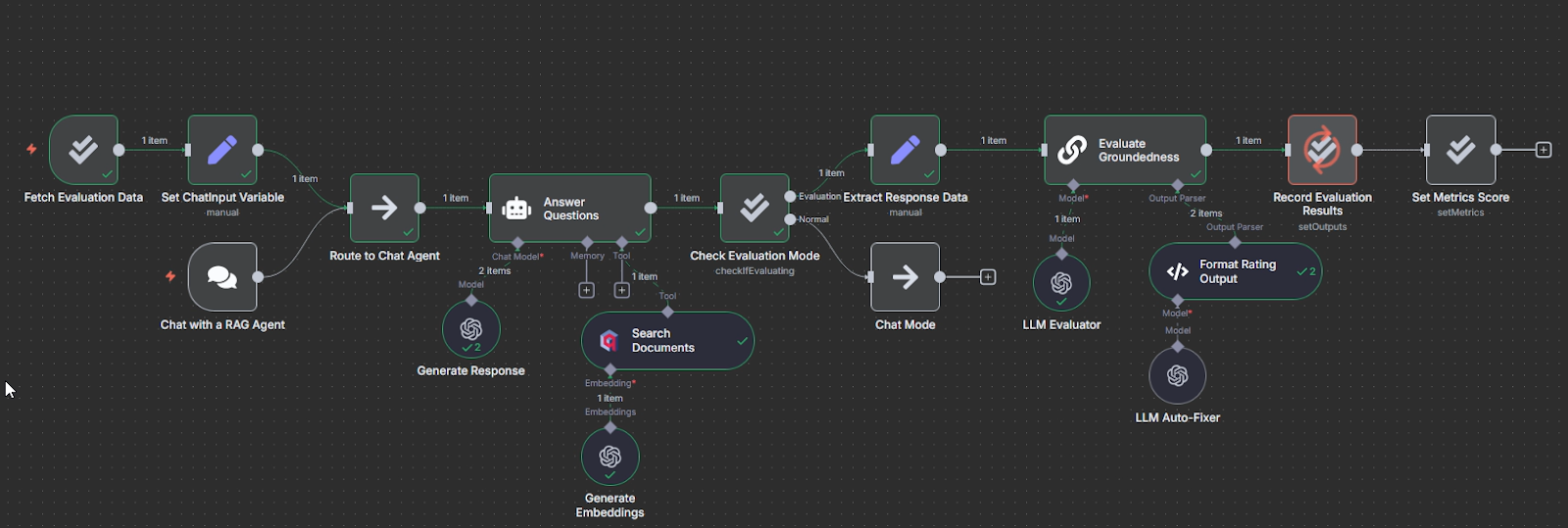
An example of the RAG evaluation: when the user interacts with the agent, it reacts in a normal way. The evaluation trigger initiates the checks only when started manually. Source: original workflow
Design for embedding model replaceability from day one
Avoid unnecessary downtime by ensuring your architecture supports dual-indexing. A Blue-Green development strategy lets you test new models for accuracy without risking your existing one or taking it offline.
Build the ultimate RAG architecture
You can build a RAG system architecture prototype in an afternoon, but a resilient system with long-term maintainability requires careful decisions. You’ll have to consider tradeoffs between speed, accuracy, and scalability.
Whether a RAG system holds up to production scrutiny ultimately depends on three main factors:
- Modularity: Can you swap out your LLM or vector database without re-engineering everything in your RAG pipeline?
- Data integrity: Did your team spend adequate time cleaning up data and has it followed best practices to prevent hallucinations and failed updates?
- Observability: Are you tracking performance in real-time so that you can spot model degradation — or improvement — as soon as possible?
With its workflow automation capabilities, n8n helps teams connect data sources, manage ingestion pipelines, and coordinate multi-stage retrieval workflows without complex custom infrastructure. By automating these processes, engineers can turn a simple RAG prototype into a scalable, production-ready architecture.
What’s next
Now that you have a good understanding of the core RAG architecture concepts, explore how to apply them in practice. We provide a number of resources to help you implement your RAG concepts.
- Start by checking our practical guide to building your RAG pipeline in n8n. It walks you through a complete RAG workflow setup from data ingestion to query handling.
- Take it further by exploring how to build custom RAG chatbots with n8n.
- After you’ve built your RAG system, learn how to measure and optimize its performance with our Evaluating RAG systems guide.
- For a deep dive into specific technical blocks, read our docs.
The best way to build your RAG automation is to create, experiment and iterate yourself. These resources are your starting point. Start with a small dataset and dense embeddings. Add advanced functionality with hybrid search, multimodal embeddings and rerankers as your project grows.