

Some tasks can't be solved in a single LLM call. When a question requires looking up data, processing it, and making a decision based on the result, a one-shot response will either hallucinate the answer or give a shallow one.
ReAct agents solve this with an iterative reasoning loop. Instead of trying to answer everything at once, the agent breaks the problem down step by step: think about what's needed, call a tool, observe the result, and decide what to do next. Each cycle grounds the model's reasoning in real data before moving forward.
This Reasoning + Acting pattern turns opaque agent behavior into something you can follow, debug, and audit - every thought and action is visible in the execution trace.
Here's how the ReAct pattern works, when to use it over other agent approaches, and how to build production-ready ReAct workflows.
What’s an AI ReAct agent? Is it AI? Or just ReAct?
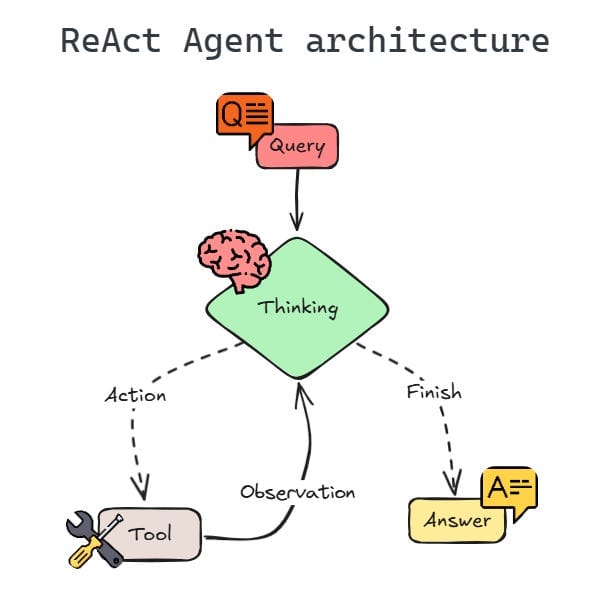
A ReAct agent (from “Reason” and “Act”) is a prompting pattern that connects internal reasoning with external execution. Unlike simple chat responses, it doesn’t just give answers based on pre-trained data. It combines reasoning and action to plan, execute API calls, and analyze the outcome of each step it takes. This creates a clear shift from a single-pass completion to a closed-loop agentic system, facilitating more traceable and grounded workflows.
ReAct agents follow an iterative loop where they:
- Generate a thought
- Select an action
- Process the observation to analyze its next move
Key benefit: ReAct agents don't operate in a vacuum. Unlike a single-turn response that has no way to verify its output , the ReAct pattern forces the model to show its work. It extends chain-of-thought (CoT) reasoning by adding action and observation: where CoT reasons internally, ReAct validates that reasoning against real-world tool outputs. This makes it more transparent and debuggable for complex tasks where your team needs real-time knowledge and data retrieval for an accurate answer.
ReAct agent architecture and components
A functional ReAct agent is a coordinated system with modular components. Each piece of the system must work in sync to ensure the agent logic remains consistent throughout the entire execution loop. Here are the main elements at play.
The reasoning engine: Large language model
The core of the system is the LLM. ReAct relies on a central reasoning engine, which interprets the initial prompt and creates a plan. Instead of producing immediate final responses, it reasons step by step, outputting explicit thought traces before each action. The model evaluates its current state, identifies the missing information, and selects the next thought or action required to take it one step closer to its goal.
The tool layer: External functions and API
ReAct agents need a solid tool layer to interact with the external environment. This usually involves connecting to search engines, databases, or third-party services via API calls.
The working memory: Context window
ReAct follows an iterative process for automation so the agent must maintain a record of its previous thoughts, actions, and observations. Memory helps the model avoid repeated failed attempts or lose track of its original goal. The model must effectively manage context to analyze new observations based on the entire conversation history. As conversations grow longer, older steps may fall outside the context window, which is why context management matters.
The orchestrator: Control loop
The control loop manages the cycle of thought, action, and observation. It passes the ReAct LLM’s output to the tool layer and feeds the tool’s results back into the model. This closed-loop process continues until the reasoning engine determines it has enough information to give the user a final answer. In n8n, the AI Agent node handles this loop automatically.
ReAct prompting and templates
ReAct is a behavior triggered by how you write your prompt, not by direct changes you make to the model. Giving the ReAct agent’s LLM instructions or examples that show both “thinking” and “doing” guides it to follow a clear path you’ve set. This setup turns a basic chat into a structured process where the model explains its plan before it ever touches a tool.
A solid ReAct agent prompt uses a strict format to maintain the “Thought-Action-Observation” cycle. Following that structure reduces the risk of the agent jumping to premature conclusions and makes it easier to catch errors when they occur.
Here’s a simple example of what a template looks like:
Question: What is the total cost for 15 units of the "Ultra Sensor", including the 10% bulk discount?
Thought: First, I need to find the base price of the "Ultra Sensor" in the product catalog.
Action: Product_Catalog_Search
Action Input: {"product_name": "Ultra Sensor"}
Observation: Price: $120.00 per unit.
Thought: The unit price is $120.00. Now I need to calculate the total for 15 units ($1,800) and apply the 10% discount.
Action: Calculator_Tool
Action Input: "1800 * 0.90"
Observation: 1620
Thought: I have the final discounted price. I can now answer the user.
Final Answer: The total cost for 15 units of the Ultra Sensor is $1,620.00.
How to build a ReAct agent?
If you're building from scratch, creating a ReAct agent follows four steps:
- Define tools: Map external functions (like database queries and APIs) into schemas so the LLM understands what each tool does and when to use it.
- Create the loop: Write a control loop that sends the user prompt to the LLM, receives a tool request or final answer, and continues until the task is complete.
- Parse and execute: With your code, extract the action from the model’s output, trigger the right tool, and capture the observation.
- Manage state: Feed that observation back into the context window to trigger the next thought or action.
ReAct in n8n: Built into the tools agent
If you've been looking for a dedicated ReAct node in n8n, you won't find one — and that's by design. n8n deprecated the standalone ReAct Agent in favor of the Tools Agent, which already incorporates the core ReAct principles: iterative reasoning, tool selection, and observation-based decision-making.
The shift reflects a broader industry trend. Modern LLMs like GPT-5, latest Claude, and Gemini models are now handling the reasoning-action loop natively through built-in tool calling, making explicit ReAct prompting unnecessary for most use cases. n8n's Tools Agent builds on this, adding what the original ReAct pattern lacked, including persistent memory, configurable max iterations, and full execution traceability.
In practice, this means you get ReAct-style behavior — think, act, observe, repeat — without needing to manually prompt for it.
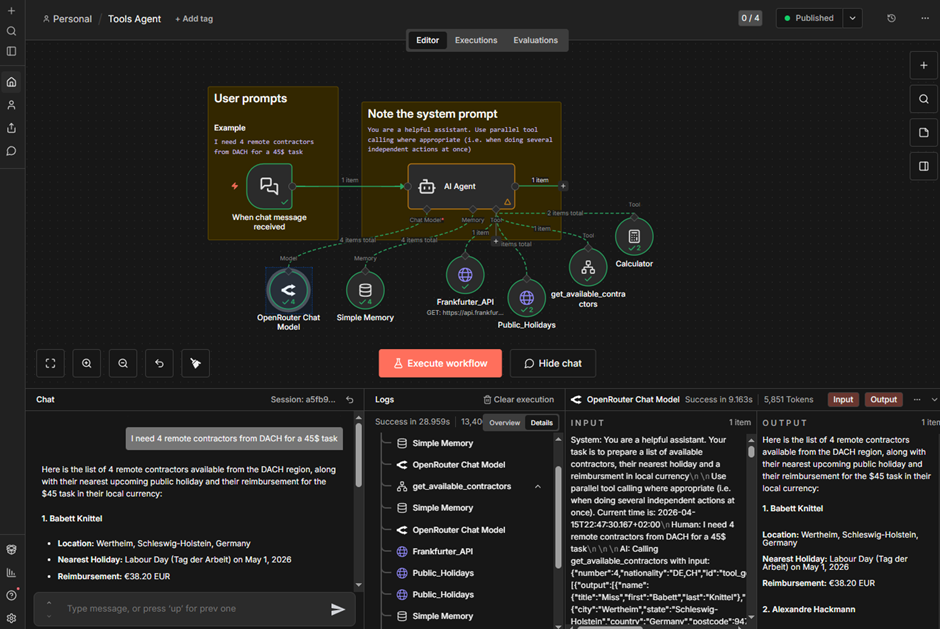
Here’s a workflow that demonstrates ReAct-style behavior in n8n's Tools Agent: a contractor-sourcing assistant that combines multiple tools, parallel execution, and a sub-workflow for data safety.
A user asks for remote contractors from a specific region, and the agent returns each one's location, nearest public holiday, and payment in local currency.
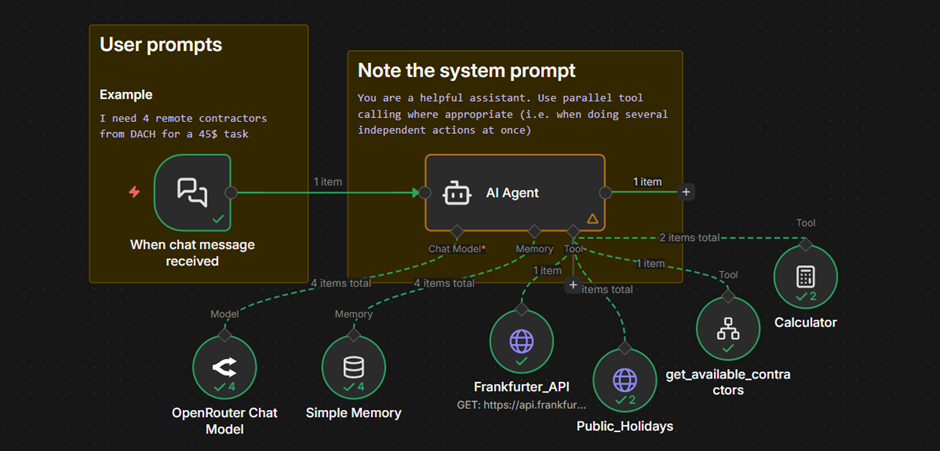
Two things stand out in how n8n handles this. First, sub-workflows let you wrap complex logic — data fetching, filtering, sanitization — into a single tool the agent can call. This keeps sensitive data out of the model's context and gives you control over execution order that a raw API tool can't offer.
Second, the execution view traces every step the agent takes, like which tools were called, in what order, with what inputs, and what they returned. You get the iterative reasoning ReAct was designed for, with full visibility into how the agent got to its answer.
ReAct agents vs. deterministic workflows: when to use each
Not every task needs an AI agent. Developers must weigh flexibility against predictability, latency, and cost. Here's how the two approaches compare:
Developers often combine these approaches. Use a deterministic workflow for the predictable parts — data routing, transformations, API calls with known inputs — and hand off to an AI agent only for the subtasks that require reasoning. n8n lets you do this natively: Build structured workflows and embed AI Agent nodes exactly where you need flexible decision-making.
(While some frameworks might favor a fully autonomous agent, n8n gives developers tighter operational control. You can use a structured workflow for web scraping and reserve the ReAct framework for subtasks where you need real-time reasoning.)
Build more reliable agents with n8n
The ReAct pattern proved that making an agent's reasoning visible leads to better outcomes — more traceable decisions, easier debugging, and fewer silent failures. That principle is now built into how modern agents work.
n8n's Tools Agent gives you ReAct-style reasoning, with the production infrastructure to back it up. It provides execution tracing, tool failure visibility, configurable iteration limits, and the ability to combine agentic and deterministic workflows in a single canvas. And when tasks require specialized expertise, you can coordinate multiple agents in a single workflow — each with its own tools and reasoning.
Ready to build smarter agents? Try n8n Cloud free or deploy a self-hosted Community Edition.